
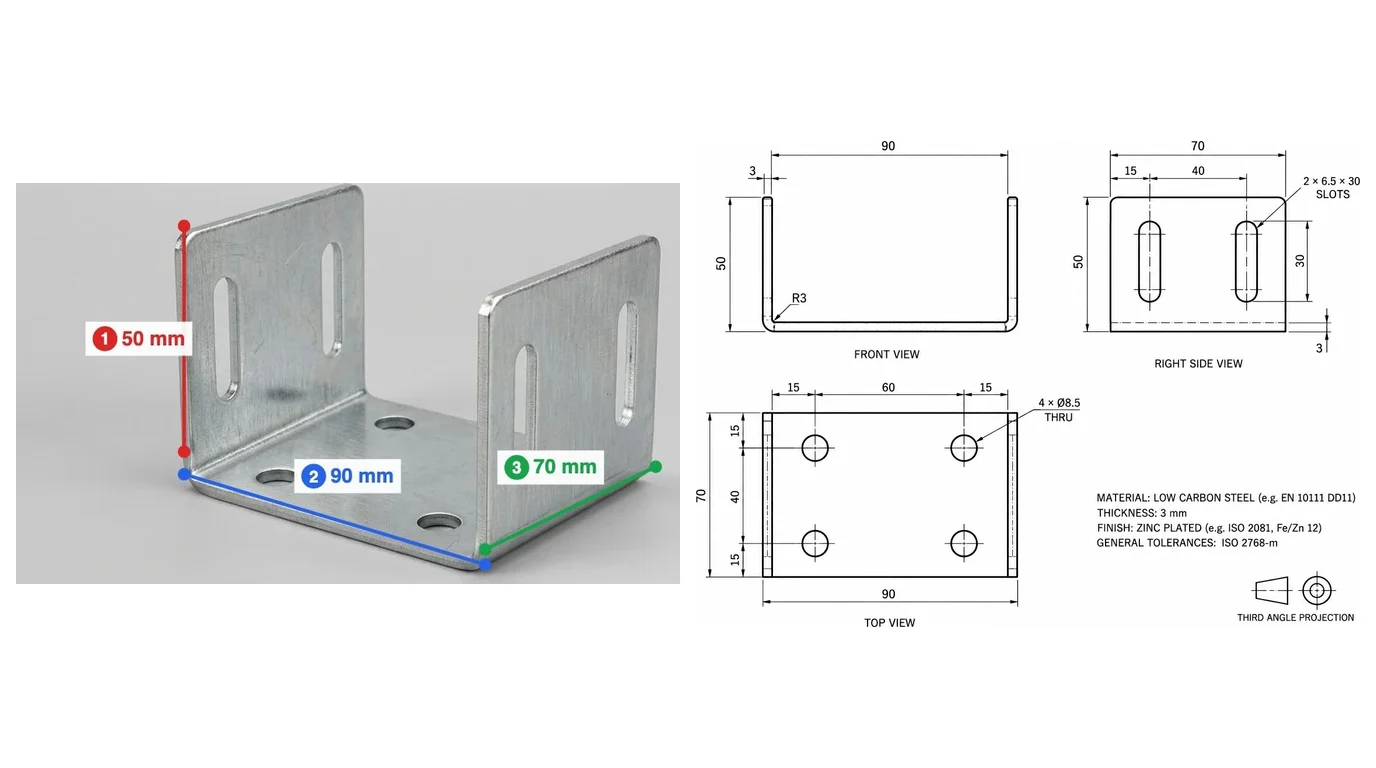
AI in mechanical engineering, in October 2026, means six jobs: making drawings, driving CAD from a chat, generating geometry, predicting simulation results, searching engineering knowledge and reviewing designs. No tool does all six, so a single “best AI” list is the wrong shape. We ranked ten tools by one question: can a working mechanical engineer put it to use this week and check what it produced? Where we have run a tool ourselves, you get our numbers, including the mistakes. Where we have not, we say so. TechDraw AI is ours and ranks first, and its section has the most criticism on the page.
Our articles are still written by humans!
Get human written articles in your Google feed.

The short answer
- To get a drawing of a part from a photo, a sketch or a sentence: TechDraw AI.
- For one assistant that reads STEP and DXF and drives your CAD: Claude, connected through MCP.
- For calculations, scripts and macros: ChatGPT or Claude, both about $20 a month, both wrong often enough to check.
- For lightweight parts under loads: Fusion generative design.
- For simulation: SimScale's Engineering AI agent to set up and run it, Ansys SimAI if you have years of past results to train on.
The ten, ranked
Prices and availability read on each vendor's own pages, 17 October 2026, in US dollars unless stated
How we ranked them
Most lists on this topic are written by one of the vendors in them, and so is this one. The difference we can offer is to show our working. We ranked on four checks, in this order:
- Can one engineer start this week? A tool that needs a sales call, a PLM rollout or a year of training data ranks below one you can open today. That is why Ansys SimAI, a strong product, is eighth.
- Is the output something you can check? A DXF you can measure, a STEP you can open, a result with a confidence score. A paragraph of confident text is the weakest kind of output.
- Is it doing engineering, or describing it? Chatbots that only answer from help pages are left off.
- Is the price published? If you cannot know the price without a meeting, it costs you a meeting.
If you run a simulation team inside a large OEM, this order is wrong for you: start at number seven. The by job table below is the more useful view anyway.
1. TechDraw AI: drawings
Verdict: the fastest way to get a dimensioned drawing of a part you can photograph but have no CAD model of, as long as you check the dimensions it worked out for itself.
You upload a photo, draw a line across an edge and type its length, as many as you like. You pick ISO or ANSI, sheet size, units, first or third angle projection and the views. It returns a drawing with orthographic views, dimension lines, a projection symbol and notes, usually in under a minute. There is also a text to technical drawing tool for plates, turned parts and angle brackets, where the sheet is computed rather than drawn, and a Chrome extension that does the same from a product page.
What our test found
On 10 October 2026 we ran the production pipeline from a script on 13 photos with 39 typed lengths, including two lines a few pixels apart. All 39 values landed on the right edge. Then we checked what nobody asks about: the dimensions the model added by itself. Three of the photos were mechanical parts.
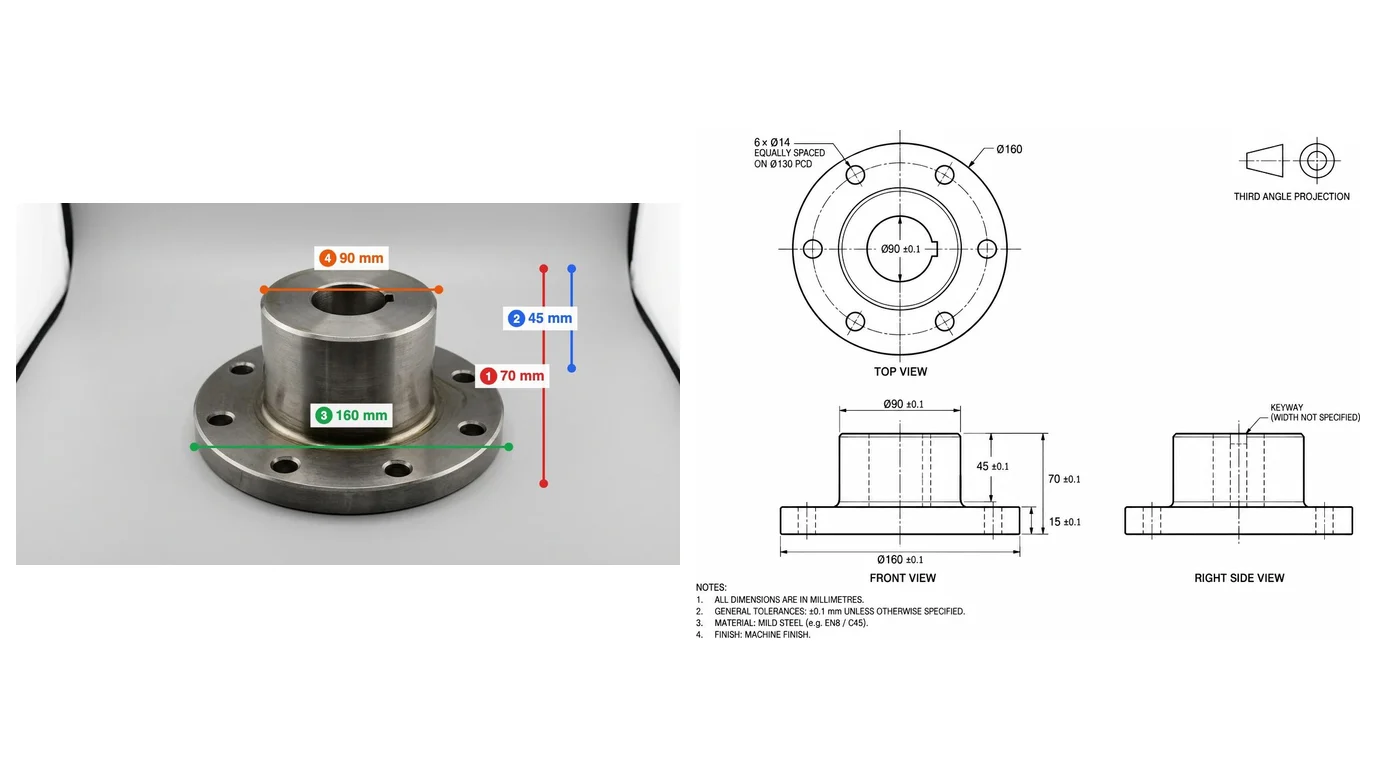
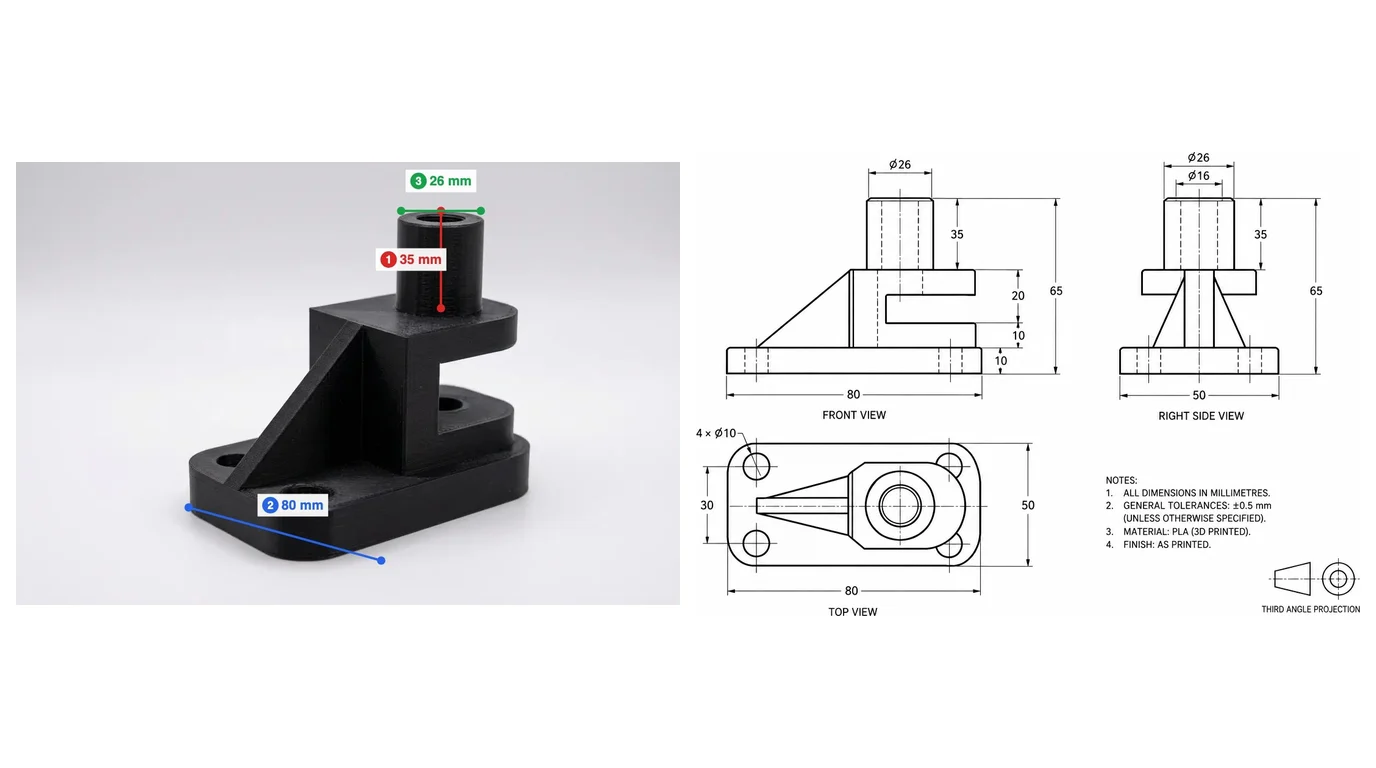
TechDraw AI, mechanical parts from the 10 October 2026 test
So the honest summary is: what you measure comes back exact, and what it infers is a well-drawn guess. Material, tolerances and hole counts in the notes are guesses too. That is fine for a reference drawing, a quote request or a starting point in CAD, and it is not fine for sending to a machine shop unchecked. Measure every dimension that matters. A single photo cannot carry scale on its own, which is why the typed lengths exist.
- Pro: From photo to a dimensioned three view drawing in about a minute, with no CAD model and no CAD seat.
- Pro: Measured values were placed correctly 39 times out of 39 in our test, including adjacent parallel lines.
- Pro: Real standards: ISO or ANSI, A4 to A0 or ANSI A to E, first or third angle, title block.
- Pro: DXF and DWG out, so the drawing ends up in AutoCAD, SolidWorks or Fusion, not in a PNG.
- Con: Inferred dimensions can contradict each other, as two of the three parts above show. Check every chain.
- Con: Notes on material and tolerance are suggestions from a photo, not engineering decisions.
- Con: Hidden features you did not photograph are guessed or missing.
- Con: DXF, DWG, PDF and SVG export need the Studio plan; PNG is on every plan.
Price: 5 credits per drawing, failed drawings are not charged, and new accounts get free credits. Starter is $29 a month and Studio, which adds the CAD exports, $89 a month, or $11 and $49 a month billed yearly. The text to technical drawing tool is free to generate with a sign-in.
Upload a photo of a part, mark one real length, and get a dimensioned drawing back, with free credits to try it.
Make a drawing2. Claude: the CAD copilot
Verdict: the best general assistant for a mechanical engineer in 2026, because it can read the plain text CAD formats and operate CAD programs through MCP, and because in our tests it said what it had assumed.
MCP is the standard that lets an assistant call another program's tools. Claude's desktop app installs local MCP servers as “desktop extensions”, and Anthropic lists connectors and desktop extensions on every plan, Free included. Servers exist for SolidWorks, Fusion, FreeCAD and Onshape.
What our tests found
- Drawing to model, in FreeCAD: given a PDF drawing of a 70 by 49 mm plate, Claude built it in 68 seconds. Every dimensioned feature matched exactly; undimensioned corner radii were guessed 0.5 to 1 mm small. The solid was 0.5% off in volume.
- Model to drawing, in FreeCAD: an A3 TechDraw sheet in 126 seconds with nine correct dimensions, and an extension line running through the text “3,25”. Claude looked at the PDF and wrote “Layout is clean.”
- Reading files blind: on STEP and DXF exports of the same part, every dimension was right. On the PDF it caught the template's “dimensions are in inches” note, and raised one false alarm.
- Pro: Reads STEP and DXF, which are plain text, and works out real geometry from them.
- Pro: MCP connectors and desktop extensions on every plan, Free included.
- Pro: Lists its own assumptions, which is the habit you want from a junior.
- Con: Cannot read a DWG or a native SLDPRT as geometry by itself; binary formats need the CAD program in the loop.
- Con: Will tell you a drawing is fine when it is not. It checks its own work loosely.
- Con: Most CAD MCP servers are community projects; read their code before you trust one with company files.
Price: Free, Pro $20 a month ($17 billed yearly), Max from $100 a month. Claude Code, the version we ran the tests in, is on the paid plans.
3. ChatGPT: calculations and code
Verdict: the assistant most engineers already have open, good for worked calculations, unit conversions, Python and macros, and weaker than Claude as a CAD operator for an individual.
Ask it to size a shaft or check a bolted joint and it will show its steps, which is the only way to use it: read the steps, not the answer. It can run Python for data and plots. The catch for CAD work is MCP. OpenAI's help page, updated this week, says custom MCP server connections are available on Business and Enterprise plans on the web, and says nothing about Plus. We cover the workarounds in connecting ChatGPT to SolidWorks. In earlier tests it also could not produce a real technical drawing, only a picture of one.
- Pro: Cheap entry: Go is $8 a month in the US.
- Pro: Good at explaining a method step by step.
- Pro: Python for data, plots and quick scripts.
- Con: Custom MCP is a Business and Enterprise feature per OpenAI.
- Con: Image output looks like a drawing and cannot be measured.
- Con: Confident arithmetic slips; check every number that matters.
Price: Free, Go $8, Plus $20 a month, Pro from $100.
4. Autodesk Fusion: generative design
Verdict: the most accessible real generative design, and an assistant that now works inside the model, with token limits you should know about before you rely on it.
Generative design is the oldest kind of AI here: you set loads, keep-out regions, a material and a manufacturing method, and the cloud returns shapes that meet them. In Fusion it is in the Simulation Extension, not the Design Extension, at $1,465 a year or $185 month to month on top of a Fusion subscription, with unlimited cloud solves according to Autodesk. Autodesk Assistant became generally available to all Fusion users at AU 2026, and from 6 October its design actions draw on a monthly allowance of Flex tokens: 20 for commercial users, 10 for personal use. Questions about how to do something are free.
- Pro: Generative design with unlimited cloud solves in the Simulation Extension.
- Pro: Assistant that acts on the open design, plus official MCP servers.
- Pro: Free for personal, non-commercial use.
- Con: Personal use cannot run extensions, so no generative design for free.
- Con: 20 assistant actions a month on a commercial seat is not many.
- Con: Generated shapes still need engineering review and usually redesign for the real process.
Price: $85 a month or $680 a year; Simulation Extension $1,465 a year extra; 30 day free trial.
5. Zoo: text to CAD
Verdict: the best text to CAD for an engineer, because what comes out is editable code, not a dead mesh.
Zoo Design Studio has an agent, Zookeeper, that turns a description into a model written in Zoo's own CAD language, KCL, with a feature tree you can edit by hand. Zoo calls KCL “the source of truth”, and models export as STEP or STL. It starts from words, so it is for new parts, not for documenting one that exists.
- Pro: Parametric, editable output with a feature tree.
- Pro: STEP export, so it goes into any CAD program.
- Pro: A free tier with $10 of usage a month.
- Con: On the free tier Zoo may train on your data, with no opt out.
- Con: You have to describe the part well; vague prompts give vague parts.
- Con: KCL is one more language for the team to learn.
Price: Free with $10 of credit a month, Plus $20, Pro $99, Team $399 per user a month.
6. Solid Edge: automatic drawings
Verdict: the most honest AI claim in this list: Siemens says its automatic drawings are 70 to 80% complete.
Designcenter Solid Edge 2026 added three AI features. Automatic Drawings lays out a drawing from a component file. Design Copilot is a chat assistant inside the program, on the Standard, Advanced and Premium tiers. Magnetic Snap Assembly adds mates as you place parts. The remaining 20 to 30% of each drawing is the part a drafter still does, which is the same lesson as our own test from the other direction. NX has a Copilot too, but Siemens publishes no price for it.
- Pro: Drawings from your real model, so geometry is exact.
- Pro: Published prices and a $1 first month for new customers.
- Pro: Vendor states the limitation instead of hiding it.
- Con: A full CAD program to buy and learn, not a tool to try in an afternoon.
- Con: Windows desktop software.
- Con: 70 to 80% complete still means a drafter finishes every sheet.
Price: from about €1,743 a year for Design and Drafting on Siemens' store (shown to us in euros), 30 day trial.
7. SimScale: an AI simulation agent
Verdict: the only serious simulation AI an individual can try for free.
SimScale runs in a browser. Its Engineering AI agent prepares the CAD, assigns materials and boundary conditions, launches runs and writes the report, and Physics AI predicts results from models trained on your past runs. In August 2026 SimScale opened the agent to its community users, and its Autumn 2026 release says the agent is now free on every plan, with a starting credit allowance on Community. Its pricing table had not caught up when we looked, so trust the release note.
- Pro: Free Community plan with the agent included.
- Pro: Browser based, no workstation.
- Pro: The agent writes the setup, which is where most simulation errors start.
- Con: Community projects are limited, and paid plans are quote only.
- Con: An agent that sets boundary conditions can set the wrong ones confidently.
- Con: Physics AI is only as good as your own past data.
8. Ansys SimAI: fast predictions
Verdict: the strongest simulation AI for a team with history, and the wrong tool for anyone starting out.
You give SimAI typically 30 to 100 past simulation results, from any solver. It trains for about two days, then predicts the full 3D field for a new design in seconds, with a confidence score. That score is the feature that matters. Ansys Discovery, the real time simulation tool, has a 30 day trial and is in the free student bundle. Neither price is published.
- Pro: Seconds per design once trained, with a confidence score.
- Pro: Learns from any vendor's results.
- Pro: Desktop and cloud options as of 2026 R1.
- Con: Needs your own library of past results first.
- Con: Contact sales for a price.
- Con: A prediction outside the training range is a guess with a number on it.
9. Leo AI: engineering knowledge
Verdict: useful inside a company with a PLM full of parts, and impossible to price from outside.
Leo answers engineering questions from your PLM data and what it calls over a million engineering sources, with citations, does calculations, and searches your parts plus over 120 million vendor parts. It lists SolidWorks, SolidWorks PDM, Inventor, Fusion, NX, Teamcenter and SAP PLM as integrations. It also says it can create concept images and 3D models, without saying how. Its page shows no price and no free tier.
- Pro: Cited answers, so you can check the source.
- Pro: Part reuse search across PLM and vendor catalogues.
- Pro: Broad CAD and PLM integration list.
- Con: No published price.
- Con: Most of the value needs your PLM connected.
- Con: Its own blog posts rank it first, as ours rank us first. Ask for a trial on your data.
10. CoLab: design review
Verdict: the most interesting idea here for quality, and not something you can buy today without being let in.
AutoReview puts markups straight onto a 3D model or 2D drawing: missing views, vague notes, dimension and tolerance errors, GD&T and hole callouts, BOM mismatches and manufacturability. CoLab says checks on 3D models are deterministic geometry and checks on 2D drawings are AI, which is the right split. Access is rolling out to customer cohorts and there is no price. For a feel of what AI review does well and badly, see whether AI can check a drawing for errors.
What we left off
- Onshape AI Advisor. PTC's own page says it answers from Onshape's help and “does not generate designs”. Onshape's FeatureScript MCP server is the more interesting piece; see Claude and Onshape.
- Siemens NX Copilot. A chat assistant inside NX, no published availability or price.
- nTop. Excellent implicit modelling, and its own page says it is “not an AI design tool itself”.
- Neural Concept and bananaz. Serious enterprise products, Neural Concept for simulation surrogates and bananaz for design agents and checks, both behind a meeting.
- Image generators. They draw something that looks like a blueprint and cannot be measured. Fine for a slide, useless for a part.
Which AI for which job
Where AI still fails engineers
Across our own runs the failures had a pattern, and it is worth knowing before you buy anything:
- Internal consistency. Dimensions that each look plausible and do not add up. Ours did it, in two parts of three.
- Self-checking. Claude called a sheet clean with a line through a number. An AI reviewing its own work is not a review.
- Units. A file with no declared unit gets the reader's default, and a DXF that opens at the wrong size is the classic result.
- Invented specifics. Material grades, tolerances and hole counts that nobody asked for, written in the same confident lettering as the measured numbers.
- Binary formats. A DWG read as text gives away layer names and notes and no geometry, which makes a wrong answer sound informed.
Will AI replace mechanical engineers?
No, not on any data available in October 2026. The US Bureau of Labor Statistics projects mechanical engineering employment to grow 11% from 2025 to 2035, “much faster than average”, from 298,500 jobs, with about 17,800 openings a year and a 2025 median pay of $104,110. The World Economic Forum's Future of Jobs Report 2025 found 86% of employers expect AI to transform their business by 2030, and expects 39% of existing skill sets to change.
Both are true at once, and our tests show why. AI took over the typing: laying out views, placing dimensions, building a plate from a PDF, setting up a simulation. It did not take over judgement. Every tool we ran produced something that looked finished and was wrong in a way that only someone who understood the part would catch. Siemens puts the same thing as a number when it calls its own drawings 70 to 80% complete.
The work that shrinks is first drafts, boilerplate drawings and routine lookups, the work juniors used to learn on. The work that grows is specifying, checking and signing off. If you are early in your career, learn to check AI output fast: dimension chains, units, load cases, tolerances. That skill does not get automated by the tool that needs checking. We made the same argument with numbers for drafting in AI versus hiring a draftsman.
FAQ
Frequently asked questions
How is AI used in mechanical engineering?
In six jobs, in 2026: making 2D drawings from photos, sketches or models (TechDraw AI, Solid Edge Automatic Drawings), driving CAD through an assistant (Claude or ChatGPT connected to SolidWorks, Fusion or FreeCAD, Autodesk Assistant), generating geometry from a description (Zoo) or from loads and constraints (Fusion generative design), predicting simulation results in seconds from past runs (Ansys SimAI, SimScale Physics AI), searching engineering knowledge and parts (Leo AI), and reviewing drawings and models for errors (CoLab AutoReview). In every one of them a person still checks the output.
What is the best AI tool for mechanical engineers?
There is no single best one, because the tools do different jobs. For making drawings, TechDraw AI turns a photo plus one measured length into a dimensioned three view drawing with DXF and DWG export. As a general assistant that can read STEP and DXF files and drive CAD through MCP, Claude did best in our tests. For generative design, Autodesk Fusion with the Simulation Extension. For simulation, SimScale's Engineering AI agent is free on every plan and Ansys SimAI predicts results from past runs.
Will AI replace mechanical engineers?
Not on the evidence available in October 2026. The US Bureau of Labor Statistics projects mechanical engineering jobs to grow 11% from 2025 to 2035, much faster than average, with about 17,800 openings a year. AI is taking over pieces of the work, such as first draft drawings, simulation setup and routine checks, but every tool we tested still made errors that only someone who understands the part would catch. The engineers at risk are the ones who refuse to use these tools, not the ones who check their output.
Can ChatGPT do mechanical engineering?
ChatGPT can do a lot of the paperwork around mechanical engineering: explain a formula, size a bolt or a beam with worked steps, write Python or a macro, and read a drawing image. It cannot be trusted with the result unchecked, and it cannot open a native CAD file on its own. Custom MCP connections that let it drive other software are, per OpenAI's help page in October 2026, a Business and Enterprise feature on the web.
Is there a free AI tool for mechanical engineering?
Yes. SimScale's free Community plan now includes its Engineering AI agent with a starting credit allowance. Zoo's free tier gives $10 of Text-to-CAD usage a month, though Zoo may train on free-tier data. Claude and ChatGPT both have free plans. Fusion is free for personal, non-commercial use under $1,000 a year of revenue, but without extensions, so no generative design. TechDraw AI gives new accounts free credits, and its text to technical drawing tool is free to generate with a sign-in.
Can AI make engineering drawings?
Yes, with a caveat. Solid Edge 2026 produces drawings from a model that Siemens itself calls 70 to 80% complete. TechDraw AI produces a dimensioned drawing from a photo and the lengths you measure. In our test every measured length landed on the right edge, 39 of 39, but in two of three mechanical parts one inferred dimension did not add up with its neighbours. An AI drawing is a fast first draft that you check, not a release document.
Is generative design the same as AI?
Not quite. Generative design, as in Autodesk Fusion, explores shapes that satisfy loads, constraints and a manufacturing method by running many simulations. It is optimisation, not a chatbot, and it predates the current wave of language models. In Fusion it sits in the Simulation Extension, which costs $1,465 a year on top of a Fusion subscription.
Sources
- US Bureau of Labor Statistics: Occupational Outlook Handbook, Mechanical Engineers (2025 to 2035 projections)
- World Economic Forum: The Future of Jobs Report 2025
- Claude pricing (Free, Pro, Max)
- Claude Help Center: getting started with local MCP servers on Claude Desktop
- OpenAI Help Center: connecting custom MCP servers in ChatGPT
- OpenAI Help Center: what is ChatGPT Plus
- Autodesk: Fusion overview and pricing
- Autodesk: Fusion Simulation Extension (generative design)
- Autodesk Fusion blog: changes to Autodesk Assistant beginning October 6th
- Autodesk: Fusion for personal use
- Zoo: Zookeeper documentation
- Zoo: FAQ (KCL, STEP and STL export, usage credits)
- Siemens: Designcenter Solid Edge 2026 artificial intelligence
- SimScale: what's new, Autumn 2026
- SimScale: Engineering AI
- Ansys (Synopsys): SimAI
- Ansys (Synopsys): Discovery
- Leo AI
- CoLab: AutoReview
- Onshape: AI Advisor
- nTop: platform