
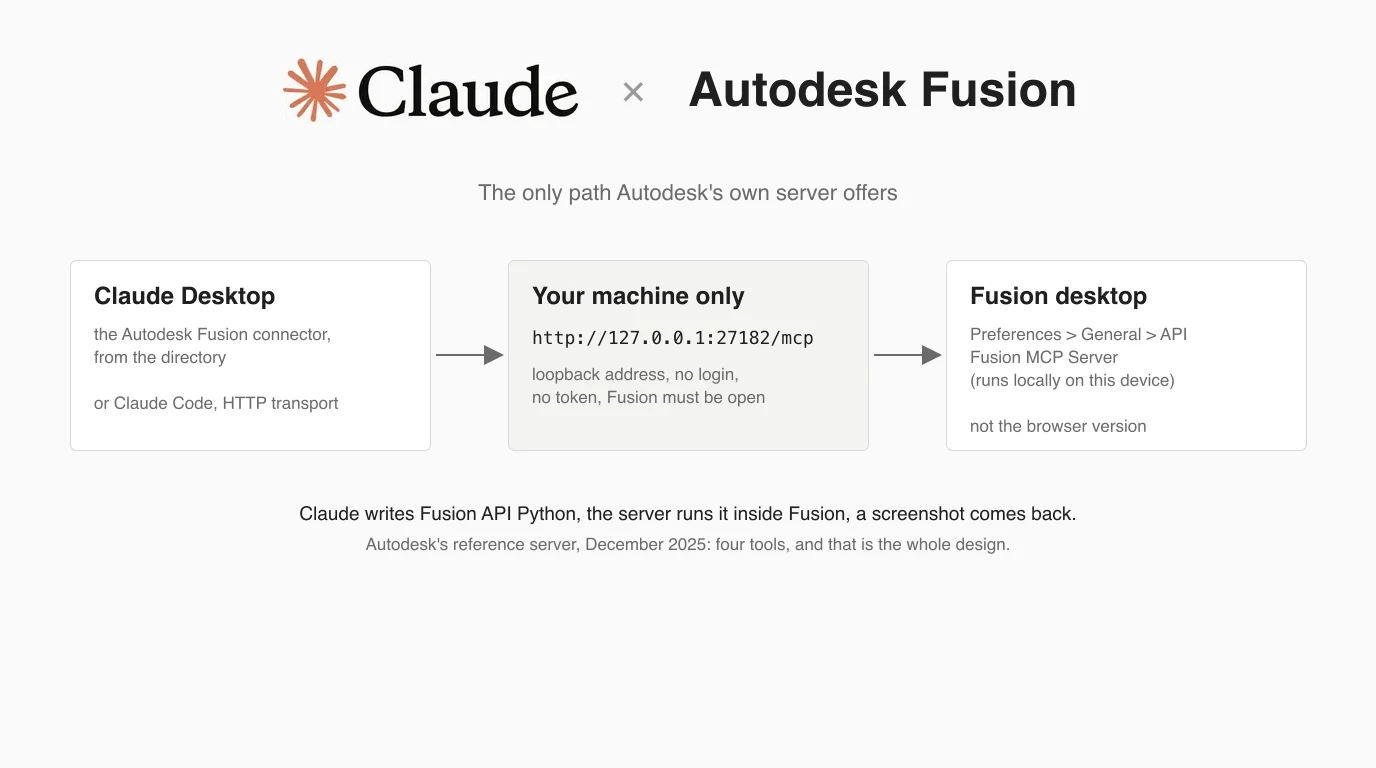
Fusion is the one CAD program in this series where the vendor wrote the connector. Autodesk built an MCP server into Fusion in April 2026, put it in Anthropic's directory a month later, and has since published a proper documentation site for it. This guide walks the setup step by step with that documentation on screen, then adds what the documentation leaves out: the port mismatch people hit on the forum, what Autodesk's own reference server code says the thing is for, a competitor's claim that does not survive the sources, and what Claude Code shows you when Fusion is not there. One honest caveat first: we do not have Fusion installed, so unlike our FreeCAD test we did not run it. Every screenshot below is a real page, and every claim says where it comes from.
Our articles are still written by humans!
Get human written articles in your Google feed.


Which Autodesk MCP server you need
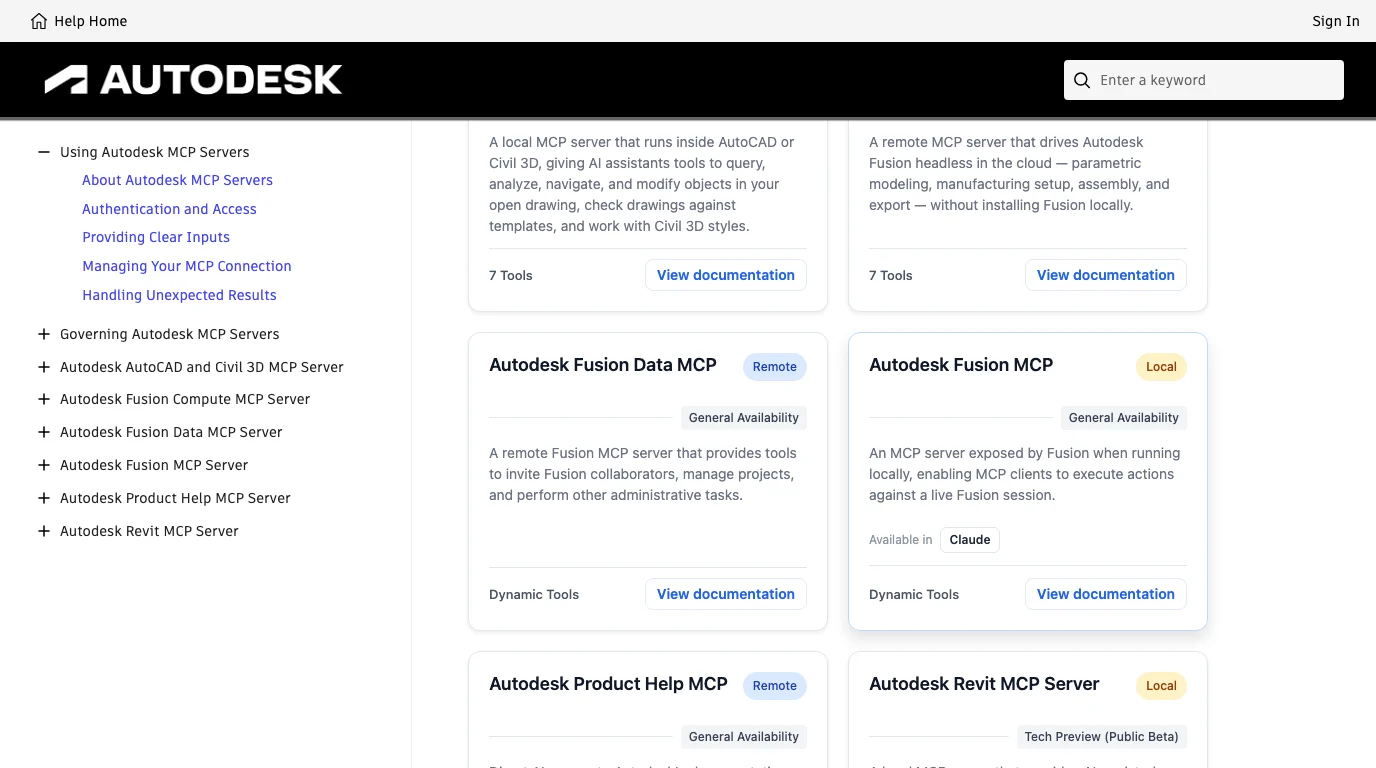
If you searched for “Autodesk MCP” you probably landed on a page that lists servers without saying which one you want. Autodesk's MCP documentation site, captured below on 10 October 2026, lists six. Each carries a Local or Remote tag and a release stage, and Autodesk's own definitions are worth knowing: General Availability means supported for production use, Public Beta means usable but still changing.
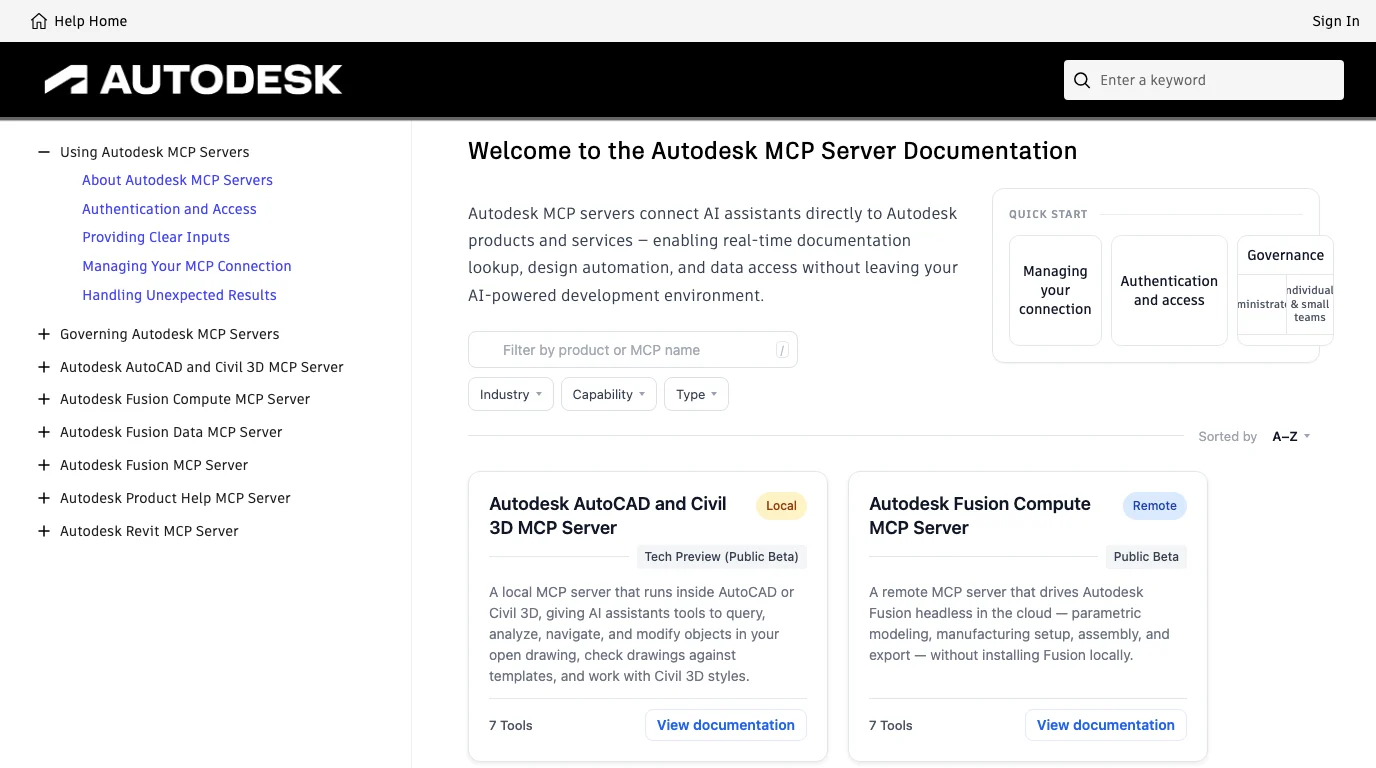
- Fusion MCP Server. Local, General Availability, “Available in Claude”. Exposed by the Fusion desktop app itself, needs Fusion open, no authentication, works with Claude Desktop, Cursor, VS Code or any Streamable HTTP client. This is the one this guide is about.
- Fusion Data MCP Server. Remote, General Availability. Invites collaborators, manages projects, folders and items in your hubs, with Fusion closed. Needs an Autodesk account sign-in and a client that does OAuth, which Autodesk lists as Claude Desktop and VS Code. It cannot see the geometry on your screen.
- Fusion Compute MCP Server. Remote, Public Beta since 15 September 2026, seven tools. Autodesk runs Fusion headless in its cloud so an agent can model, set up manufacturing, assemble and export without a local install. The beta allows two sessions per user, one hour each, and stops a session after 15 idle minutes; anything not saved to Fusion Team is gone. You need an active Fusion licence and a Fusion Team hub.
- Revit MCP Server. Local, Tech Preview (Public Beta), Revit 2027.2 only, installed as a separate add-in. We covered it in Connect Claude to Revit.
- Product Help MCP Server. Remote, General Availability, two tools. Search across Autodesk's documentation for 110 or more products in ten languages, available in Claude, ChatGPT and Microsoft Copilot. Answers questions, never touches a file.
- AutoCAD and Civil 3D MCP Server. Local, Tech Preview (Public Beta), seven tools, Windows only. It runs inside Autodesk Assistant, its documentation lists exactly one supported AI client, Autodesk Assistant, and access is read-only in AutoCAD with write tools in Civil 3D. It is not a way to connect Claude. For AutoCAD you still use a community server, see Connect Claude to AutoCAD.
An Autodesk blog post has also named a Model Data Explorer MCP server as planned. It has no page on the documentation site, so we treat it as announced, not shipped. Autodesk also announced an Assistant Builder and an AI Orchestrator at Autodesk University in September 2026, for wiring MCP servers and data sources into its own Autodesk Assistant. Those are Autodesk's assistant talking to Autodesk's servers. Claude's route is the first server above, and the rest of this guide is that route.
Before you start
- Fusion desktop, not the web client. Autodesk says it plainly: desktop-only, does not work with the Fusion web client. The server lives inside the app and is only available while the app is open.
- A recent Fusion build. The troubleshooting page's last row says that if the MCP checkbox and port are not visible in API settings, the Fusion version does not include MCP support, and the fix is to update. The feature arrived in the April 2026 update.
- A Fusion subscription, probably. Autodesk's launch post says the connector is “for Fusion subscribers”. We found no Autodesk page that says whether the checkbox appears in the free personal-use edition, and we could not check. If it is missing for you and your build is current, the community servers in the table further down install as ordinary add-ins, and one of them states plainly that a personal licence is enough.
- Claude Desktop, where the connector comes from the directory, or Claude Code, Cursor or VS Code, which take the URL directly. Not claude.ai in a browser: a web page cannot reach a server on your machine.
- A saved copy of the design you are going to let Claude touch. Everything the server does is a Fusion API script run with your permissions, and there is no undo on the Claude side.
Step 1: Start Fusion and open a design
The order matters. Fusion hosts the server, so Fusion has to be running before any client tries to connect, and Autodesk's own troubleshooting table lists “no document or workspace is open in Fusion” as the reason commands do not execute. Open an existing design or create a new one. For a first run, create a new empty design so the 10 mm cube in Step 5 has nowhere to collide.
Step 2: Switch the server on in Fusion
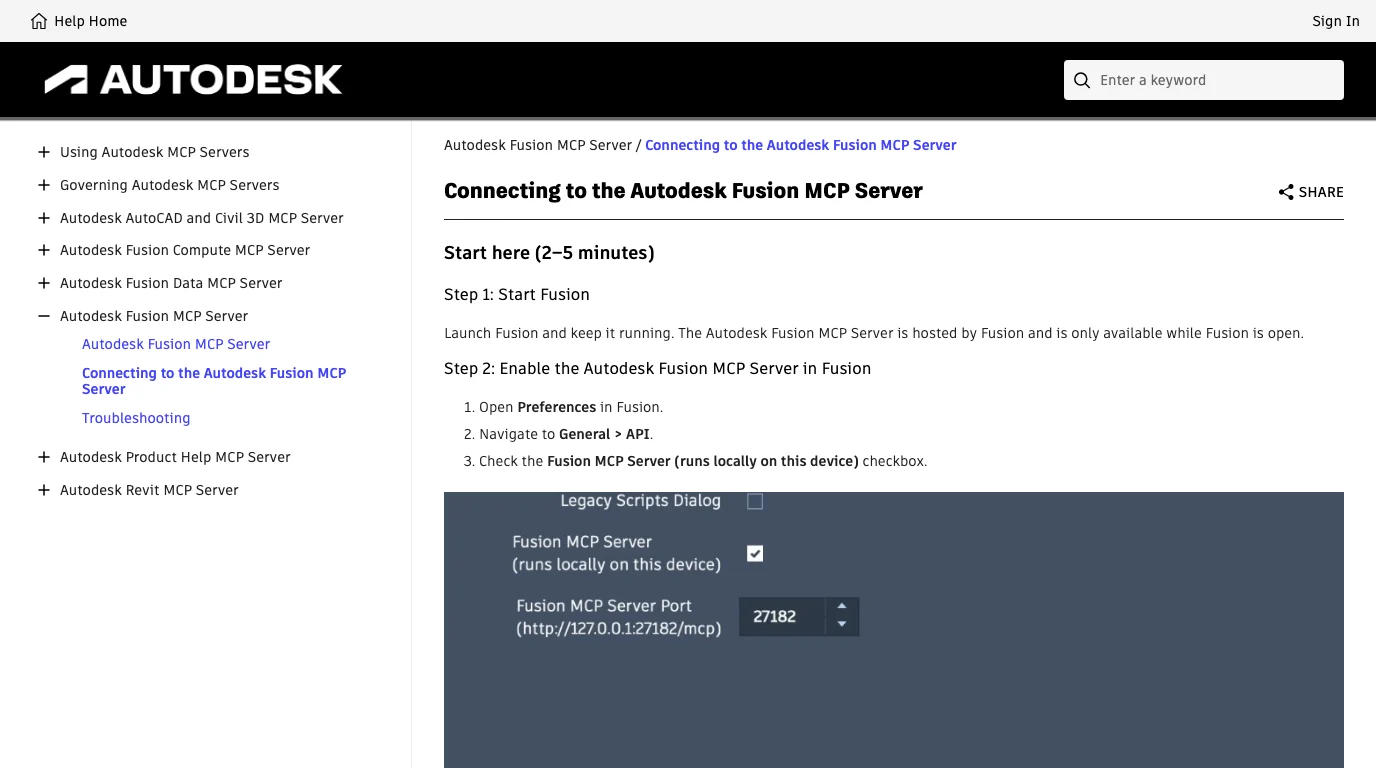
- In Fusion open Preferences (the account menu at the top right on both Windows and macOS).
- Go to General > API.
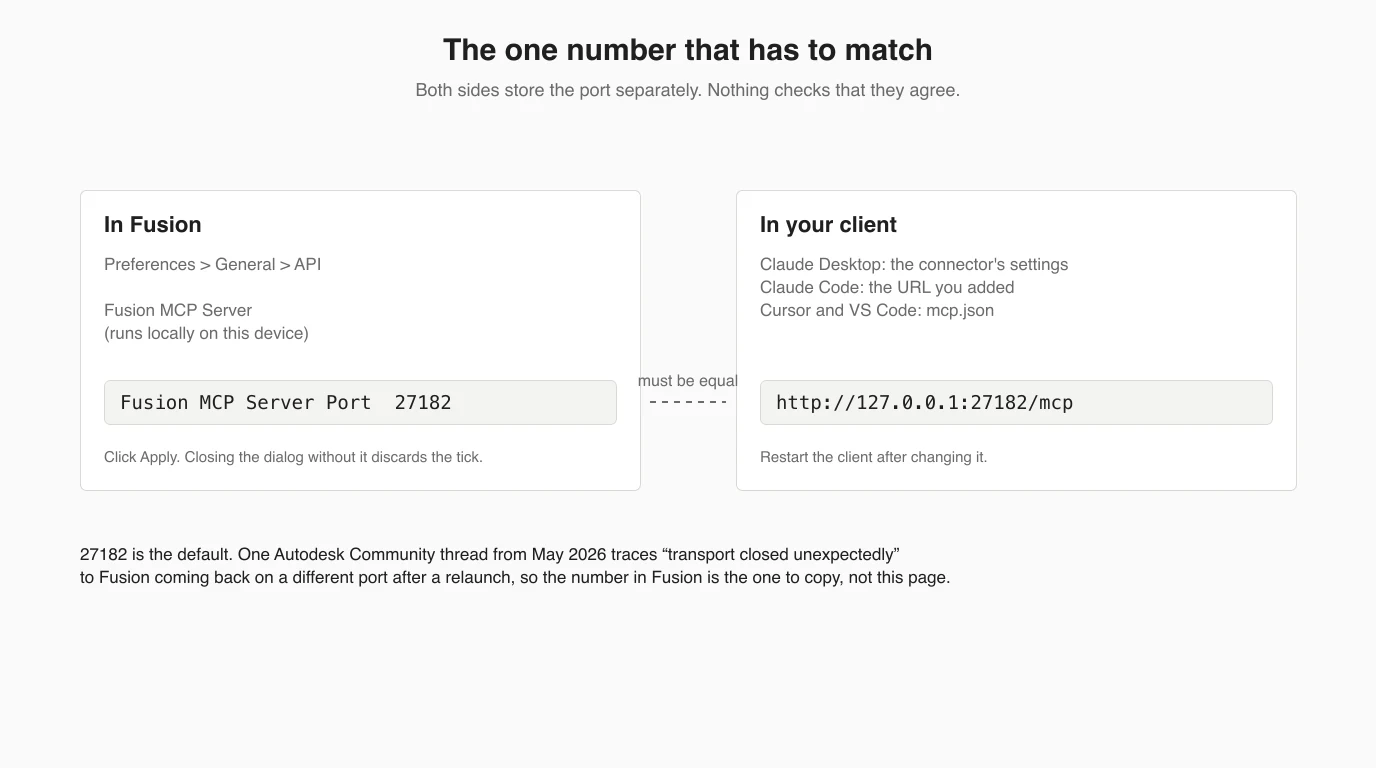
- Tick Fusion MCP Server (runs locally on this device). A Fusion MCP Server Port field appears underneath showing
27182and the full address,http://127.0.0.1:27182/mcp. Leave the default unless something else on your machine already uses it. - Click Apply and then OK. A third-party automation project that drives this dialog found that closing it without Apply discards the tick while the checkbox still looks ticked, so do not skip this.
Step 3: Add the connector in Claude Desktop
The current Claude Desktop path, from Autodesk's connecting page. Older builds of Claude Desktop and Autodesk's May walkthrough call the same screen Extensions; it has since moved under Connectors.
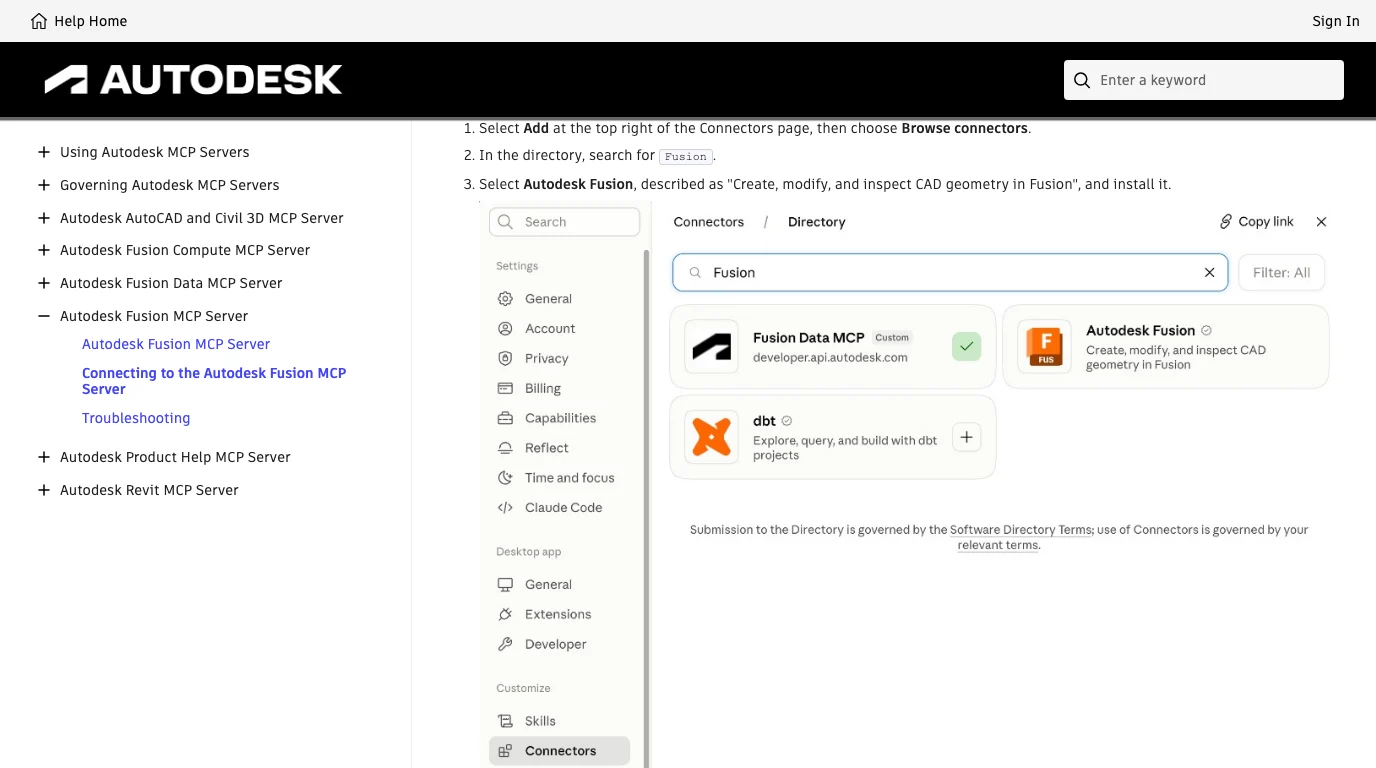
- Open Claude Desktop and go to Settings > Connectors.
- Select Add at the top right, then Browse connectors.
- Search for
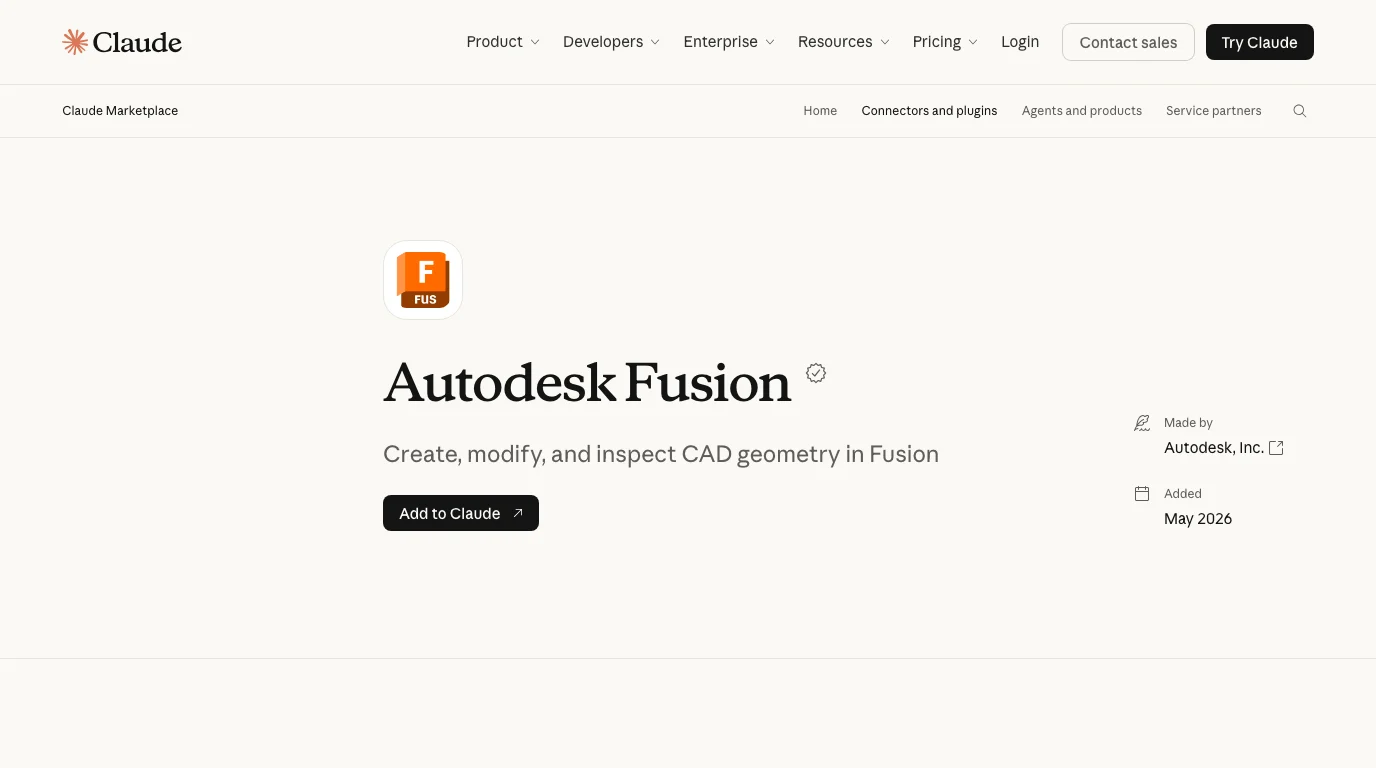
Fusion. Two tiles can appear: pick Autodesk Fusion, described as “Create, modify, and inspect CAD geometry in Fusion”, and install it. The other tile, Fusion Data MCP, is the cloud server for hubs and projects, a different thing. - You do not enter the URL. The connector already points at
http://127.0.0.1:27182/mcp. If you changed the port in Fusion, open the connector's settings and change it there too. - Quit and reopen Claude Desktop. Autodesk's walkthrough recommends it even when nothing looks wrong, and its troubleshooting table gives the same advice when the tool list stays empty.
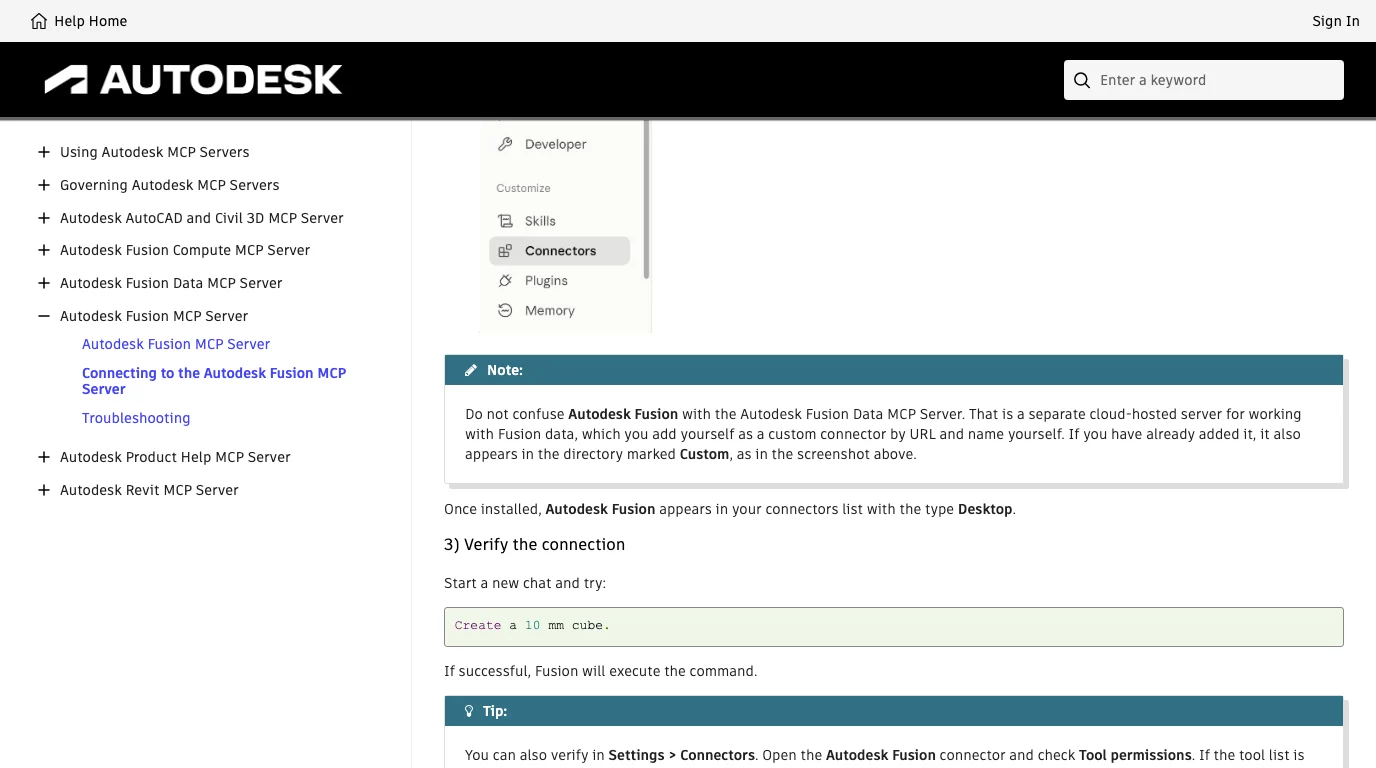
How you know it worked. Autodesk's tip is the useful one: in Settings > Connectors open the Autodesk Fusion connector and look at Tool permissions. If the list has tools in it, Claude is connected. If it is empty, it is not, whatever the connector's status badge says. Once installed the connector shows the type Desktop.
Step 4: Claude Code, Cursor and VS Code
Autodesk documents Cursor and VS Code and then says that any other client that supports MCP over Streamable HTTP can connect to the same URL. Claude Code is one of those, so it works by protocol, not by a named promise. We ran it.
Claude Code
There is nothing to install. In the project where you want Fusion available, run:
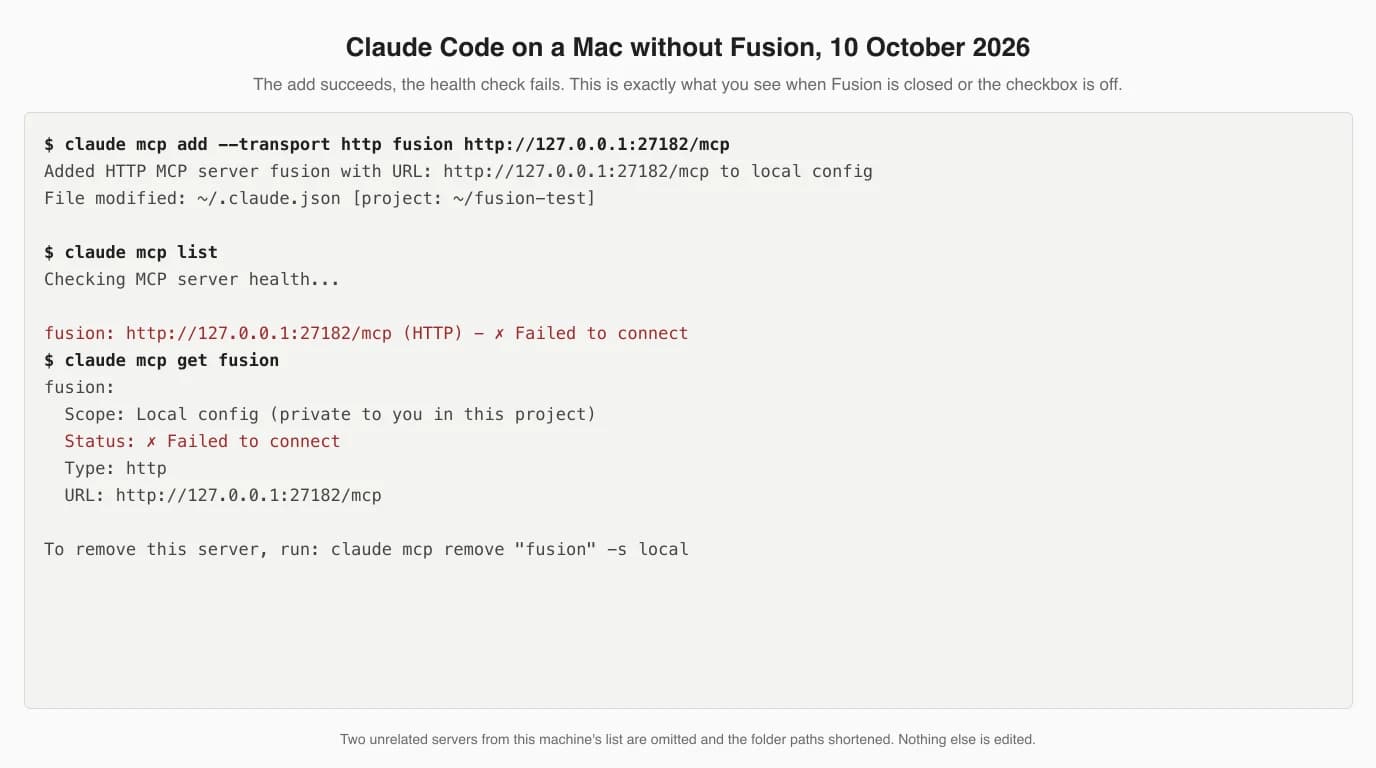
claude mcp add --transport http fusion http://127.0.0.1:27182/mcpThen ask Claude to list the Fusion tools, or run claude mcp list. Below is what that gave us on a Mac with no Fusion. The server is added, the health check fails. That is the same output you get when Fusion is closed or the checkbox is off, so if you see it, go back to Steps 1 and 2 before suspecting Claude Code.
Cursor
Open the Command Palette, go to Cursor Settings: Tools & MCP, select Add Custom MCP and add this. The file is ~/.cursor/mcp.json for all projects or .cursor/mcp.json in a project root.
{
  "mcpServers": {
    "autodesk-fusion": {
      "url": "http://127.0.0.1:27182/mcp"
    }
  }
}
Restart Cursor if the server does not appear, and remember that tool calls need the chat in Agent mode; Autodesk lists a chat in the wrong mode as its own failure row.
VS Code
Run MCP: Add Server from the Command Palette, choose HTTP and enter the URL, or edit .vscode/mcp.json. This one has a trap Autodesk calls out in bold: VS Code uses servers as the top-level key, not mcpServers, and every entry needs a type. A block copied from Cursor is valid JSON, so VS Code accepts the file without an error and silently ignores the server.
{
  "servers": {
    "autodesk-fusion": {
      "type": "http",
      "url": "http://127.0.0.1:27182/mcp"
    }
  }
}
Step 5: The first three prompts
Autodesk's verification prompt is Create a 10 mm cube. It is a good first prompt because it proves the whole chain in one go: Claude found the tools, Fusion accepted a script, and a body appeared in the open document. Here are the next two we would run, in that order, and why.
- “Describe the open document: components, bodies, sketches, parameters, units.” Read-only. It tells you two things at once: that Claude really can see the existing model (see the section on that below), and how it names things, which you will need when you ask for edits. If this comes back wrong, stop here.
- “Make the cube 40 by 25 by 10 mm and add a 6 mm through hole in the centre of the top face, as a parametric feature.” The first edit. Asking for a parametric feature rather than “a hole” matters: Claude tends to write absolute coordinates, and you want to find out now whether the feature lands in the timeline where you can change it later.
- “Export the body as STEP to my desktop and tell me the bounding box.” Proves the way out, and the bounding box is a number you can check against the 40 by 25 by 10 you asked for. If the units are wrong you find out here, not in a shop.
When it fails: the documented list
Autodesk's troubleshooting page is a 13-row table, and it is better than most of the community advice, so it comes first. Three rows cover nearly everything people post about: the server is not enabled, Fusion is not running, or the URL does not match.
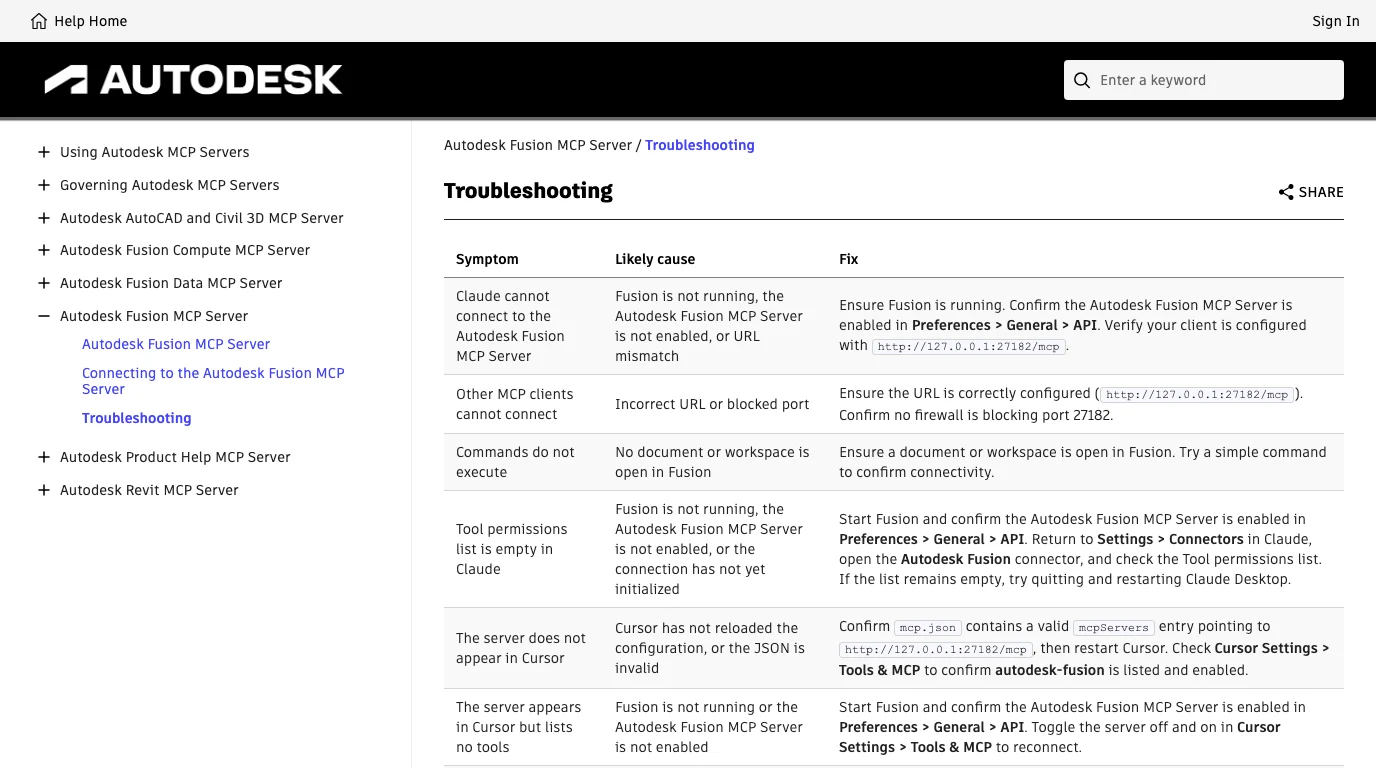
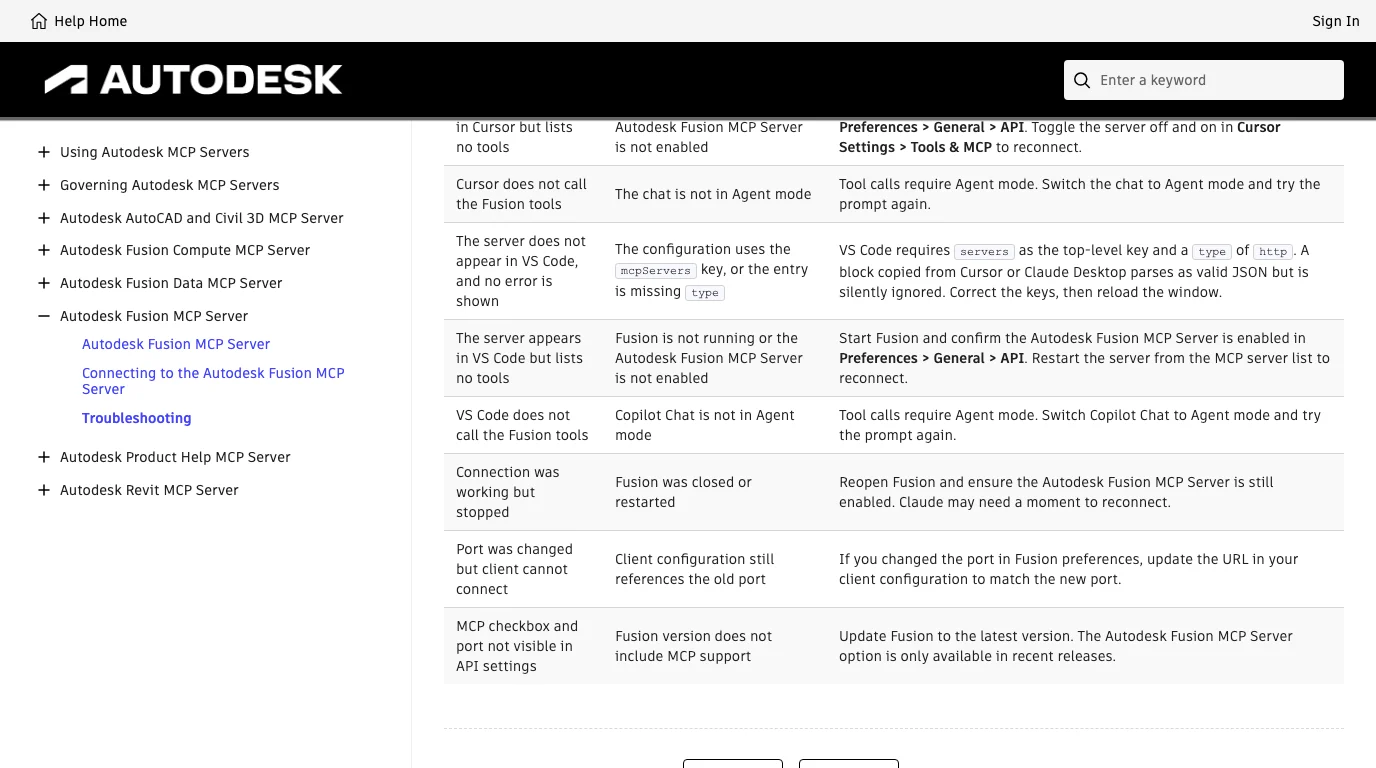
Two failures are not in that table, and both come from Autodesk's own forum and support site.
Connects, then “transport closed unexpectedly”
A thread on the Autodesk Community from late May 2026, Claude Desktop on Windows, describes the server accepting the first handshake and dropping straight after it. The poster had already disabled the firewall, installed Node 24 and restarted everything. A later reply reported the same crash and confirmed with netstat that Fusion was listening on 127.0.0.1:27182, so the firewall was never the problem. The poster's own diagnosis was that Fusion had come back on a different port after a relaunch while the connector was still sending to 27182. That is one user's report, not an Autodesk statement, but it is the “URL mismatch” cause from the table wearing a different error message, and it costs nothing to check: open the Fusion preference, read the port, compare.
“Connection refused” from Claude, Cursor or VS Code
Autodesk has a support article for this exact wording. The stated cause is that the server is not enabled in user preferences. Go back to Step 2 and look for the Apply button.
A third one is historical. Before the server was built in, Autodesk shipped it as an add-in through the Autodesk App Store, and the announcement thread has a user whose settings pop-up showed ERR_CERT_DATE_INVALID and another who found the add-in gone from the store and installed it from a zip. If a guide tells you to download an add-in for the official server, it is describing that earlier version. The same goes for guides that tell Claude Desktop users to run an mcp-remote proxy through npx: that was Autodesk's reference server's advice from before Claude Desktop could talk to a local HTTP server. With the connector it is not needed.
What the server can actually do
Autodesk does not publish a fixed tool list for the built-in server. Its documentation says “dynamic tooling”: your client discovers the tools when it connects and the set may change between releases. The connector page says Claude can create, modify and inspect 3D geometry, sketches and features, create primitives and query design data. For what the design actually is, we went to the one place Autodesk shows its working: the FusionMCPSample repository, an MIT-licensed reference server written by the Fusion API team in December 2025, with a tips document by one of its authors.
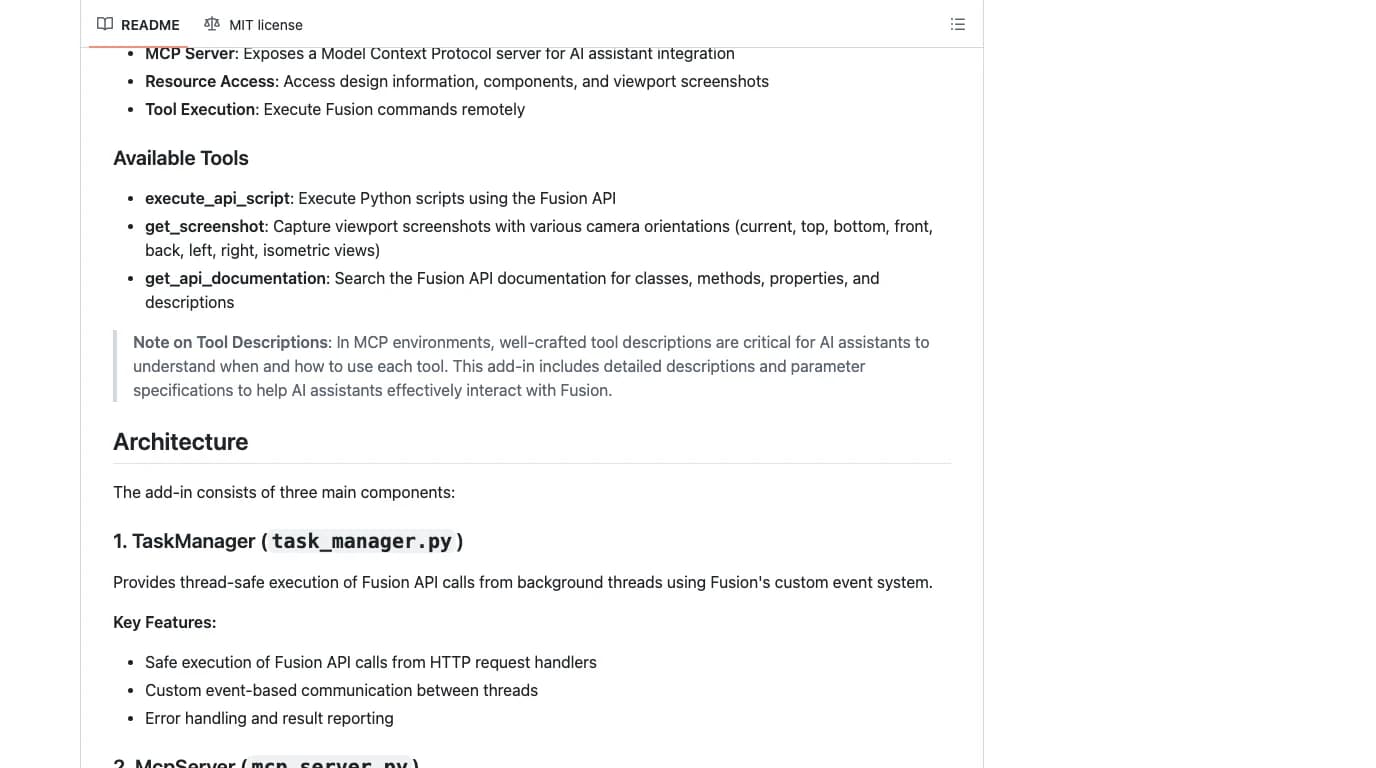
Four tools. get_best_practices loads a rules file into context, the same idea as a CLAUDE.md. get_api_documentation searches the Fusion API docs and returns the top three hits. execute_api_script runs a Python script inside Fusion with the full API. And get_screenshot returns the viewport from any of eleven camera angles so the model can look at what it did. That is the whole design, and it is the honest one: Fusion's API is Python, so the server lets Claude write Python and then see the result.
The tips document is the most candid thing Autodesk has written about this. In the authors' words the sample is “a functional sample, not a product”, and “when people think of MCP servers in the context of CAD/CAM, they often imagine an AI independently creating full components and assemblies from scratch. We're not exactly there yet.” Then: “Drawing sketches to build components is often out of scope.” What they say it is good at is retrieving and analysing information from designs, editing properties of existing components, and helping developers write add-ins. They also warn that a script which opens a modal window pauses execution with no way for the AI to close it, and that Cursor's automatic model choice “consistently gave me poor results”, while GPT-5.1 and Claude 4.5 both did fine.
Can it read what is already in the model?
A review from Leo AI, which sells a competing AI design product, is the most shared assessment of this connector. It says the connection is one-directional, that Claude “cannot read back what already exists in a model”, and that “Claude always starts from zero”. We looked at what that rests on, because it contradicts the vendor.
Autodesk's Fusion help says the local server lets you “drive modeling, execute commands, and inspect the active document”. The reference server's script tool can read anything the API exposes, which is the whole document, and its screenshot tool exists so the model can see the current state. The Autodesk engineer's May walkthrough opens an existing model and has Claude apply a chrome appearance to two named bodies in a named group, which requires reading the component tree first. And the review itself says its commands went “through a community-built Fusion MCP server”. So the one-directional claim describes a particular community server from spring 2026, not Autodesk's. We have not run either, so we are weighing documents against documents here, but the documents are clear, and the second prompt in Step 5 is how you check it yourself in thirty seconds.
Where the review is right is on judgement. Claude cannot see a solver failure except as an error string, does not check clearance or stiffness, and tends to sketch with absolute coordinates rather than constraints, so changing one dimension later can break the sketch. Those limits are not about reading; they are about Claude not being an engineer.
The community servers
Before April 2026 every route from Claude to Fusion was a community add-in, and most of them are still maintained. They matter for three reasons: they install on a personal licence, several are built for Claude Code rather than Claude Desktop, and some expose things the official server does not describe, such as comparing a body against a reference STL. Star counts are from GitHub on 10 October 2026.
Fusion MCP servers on GitHub, 10 October 2026, from their READMEs
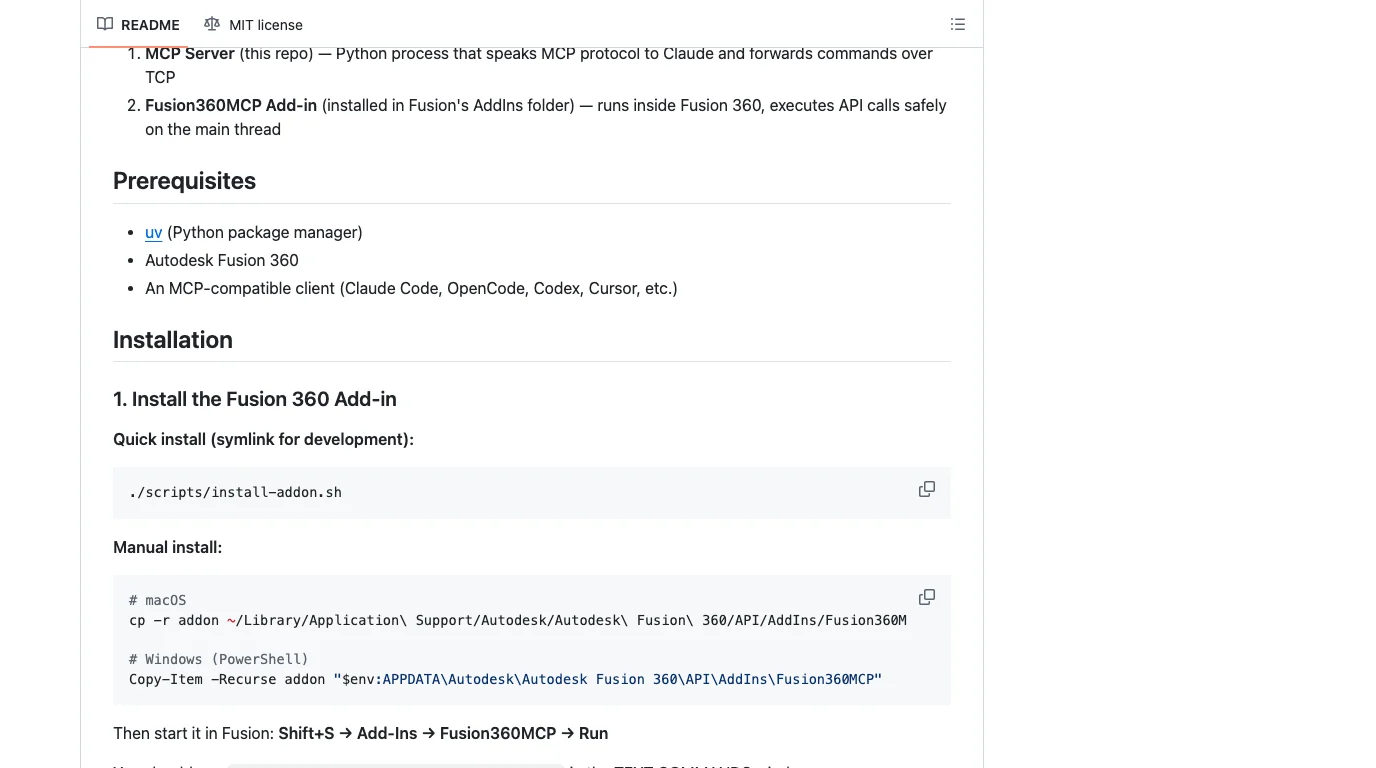
Every one of them has a tool that runs arbitrary Python inside Fusion, as the official one does, and none of them has a tool for Fusion's Drawing workspace. The nearest is faust-machines' export_view_sheet, which writes a PNG of four views for the model to look at, not a drawing you could send to a shop. We noted the same gap in FreeCAD, where no server had a TechDraw tool.
What the code says about safety
- Loopback only, no login. The official server binds 127.0.0.1 and Autodesk says so: local-only, no remote connections or authentication required. Nothing on your network can reach it, and the design stays on the machine, which is Autodesk's privacy argument. The same fact means any process on your computer can drive Fusion while the box is ticked. Autodesk's own connection guidance ends with “turn it off” when you no longer need it, and that is the right habit.
- Everything is code execution. The reference server's
execute_api_scriptruns whatever Python it is given, with your user's permissions, and the community servers do the same. The approval you get is Claude Desktop's own tool prompt. Keep it on. - One community server can be opened to the network. faust-machines documents a
FUSION_MCP_HOST=0.0.0.0option and warns in the same paragraph that the socket has no authentication. Leave it on 127.0.0.1. - Two servers thought about this. ndoo stores a generated secret in a mode-600 file and returns 401 without it; Ghost pops a dialog in Fusion before the AI may connect. Neither is the official server.
What it is good at, and what it is not
Putting Autodesk's own tips document next to the reviews gives a consistent picture.
- Good: prismatic parts you can describe in a sentence (enclosures, brackets, housings), batch edits on an existing design (rename components, apply materials, export STL or STEP), reading a design and summarising it, and writing Fusion add-ins. The Autodesk walkthrough also shows a drawing image pasted into Claude being rebuilt as a solid “after several attempts”, which matches what we measured with FreeCAD.
- Not: surfaces, lofts and organic blends, fully constrained sketches, multi-feature parts where a failed extrude needs recovery, draft angles and snap fits that have to work, and anything Fusion's solver rejects, because Claude only sees the error text. Autodesk's own authors put sketch-driven part building “often out of scope”.
- Unknown to us: speed and accuracy on a real part, because we did not run it. With FreeCAD we measured a 0.5% volume error and 68 seconds; we would expect Fusion to be similar on the same server design, and we will say so only when we have measured it.
Where a 2D drawing fits
Fusion makes 2D drawings from a model in its Drawing workspace, but no server we read exposes that, and the Fusion API's drawing support is thin next to its modelling API. So the realistic loop today is: model in Fusion with Claude, export STEP, and make the drawing elsewhere. If you only need true-size views of the exported model, our orthographic projection tool does that in the browser from the STEP. If you are starting from a photo or a sketch rather than a model, the drawing is the product on this site and the Fusion step is optional.
Exported a STEP from Fusion and need front, top and side views as a DXF at true size? Drop the file in your browser. Nothing is uploaded.
Open the orthographic projection toolRelated reading: the full CAD MCP server landscape, Claude with Onshape (the other vendor server, hosted in the cloud), Claude with SolidWorks, Claude with FreeCAD (the one we ran and measured), and which CAD files Claude can read without any server at all.
FAQ
Frequently asked questions
Is there an official Claude connector for Fusion 360?
Yes. Autodesk built the Fusion MCP server into Fusion itself in April 2026, and Anthropic lists it in the Claude connector directory as an Anthropic-verified connector made by Autodesk, added May 2026. You switch it on in Fusion under Preferences > General > API, then install the Autodesk Fusion connector from the directory inside Claude Desktop. It is the only CAD program in this series where the vendor ships the connector rather than the community.
How do I connect Claude to Fusion 360?
Start Fusion desktop and open a design. Go to Preferences > General > API, tick Fusion MCP Server (runs locally on this device) and click Apply; Fusion shows the port, 27182 by default. In Claude Desktop go to Settings > Connectors, choose Add, then Browse connectors, search for Fusion, and install Autodesk Fusion. Open a new chat and type: Create a 10 mm cube. If a cube appears in Fusion, you are connected. For Claude Code run claude mcp add --transport http fusion http://127.0.0.1:27182/mcp.
What port does the Fusion MCP server use?
27182 by default, on the loopback address 127.0.0.1, with the path /mcp. Fusion shows the number next to the checkbox in Preferences > General > API and lets you change it. If you change it, every client that points at the server has to be updated by hand, because nothing checks that the two sides agree. A thread on the Autodesk Community from May 2026 traces the error transport closed unexpectedly to exactly that mismatch after a Fusion relaunch.
Does the Fusion MCP server work with the free personal-use licence?
Autodesk's announcement says the connector is for Fusion subscribers, and the troubleshooting page says only that the checkbox is missing when the Fusion version is too old. We found no Autodesk page that says whether the personal-use edition has it, and we could not check, because we have no Fusion install. What we can say is that the community servers, which are add-ins you install yourself, explicitly work on the personal licence: ndoo/fusion360-mcp-bridge states that a free personal licence is sufficient. If the official checkbox is missing for you, that is the route.
Can Claude read a model that already exists in Fusion?
Yes. One widely shared review from a competing vendor claims the connection is one-directional and that Claude always starts from zero. Autodesk's own documentation says Claude can inspect the active document, Autodesk's reference server has a screenshot tool and a tool that runs any Fusion API script, and an Autodesk engineer's walkthrough applies a chrome appearance to two bodies of an existing model through the server. Reading the open document is exactly what the design is for.
Does the Fusion MCP server work with Claude Code?
It is a Streamable HTTP MCP server on your machine, and Claude Code accepts those with claude mcp add --transport http fusion http://127.0.0.1:27182/mcp. Autodesk documents Claude Desktop, Cursor and VS Code and says any other Streamable HTTP client can connect to the same URL, so it works by protocol rather than by a named promise. We ran the command on a Mac without Fusion and Claude Code reported Failed to connect, which is also what you see when Fusion is closed.
Is the Fusion MCP server safe?
It listens only on 127.0.0.1, so nothing on your network can reach it, and your design data never leaves the machine. It also has no login and no token, so any program running on your computer can send it commands while the checkbox is ticked, and every Fusion MCP server we read, official or community, ultimately runs Python inside Fusion. Autodesk's own reference code warns that a script which opens a dialog freezes the session. Keep a saved copy of the design before you let Claude edit it, and untick the box when you are done.
What is Autodesk MCP?
Autodesk MCP is the name Autodesk gives its family of Model Context Protocol servers. As of October 2026 its documentation site lists six: the Fusion MCP Server (local, in your open document, general availability), the Fusion Data MCP Server (cloud, your hubs and projects with Fusion closed, general availability), the Fusion Compute MCP Server (cloud Fusion sessions for agents, public beta, seven tools), the Revit MCP Server (tech preview, Revit 2027.2), the Product Help MCP Server (documentation search, two tools) and the AutoCAD and Civil 3D MCP Server (tech preview, Autodesk Assistant only, read-only in AutoCAD). Only the first puts Claude in your open Fusion document.
Sources
- Autodesk MCP Server Documentation: home (the six servers)
- Autodesk MCP Server Documentation: Autodesk Fusion MCP Server
- Autodesk MCP Server Documentation: Connecting to the Autodesk Fusion MCP Server
- Autodesk MCP Server Documentation: Troubleshooting
- Autodesk MCP Server Documentation: Managing Your MCP Connection
- Autodesk Fusion help: Autodesk Fusion MCPs Overview
- Anthropic connector directory: Autodesk Fusion (added May 2026)
- Autodesk Platform Services blog: Bringing Fusion to Claude for Creative Work (28 April 2026)
- Autodesk Developer Blog (Japan): Fusion MCP server, with the Claude Desktop walkthrough (4 May 2026)
- Autodesk support: third-party AI tools fail to connect to Autodesk Fusion MCP
- Autodesk Community: Fusion MCP Server disconnects immediately after initialize (May 2026)
- Autodesk Community: Driving Fusion via AI using MCP server add-in (announcement thread)
- AutodeskFusion360/FusionMCPSample: Autodesk's reference MCP server (MIT) and its tips document
- Autodesk Fusion blog: Fusion Compute MCP public beta (15 September 2026)
- Leo AI: Claude can now design 3D models in Autodesk Fusion, how good is it really?
- faust-machines/fusion360-mcp-server (MIT, tested with Claude Code)
- AuraFriday/Fusion-360-MCP-Server (proprietary licence)
- ndoo/fusion360-mcp-bridge (MIT, bearer token, personal licence)
- frankhommers/autodesk-fusion-mcp (MIT, Streamable HTTP, no dependencies)
- thecuriousrohan/Ghost-MCP-Fusion360 (approval popup before the AI connects)
- Model Context Protocol: official specification and docs