
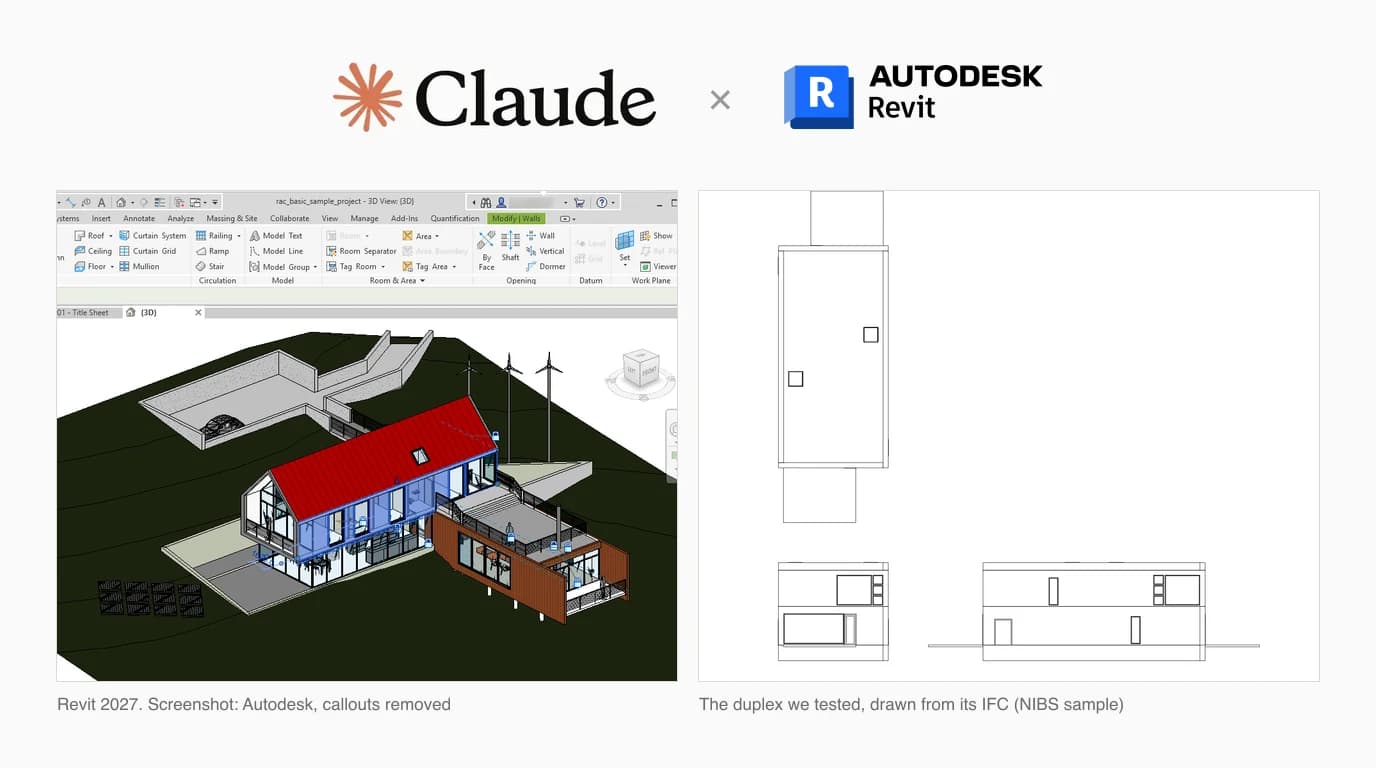
Revit is the first program in this series where Autodesk has actually shipped something: an official MCP server that lets Claude look inside a running Revit model. It is also a Technical Preview that only runs on Revit 2027.2, so most firms will end up on a community server instead. We read the code of the popular ones, and we ran a blind test on a real Revit project: the native .rvt, the IFC exported from it and a 3D PDF made from that, each given to a fresh Claude that had never seen the others.
Our articles are still written by humans!
Get human written articles in your Google feed.


What Autodesk officially ships
Autodesk calls it the Revit Public MCP Server, and its June announcement describes it as “Autodesk's official, supported MCP server for Revit 2027.” Read the small print before you plan around it. The help page says the servers “are currently supported only on Autodesk Revit 2027.2 during the Technical Preview,” and that features and tools may change before general availability. It is not built into Revit. You download it from Autodesk Account, under your Revit 2027 product updates, and it runs on your machine as a local program that Claude talks to over stdio.
The June release was read only, with seven tools. Since the 2027.2 update it comes as three separate installers, which Autodesk's tools page lists like this:
Autodesk's Revit MCP servers, from the help pages on 8 October 2026
None of the 39 tools runs arbitrary code, which matters more than it sounds once you see the community servers below. What Autodesk has not done is ship it as a Claude connector. Its MCP catalogue tags the Fusion server “Available in Claude” and leaves Revit untagged, and Anthropic's connector directory lists Autodesk Fusion and Autodesk Product Help, with no Revit entry, as of 8 October 2026. So the “Connect Claude to Fusion” experience, where you click once and sign in, does not exist for Revit yet.
Autodesk Assistant is a different thing
Revit 2027 also has Autodesk Assistant, a chat panel inside Revit that is itself a Tech Preview. Autodesk says it is “powered by Model Context Protocol,” and the June blog calls the MCP server “the same technology that lets the Assistant understand your Revit context.” That does not make it Claude. Autodesk names no model anywhere we looked; its transparency card says only “Model source: Licensed, pre-trained.”
The community servers
Before Autodesk shipped anything, the community did, and those servers are still the only option on Revit 2026 and older. They share one design: a Revit add-in that executes commands inside Revit, and a small MCP server that Claude launches and that passes those commands to the add-in. Star counts and dates are as of 8 October 2026.
Community MCP servers for Revit, checked 8 October 2026
One thing to know before you search: Google's top result for “revit mcp” is the original revit-mcp repository, which is archived in favour of mcp-servers-for-revit. The successor has more tools (26 in its README, from reading the current view to creating levels, rooms and dimensions) but the same add-in underneath, and that add-in is where the problems are.
What you need before you start
What the official server and the community servers require
On a Mac the answer is Windows in a virtual machine. Autodesk's Revit 2027 requirements include a Parallels Desktop setup for Apple silicon (Windows 11 in the VM, 16 GB of memory for it) and list accelerated graphics as not supported there. Because the MCP server is a Windows program launched by the client, Claude Desktop has to be installed inside that VM too. We found no documented way to point Claude on the Mac side at a server in the VM.
Wiring it up
The official server, on Revit 2027.2
- In Autodesk Account, go to Products and Services, then Product Updates, and download the Revit MCP Server you want. Start with Read-Tools.
- Open
%APPDATA%\Claude\claude_desktop_config.json. If the installer did not add an entry, add one undermcpServerswithcommandset toC:\\Program Files\\Autodesk\\Revit 2027 MCP Server Read-Tools Technical Preview\\Autodesk.RevitMcpServer.Stdio.exeandargsset to["--ManageConfigurationWithAutodeskRevitPluginInstaller=true"]. Doubled backslashes, no trailing comma. - Open Revit with a model, then quit Claude Desktop completely and start it again. Autodesk's own troubleshooting step is to end it in Task Manager if it will not reconnect.
- Ask Claude to “List the available Revit MCP tools.” That is Autodesk's suggested check, and it tells you at once which of the three servers you are actually talking to.
A community server, on older Revit
- Install the server's Revit add-in for your Revit version, as its README describes.
- Register the MCP side with Claude. For mcp-servers-for-revit that is an
npxentry in the same Claude Desktop config file. - In Revit, enable only the commands you need in the add-in's settings, then switch its server on from the ribbon. It stays off until you do.
- Restart Claude Desktop and ask it what it can see in the open model before you ask it to change anything.
What we found in the code
We read the source of the community servers in the table, without running any of it. The official server is closed source, so the only claims we make about it are Autodesk's own.
A Revit add-in that listens to your whole network
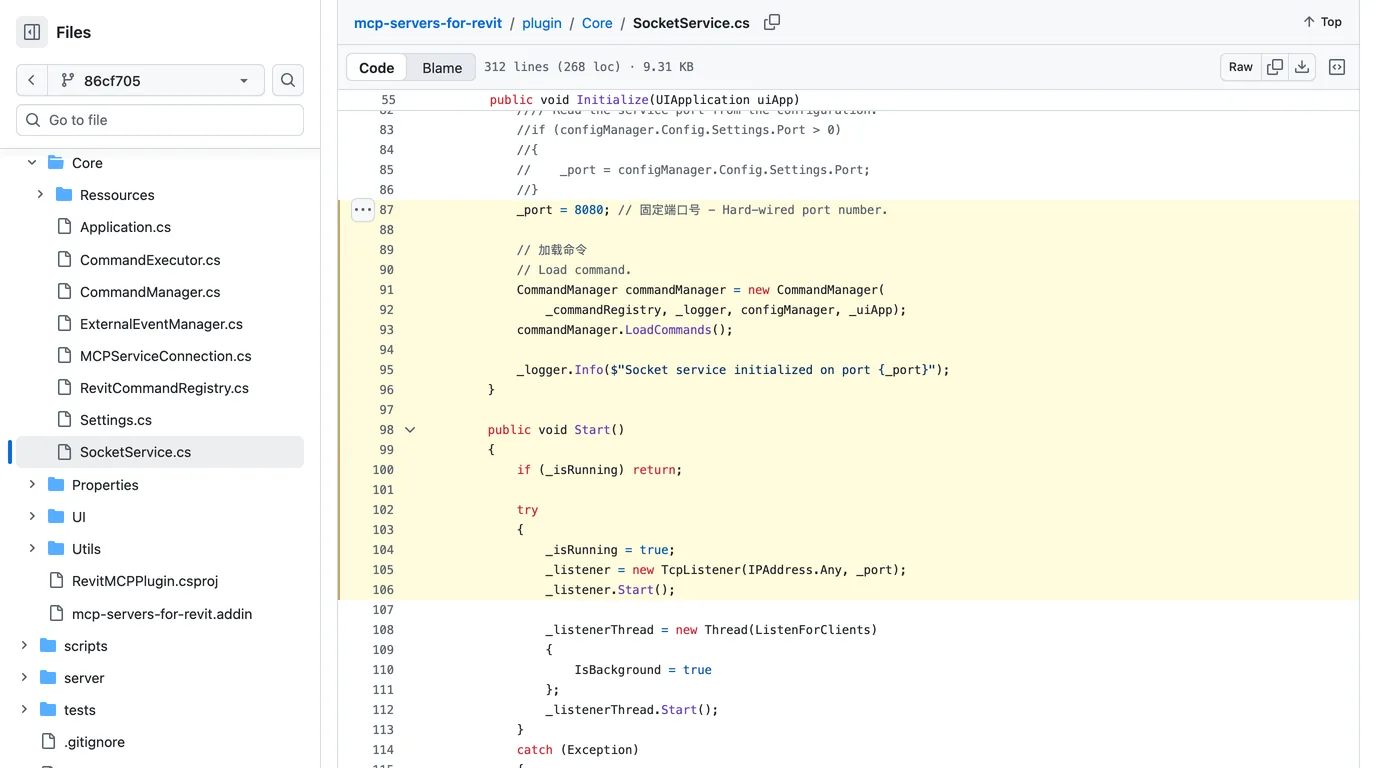
In mcp-servers-for-revit, the add-in's socket service sets the port to 8080 in code (the configurable version is commented out) and then starts a TcpListener on IPAddress.Any: every network interface on the machine, not just the machine itself. The connection handler takes whatever arrives and dispatches it as a command, with no token and no check of who sent it. The MCP server that Claude launches connects to localhost, so the wider exposure gives the legitimate user nothing. The archived original has the same two lines.
A tool that compiles and runs any C#
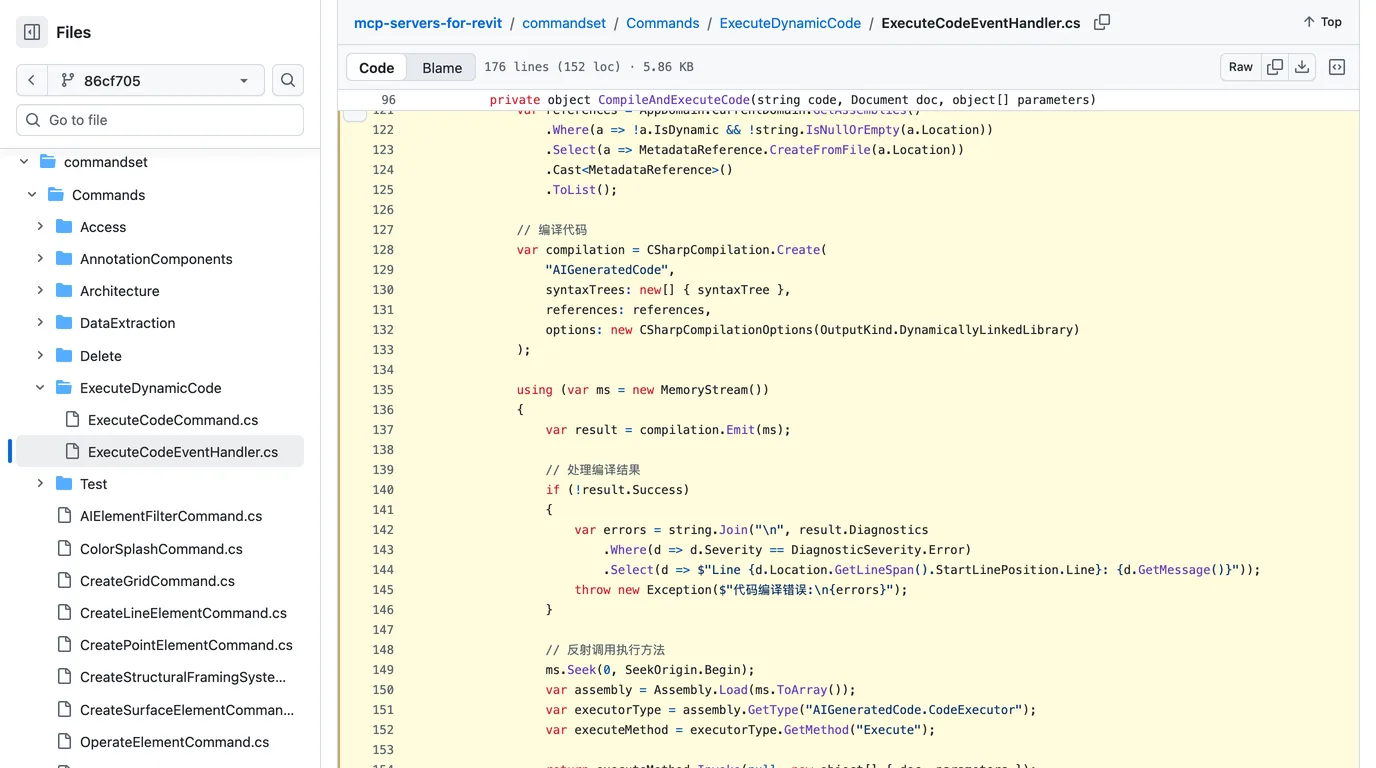
The same project ships send_code_to_revit, described as executing dynamic C# in Revit with access to the document and the Revit API. The handler wraps the code it receives in a method, compiles it with Roslyn against every assembly loaded in Revit, loads the result and runs it. Nothing limits what that code can do. It can edit the model, and it can just as easily read files, start programs or open network connections with your Windows permissions.
Put the two together and, while the add-in is switched on and that command is enabled, anyone on the same network who can reach port 8080 can ask Revit to run code. There are real mitigations, and it is only fair to list them: the socket starts only when you click the ribbon button, and commands are off until you tick them in the add-in's settings. We did not test whether Windows Defender Firewall prompts for or blocks the port on a typical office machine. The problem is the same one we found in a SolidWorks server: the safe setting is the one you have to remember to choose, and here you cannot choose it without editing the source.
The others
- mcp-server-for-revit-python runs model-supplied IronPython with
exec, and its README says plainly that it “lacks built-in authentication mechanisms.” It is the server linked from one of the most watched Claude and Revit videos on YouTube. - bimwright/rvt-mcp is the most careful of the group: localhost or a named pipe by default, network access only behind an environment variable, and a token the server checks. Its code tool is still on by default; start it with
--disable-send-codeor--read-onlyunless you need it. - oakplank/RevitMCP binds to
127.0.0.1, logs it when you open it to the network, and we found no code execution in it.
What Claude reads from a Revit file
A lot of people searching for this do not want Claude driving Revit at all. They want to hand it a model and ask questions. So we tested what it gets from the native file and from the IFC export, the two things a Revit user can actually send.
How we tested
We needed one project that exists as a native RVT and as an IFC exported from that same model, with the answers known in advance. The Duplex Apartment from the NIBS buildingSMART Common BIM files is exactly that: a two unit house published for software testing, with the RVT saved by Revit 2011 and the IFC exported from it by the same build. We measured the truth ourselves first with ifcopenshell and by decoding the RVT's streams: four levels, 21 rooms, 57 walls, 14 doors, 24 windows and an 8.8 × 17.8 m footprint.
Each file was renamed to model and handed to a separate Claude (Opus 5.5, in Claude Code) with the same questions and the instruction to cite where in the file each answer came from. Each had a shell and Python's standard library, and no internet, no BIM libraries and no permission to install any.
What each Claude reported, against the model we measured
The RVT: names yes, numbers no
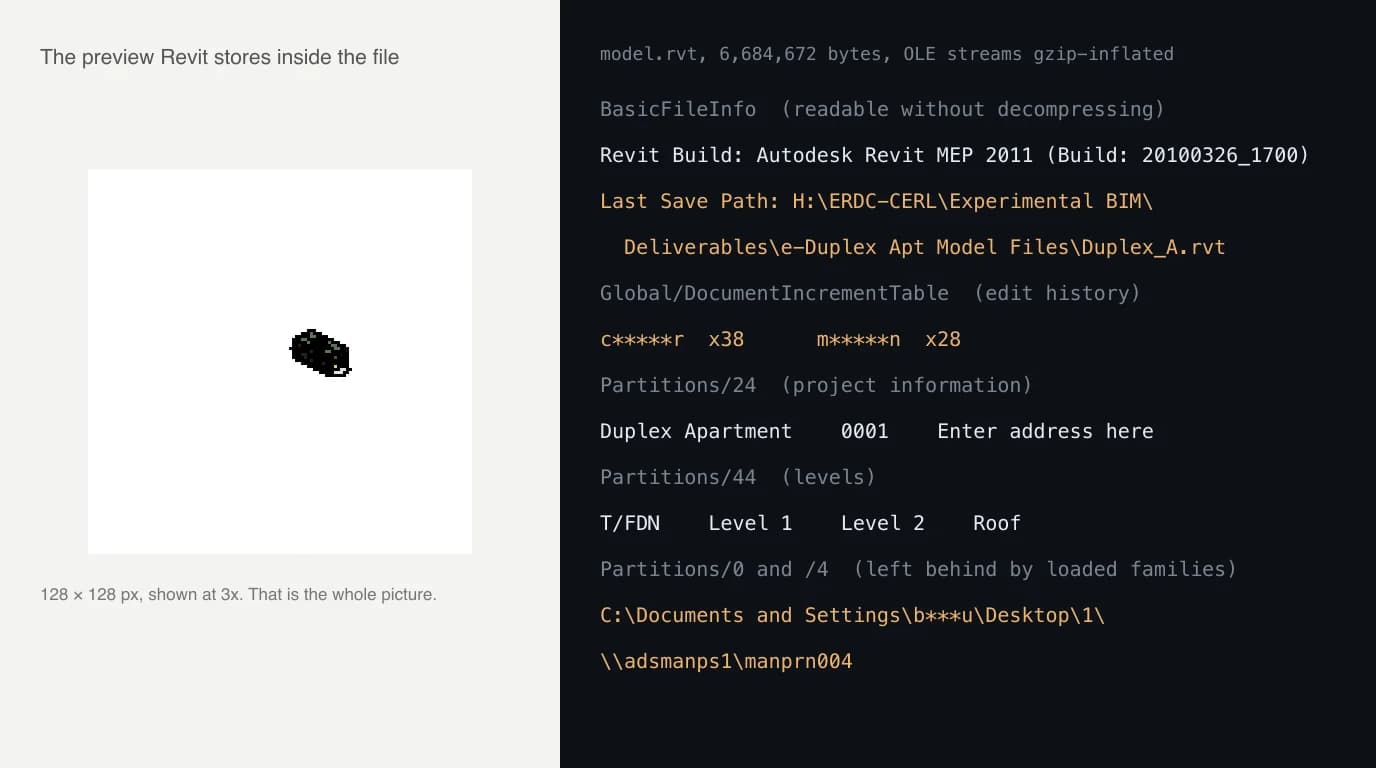
An RVT is a container of compressed streams, and read as raw bytes it shows almost nothing beyond one block of file information. The Claude that got it wrote its own parser for the container, inflated every stream, and found the room names, level names and project information as text. That is a real piece of work and it got all of it right, including a detail we had noted as a trap: one stair room is named “Stair” and its mirror in the other unit is named “Room”.
The numbers are a different story. Areas, wall endpoints and element categories are stored in binary records, and without Revit's schema it could only infer them from patterns. It said so, marked those answers low confidence, and still got them wrong: 32 walls instead of 57, a window type listed among the doors. That is the honest limit of reading RVT without Revit, and it is why the MCP servers exist at all. With Revit running, Autodesk's query_model tool asks Revit itself, which knows exactly how many walls there are.
The IFC: exact, and four times faster
IFC is text, so Claude parsed it with nothing but the standard library, followed the references between entities, and answered every question exactly: the walls by storey, all 14 doors with their sizes, all 24 windows, every room area. It also went further than we asked and flagged inconsistencies in the model, such as skylights named 1180 × 1170 mm whose stored size is 1173 × 635 mm, and the roof modelled as a room. Those are true, and they are the kind of thing a coordinator wants to know.
The project also ships a third file, which we added to the test as a curiosity: a 3D PDF that Acrobat made from the IFC. It has no text layer, only a compressed PRC 3D stream packed at the bit level. Claude worked out the format from scratch, said it was decoding the number encoding by trial, checked itself against values it could verify (a door head height of exactly 2.032 m, a roof area equal to its two sides multiplied), and came back with every count and area right. It took 25 minutes, and it also found the full path of the IFC on the PC of whoever made the PDF, Windows username included. Impressive, and still not a format to send on purpose.
We drew the same IFC in our own orthographic projection tool to check the outline. It came back at 8,850 × 26,565 mm including the two patios, the overall size Claude reported once it added them.

What it is good at, and what it is not
- Good at: questions about a model that Revit can answer: how many doors of each type, which rooms have no tag, what is on Level 2. The official Read server does this without being able to change anything.
- Good at: repetitive documentation work, through the Experimental tools or a community server: creating sheets and views, tagging, building schedules, renumbering.
- Good at: checking an IFC for missing data and contradictions, as long as a person checks the checker.
- Not good at: design. The servers give Claude a command channel into Revit, not judgement about a building.
- Not good at: answering from a bare RVT. Without Revit running, the numbers are out of reach. Send an IFC.
Where this fits in a real workflow
None of these servers starts from the thing many renovation and fit-out jobs start from: a paper plan, a site photo, or a part with no drawing at all. TechDraw AI turns a photo into a dimensioned drawing you can export as DWG or DXF, and Revit links or imports a DWG straight into a view, where Claude can then work with it through any of the servers above. We have not tested that hand-off end to end, so treat it as a route to try rather than a promise.
Have a 3D model and need its front, top and side views? Drop it in your browser and get the drawing. Nothing is uploaded.
Open the orthographic projection toolIf your office also runs AutoCAD, the same idea with different servers is in how to connect Claude to AutoCAD, and the wider list of CAD servers is in our guide to CAD MCP servers. What Claude can read from a DWG, which is less than from an IFC, is in can Claude read CAD files.
FAQ
Frequently asked questions
Is there an official Claude integration for Revit?
Partly. Autodesk publishes an official Revit MCP server, but it is a Technical Preview that only supports Revit 2027.2, installs as a separate add-in from your Autodesk Account, and has to be wired into Claude Desktop by editing a config file. It is not a Claude connector: as of 8 October 2026 Anthropic's connector directory lists Autodesk Fusion and Autodesk Product Help, and no Revit entry. Autodesk's own in-app AI, Autodesk Assistant, is a separate Tech Preview and Autodesk does not say which model it runs on.
Can Claude open a Revit .RVT file?
Partly. In our test, Claude with a shell and Python's standard library decoded a real RVT and got the Revit version, the project name, all four levels with their elevations and all 21 room names right. It did not find room areas, miscounted the walls (about 32 against 57) and could not tell doors from windows reliably, because the numbers sit in binary records it had no schema for. The IFC exported from the same model gave every one of those answers exactly, in four minutes instead of seventeen. If you want Claude to answer questions about a Revit model, send it an IFC.
How do I connect Claude to Revit?
On Revit 2027.2, download the Revit MCP Server (Read, Write or Experimental) from Autodesk Account, then add it under mcpServers in %APPDATA%\Claude\claude_desktop_config.json with the path to Autodesk.RevitMcpServer.Stdio.exe that Autodesk's help page gives. Restart Claude Desktop with Revit open and ask it to list the Revit MCP tools. On Revit 2026 or older you need a community server, which adds a Revit add-in that Claude reaches through a small local server.
Does Claude work with Revit on a Mac?
Only through Windows. Revit 2027 needs 64-bit Windows 11, and the only Mac setup Autodesk documents is Windows 11 in Parallels Desktop on Apple silicon, with accelerated graphics listed as not supported. The official MCP server is a Windows program that Claude Desktop launches directly, so Claude Desktop has to run inside the same Windows virtual machine. What does work on a Mac is sending Claude an IFC exported from Revit.
Which Revit MCP server should I use?
If you are on Revit 2027.2, start with Autodesk's own Read server: it cannot change the model and has no tool that runs arbitrary code. If you need to make changes, its Write server adds three tools for parameters, moving and rotating. On older Revit, look at servers that bind to localhost and ask for a token, such as bimwright/rvt-mcp, and turn off their run-code tool. Be careful with the most starred one, mcp-servers-for-revit, whose add-in listens on every network interface without authentication.
Is it safe to let Claude control Revit?
It depends almost entirely on the server. Autodesk's server runs locally over stdio and its write tools ask you to review changes. Several community servers include a tool that compiles or executes code inside Revit, and the most starred one also opens port 8080 on every network interface with no password while it is switched on. Work on a copy of the model, keep the code tool disabled unless you need it, and check what address the add-in listens on.
Sources
- Autodesk Help: Revit MCP Server (Technical Preview)
- Autodesk Help: Setting up the Revit MCP Server
- Autodesk Help: Revit MCP Server tools
- Autodesk AEC blog: Introducing the Revit Public MCP Server (June 2026)
- Autodesk Developer Blog (Japan): Revit MCP Server update, Read, Write and Experimental (Sept 2026)
- Autodesk AEC blog: Autodesk Assistant in Revit, Tech Preview (April 2026)
- Autodesk: Autodesk Assistant transparency card (PDF)
- Autodesk: System requirements for Revit 2027 products
- Autodesk: Connect Claude to Fusion
- Anthropic: Claude connectors directory
- mcp-servers-for-revit/mcp-servers-for-revit
- mcp-servers-for-revit/mcp-server-for-revit-python (pyRevit)
- bimwright/rvt-mcp
- oakplank/RevitMCP
- WBDG: Common Building Information Model Files, the Duplex Apartment we tested
- Model Context Protocol: official specification and docs