
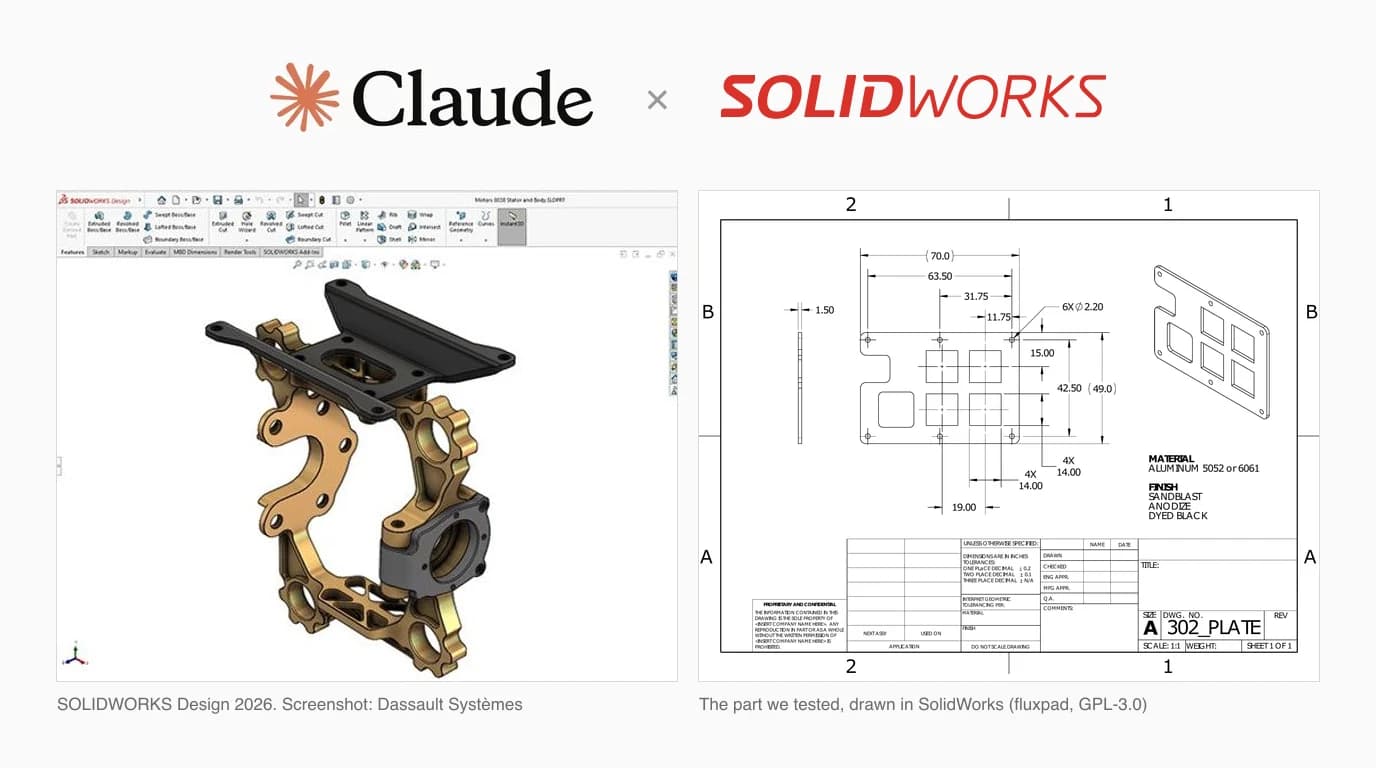
Search for how to plug Claude into SolidWorks and you get a Reddit thread, a handful of GitHub repos and some demo videos. What you do not get is anyone saying which of those repos you should trust, or what Claude can actually read from your files. So we read the code of every server we could find, and we ran a blind test on a real SolidWorks part: the native .SLDPRT, and the STEP, DXF and PDF exported from it, each given to a fresh Claude that had never seen the others.
Our articles are still written by humans!
Get human written articles in your Google feed.

There is no official connector
Start here, because it changes what you can expect. Autodesk publishes an official Claude connector for Fusion, and it owns the top of Google for “claude fusion 360” as a result. Dassault Systèmes has gone the other way and built its own. On solidworks.com, AURA and LEO are “Virtual Companions” in a panel inside SOLIDWORKS Design. AURA answers questions about your design and its documentation and is listed as available today with Cloud Services. LEO is meant to turn “natural language prompts into structured parametric CAD”, with its capabilities expanding through 2026. Neither page mentions Claude, MCP or the model underneath. According to DEVELOP3D's report from 3DExperience World 2026, that model is Mistral's, running on Dassault's own Outscale cloud.
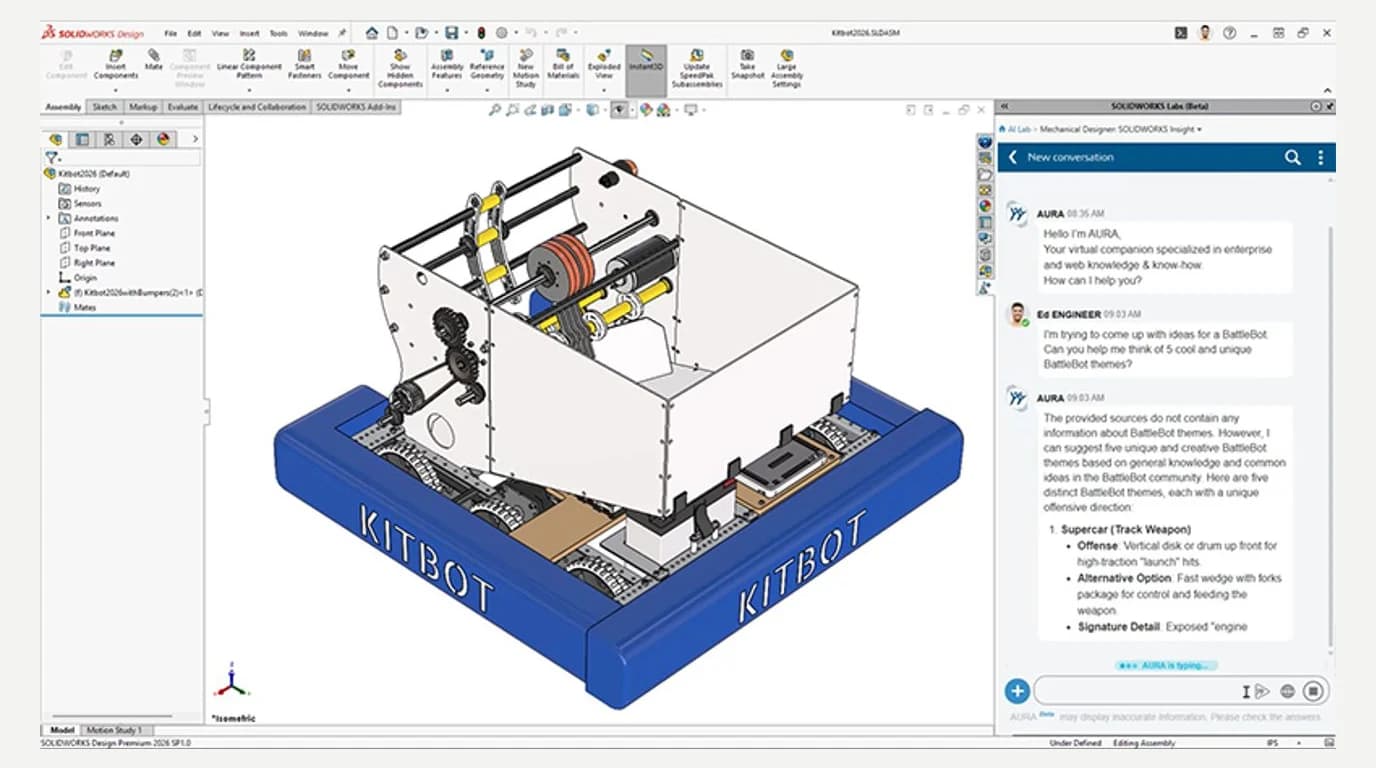
So if you are on SOLIDWORKS Design with Cloud Services, look at LEO before you wire anything up. The rest of this article is for everyone who wants Claude specifically, or who is not on that licence.
So when somebody shows Claude modelling a part in SolidWorks, what they are running is a third party MCP server: a small program that exposes SolidWorks API calls as tools, which Claude Desktop or Claude Code can then call. The protocol knows nothing about CAD. The quality, the version support and the risk all come from whoever wrote the server.
The servers that exist
We found five projects worth naming, plus a scatter of forks. All of them talk to SolidWorks the same way underneath, through the COM API that Dassault documents as the SOLIDWORKS API, and they differ in what they wrap. Star counts and dates are as of 29 September 2026.
Community MCP servers for SolidWorks, checked 29 September 2026
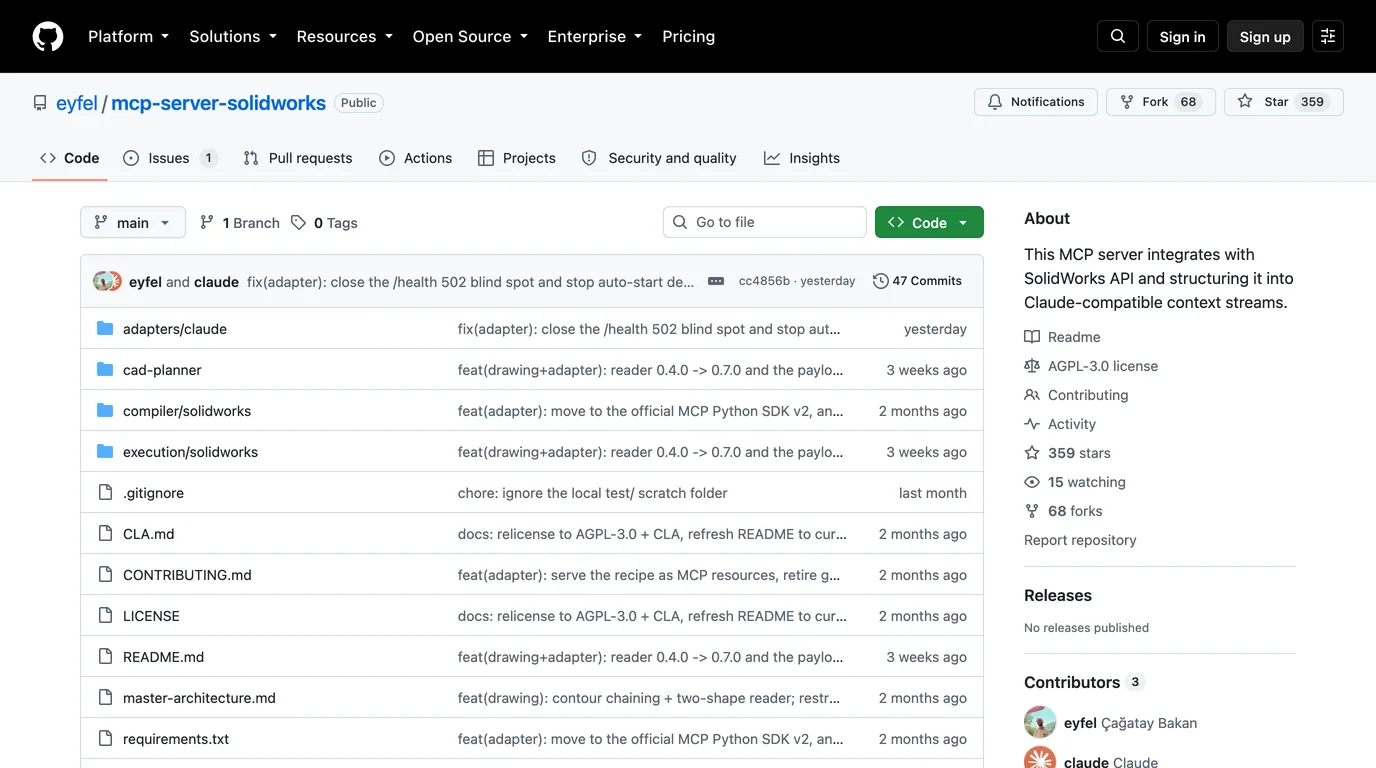
SolidPilot is the serious one
It is also the only one with an architecture worth describing. Instead of handing Claude hundreds of raw API calls, it has the model describe features (“a hole in the top face”), turns that into a CAD-neutral feature graph, and compiles the graph into SolidWorks operations with deterministic code. Its README is unusually honest: it calls itself a working prototype, says the automatic dimensioning on drawings is “drafting-blind”, and names the unsolved problem (references that survive when you change a dimension upstream). It needs SolidWorks 2026, .NET Framework 4.8 and Visual Studio's MSBuild, and its C# layer listens on localhost only, which is the right default.
The simple ones
alisamsam's server is what most demo videos show: connect, draw a circle, extrude it, fillet the edges. It installs with one pip install and claims support for three SolidWorks releases. Its last commit was in March, and the four forks with identical descriptions are ordinary GitHub forks, not a scam, although two of them have since grown their own code. haunchen's server is the one to look at if your job is drawings rather than models, and it is the only one built for Streamable HTTP, so Claude Code on a laptop can drive SolidWorks on a workstation across the room.
What you need before you start
What every SolidWorks MCP server we looked at requires
On a Mac the honest answer is no. SolidWorks does not run natively on macOS, and Dassault's own blog says it cannot recommend running it through Parallels or other virtualization over a PC. What a Mac user can do is send Claude the files SolidWorks exports, which, as the test below shows, is more useful than it sounds.
Wiring it up
- Clone the server on the Windows machine that runs SolidWorks and install its Python requirements with
pip install -r requirements.txt. SolidPilot also needs its C# layer built with MSBuild first. - Register it with Claude. For Claude Desktop, add an entry under
mcpServersin%APPDATA%\Claude\claude_desktop_config.json, withcommandset to your Python andargsset to the server's script. Use full Windows paths with doubled backslashes. - For haunchen's network server, run it on the workstation and point Claude Code at it with
claude mcp add --transport http solidworks http://<workstation>:8080/mcp. - Open SolidWorks first, then restart Claude Desktop. Most servers attach to a running instance rather than starting one.
- Ask Claude to connect and list what it can see, before asking it to build anything. If the tools do not appear, the config path or the Python path is wrong nine times out of ten.
One detail from haunchen's README worth knowing whichever server you pick: Claude Desktop's custom connectors and claude.ai connect from Anthropic's cloud, so they cannot reach a server that only exists on your office network. A local server has to be launched by the client on the same machine, or reached by Claude Code over your LAN.
What we found in the code
We read the source of the two servers most people install first. Both work. Both also make choices you should know about before you point them at a real project.
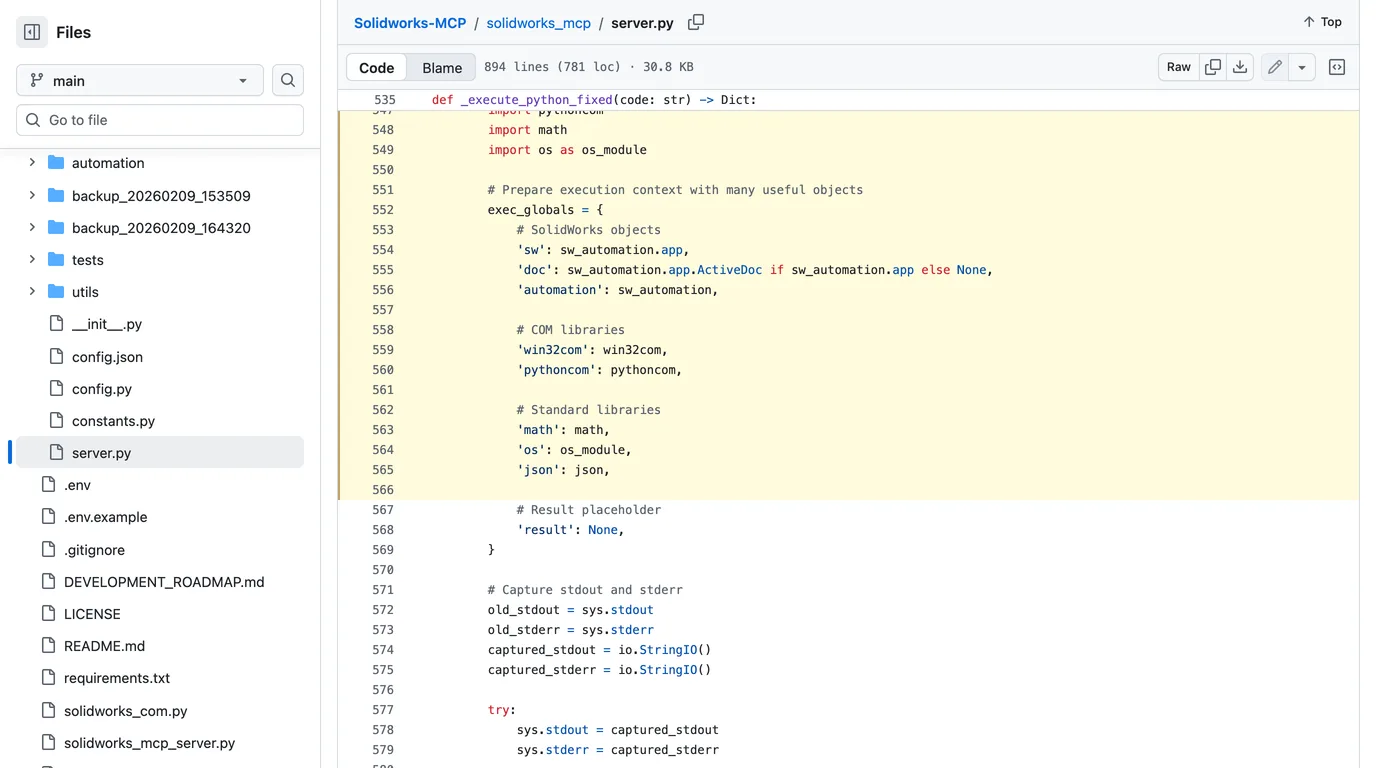
A tool that runs any Python
alisamsam's server includes execute_python, described as executing custom Python in the SolidWorks context. The code builds its environment with the SolidWorks application object and, alongside it, Python's os module. That is an escape hatch that makes the server far more capable, and it also means anything the model decides to write runs with your permissions: it can read, move or delete any file your Windows account can.
The same repository also has a committed .env file that contains what looks like a real API key for a third party model router, left over from an earlier project. We are not reproducing it, and it has nothing to do with your SolidWorks data, but it is a fair signal of how carefully the rest was reviewed.
A server that listens to your whole network
haunchen's server reads its address from an environment variable and, if you set nothing, binds to 0.0.0.0 on port 8080. That means every interface on the machine, not just your own. There is no authentication. To be fair to its author, the README says so in bold and tells you to run it on a trusted LAN only. The problem is that the safe setting is the one you have to remember to choose.
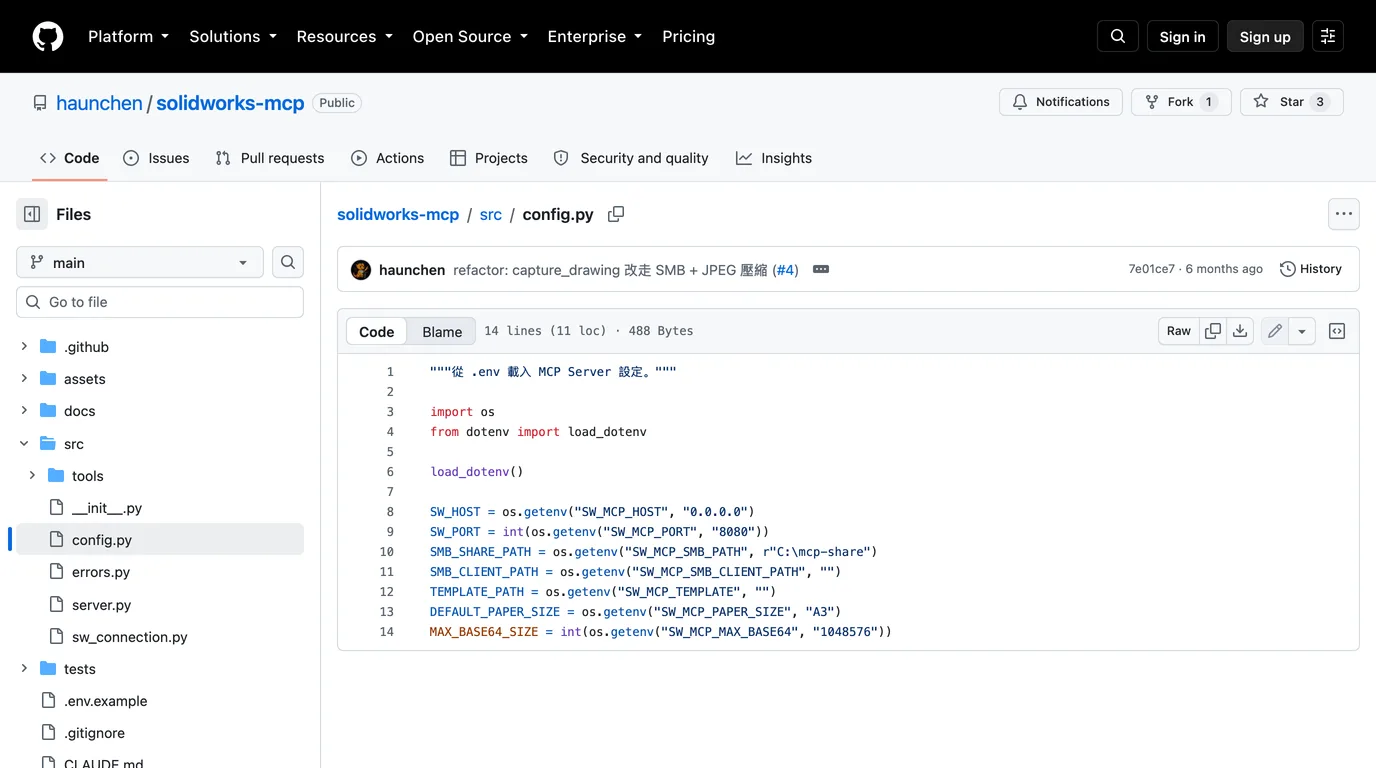
127.0.0.1 unless you have a reason not to.What Claude reads from a SolidWorks file
Most people asking about Claude and SolidWorks do not want it driving the application. They want to hand it a file and ask questions. One of the top results for this search says Claude cannot open SLDPRT files, so we tested it rather than repeating it.
How we tested
We needed one part that exists as a native SolidWorks file and as the exports made from it, with the answer known in advance. The open source fluxpad keypad (GPL-3.0) has exactly that: its switch plate, 302_PLATE, is in the repository as an SLDPRT, a STEP, a DXF and a PDF drawing. We measured the true geometry ourselves from the STEP and DXF with deterministic code. It is a 70 × 49 × 1.5 mm plate with six Ø2.2 mm holes, four 14 mm square cutouts on a 19 mm pitch, one 15.6 mm rounded square cutout and a notch in one edge.
Each file was renamed to part, so the name gave nothing away, and handed to a separate Claude (Opus 5.5, in Claude Code) with the same questions: what is this, how big, which holes, what material, and where in the file did you find each answer. Each had a shell and Python's standard library, and no internet, no CAD libraries and no permission to install any. The PDF was read visually, the way a person would.
What each Claude reported, against the geometry we measured
The SLDPRT: harder than the answer, easier than the claim
The native file is compressed binary, and a plain read of it shows nothing useful. The Claude that got it wrote a short Python script that found the file's section markers, inflated each stream, and then read the Parasolid body inside one of them as raw numbers. It came back with every dimension right. It also found something we had not asked for: the SolidWorks feature tree is stored inside the file as readable XML, with the sketch dimensions attached, so “Boss-Extrude1, D1 = 1.5” is sitting there in plain text once the stream is inflated.
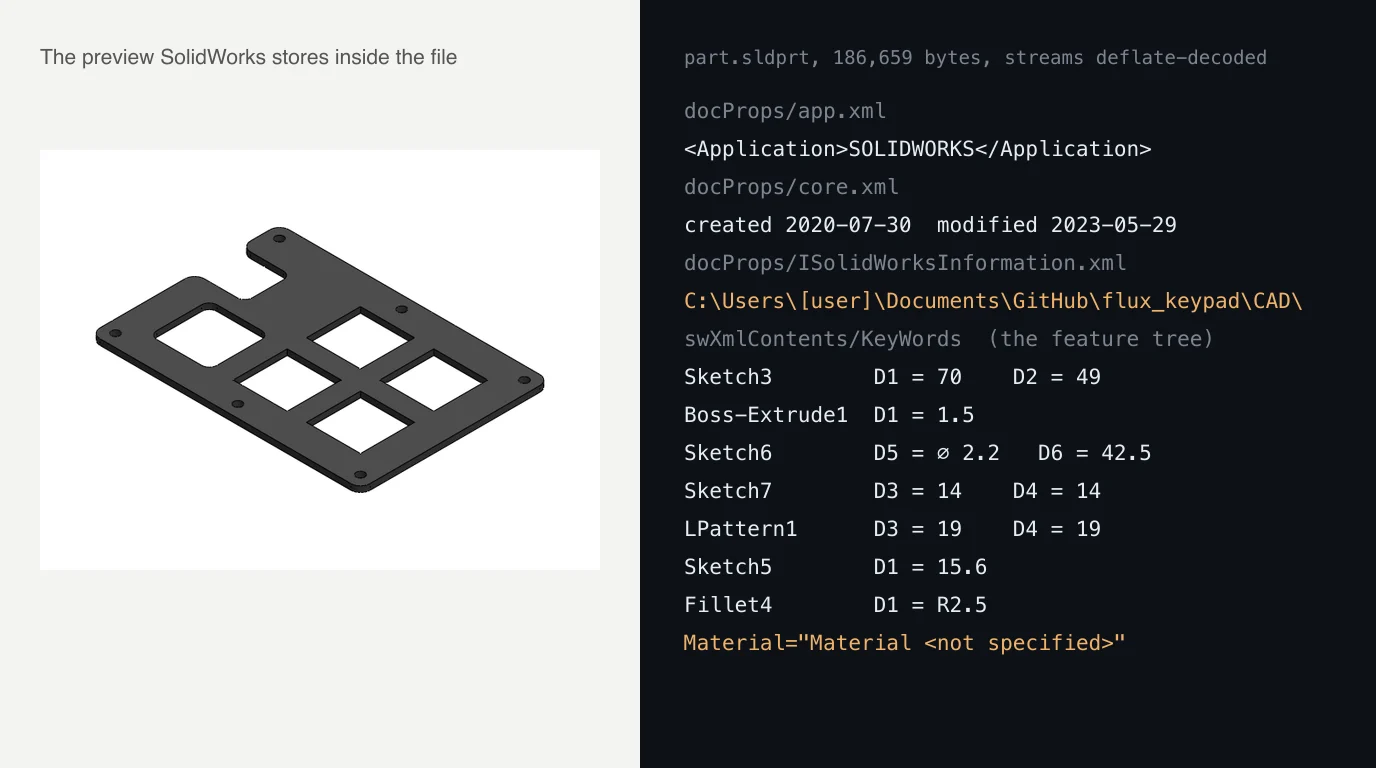
Two cautions before you conclude that Claude reads SolidWorks files. It took a shell and a script, so do not expect the same from a chat window without code execution; we did not test that. And this is a flat plate with straight extrusions. A part with lofts, a hundred features and several configurations is a different problem, and reverse engineering a proprietary format is not something to build a workflow on.
C:\Users\...\Documents\GitHub\... folder path, the path of a file from another project, a cloud sync folder named after an organisation, and created and modified dates. The STEP header carried the author's name too. Anything you upload to any AI, or send to any supplier, carries that with it.STEP and DXF: exact, and cheap
STEP is text, so Claude could parse it with nothing but regular expressions, and it got every feature exactly, in well under half the time. It even picked up that the solid inside is named Fillet5, after a SolidWorks feature. The DXF gave the same 2D answer and was right to refuse the rest: a DXF has no thickness and no material, and it said so instead of guessing. We opened both in our own viewers to check the same numbers came out.
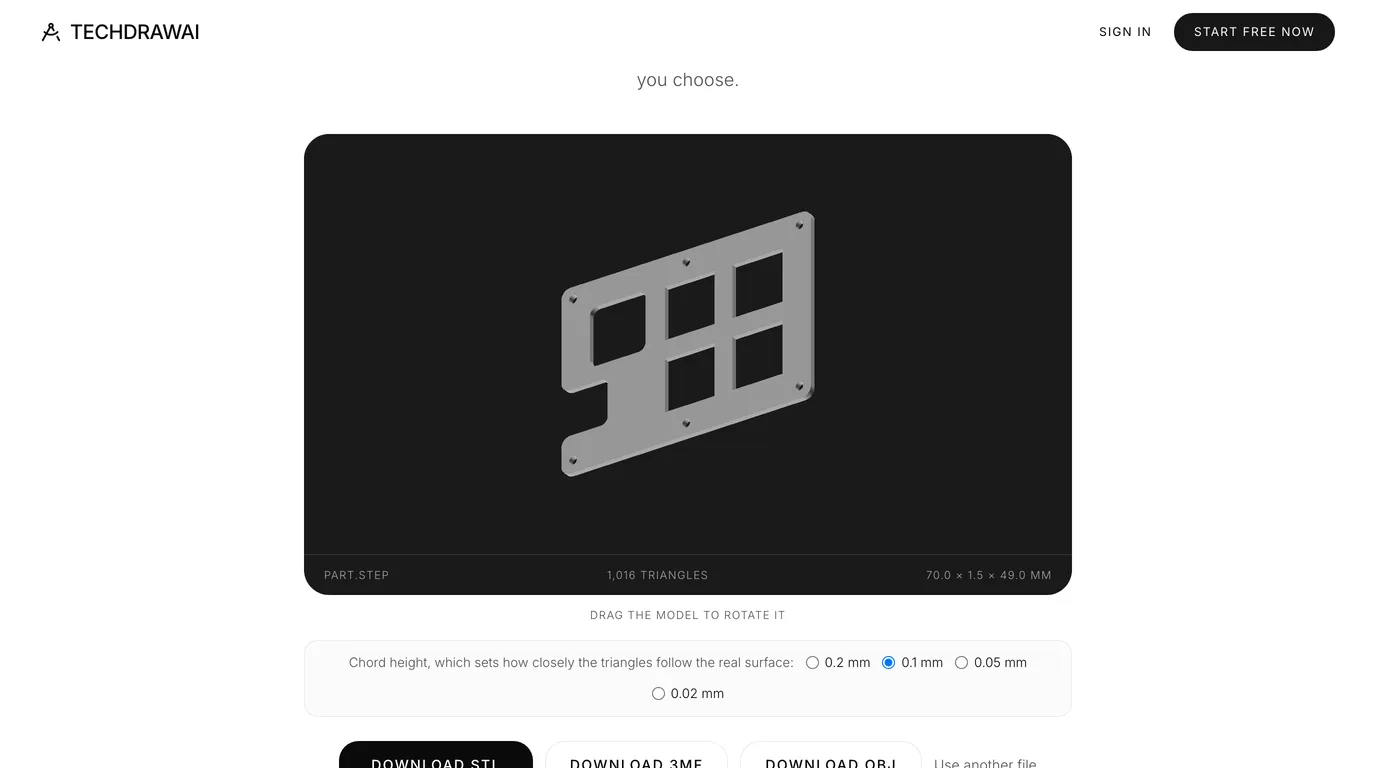
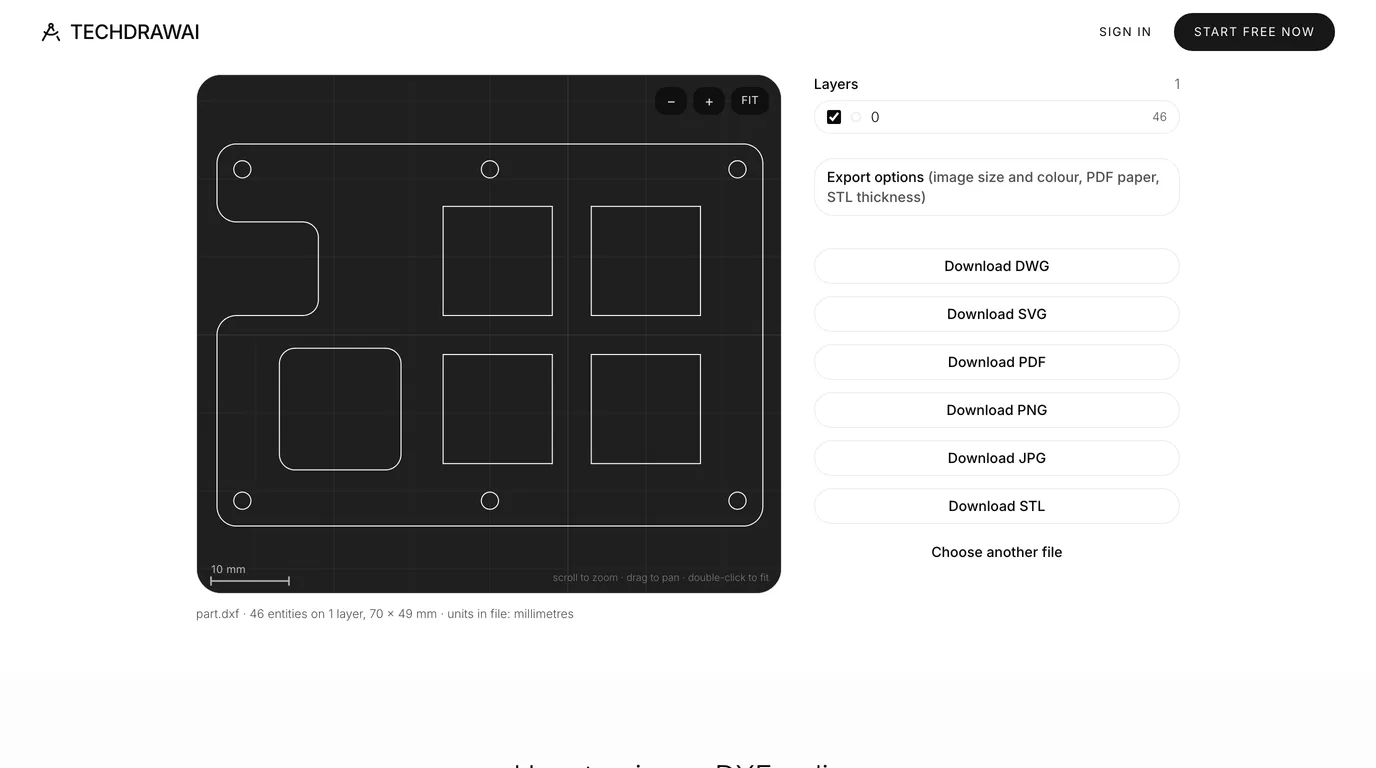
The PDF drawing: the best checker, and one false alarm
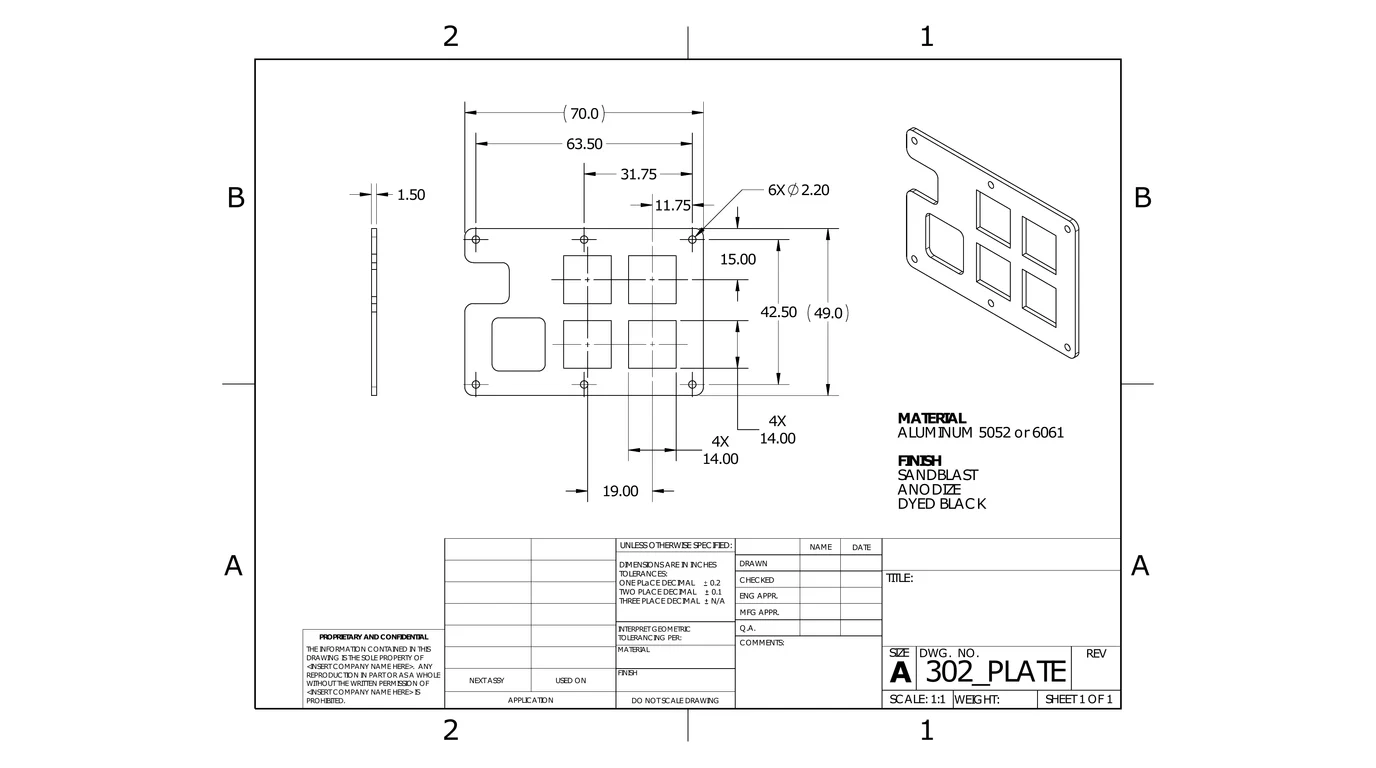
The drawing was the only file that carried a material and a finish, and the only one with a trap in it. Its title block, apparently left as the template had it, says “DIMENSIONS ARE IN INCHES”. Claude caught it: a 70 by 49 inch plate cannot fit on an A-size sheet at the stated 1:1 scale, so the numbers are millimetres and the note is wrong, and a machinist following the note would read ±0.1 as a tenth of an inch. It also listed every feature that had no dimension at all, which is exactly what you want from a drawing check.
It also got one thing wrong. It reported that the chain of dimensions across the top of the drawing does not add up, because 19.00 plus 11.75 is 30.75, not 31.75. The geometry settles it: in the DXF and the STEP, the left column of cutouts sits 1 mm off the centre line of the middle hole, so the dimensions are consistent and Claude had assumed two lines were one. It did say its reading could be wrong. Still, if you use Claude to check drawings, check its objections too.
What it is good at, and what it is not
What the good end of this looks like, in 21 seconds: a fully constrained door hinge assembly built in SolidWorks from plain language prompts. Be clear about what it is, though. It is MecAgent, a commercial tool that pairs Claude Opus 4.7 with its own fine-tuned models, not one of the free servers above, and a short vendor clip rather than an independent test.
- Good at: repetitive, describable modelling (patterns of holes, plates, brackets, variants of a part with new dimensions), setting up drawing views and exporting PDFs, and writing macros when it has the API documentation to hand.
- Good at: reading what exports already contain and checking a drawing for contradictions and missing dimensions, as long as a person checks the checker.
- Not good at: anything that needs judgement about a physical object. The servers give Claude a command channel into SolidWorks, not eyes on your part.
- Not good at: surviving edits. Even SolidPilot says its references break when an upstream dimension changes, which is the everyday reality of parametric modelling.
Where this fits in a real workflow
The gap none of these servers closes is the first step: getting from a physical part, or a photo of one, to geometry anybody can model from. That is the problem TechDraw AI solves. You photograph the part, give one measurement, and get a dimensioned drawing you can export as DXF or DWG. SolidWorks imports a DXF straight into a sketch, and SolidPilot has a reader built to rebuild a part from exactly that kind of file. We have not tested that last hand-off end to end, so treat it as a route to try rather than a promise.
Want to see what is in a DXF before you send it to Claude or to SolidWorks? Open it in your browser. Nothing is uploaded.
Open the DXF viewerIf your shop runs AutoCAD rather than SolidWorks, the same idea with different servers is in how to connect Claude to AutoCAD, and what Claude can read from a DWG, which is far less than from a STEP, is in can Claude read CAD files. If you are deciding which format to send, our guide to what a STEP file is explains why it travels so well.
FAQ
Frequently asked questions
Is there an official Claude integration for SolidWorks?
No. Dassault Systèmes ships its own assistants, AURA and LEO, in a panel inside SOLIDWORKS Design, and according to DEVELOP3D they are built on a Mistral AI model hosted on Dassault's Outscale cloud. It has not shipped a Claude connector. That is different from Autodesk, which publishes an official Claude connector for Fusion. Every way of wiring Claude into SolidWorks today is a community MCP server that drives the SolidWorks API on your own Windows machine.
Can Claude open a SolidWorks .SLDPRT file?
Not as a feature, but in our test it read one anyway. Given a real SLDPRT, a shell and Python's standard library, Claude decoded the file's compressed streams and the Parasolid body inside them and reported the part's outline, thickness, all six holes and every cutout correctly, in about three minutes. That took code execution. We did not test a chat window without it, and a complex part would be much harder than our flat plate. If you want reliable answers, export a STEP file, which Claude read exactly with far less effort.
How do I connect Claude to SolidWorks?
Install a community MCP server on the Windows machine that runs SolidWorks, then register it with your MCP client. For Claude Desktop that means an entry under mcpServers in %APPDATA%\Claude\claude_desktop_config.json pointing at the server's Python script. For Claude Code it is one claude mcp add command. Open SolidWorks first, restart the client, and the server's tools appear to Claude.
Does Claude work with SolidWorks on a Mac?
Not directly. SolidWorks itself runs only on Windows 10 and 11, and every MCP server we looked at talks to it through the Windows COM API. Running Windows in a virtual machine on a Mac is possible but Dassault does not recommend it. What does work on a Mac is sending Claude a STEP, DXF or PDF exported from SolidWorks on another machine.
Which SolidWorks MCP server should I use?
It depends on the job. SolidPilot (eyfel/mcp-server-solidworks) is the most complete and most active, with 47 tools including drawing creation and a reader that rebuilds a part from a DXF or DWG, but it targets SolidWorks 2026 and is AGPL licensed. alisamsam/Solidworks-MCP is simpler, with 22 part modelling tools for SolidWorks 2023 to 2025. haunchen/solidworks-mcp is built around making drawings in SolidWorks 2021. If you only want Claude to write better macros, a documentation server such as SWAPI Pilot is the low risk option.
Is it safe to let Claude control SolidWorks?
Treat the server like any script from the internet. One popular server includes a tool that runs arbitrary Python with the os module in scope, which means the model can touch any file your user account can. Another listens on every network interface with no authentication by default, which its README does warn about. Read the code, run it on copies of your models, and keep it off shared drives and open networks.
Sources
- DEVELOP3D: New Solidworks AI agents added at 3DExperience World (Feb 2026)
- SOLIDWORKS: AI Built into SOLIDWORKS Design (AURA and LEO)
- SOLIDWORKS: System Requirements
- SOLIDWORKS blog: How to run SOLIDWORKS on a Mac (Nov 2024)
- SOLIDWORKS API Getting Started Overview (2026)
- Autodesk: Connect Claude to Fusion
- eyfel/mcp-server-solidworks (SolidPilot)
- alisamsam/Solidworks-MCP
- haunchen/solidworks-mcp
- arthurle3210/swapi-pilot-solidworks-mcp (SWAPI Pilot)
- sssata/fluxpad: the open source keypad whose plate we tested (GPL-3.0)
- Model Context Protocol: official specification and docs