
Gemini 4 Argon has been open to developers since 13 October, and there is still no official way to put it in SolidWorks. There are community MCP servers, and an Antigravity config that can reach them. SolidWorks only runs on Windows and our test bench is a Mac, so we tested everything that does not need a live SolidWorks: 14 blind reads of real SolidWorks files, five servers' tool lists sent to the Gemini API, and three dry runs of Argon building a part through a server's real tools. Every number below comes from those runs.
Our articles are still written by humans!
Get human written articles in your Google feed.

There is no Gemini connector for SolidWorks
Start with what does not exist. Google's developer announcement for Argon says nothing about CAD. Dassault's own AI in SOLIDWORKS, the “virtual companions” Aura and Leo, was announced in February and, according to DEVELOP3D, is built on Mistral's model on Dassault's Outscale cloud. We found no partnership between Google and Dassault, and no MCP server from Dassault.
What does exist is the same thing Claude and ChatGPT users rely on: an open source MCP server that runs on the SolidWorks PC, talks to SolidWorks through its Windows COM API, and offers the model a list of tools. Argon supports function calling, which is how MCP tools reach a Gemini model, and Antigravity is where Google wants you to use it. So the setup is Antigravity, plus a server, plus a Windows PC with SolidWorks on it. If you have read our Claude and SolidWorks guide, the servers are the same ones; what changes is the client, the config format and the model's habits.
Gemini 4 Argon, from Google's model and pricing pages, 18 October 2026
The servers, and which one to pick
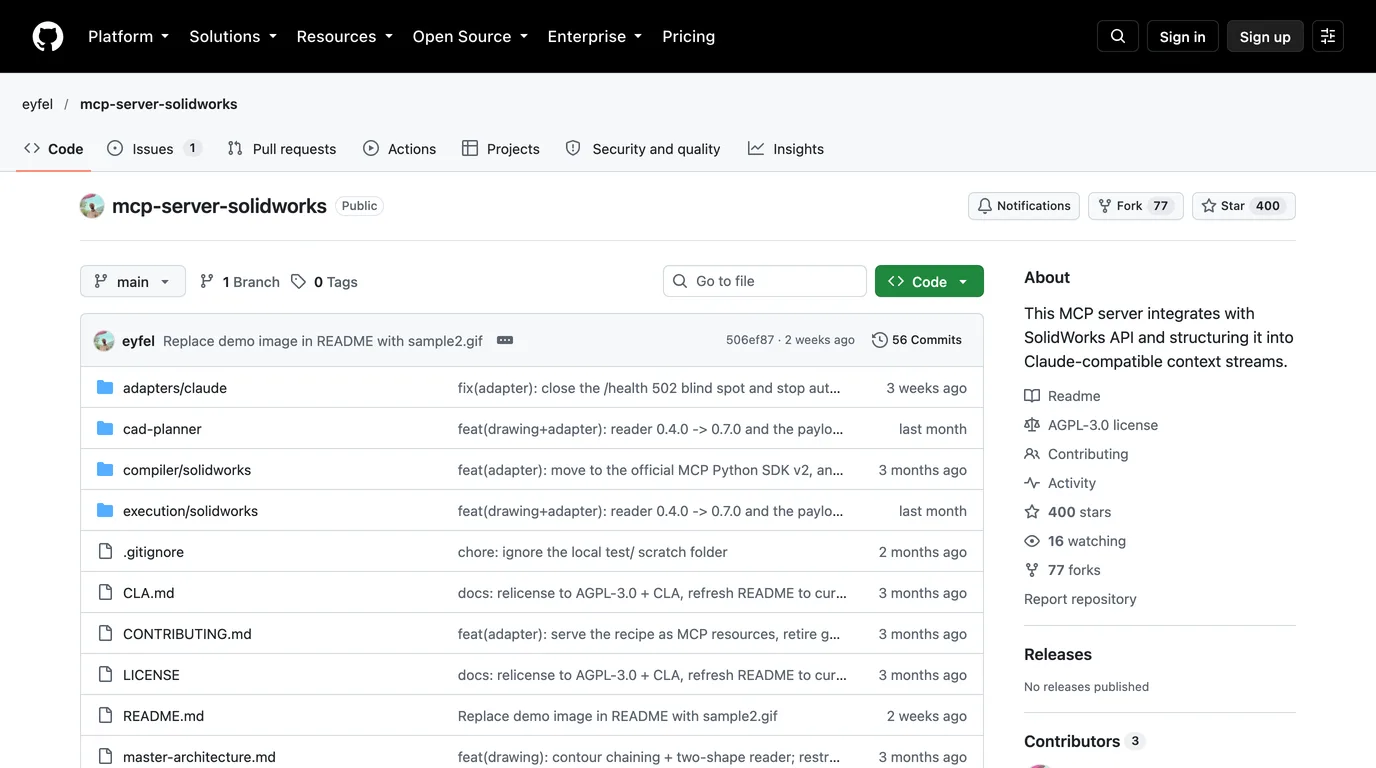
GitHub has over a hundred repositories for “solidworks mcp”. On 18 October we cloned five and read their code: the two most starred, the one from our Claude test, and the two whose READMEs name a client other than Claude. None mentions Antigravity. Only haunchen's lists a Gemini client, Gemini CLI. Tool counts are what each server returned when we listed its tools on macOS, which does not always match its README.
SolidWorks MCP servers, read on 18 October 2026
How to choose, in practice:
- To build and edit parts: SolidPilot. It is the most engineered of the five, with a feature-level plan, a compiler and checks, and it targets SolidWorks 2026. Two things to know: it is AGPL, and every length it takes is in meters, which matters more than it sounds (Test 2).
- To work from a Mac or Linux machine: solidworks-automation-skill. It can serve its tools over HTTP to another machine, and its README requires a shared token and an explicit allowed host before it listens beyond the PC itself. It is also the most starred, though its README is mostly in Chinese.
- For drawings only: haunchen's server makes drawing views, dimensions and PDFs, and it is the one with a Gemini line in its README. Its own README says it has no authentication and belongs on a trusted LAN only. Take that literally.
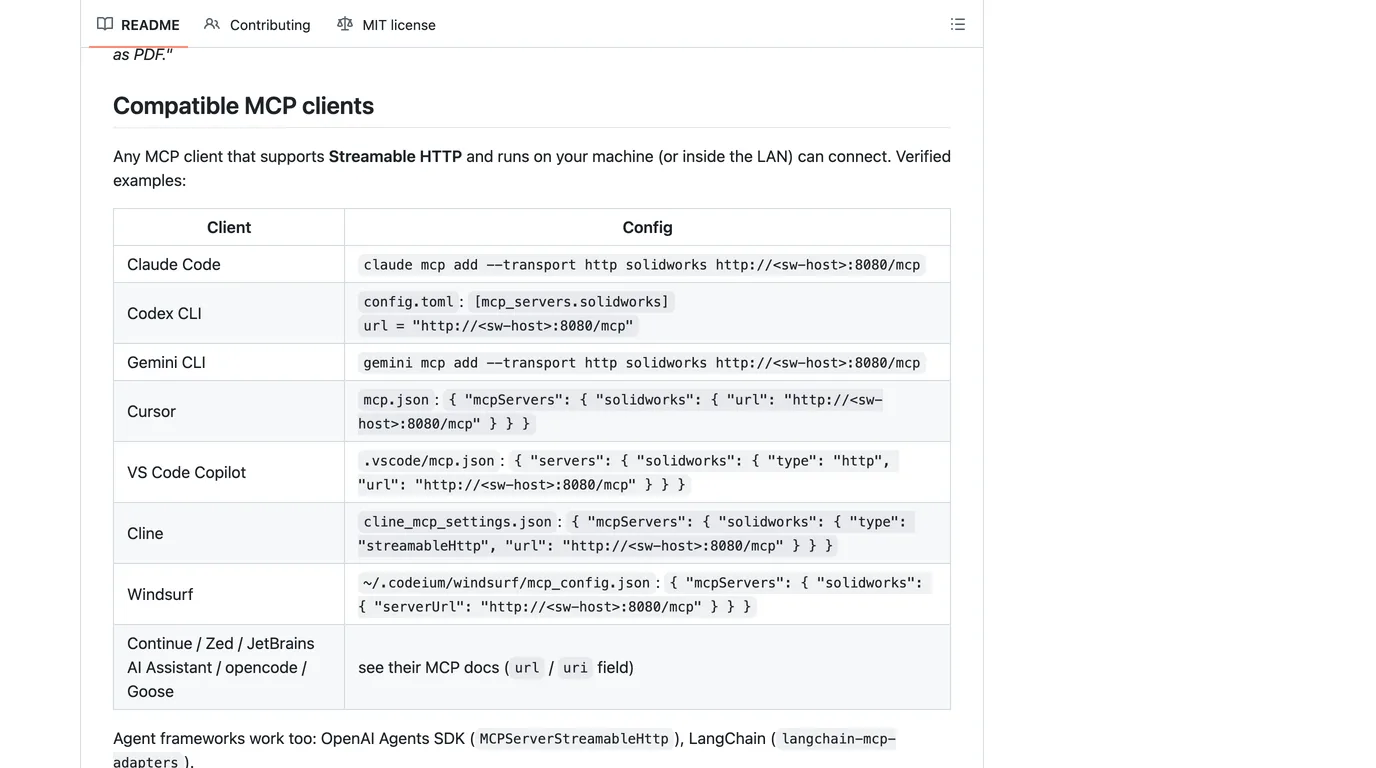
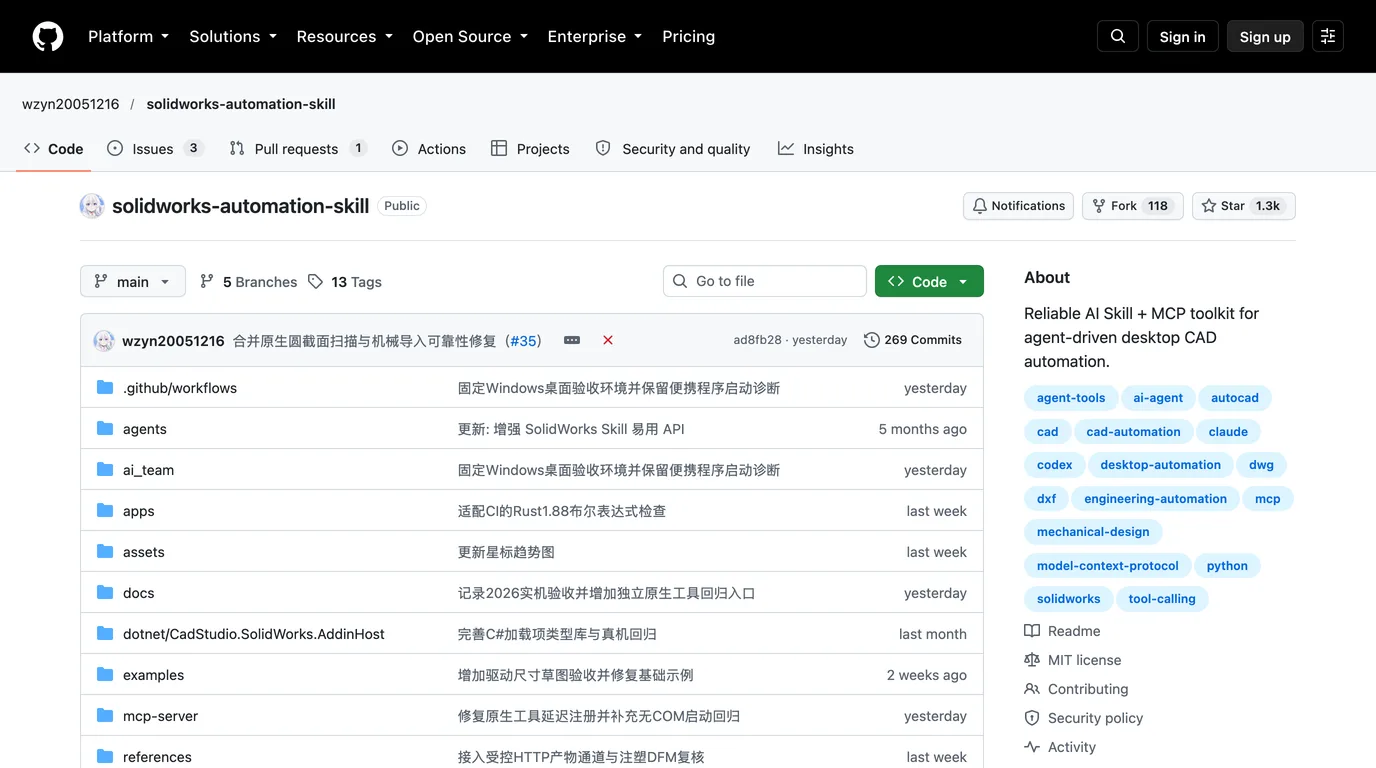
We left alisamsam's server and HarrierPigeon's off the recommendations for different reasons. We found code-execution and credential problems in alisamsam's when we reviewed it for Claude, and HarrierPigeon's 95 tools are the longest list of the five, which costs you on every turn, as the next section shows.
The cost nobody lists: the tool list
Every MCP tool reaches the model as a function declaration, and the whole list is sent again on every turn of the conversation. We sent each server's real tool list to gemini-4-argon with a one-word prompt and read the token count the API returned, minus the prompt alone. The good news: Argon accepted all five lists exactly as the servers produce them, with no schema cleaning. The less good news is the size.
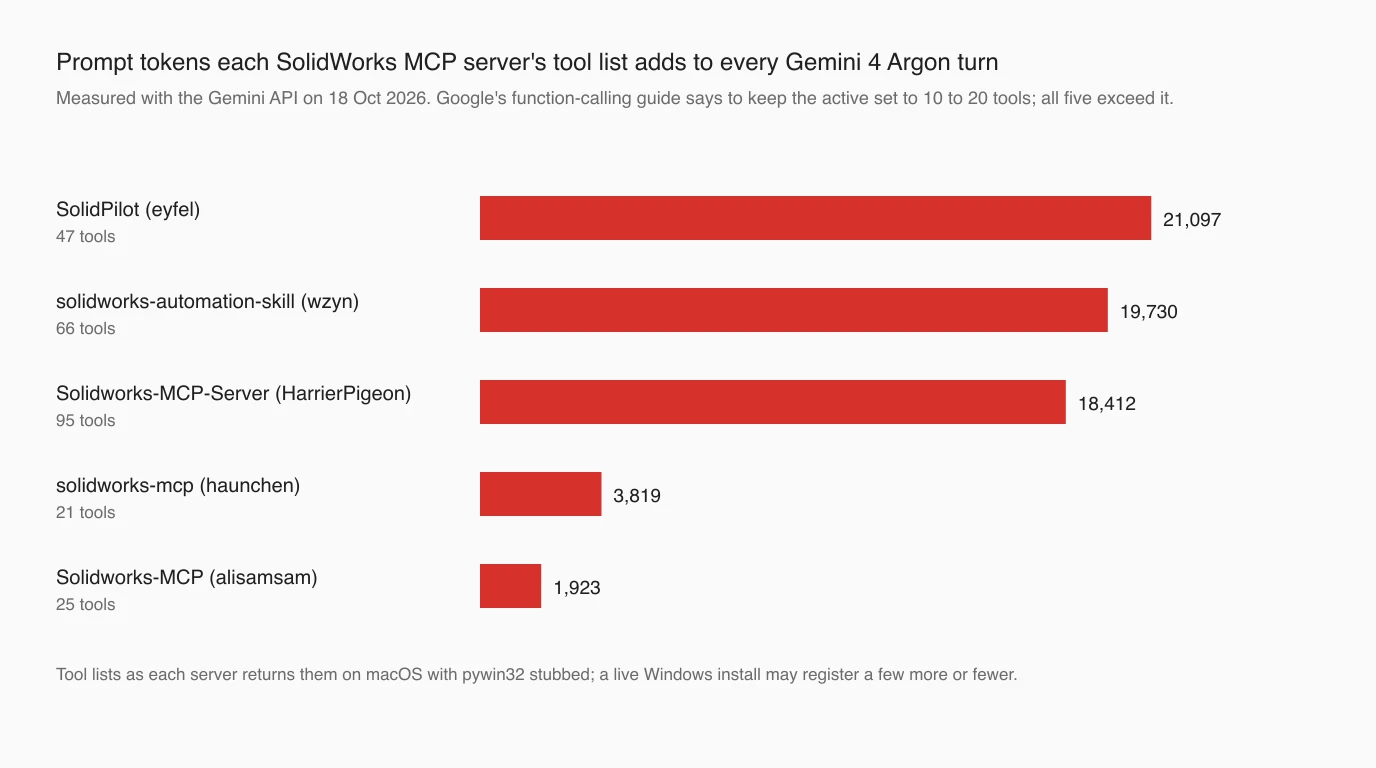
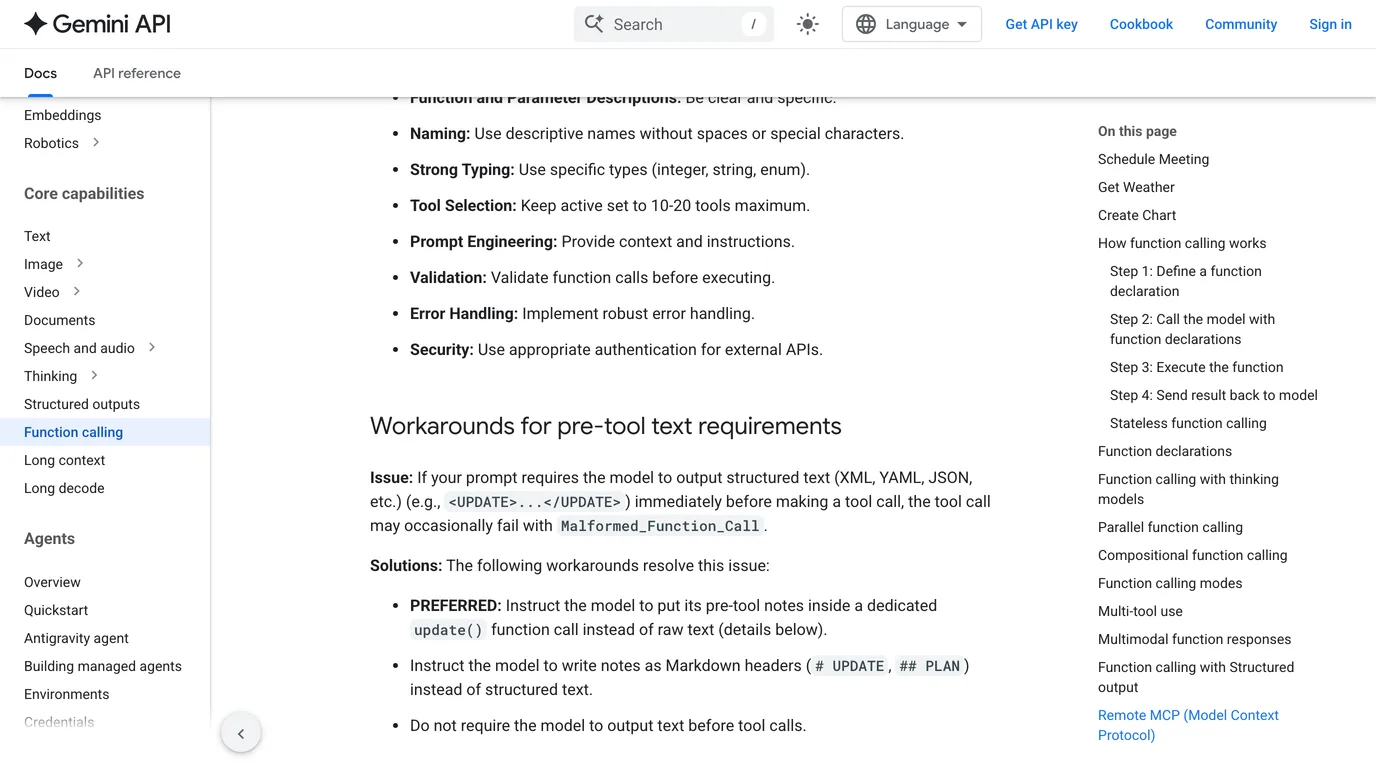
Google's own function-calling guide says to “keep active set to 10-20 tools maximum”. All five SolidWorks servers are over that. At Argon's current input price, 21,000 tokens a turn is about 4 cents a turn before you have asked anything, and that doubles in December.
Antigravity has the fix built in: disabledTools, a list of tool names to withhold from the model. We kept the 16 SolidPilot tools a part-modelling session needs (sketch, extrude, fillet, pattern, material, check, save, export) and measured again: 21,097 tokens fell to 7,129, two thirds less, with nothing lost for that job. The exact list is in the config below.
Wiring it up in Antigravity
Antigravity reads MCP servers from ~/.gemini/config/mcp_config.json, or from .agents/mcp_config.json in a project. The keys below are from its MCP documentation; the paths are yours. We did not run them inside Antigravity, so treat them as the documented format rather than tested files.
On the SolidWorks PC: SolidPilot over stdio
Antigravity's app and CLI both run on Windows 10 or later, so the simplest setup is everything on one PC. Build and start SolidPilot's execution service as its README describes, then add the adapter:
{
  "mcpServers": {
    "solidworks": {
      "command": "C:\\path\\to\\python.exe",
      "args": ["C:\\path\\to\\mcp-server-solidworks\\adapters\\claude\\server.py"],
      "disabledTools": [
        "activate_document", "add_drawing_dimension", "add_drawing_view",
        "add_flat_pattern_view", "add_hole_callout", "add_mate",
        "add_reference_geometry", "add_section_view", "analyze_assembly",
        "analyze_drawing", "analyze_slddrw_test", "auto_center_marks",
        "auto_dimension_drawing", "batch_export", "compare_assemblies",
        "compare_parts", "create_drawing", "create_rib", "edit_feature",
        "edit_sketch", "get_recipe", "get_selection", "insert_component",
        "modify_dimension", "open_document", "open_new_assembly",
        "rebuild_from_ir", "save_analysis", "save_body_as_part",
        "sheet_metal_feature", "submit_feature_graph"
      ]
    }
  }
}
The adapter folder is called claude, but nothing in it is Claude-specific; it is a standard MCP server. Drop disabledTools when you need drawings or assemblies.
From a Mac: a remote server over HTTP
If Antigravity runs on a Mac and SolidWorks on a Windows PC, the server has to listen on the network, and Antigravity connects with serverUrl. With solidworks-automation-skill started in its --transport streamable-http mode and a token set on the PC, the entry is:
{
  "mcpServers": {
    "solidworks": {
      "serverUrl": "http://192.168.1.20:8000/mcp",
      "headers": { "Authorization": "Bearer <the SW_MCP_TOKEN you set on the PC>" }
    }
  }
}serverUrl, and that “legacy fields like url or httpUrl aren't supported”. The Gemini CLI command in haunchen's README writes httpUrl into Gemini CLI's own settings, so it will not carry over. Google also says Gemini CLI itself has not been optimized for Argon and points to Antigravity.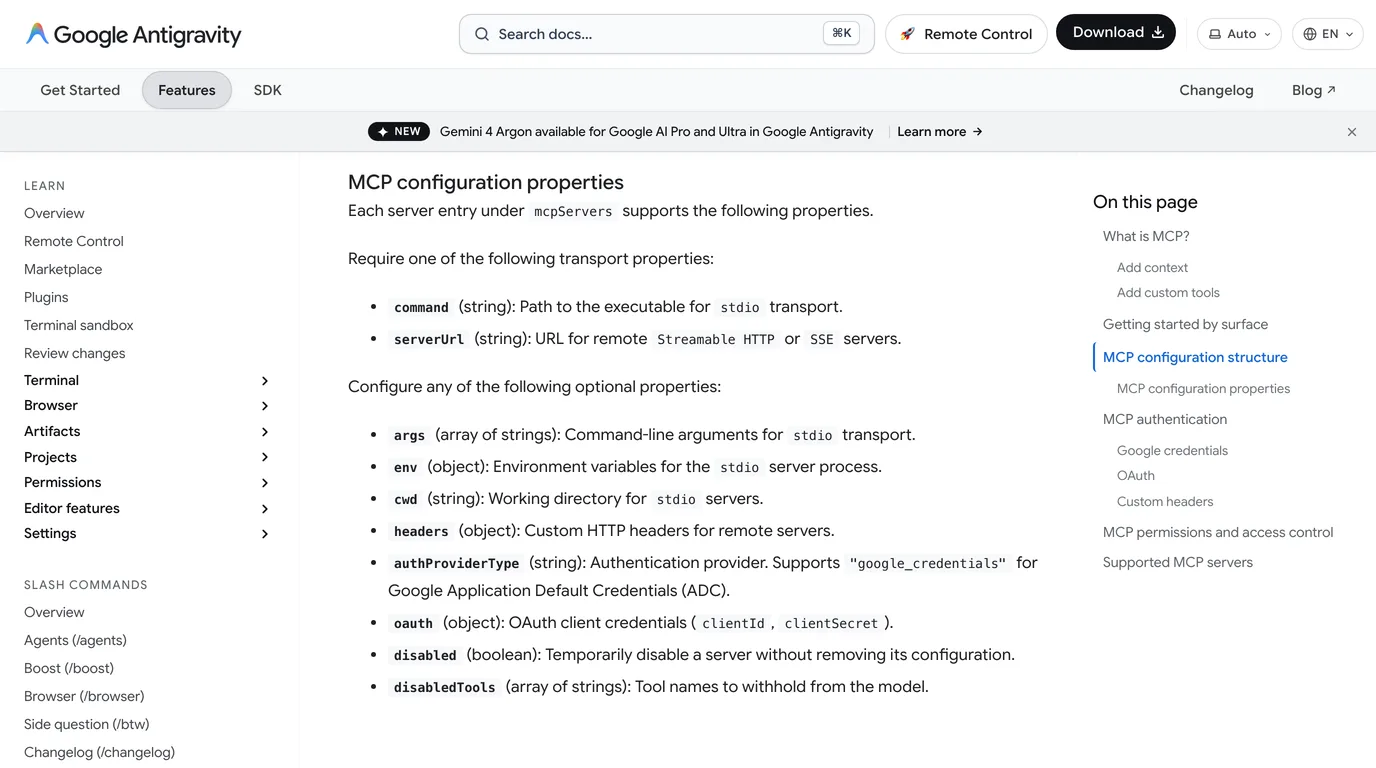
Leave Antigravity's default approval on. Unconfigured MCP tools run in Ask mode, so you confirm each call before it reaches SolidWorks. In our AutoCAD test, Argon once reached for an unrequested script through a tool marked read-only, and the approval prompt is what catches that.
How we tested it without SolidWorks
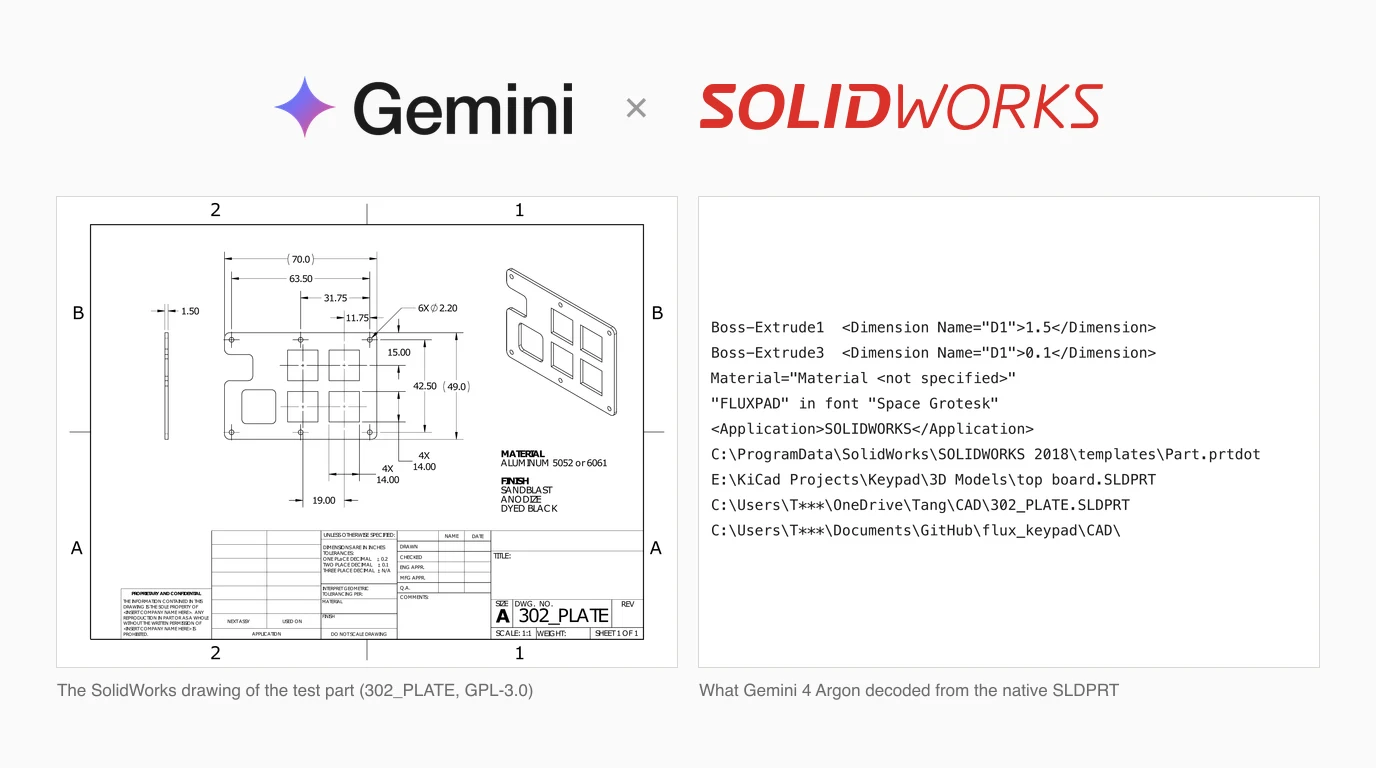
Without SolidWorks we could not watch Argon click through a real session, and we are not going to pretend we did. We tested the three things that do not need it, with the same part throughout: the switch plate from the open source fluxpad keypad (GPL-3.0), which its designer published as a native SLDPRT, a STEP, a DXF and a PDF drawing. It is a 70 × 49 × 1.5 mm plate with six Ø2.2 mm holes, four 14 mm square cut-outs on a 19 mm pitch, a 15.6 mm rounded cut-out and a notch, and we measured all of that ourselves before any model saw it. It is the same part as in our Claude tests, so the results compare directly.
- Reading files. Each file renamed to
part, given to a fresh Argon with five questions and a Python tool: standard library only, no internet, no installs, run in a macOS sandbox with networking denied. Three runs per format, five for the SLDPRT. - The tool lists. The five servers started on macOS with Windows' COM libraries stubbed out, just far enough to list their tools, and the lists sent to the Gemini API as they are.
- Building a part. SolidPilot's real adapter started, its real tools declared to Argon with the drawing attached, and every call that would reach SolidWorks answered with a stub success. Argon was told it was a dry run. We scored the values it sent, not a model it built, because there was none. Three runs.
Test 1: reading SolidWorks files
What Gemini 4 Argon reported from each file, against the geometry we measured. SLDPRT figures are from the two runs that finished.
Read across the rows and the headline is simple: on geometry, Argon did not miss. Every format gave it every number it could give, and on the DXF it correctly refused to invent a thickness or a material. The mistakes are elsewhere, and they are worth more of your attention than the successes.
The SLDPRT: right answers, wrong story
A native SLDPRT is a compressed binary container, and Argon had nothing but Python's standard library. In both runs that finished, it worked out the container, inflated the streams and read the feature tree, which SolidWorks stores as plain XML inside: Boss-Extrude1 with D1 = 1.5, and Material <not specified>. It also found a Boss-Extrude3 of 0.1 mm and the word FLUXPAD in the Space Grotesk font, raised lettering that is in the feature tree but not in the exported STEP, which is solid at 1.5 mm. Our Claude write-up did not mention it.
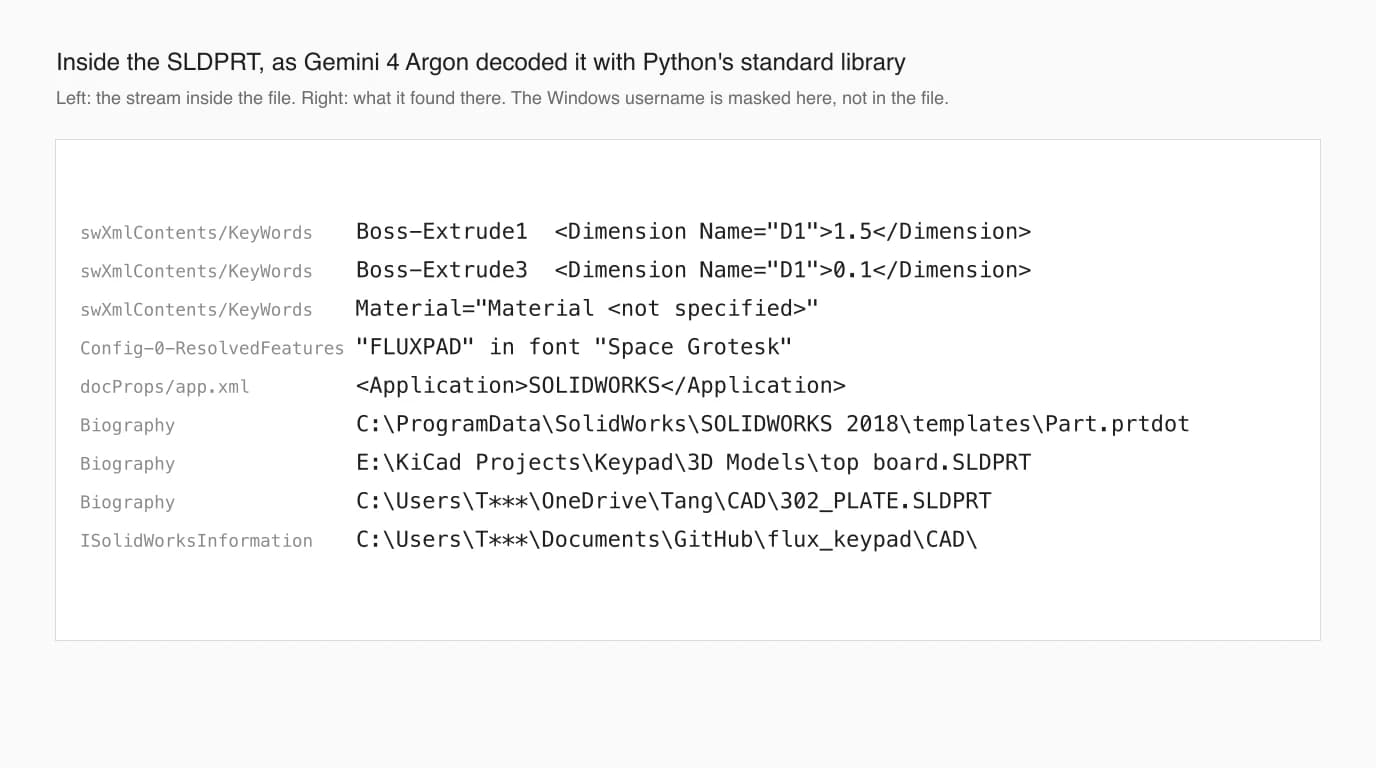
Then it told a story the evidence does not support. Both reports said the file was corrupted; one said it had been “systematically modified/corrupted at the binary level”, because standard ZIP tools could not open it. The second also called it a SOLIDWORKS 2023 file, when the template path inside and the STEP header both say 2018. That is simply how SolidWorks stores its files; the designer saved it, and it opens in SolidWorks. Had we been less sure of the file's origin, that confident paragraph would have sent us looking for tampering that never happened.
STEP and DXF: exact geometry, too many alarms
STEP is text, and all three runs parsed it as text and got every feature, its exact coordinates and the SolidWorks 2018 stamp in the header. The DXF runs got the same 2D answer. What they added was noise. Asked for anything suspicious, the STEP runs listed harmless details, such as 20 reference points that sit 87 mm above the plate, which change nothing about the solid. The DXF runs listed table counts and floating point dust as errors.
One DXF run went further and stated, under a bold heading, that the file was generated by Autodesk Fusion 360, citing Autodesk's San Francisco coordinates in the header and Fusion's “characteristic” export habits. Those coordinates are AutoCAD's default location, and other DXF writers copy it: the open source ezdxf library writes the same pair. Nothing in the file names Fusion, and the DXF sits in the designer's SolidWorks project folder with the same date as the STEP and the PDF. The other two runs correctly said the program was not named. One run in three inventing a provenance, with evidence attached, is the number to remember.
The PDF drawing: the best checker
The drawing is the only file with a trap. Its title block, left as the template had it, says “DIMENSIONS ARE IN INCHES”. All three runs caught it and proved it two ways: a 70 by 49 inch plate cannot fit on an A-size sheet at the stated 1:1 scale, and the vector paths in the PDF measure 70.00 mm across. All three also listed every feature the drawing never dimensions, and measured those from the vectors instead, exactly. And unlike our Claude run, none raised a false alarm about the chain of dimensions across the top. Remember the PDF result for the next test: all three runs read the 15.00 dimension from the top edge of the plate, which is where the drawing measures it from.
Test 2: building a part through SolidPilot
For the build test we attached the drawing as an image, the way most people would paste it, and gave Argon SolidPilot's real tool list. All three runs went straight to work: start the session, new part, sketch on the front plane, extrude 1.5 mm, cut the holes and cut-outs, set the material.
- Units: right, 3 of 3. SolidPilot takes every length in meters, which its tool descriptions say. Argon sent
0.07for 70 mm and0.0015for the thickness in every call, in every run. This is the trap we expected it to fall into, and it did not. - Outline and holes: exact, 3 of 3. 70 × 49 mm and six Ø2.2 mm holes 3.25 mm in from each edge, to the hundredth.
- Square cut-outs: wrong, 3 of 3. Horizontally exact, but 3.25 mm low in run 1, 1 mm low in run 2, and 3.25 and 1.25 mm low by row in run 3.
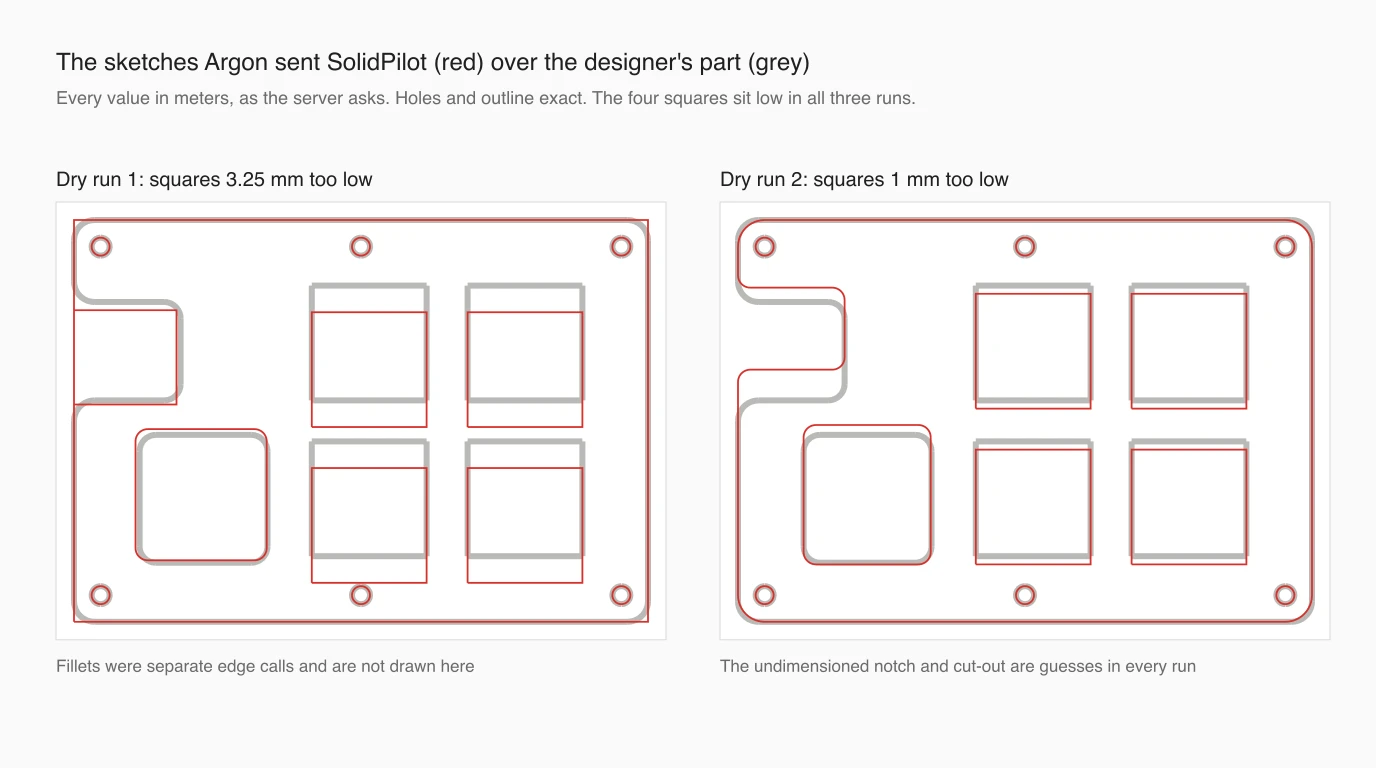
This is the same mistake we measured in all six AutoCAD runs from the same drawing, now nine out of nine. The drawing locates the squares with one dimension measured from a hole and another measured from the plate edge, and from a picture Argon keeps taking one of them from the wrong line. From the vector PDF, with a code tool to measure it, the same model read that datum correctly three times out of three. Two things changed at once there, the format and the tool, so we cannot say which one fixed it. The practical advice is the same either way: give Argon the PDF or the DXF, not a screenshot, and check every located feature before anything is cut.
Two smaller things. The rounded cut-out and the notch are not dimensioned on the drawing, so every run estimated them, within about a millimetre, and said so only in its final summary. And all three picked 6061 from the drawing's “5052 or 6061”, a reasonable choice that was still a choice made for you.
What the runs cost, and what went wrong
An agent pays for its whole conversation again on every turn, so a run that makes many tool calls gets expensive quickly. These are list prices from the token counts the API returned, before any cache discount:
Cost per run at $2 / $10 per million tokens, from the API's own token counts
Three of the five SLDPRT runs never answered, and we count them rather than hide them. One was still decoding when it reached our limit of 40 turns, after $4.79 of tokens. One stopped after 29 calls when the API returned 503 with “This model is currently experiencing high demand”, five days after developer access opened. We gave the next run a limit of 100 turns, and after 66 calls and 23 minutes it was still re-decoding the same streams, so we stopped it. If you want answers from SolidWorks files, give Argon a STEP or a PDF: they finished every time, in about a third of the time, for about a tenth of the price.
Where this fits
Put together, the tests say Argon is a careful reader of exported SolidWorks files, an unreliable one of native SLDPRTs, and a fair operator of a SolidWorks server, with two habits to manage: it reports guesses and inventions in the same confident voice as facts, and it misreads located features from a picture. Use it to check exports, find what a drawing leaves undimensioned, and drive repetitive modelling with approvals on. Do not use it as the last check before a part is cut.
None of it helps when what you have is a physical part and no CAD at all. That is what TechDraw AI does: photograph the part, add one measurement, and get a dimensioned drawing as DXF or DWG to bring into SolidWorks. Our SolidWorks workflow guide shows the route from the drawing to a sketch.
TechDraw AI has its own MCP server, so the same Antigravity session can turn a photo into a drawing before it ever reaches SolidWorks.
See TechDraw AI's MCP serverIf you use Claude or ChatGPT instead, the servers are the same and the setup is in how to connect Claude to SolidWorks and how to connect ChatGPT to SolidWorks. For what Gemini does with drawings without any server, see can Gemini make technical drawings.
FAQ
Frequently asked questions
Can Gemini 4 Argon control SolidWorks?
Only through a community MCP server. Dassault ships no MCP server and Google ships no SolidWorks connector, but Argon supports function calling, which is how MCP tools reach it. We sent the real tool lists of five SolidWorks MCP servers to the Gemini API and Argon accepted all five without any change. Every one of those servers needs SolidWorks running on Windows.
Can Gemini read SLDPRT files?
Sometimes. Given a Python tool with only the standard library, Gemini 4 Argon decoded the native SLDPRT of our test plate in two of five runs, and both got its size, thickness, holes, cut-outs and missing material right, in 38 tool calls and about 11 minutes. Both also wrongly called the file corrupted. The other three runs never answered: one hit our turn limit, one an API capacity error, and one was still decoding after 23 minutes. STEP and PDF exports finished every time, faster and cheaper.
Can I use Gemini 4 Argon with SolidWorks for free?
No. Gemini 4 Argon is not on the free tier of the Gemini API, and Antigravity lists it for Google AI Pro (paid), Ultra and Enterprise. At list price our file reads cost between 41 cents and 5.84 dollars each, because an agent re-sends its whole conversation on every turn. The SolidWorks MCP servers themselves are free and open source.
Which SolidWorks MCP server works best with Gemini?
None is built for Gemini, and only haunchen/solidworks-mcp names a Gemini client in its README. For building parts, SolidPilot is the most developed, but its 47 tools add about 21,000 prompt tokens to every turn; withholding the drawing and assembly tools in Antigravity cut that to about 7,100 in our measurement. For working from a Mac against a Windows PC, solidworks-automation-skill is the one with token authentication on its HTTP mode.
Can Gemini 4 Argon build a SolidWorks part from a drawing?
Partly. In three dry runs through SolidPilot's real tools, it sent every value in meters as the server requires, and the outline and all six holes were exact. But it placed the four square cut-outs 1 to 3.25 mm low in all three runs, the same misreading of a dimension datum we saw in six AutoCAD runs from the same drawing. When it read the vector PDF with a code tool instead, it got that datum right three times out of three.
Is it safe to upload SolidWorks files to Gemini?
Check what is in them first. The SLDPRT we tested carried the designer's Windows username, three folder paths including a cloud sync folder and another project's drive, and the name of a feature that never reached the exported part. Argon found and reported all of it. Any file you give any AI, or any supplier, carries that with it.
Sources
- Google: Gemini 4 Argon is now available for developers (13 Oct 2026)
- Gemini API: Gemini 4 Argon model page
- Gemini API: pricing
- Gemini API: function calling, best practices
- Google Antigravity: Model Context Protocol (MCP)
- Google Antigravity: choose a model
- Dassault Systèmes: AI-powered virtual companions (11 Feb 2026)
- DEVELOP3D: New Solidworks AI agents added at 3DExperience World (Feb 2026)
- eyfel/mcp-server-solidworks (SolidPilot)
- wzyn20051216/solidworks-automation-skill
- HarrierPigeon/Solidworks-MCP-Server
- haunchen/solidworks-mcp
- alisamsam/Solidworks-MCP
- sssata/fluxpad: the open source keypad whose plate we tested (GPL-3.0)