
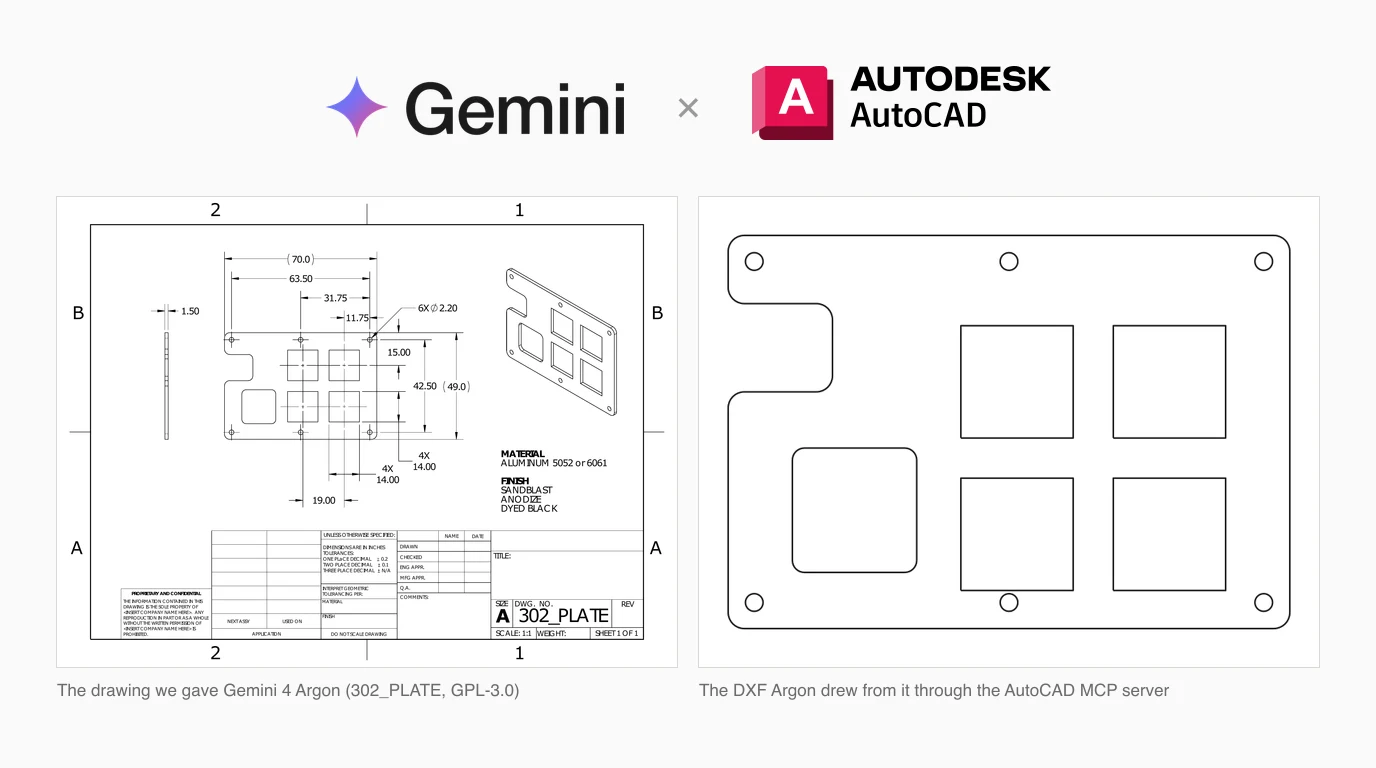
Google opened Gemini 4 Argon to developers on 13 October. If you want it working in AutoCAD, you do not have to take a demo's word for it: we connected Argon to the most popular AutoCAD MCP server and ran it 12 times, from a plain description, from a real manufacturing drawing, and with a request to check its own work. Then we measured every file it saved against the real part. It was exact on most of what it drew, and wrong in the same place in six runs out of six.
Our articles are still written by humans!
Get human written articles in your Google feed.

What Argon is, and who can use it
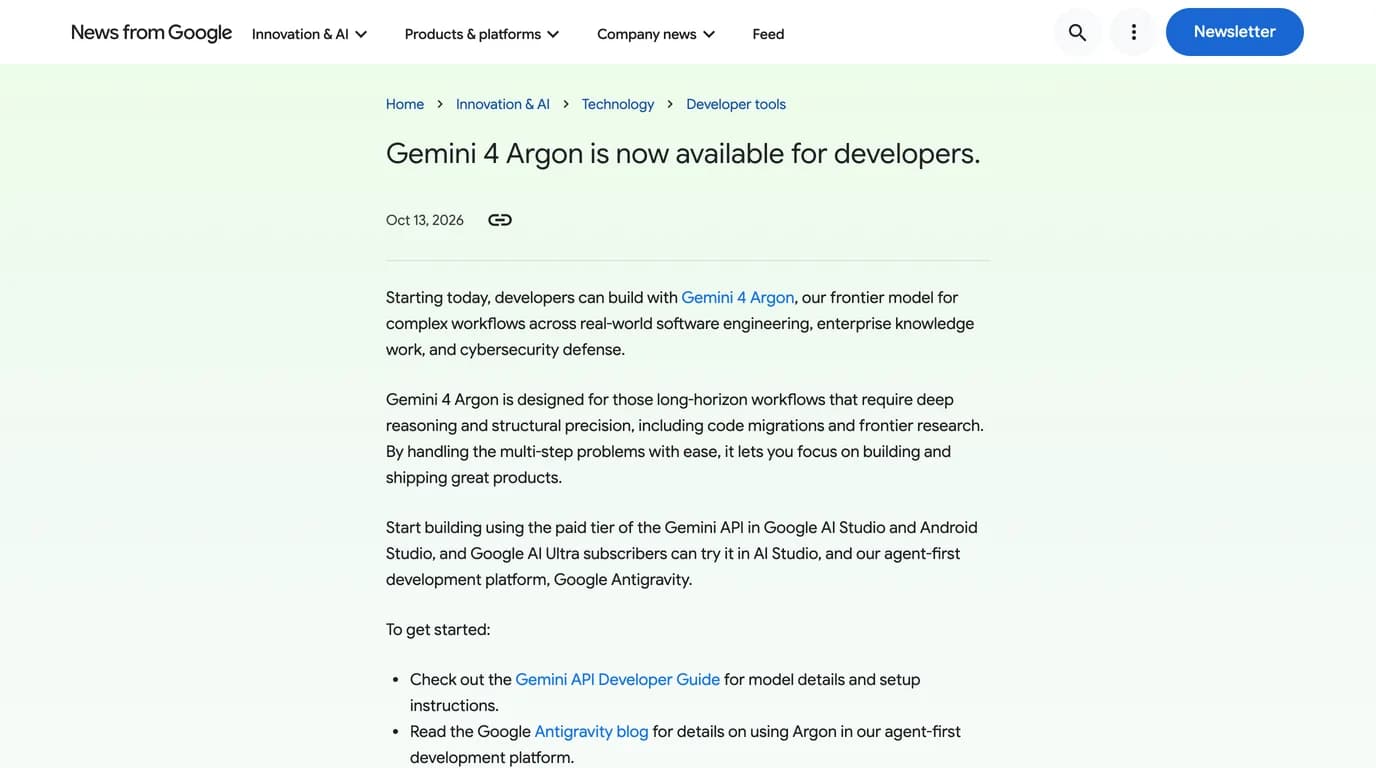
Google announced Gemini 4 Argon on 30 September, at first only for a group of “trusted cyber defenders”, and opened it to developers on 13 October. Its developer post calls it “our frontier model for complex workflows across real-world software engineering, enterprise knowledge work, and cybersecurity defense”, available through the paid tier of the Gemini API and, for Google AI Ultra subscribers, in AI Studio and Antigravity. Nothing in it mentions CAD, and nothing we found from Autodesk mentions Argon.
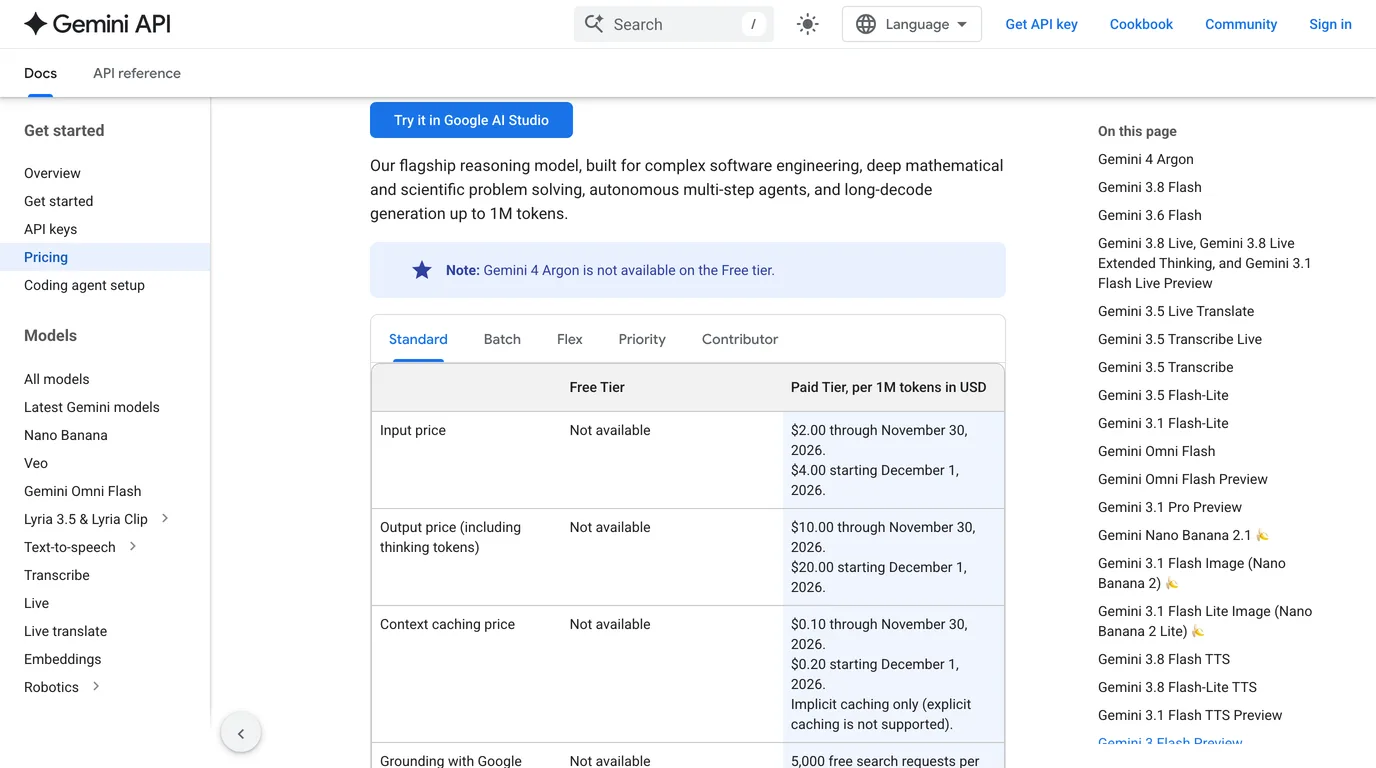
The figures that matter for CAD work are on Google's model page and pricing page. The price is introductory, and it doubles on 1 December.
Gemini 4 Argon, from Google's model and pricing pages, 18 October 2026
Google's own launch clip below is a good picture of how Google expects you to use Argon: inside Antigravity, building things from a prompt. It is not a CAD demo.
Which Gemini can reach AutoCAD
An AutoCAD server runs as a program on your own computer, so the Gemini you use has to be able to start one. The Gemini app in a browser cannot. That leaves three routes, and the obvious one is the wrong one.
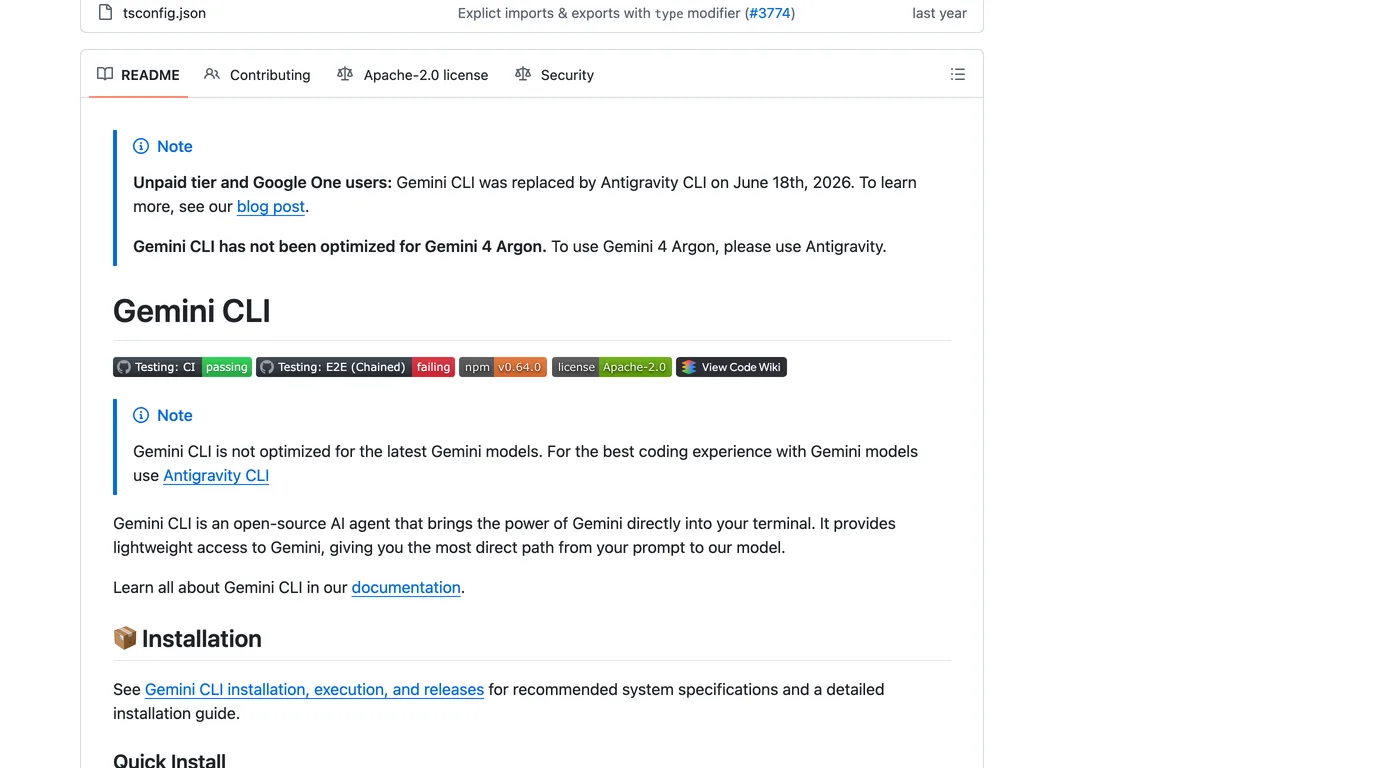
- Gemini CLI is what our earlier Gemini guides used. Its README now opens with two notes: unpaid and Google One users were moved to Antigravity CLI on 18 June 2026, and “Gemini CLI has not been optimized for Gemini 4 Argon. To use Gemini 4 Argon, please use Antigravity.”
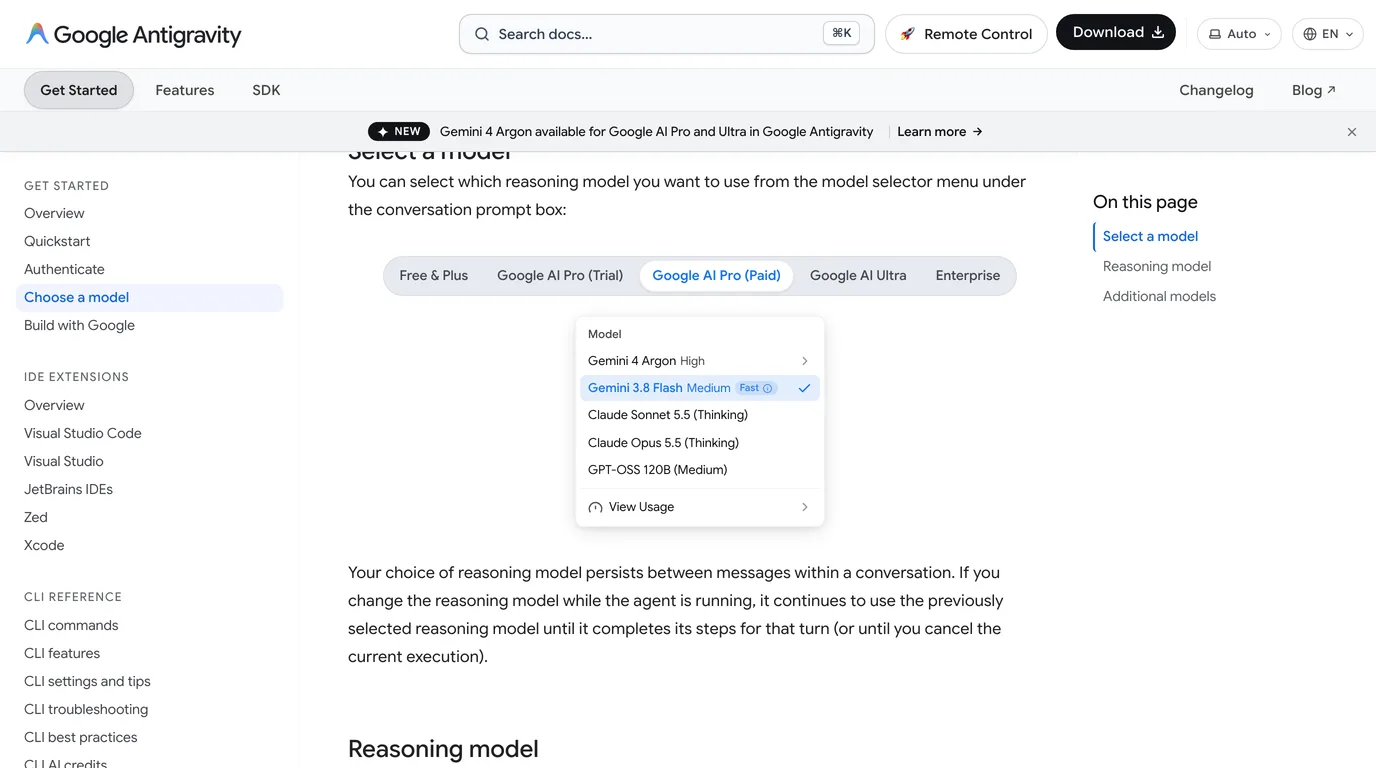
- Antigravity, Google's agent app, is the route Google intends. Its model page lists Argon for Google AI Pro (paid subscriptions, not trials), Ultra and Enterprise, in the Antigravity App, Antigravity CLI and IDE extensions, and not in the Antigravity IDE.
- The Gemini API with any MCP client that can call it. That is what we used for the tests below, because it logs every call and every token.
The server to use
puran-water/autocad-mcp is the one we have used for every model in this series, so the results compare. It has 573 stars, an MIT licence and eight tools: drawing, entity, layer, block, annotation, P&ID, view and system. Its last release, v3.1, is from 20 February 2026. What makes it useful is that it has two backends behind the same tools.
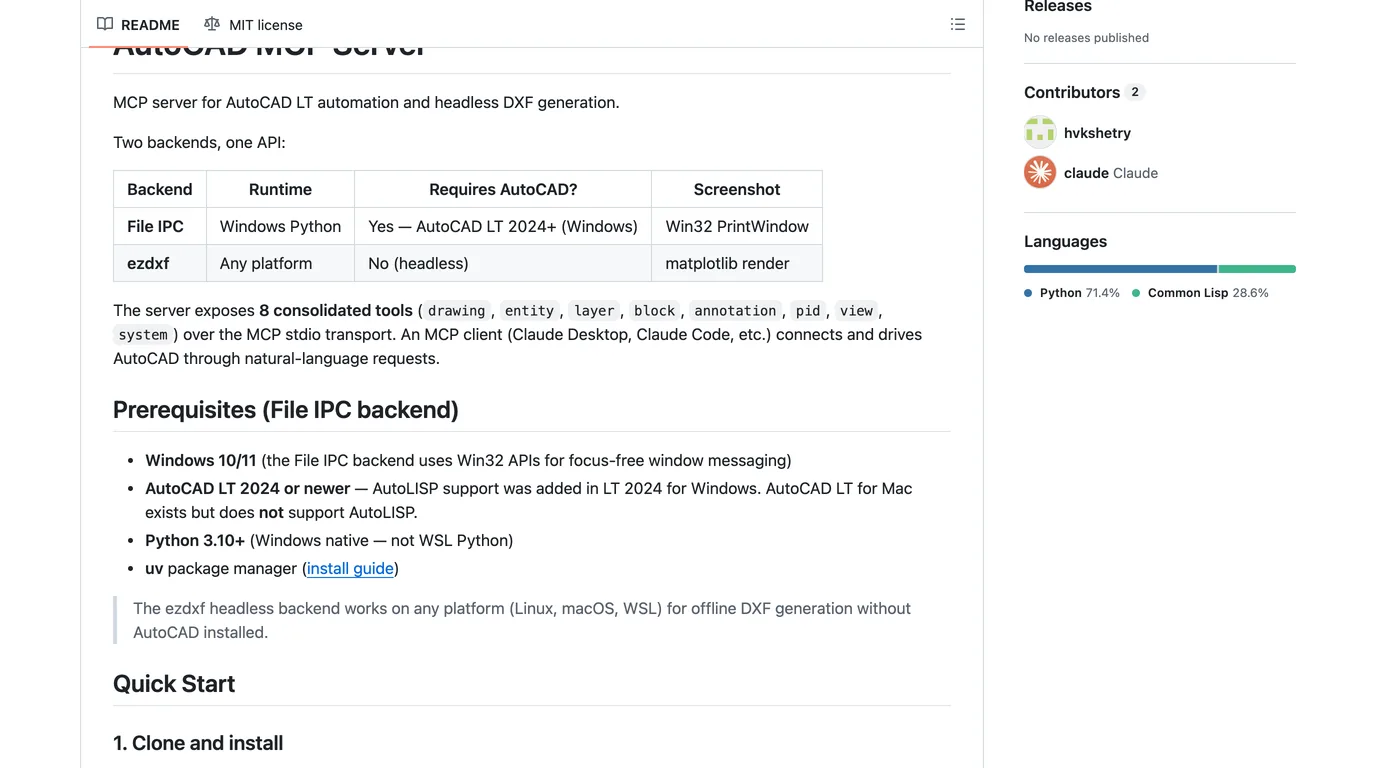
- File IPC drives a running AutoCAD LT 2024 or newer on Windows through AutoLISP. This is the one that edits your real drawing.
- ezdxf writes DXF files on Windows, macOS or Linux with no AutoCAD at all. It is the only way to do this on a Mac, since AutoCAD LT for Mac has no AutoLISP, and it is what we tested.
Wiring it up in Antigravity
- Clone the server and run
uv syncin it. On Windows with AutoCAD, also loadlisp-code/mcp_dispatch.lspwith APPLOAD, as its README describes. - Open Antigravity's MCP config. In the app it is under Settings, Customizations, Installed MCP Servers; in the CLI, type
/mcp. The global file is~/.gemini/config/mcp_config.json, and a project can have its own in.agents/mcp_config.json. - Add the server, then pick Gemini 4 Argon in the model menu.
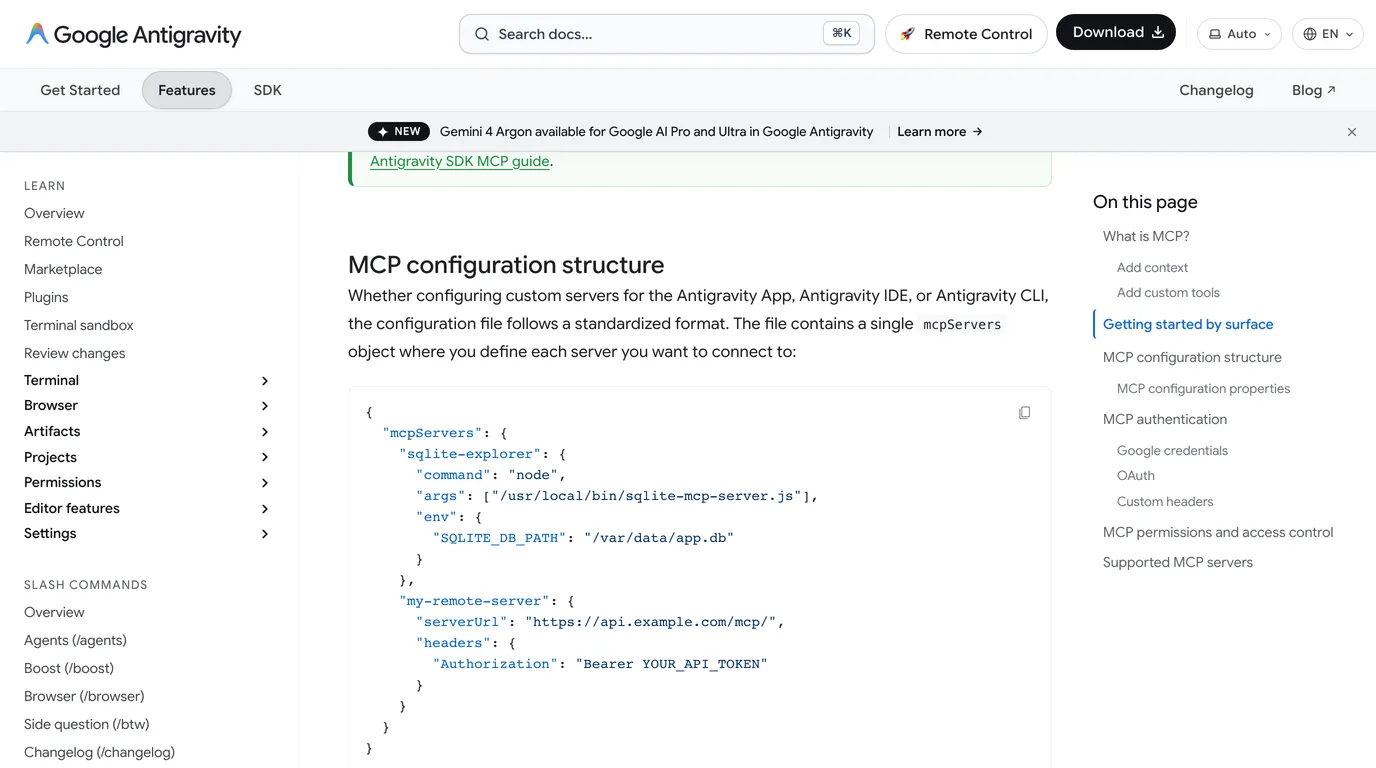
This is the entry we would use. The keys are from Antigravity's MCP documentation; the path is yours. We did not run it inside Antigravity, so treat it as the documented format rather than a tested file.
{
  "mcpServers": {
    "autocad": {
      "command": "/path/to/autocad-mcp/.venv/bin/python",
      "args": ["-m", "autocad_mcp"],
      "env": { "AUTOCAD_MCP_BACKEND": "ezdxf" }
    }
  }
}
Use "auto" instead of "ezdxf" on Windows with AutoCAD running. If you do not need the server's status and scripting tool, add "disabledTools": ["system"] to the entry. Test 3 shows why that is worth considering.
How we tested it
We installed the server on a MacBook with the ezdxf backend and wrote a short MCP client, about 100 lines of Python, that hands the server's eight tools to gemini-4-argon through the Gemini API and passes every call through. It also passes the server's rendered pictures back to the model, which matters for Test 2. Every call, result and token count went to a log, and every saved DXF was read back with ezdxf and compared with the real part.
Twelve runs in all, each a fresh conversation with no examples: three from a description, six from a drawing, three with a request to check units. The costs below are Google's introductory list prices applied to the tokens the API reported, before any caching discount.
Test 1: a part from a description
The first part is the one every model in this series has drawn: an 80 × 60 mm L-bracket with a 40 mm step and two Ø8 mm holes at (20, 15) and (60, 15), described in a short paragraph of plain English.
Three runs from a description
All three did the same thing: create a drawing, one closed polyline with exactly the six corners, two circles of radius 4 at the right centres, save. ezdxf's audit found nothing wrong with any of them. For a part you can describe in numbers, this is as good as it gets.
Then we opened the file in our DXF viewer, and it read 80000 × 60000 mm. All three summaries described the bracket in millimetres, and none of the runs checked the file's units. The geometry is in millimetres, but the file says metres.
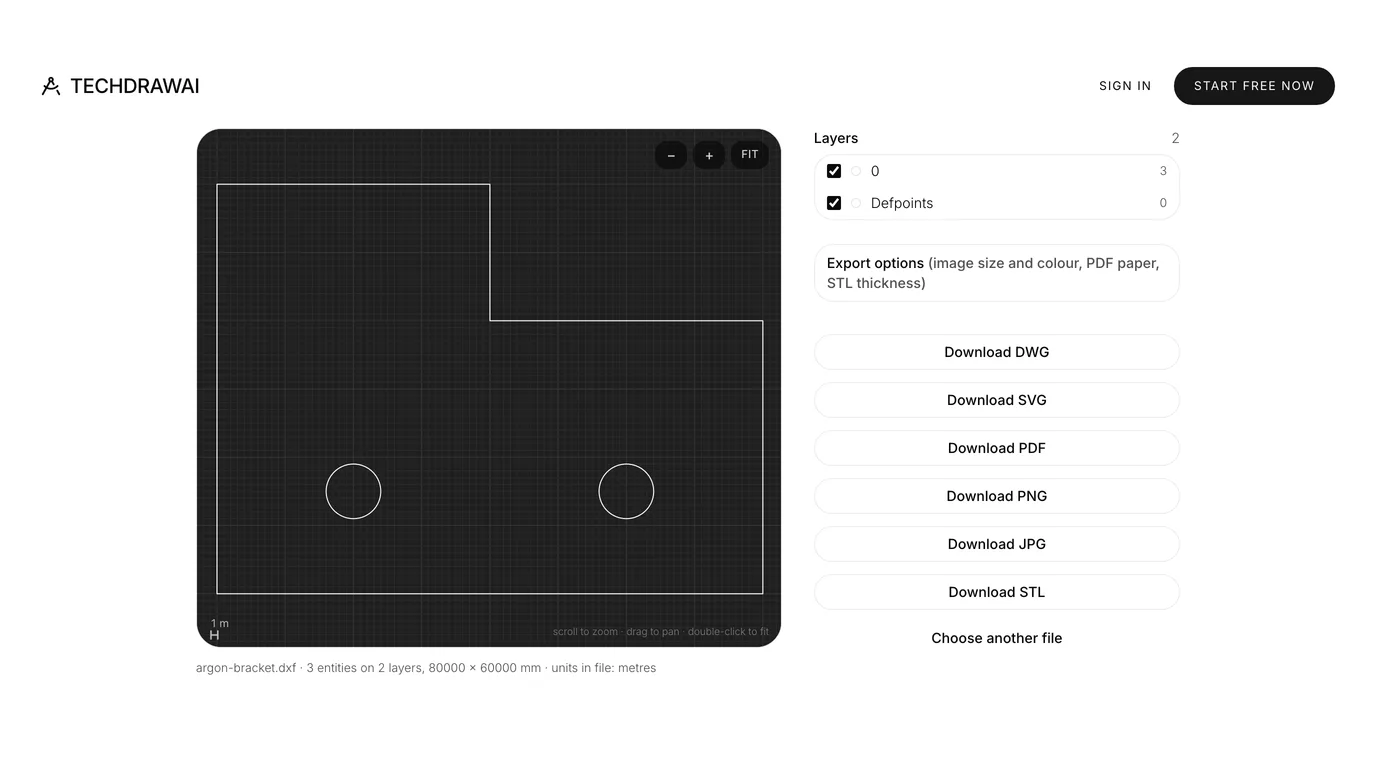
That is the server, not the model: its headless backend creates every drawing with ezdxf's default, $INSUNITS 6, which is metres. We first hit it in the GPT-6 Sol test and it is still there in the current version. Anything that honours the label, from a block insert in AutoCAD to most laser and CNC software, scales the part by a thousand. Test 3 is about whether Argon can catch it.
Test 2: a part from a drawing
Drawing from a description is typing with extra steps. The harder job is reading a real drawing. We used the same one as in our FreeCAD test: the 302_PLATE from the open source fluxpad keyboard, a 70 × 49 mm aluminium plate published under GPL-3.0 with the designer's STEP model, so there is a true answer to measure against. It is a good test because it is real and imperfect: the title block says inches, wrongly, and the slot, the rounded cut-out and the corner radii have no dimensions at all.
The attached image is a manufacturing drawing of a flat plate. Using the
AutoCAD tools, draw the plate's main view (the large view with the
dimensions) at 1:1 in millimetres, with the outer outline, every hole and
every cut-out. Put the bottom-left corner of the plate at 0,0. Save it as
a DXF to <path>.

Afterwards, tell me what you drew and anything on the drawing you had to
guess.
We ran that six times. In the first three the server's rendered picture did not reach the model; that was our client's fault, so we fixed it and ran three more in which Argon could see its own drawing before saving. Both sets are below, because the result did not change.
Six runs from the 302_PLATE drawing, against the designer's STEP
Most of that is very good. Every hole landed on the designer's position to the hundredth of a millimetre, in every run, and the outline was exact. Where the drawing gives no number, Argon measured the picture and said so, which is the right behaviour even when the guesses were a millimetre or two off.
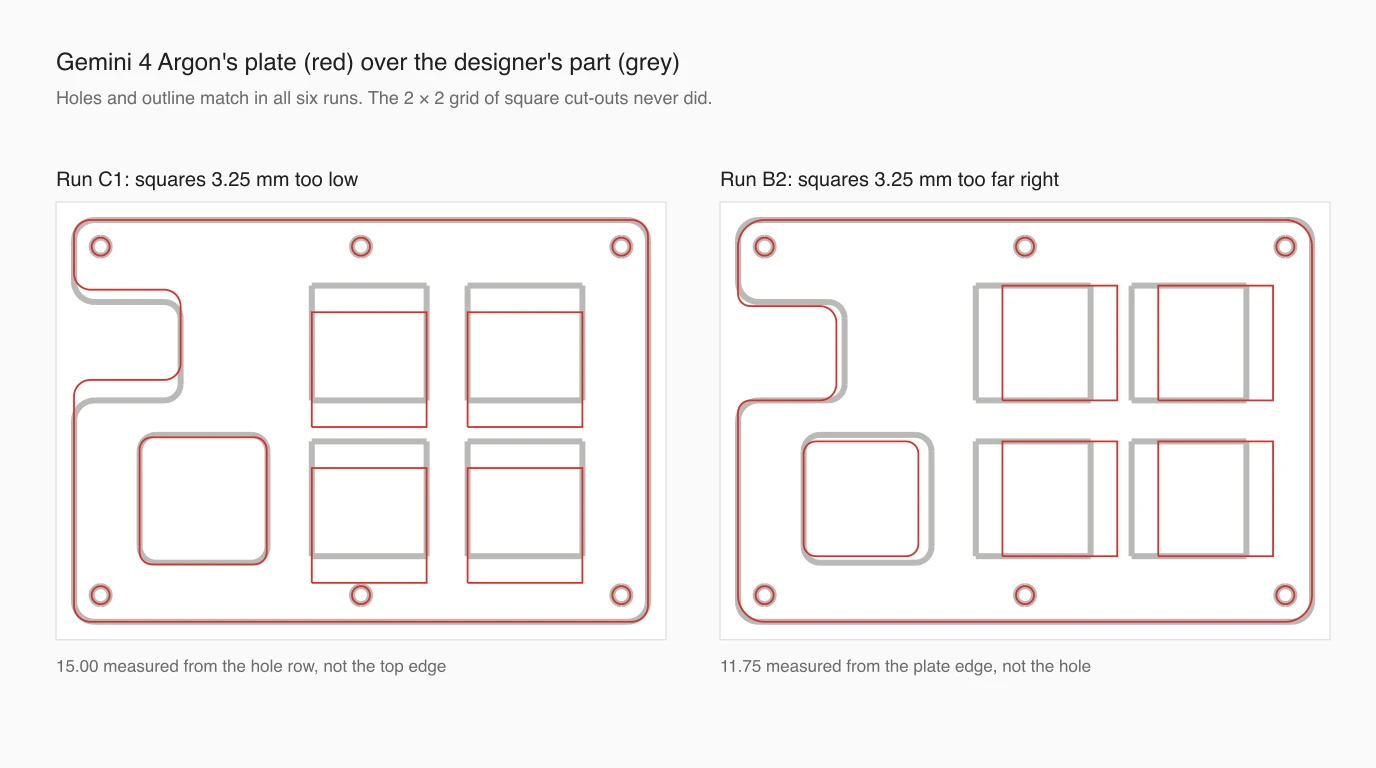
The squares are the problem, and they are the features a shop would cut. Their size was right every time, but in all six runs the grid sat 3.25 mm from where it belongs (in one run only the top row did, and the bottom row was 1.25 mm out). 3.25 mm is precisely the distance from the plate's edge to the hole centres. Argon took a dimension from the wrong line. Two dimensions place the squares, and each run misread one of them.
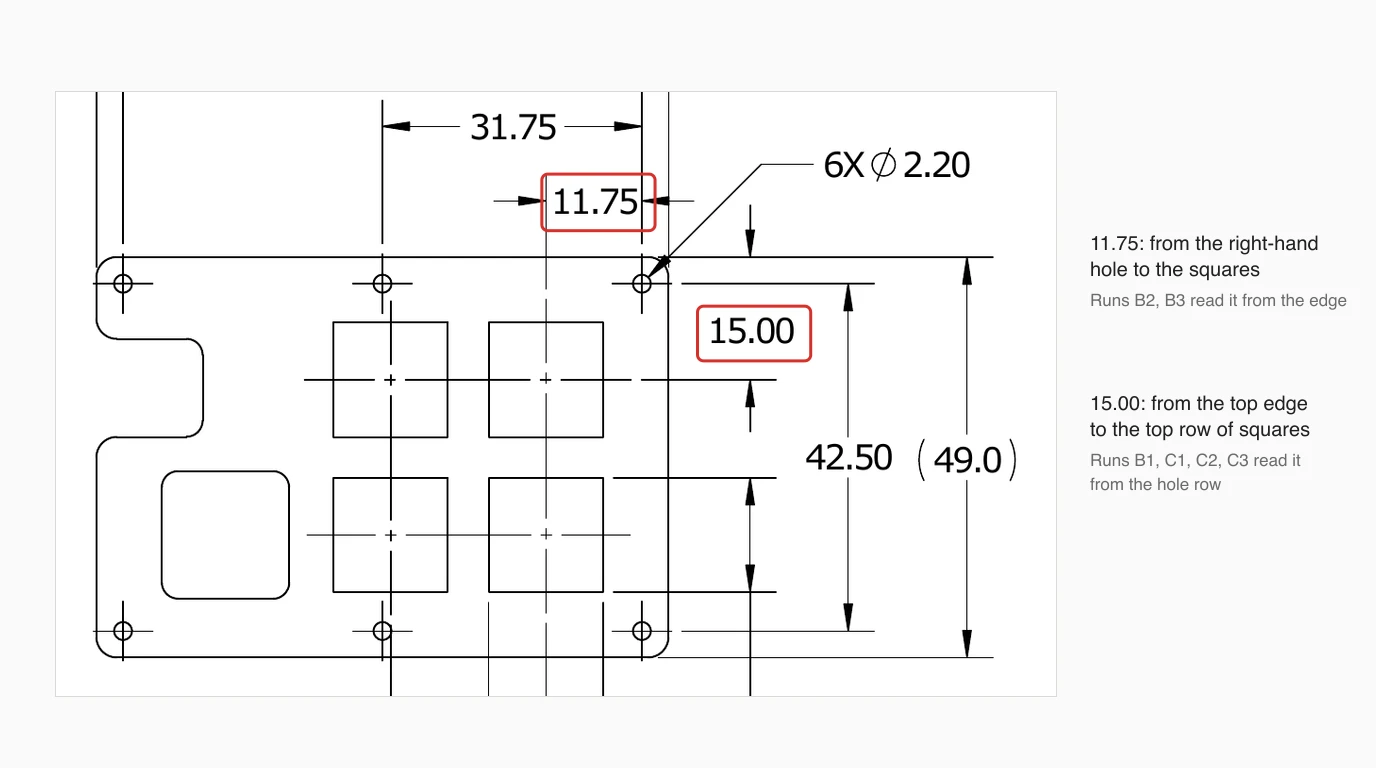
- 11.75 runs from the right-hand hole to the centre of the squares. Two runs measured it from the plate edge and pushed the grid 3.25 mm right.
- 15.00 runs from the top edge to the top row of squares. Four runs measured it from the hole row and dropped the grid 3.25 mm.
Two things make this worse than a plain mistake. First, no run listed the misread dimension among the things it had guessed, and three filed the squares under “explicitly dimensioned features”. The summary you would read to decide whether to check the file said there was nothing to check there. Second, seeing its own render did not help, and could not have: the picture showed exactly what Argon meant to draw. A self-check only catches errors in carrying out a plan, not errors in reading the drawing.
For scale: in our FreeCAD test, Claude Opus 5.5 read the same drawing and placed the same squares exactly. That was one run, in FreeCAD through a different server, against six here, so it is not a benchmark. It does show the drawing can be read correctly, which a human checker would do in seconds.
Test 3: asking it to check the units
The bracket prompt again, with one sentence added: “Before you finish, check that the saved file is in millimetres.” Three runs.
All three found it. Each read the header with the server's get_variables, reported $INSUNITS 6 as metres, and said plainly that the geometry was in millimetres but the label was not and that it could not change it, because the server has no tool to set header variables. That is an honest answer, and it is the best you can get from this server. It took 14 to 17 tool calls, 33 to 67 seconds and 4 to 8 cents.
So one sentence in your prompt buys you a correct warning. The fix is still yours: change the value after $INSUNITS from 6 to 4 in any text editor, or set INSUNITS to 4 in AutoCAD before saving. Our guide to DXFs that import at the wrong size covers the other ways this goes wrong.
The read-only tool it reached for
How the runs tried to fix the units is the most useful thing we saw. Two tried a set_variables operation that does not exist, which is harmless. Run 2 went straight for AutoLISP. From its log:
call 2  system {"operation": "execute_lisp",
                "data": {"code": "(setvar \"INSUNITS\" 4) (setvar \"MEASUREMENT\" 1)"}}
        -> {"ok": false, "error": "Not supported on this backend"}
On our Mac it bounced, because the ezdxf backend cannot run AutoLISP. On Windows with AutoCAD it would have run. This time the code was harmless and even sensible. The point is the route: the server marks its system tool read-only, and that same tool contains execute_lisp, which runs any AutoLISP the model writes. Argon used it on its own initiative, for something we had not asked it to change, in the second tool call of the run.
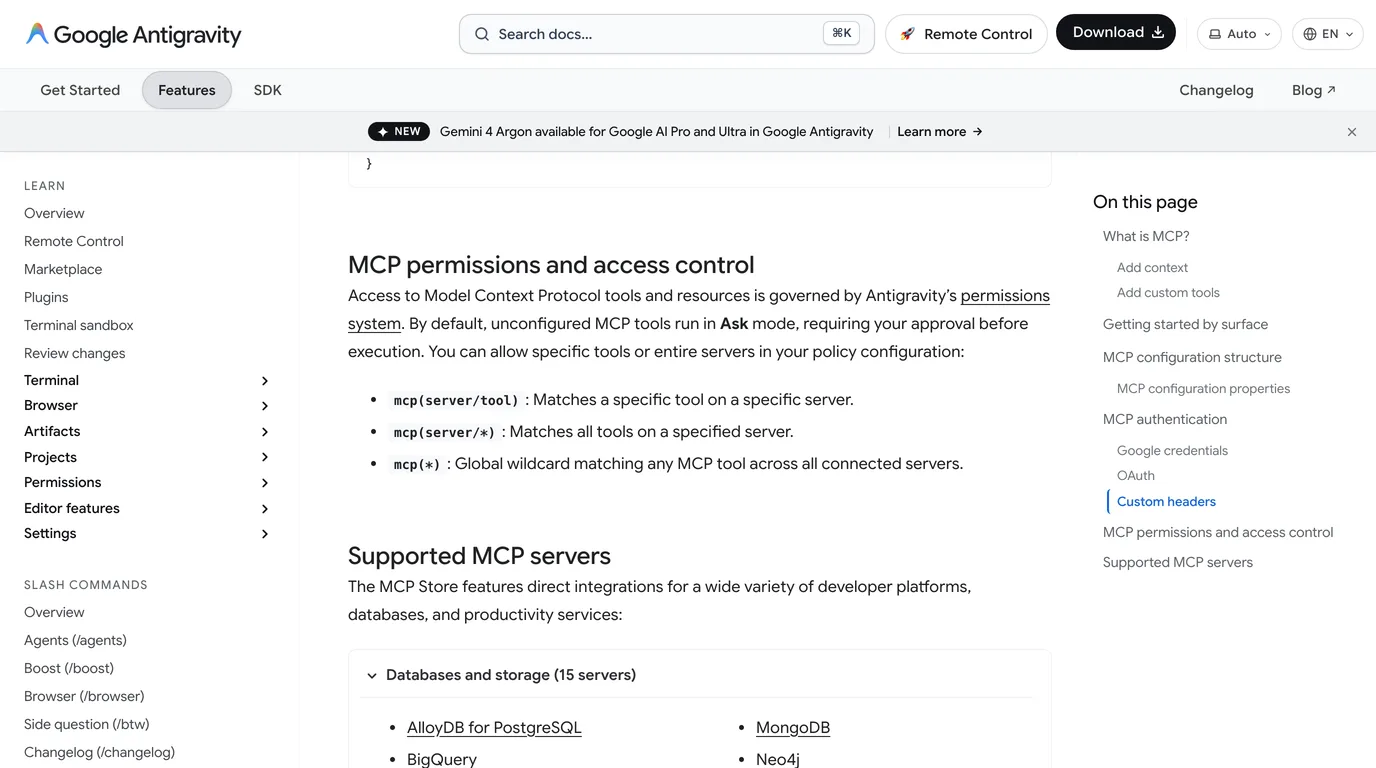
Antigravity handles this better than some clients. Its documentation says unconfigured MCP tools run in Ask mode, so you would see the call and could refuse it. The danger is the convenience setting: an allow rule for mcp(autocad/*) or mcp(*) approves everything, execute_lisp included. Allow the drawing and entity tools if the prompts get tedious, leave system on Ask or withhold it with disabledTools, and work on copies of drawings you care about.
What it still cannot do
A server gives Argon a command channel into AutoCAD. It can draw what you describe, check a file when told to, and repeat an edit across a folder. Our tests also show where the channel stops: it read a clean drawing with one wrong datum, and nothing in the chain can look at a physical part at all. That is the job TechDraw AI does: photograph the part, give one measurement, and get a dimensioned drawing as DXF or DWG, which Argon or any other model can then open and work on.
TechDraw AI has its own MCP server, so the same Antigravity session can turn a photo into a drawing and then hand it to AutoCAD.
See TechDraw AI's MCP serverIf you use Claude or ChatGPT instead, the server and both traps are the same, and the setup is in how to connect Claude to AutoCAD and how to connect GPT-6 Astra to AutoCAD. For what Gemini can do without a server, see can Gemini make technical drawings, and for Argon on the other big CAD program, how to connect Gemini 4 Argon to SolidWorks.
FAQ
Frequently asked questions
Can Gemini 4 Argon control AutoCAD?
Yes, through an MCP server. Google's model page lists function calling for gemini-4-argon, and MCP tools reach the model as function calls. We connected Argon to the puran-water/autocad-mcp server and it drew, checked and saved DXF files through it in all 12 of our runs. Driving a live AutoCAD needs that server's Windows backend and AutoCAD LT 2024 or newer.
Can I use Gemini 4 Argon with AutoCAD for free?
No. Google's pricing page says Gemini 4 Argon is not available on the free tier of the API, and Antigravity's model page lists it for Google AI Pro (paid, not trial), Ultra and Enterprise only. Through the API it costs 2 dollars per million input tokens and 10 per million output tokens until 30 November 2026, then 4 and 20. Our runs cost between 2 and 66 cents each at those prices.
Does Gemini CLI work with Gemini 4 Argon?
Not as Google recommends it. The Gemini CLI README says it has not been optimized for Gemini 4 Argon and points to Antigravity instead, and unpaid and Google One users were moved from Gemini CLI to Antigravity CLI on 18 June 2026. For a local AutoCAD server, use the Antigravity app or Antigravity CLI, which read MCP servers from mcp_config.json.
How accurate is Gemini 4 Argon at drawing a part from a drawing?
In our six runs from the same real manufacturing drawing, it placed all six holes and the 70 by 49 mm outline exactly every time. But it misplaced the square cut-outs by 3.25 mm in all six runs, because it measured one dimension from the wrong reference line. None of its summaries flagged that dimension as a guess, so check every position against the drawing before anything is cut.
Why does the DXF from the AutoCAD MCP server open at the wrong size?
Because the server's headless ezdxf backend saves every drawing with $INSUNITS 6, which means metres. In our tests Argon said the file was in millimetres every time we did not ask it to check. When we did ask, it found the problem in three runs out of three and said it could not fix it, because the server has no tool for header variables. Change the value after $INSUNITS from 6 to 4 in a text editor, or set INSUNITS to 4 in AutoCAD.
Is it safe to let Gemini run commands in AutoCAD?
Only with approvals left on. In one of our runs Argon tried to run AutoLISP through the server's system tool, which the server marks as read-only, to change a setting nobody asked it to change. On our Mac setup that call did nothing, but on Windows with AutoCAD it would have run. Antigravity asks before every MCP tool call by default; keep it that way for this server, or withhold the system tool with disabledTools.
Sources
- Google: Gemini 4 Argon is now available for developers (13 Oct 2026)
- Google: Gemini 4 Argon, our next era of frontier intelligence
- Gemini API: Gemini 4 Argon model page
- Gemini API: pricing
- Google Antigravity: choose a model
- Google Antigravity: Model Context Protocol (MCP)
- google-gemini/gemini-cli README
- puran-water/autocad-mcp: MCP server for AutoCAD LT with a headless ezdxf backend
- fluxpad keyboard: 302_PLATE drawing and STEP model (GPL-3.0)