
The question people are actually typing is “can Astra use AutoCAD like Claude can”, and the honest answer starts with a detail almost every quick tutorial skips: the wiring depends far more on which OpenAI client you pick than on which model is behind it. Get the client wrong and a perfectly good AutoCAD MCP server will simply never appear, with no error telling you why. And if the goal is a whole building rather than AutoCAD linework, AIBIMTool, an AI BIM tool, builds it as a BIM model from a written brief and exports IFC4, with no MCP setup at all.
Our articles are still written by humans!
Get human written articles in your Google feed.


What MCP actually is
The Model Context Protocol is an open standard for connecting an AI assistant to outside tools and data. The useful mental model is a plug standard rather than a feature: an MCP server exposes a set of tools, and an MCP client, Claude Desktop, ChatGPT, Codex, Cursor, whatever you run, discovers those tools and calls them on your behalf. The protocol itself knows nothing about CAD, and nothing about which company built the model on the other end.
That is the whole reason this article can exist at all: the community servers written for Claude did not have to be rewritten for Astra. They expose the same tools over the same protocol. What changed is the client landscape, because OpenAI's clients handle MCP differently from each other, and that difference is where most attempts will actually get stuck.
The part that actually changes with Astra
OpenAI's own MCP documentation is specific about the connection model: ChatGPT's connectors expect a remote server reachable over HTTPS, speaking SSE (server-sent events). The sample configuration in their docs points at a public URL ending in /sse/. Nothing in that flow accepts a local process.
The community AutoCAD servers, the ones that actually draw, are the opposite: local stdio processes that talk to AutoCAD running on your own Windows machine over your local network stack. Point the ChatGPT website at one and nothing happens, because the website was never going to reach into your machine in the first place. That is not a bug you fix by retrying, it is the wrong tool for the job.
OpenAI confirms the desktop app, Codex CLI and the IDE extension all read the same configuration file, so once a server is registered for one, the others see it too. The Astra launch post points at the same config.toml for enabling its new cross-context note-keeping in Codex, which is a fair signal of where OpenAI expects local configuration to live. Practically: use codex mcp add or the desktop app, not the browser tab, if the server you want lives on your own machine.
What Autodesk officially ships
Be precise here, because most write-ups are sloppy about it. Autodesk has released the Product Help MCP Server, which gives AI assistants secure, read-only access to official Autodesk help content across more than 110 products, at no cost. It is genuinely useful for looking up a command flag or a system variable mid-conversation.
It also does not touch your drawings. It reads documentation.
The servers that drive the desktop app
Several community projects expose AutoCAD itself, differing mostly in how they get commands into the application:
Headless script execution
Runs .scr and .lsp scripts against .dwg files using accoreconsole.exe, the console version of AutoCAD. No visible application, which suits batch work across many files, at the cost of no screenshot back to verify against.
AutoLISP dispatch into the running app
The most common approach on LT: a server posts keystrokes into AutoCAD's window to trigger an AutoLISP dispatch command, exchanging commands and results through files on disk. It works, and it is exactly as fragile as it sounds if the window loses focus or a dialog pops up mid-run.
A .NET plugin
A plugin loaded inside AutoCAD gives real-time command execution through a proper API rather than synthesised keystrokes. Cleaner, but it needs full AutoCAD, since LT does not load .NET plugins.
None of these three routes cares which model is issuing the commands. A tool call from Astra looks the same to the server as a tool call from Claude.
Wiring it up with Codex
- Pick a server and read its source before you give it write access to your drawings.
- Check your AutoCAD version and edition. Windows 10 or 11, AutoCAD or LT 2024 or newer for AutoLISP, Python installed natively rather than under WSL.
- Install the server following its own instructions.
- Register it with Codex, not the ChatGPT website:
codex mcp add autocad -- <server command>. This writes to~/.codex/config.toml, shared with the desktop app and IDE extension. - Set the model explicitly: add
model = "gpt-6-astra"to that same config file, or passcodex -m gpt-6-astrafor a single session. Recent Codex releases reportedly bundle Astra as the default, but an older config can still pin a previous model, so check rather than assume. - Open AutoCAD and load whatever plugin or LISP the server needs, then run
/mcpin Codex to confirm the server shows up as active. - Test on a scratch drawing. Ask for something small and verifiable, a rectangle at a known size on a named layer, and confirm it landed correctly before trusting anything larger.
Want the other half of the workflow, turning a photo into a dimensioned drawing an AutoCAD server can then place? Our own MCP server runs alongside any AutoCAD one, in the same conversation.
See TechDraw AI's MCP serverOr skip MCP: can it just drive the GUI?
Worth asking, because MCP is a lot of setup for a model whose headline feature is computer use: watching a screen, moving a pointer, clicking things. If Astra can operate AutoCAD the way a person does, the whole server question goes away.
OpenAI's own launch material is the best evidence available, and it is more relevant to engineering than most people noticed. One of their demos is Astra doing printed circuit board layout in KiCad, described as “turning an electronic schematic into a manufacturable PCB by placing components and routing copper connections”. Another has it modelling a house in Blender and moving it into Unreal Engine 5. Those are real engineering applications, driven through the interface, not through a bespoke server.
Computer-use scores OpenAI publishes for Astra
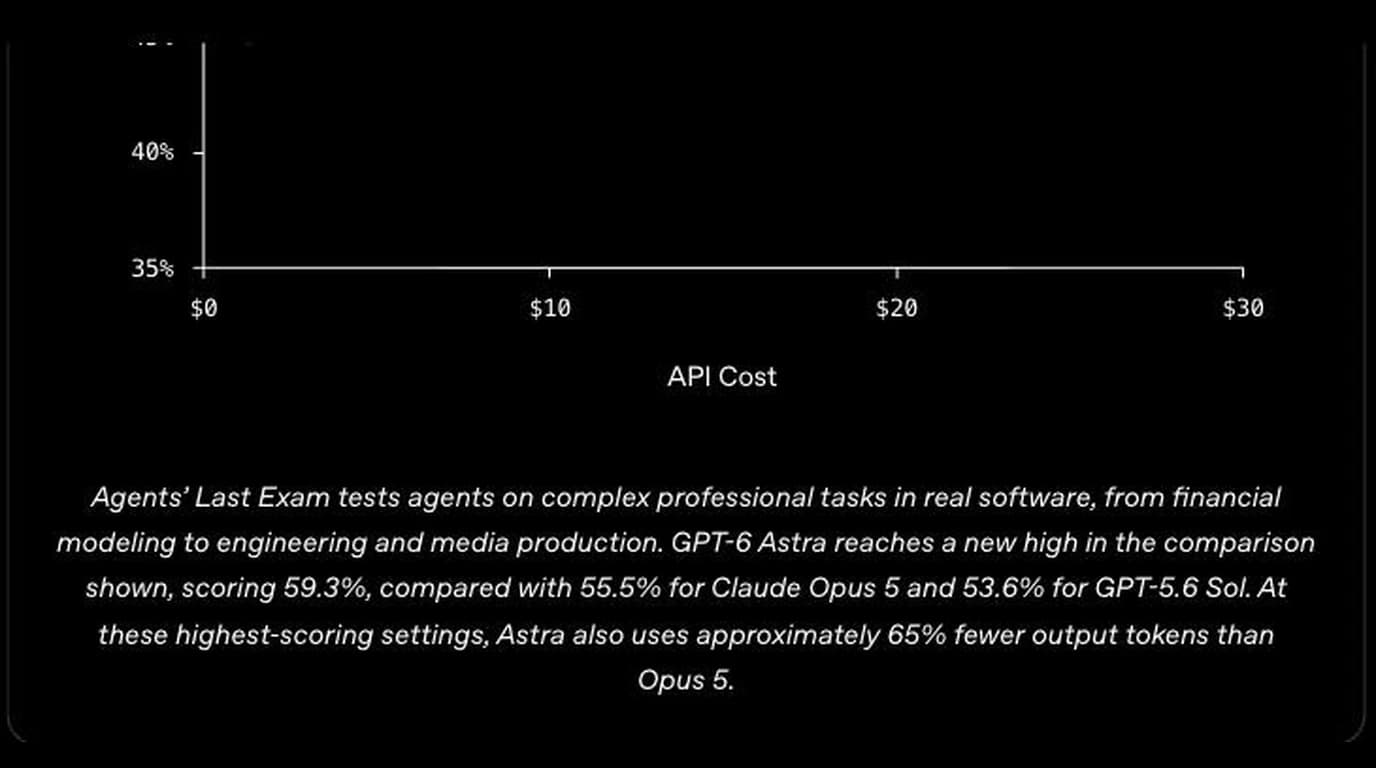
So the honest answer is: plausibly yes for simple, visible operations, and nobody has published a real AutoCAD run to prove it. Two caveats before you bet an afternoon on it. Screen-driving is slow and non-deterministic compared with a tool call, and AutoCAD is a dense, modal, keyboard-driven application where a mis-click lands in a command you did not want. And OpenAI notes that Astra's extra safety checks can “slow, pause, or stop legitimate work”, with tasks pausing for review, which is a poor fit for a long drafting session.
What it is genuinely good at
This part does not change with the model. It is strong wherever the work is describable in words and tedious to do by hand:
- Repetitive geometry. A bolt pattern, a grid of identical openings, a run of parallel lines at a fixed spacing.
- Layer and standards cleanup. Auditing a drawing against a layer standard and moving entities where they belong.
- Batch operations over a folder of drawings through the headless path.
- Scripting without learning AutoLISP by hand.
- Answering questions about a drawing, counting entities on a layer, listing which blocks are used.
What it still cannot do
An MCP server gives Astra a command channel, not perception. It can issue a command to draw a 40 by 25 rectangle. It has no way to know your part is 40 by 25 unless you tell it. Every dimension in the output came from you or from a guess, and a confidently drawn guess is worse than no drawing at all.
That rules out the thing most people actually want: photograph a part and get a dimensioned drawing out the other end. No AutoCAD MCP server gets you there, because the bottleneck is working out geometry and scale from an image, a perception problem, covered in getting dimensions from a photo.
That half does have an MCP server, though. TechDraw AI publishes one for exactly this step: hand it a photo and a real measurement, and it returns a dimensioned drawing and a DXF at true size. Run it alongside an AutoCAD server and one agent covers both halves, perception and command channel, in the same conversation.

- It does not know your standards. Title blocks, layer conventions, dimension styles have to be specified every time, unless built into a template.
- Verification is still yours. The headless path gives no visual feedback at all.
- It is not deterministic. The same request twice can produce a different command sequence.
- Complex or fragile drawings punish it: deeply nested references, heavy constraints, unusual custom objects.
Letting a model run code on your machine
Several of these servers expose a tool that executes arbitrary AutoLISP, and at least one drives AutoCAD by posting keystrokes into the running application window. That is a lot of trust to hand a process, regardless of which model is on the other end of it. Read the source, run it against copies rather than live production drawings, keep it off shared network paths, and make sure your version control or backups are real before you start.
Watch: Astra driving desktop apps
Mark Kashef runs GPT-6 Astra's computer use from Codex through five real jobs: searching flights, opening Claude Desktop to test an MCP server end to end, auditing one of his own apps, pushing a video through Descript and changing phone settings through iPhone mirroring. None of it is AutoCAD, but it is the clearest recent look at what the computer-use section of this post describes, including the allow-this-app prompts. His first example also makes the rule of thumb above concrete: once the clicking worked, he had Astra turn it into a reusable command-line tool, which cut the same flight search from 77 seconds to 23.
Frequently asked questions
Can GPT-6 Astra control AutoCAD?
Yes, through the same class of MCP server that Claude uses, since MCP is a protocol, not a feature of any one model. Autodesk's own MCP server is read-only access to help documentation and does not touch your drawings. To have Astra actually draw, you point it at a community MCP server that talks to AutoCAD on your machine.
Does ChatGPT web work for this, or do I need Codex?
For a local AutoCAD server, use Codex CLI or the ChatGPT desktop app, not the chatgpt.com website. OpenAI's own MCP documentation is specific: ChatGPT's connectors expect a remote server reachable over HTTPS with an SSE endpoint. The community AutoCAD servers run as local stdio processes on your machine, which the website cannot reach without you tunnelling it first. Codex CLI adds local stdio servers directly, no tunnel required.
How do I make sure Codex is actually using GPT-6 Astra?
Set it explicitly rather than assuming. Either add model = "gpt-6-astra" to ~/.codex/config.toml, or pass it per session with codex -m gpt-6-astra. Recent Codex CLI releases reportedly default to Astra automatically, but a config file from before the update can still pin an older model, so check rather than guess.
Does this work on AutoCAD LT?
On Windows, yes, for versions where AutoLISP is available. AutoLISP arrived in AutoCAD LT in the 2024 release, and the LISP-based MCP servers depend on it, so LT 2024 or newer works. AutoCAD LT for Mac does not support AutoLISP, so those servers will not run there, and LT has no ActiveX/COM automation or Visual LISP IDE either, ruling out anything built on those older paths.
Can GPT-6 Astra make an AutoCAD drawing from a photo?
No. An MCP server gives Astra a command channel into AutoCAD: draw geometry, set layers, place dimensions, run scripts. It has no way to look at a photograph of a physical part and work out its shape and size. That is a different problem, and it is the one TechDraw AI solves, through its own MCP server at techdrawai.com/mcp, which you can run alongside an AutoCAD server in the same session.
Is it safe to let Astra run commands in AutoCAD?
Treat it the way you would treat any script pulled off the internet. Several of these community servers expose a tool that executes arbitrary AutoLISP, and at least one drives AutoCAD by posting keystrokes into the running window. Read the source before you install it, run it against copies rather than live production drawings, and make sure your backups or version control are real.
Sources
- OpenAI: GPT-6 Astra (computer-use results, KiCad PCB and Blender demos)
- Model Context Protocol: official specification and docs
- OpenAI: MCP connector requirements (remote servers, SSE)
- OpenAI: connecting MCP servers to Codex CLI, ChatGPT desktop and IDE extension
- Autodesk launches Product Help MCP Server to bring trusted documentation to AI assistants
- puran-water/autocad-mcp: an AutoLISP-based MCP server for AutoCAD LT
- Autodesk: AutoLISP support in AutoCAD LT 2024