
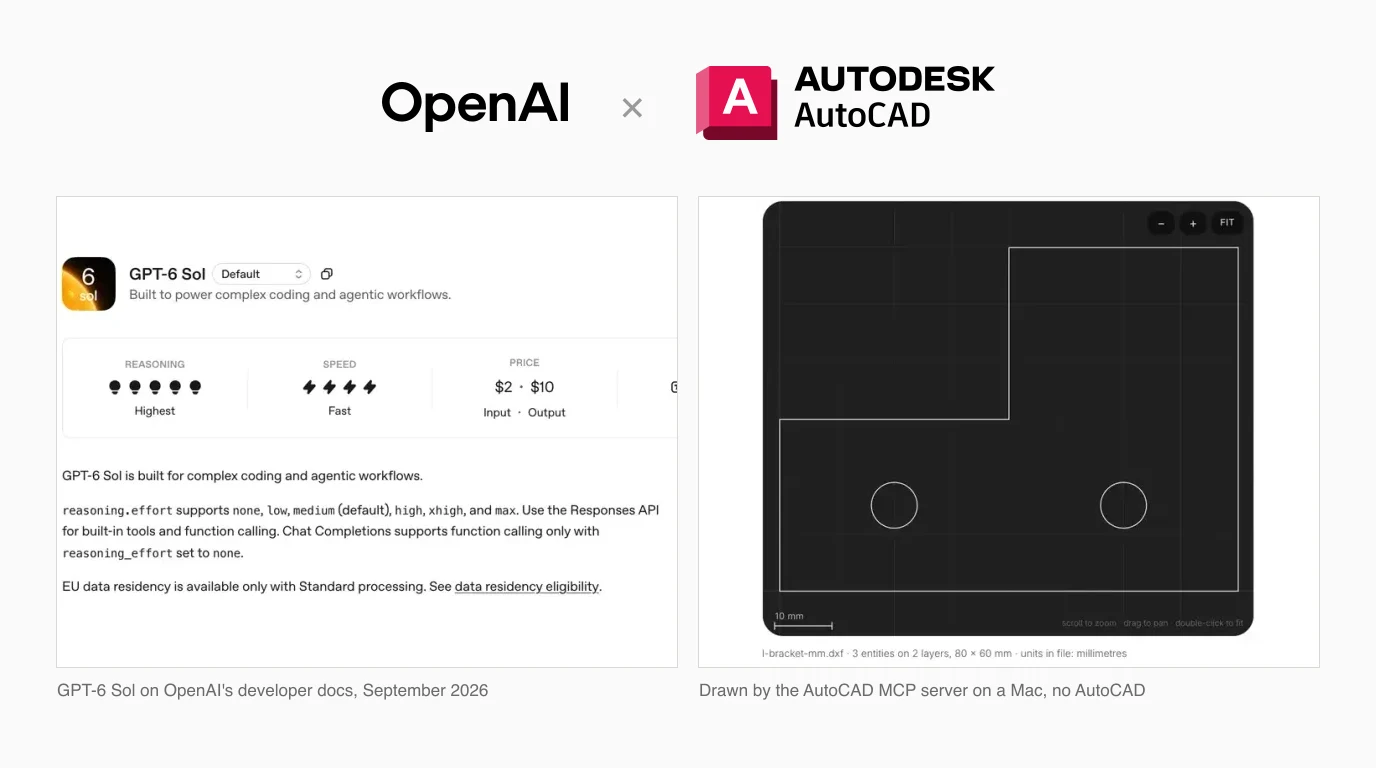
On 22 September OpenAI put GPT-6 Sol into ChatGPT and Codex, and a cheaper GPT-6 Luna into the free desktop app. If you want either of them working in AutoCAD, the model is the easy part. What decides whether it works is which ChatGPT you use, which server you point it at, and two defaults in that server that nobody mentions. We ran the server on a Mac with no AutoCAD installed and checked every line of the output, so this covers what actually happens, not what the demo videos show.
Our articles are still written by humans!
Get human written articles in your Google feed.


What changed on 22 September
OpenAI's announcement says Sol and Luna “build on the advances behind GPT-6 Astra” in faster and cheaper models, and that they “roll out today in ChatGPT Work and Codex for Plus, Pro, Business, Enterprise, and Edu users.” The line that matters most for this article is the last one: “Free and Go users can try GPT-6 Luna in the desktop app.”
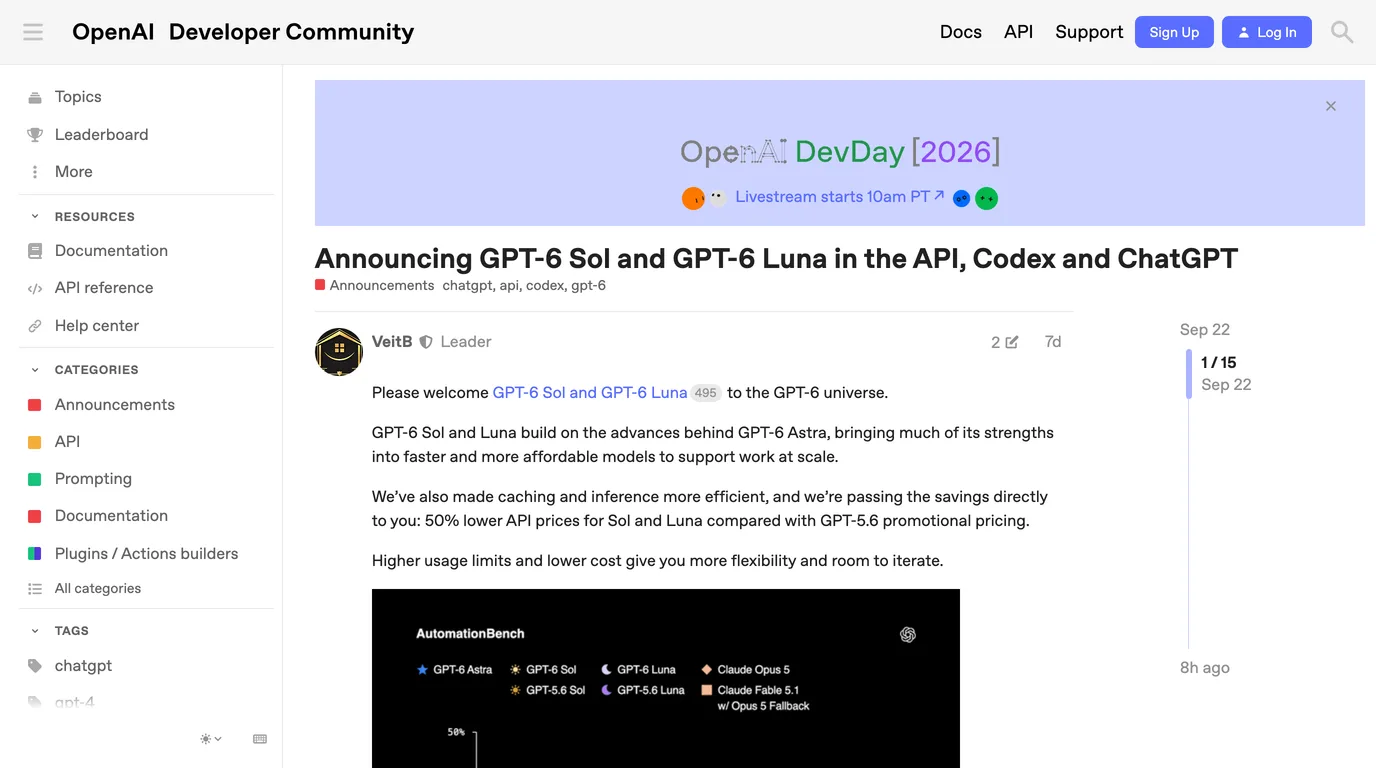
Who gets which model, per OpenAI's announcement
GPT-6 Astra, which we covered in how to connect GPT-6 Astra to AutoCAD, is the larger and more expensive sibling. Sol is, in OpenAI's words, much of Astra's strengths in a faster, more affordable model, and Luna is the first GPT-6 model a free account can use at all.
Sol, Luna or Astra for CAD work
OpenAI publishes the three side by side on its API model pages. Its own guidance positions Astra as the most capable, Sol for “strong reasoning on demanding tasks” and Luna for “efficient, repeatable work at scale”.
The three GPT-6 models, from OpenAI's API model pages, 29 September 2026
The one capability chart in OpenAI's announcement is something it calls AutomationBench. Read off that chart, Sol scores about 33 percent at about 27 cents a task, Astra about 41 percent at about $1.70, and Luna about 21 percent at about 4 cents. Claude Opus 5 sits around 27 percent at about $2.80. Three caveats, all important: these are our readings of a vendor's chart, the post does not say what AutomationBench measures, and none of it is a CAD test.
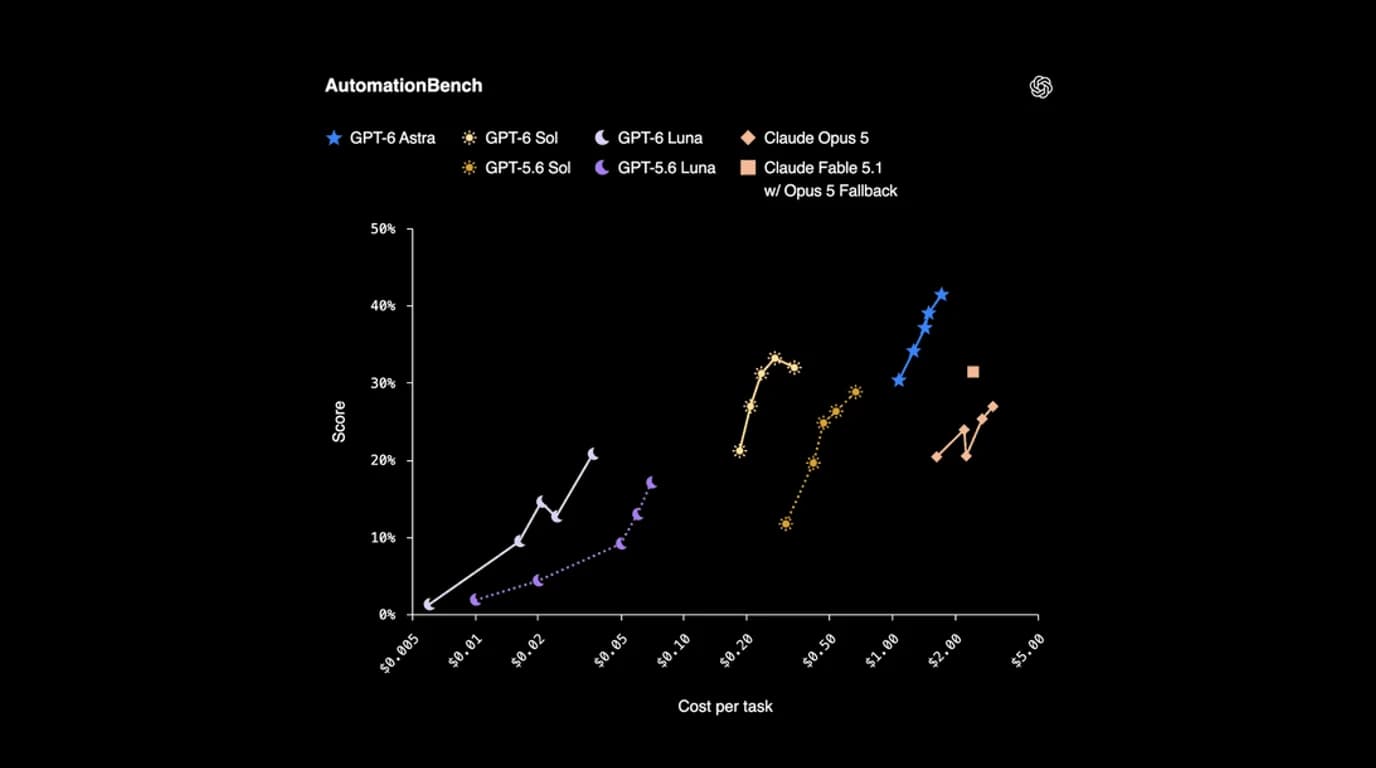
For AutoCAD work driven through a server, our reading is simple. Use Sol for anything where a wrong line costs you time, because every tool call it gets wrong is a line you have to find and delete. Luna is worth trying for bulk, checkable jobs, such as renaming layers across a set of drawings, where a cheap model's mistakes are easy to spot.
Which ChatGPT can reach AutoCAD
This is the part that decides whether anything works, and it has not changed since Astra. An AutoCAD server runs as a local process on your computer. OpenAI's MCP documentation says the ChatGPT desktop app, Codex CLI and the IDE extension can start local (stdio) servers and share one configuration, while ChatGPT on the web “can use remote MCP-backed tools supplied by plugins” only. So chatgpt.com in a browser will never see an AutoCAD server on your desk.
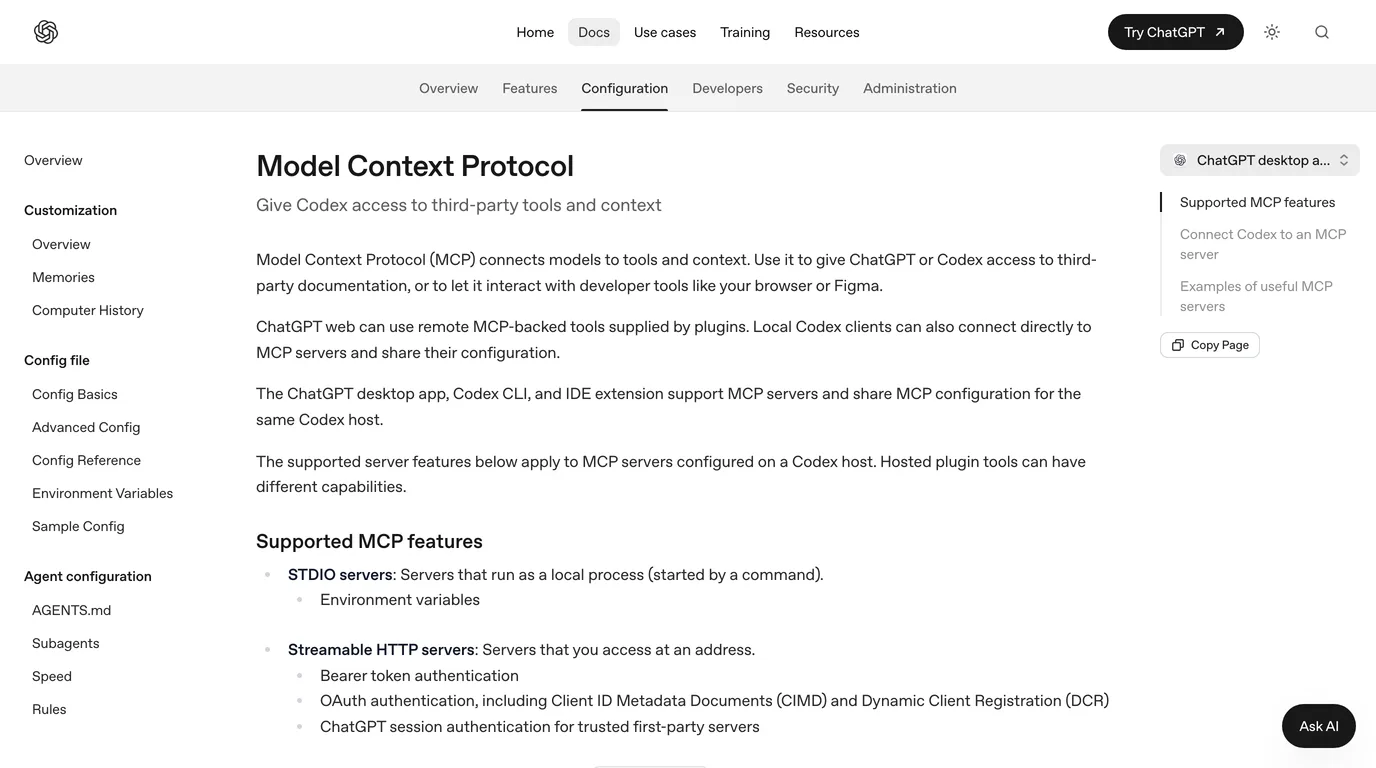
What is new since Astra is the desktop app itself. OpenAI's current desktop app puts Chat, Work and Codex in one window, and adding a server is a settings screen rather than a config file: Settings, MCP servers, Add server, then STDIO. That is also the app free users are told to try Luna in. What we could not establish is whether the MCP settings are there on a free account. OpenAI's pages do not say, and we did not test it, so treat it as unknown until you see it on your own screen.
The server to use
puran-water/autocad-mcp is the one we would start with. It has 540 stars, an MIT licence, and eight consolidated tools (drawing, entity, layer, block, annotation, P&ID, view and system). More useful than the numbers is that it has two backends behind one set of tools.
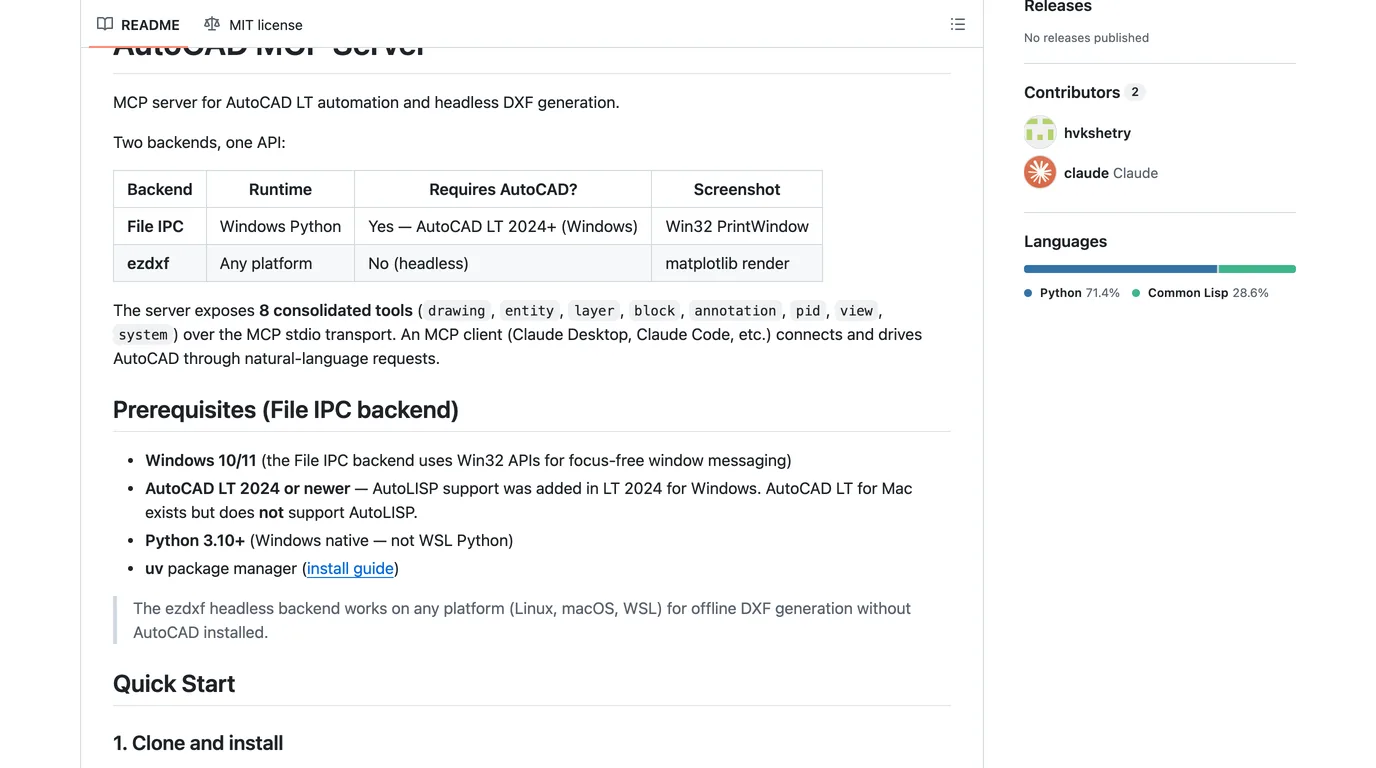
- File IPC drives a running AutoCAD LT 2024 or newer on Windows, through AutoLISP. This is the one that edits your real drawing, with undo, and can plot to PDF.
- ezdxf writes DXF files headlessly on Windows, macOS or Linux, with no AutoCAD at all. It cannot fillet, chamfer, offset or plot, but it is the only honest answer to “can I do this on a Mac”, since the File IPC backend talks to AutoCAD through Win32 window messaging and AutoCAD LT for Mac has no AutoLISP.
For a sense of what the Codex route looks like against a real AutoCAD model, the clearest demo we found drives AutoCAD Plant 3D from the Codex chat: finding untagged pipe components, checking spec classes and sorting them onto layers. It is in Spanish, and it does not say which MCP server it uses, so treat it as a picture of the workflow rather than of this server.
Wiring it up
- Clone the server and run
uv syncin it. On Windows with AutoCAD, loadlisp-code/mcp_dispatch.lspwith APPLOAD, as its README describes. - In the ChatGPT desktop app, open Settings, MCP servers, Add server, choose STDIO, and point it at the server's Python with the arguments
-m autocad_mcp. Or put the same thing in~/.codex/config.toml, which the desktop app, Codex CLI and IDE extension all read. - Set the model explicitly rather than trusting a default, and set the approvals before the first run, not after.
This is the config we would use. The keys are from OpenAI's config reference; the path is yours.
model = "gpt-6-sol"

[mcp_servers.autocad]
command = "/path/to/autocad-mcp/.venv/bin/python"
args = ["-m", "autocad_mcp"]
env = { AUTOCAD_MCP_BACKEND = "ezdxf" }   # "auto" on Windows with AutoCAD
default_tools_approval_mode = "writes"

[mcp_servers.autocad.tools.system]
approval_mode = "prompt"
The last two lines are not decoration. Why they are there is the second trap below.
What we ran on a Mac with no AutoCAD
We installed the server on a MacBook, selected the ezdxf backend and drove it over MCP from a short script, calling the same tools Sol would call. The part was our standard test piece from the earlier model posts: an 80 × 60 mm L-bracket with a 40 mm step and two Ø8 mm holes at (20, 15) and (60, 15). That is one closed polyline and two circles, then a save.
Every call returned ok. Reading the saved file back with ezdxf, the polyline had exactly the six corners we sent, closed, and both circles were Ø8.0 mm at the right centres. The geometry was perfect. Then we opened it in our DXF viewer, and the status line read 80000 × 60000 mm.
Two traps in the server
1. Every headless drawing is saved as metres
The ezdxf backend creates each drawing with ezdxf.new("R2013") and never sets the units. ezdxf's default for a new drawing is $INSUNITS 6, which is metres. The numbers in the file are the millimetre values you asked for, but the label says metres, so anything that honours the label, from a block insert in AutoCAD to most laser and CNC software, scales your part by a thousand. We have seen this exact failure enough to have written a whole guide to DXFs that import at the wrong size.
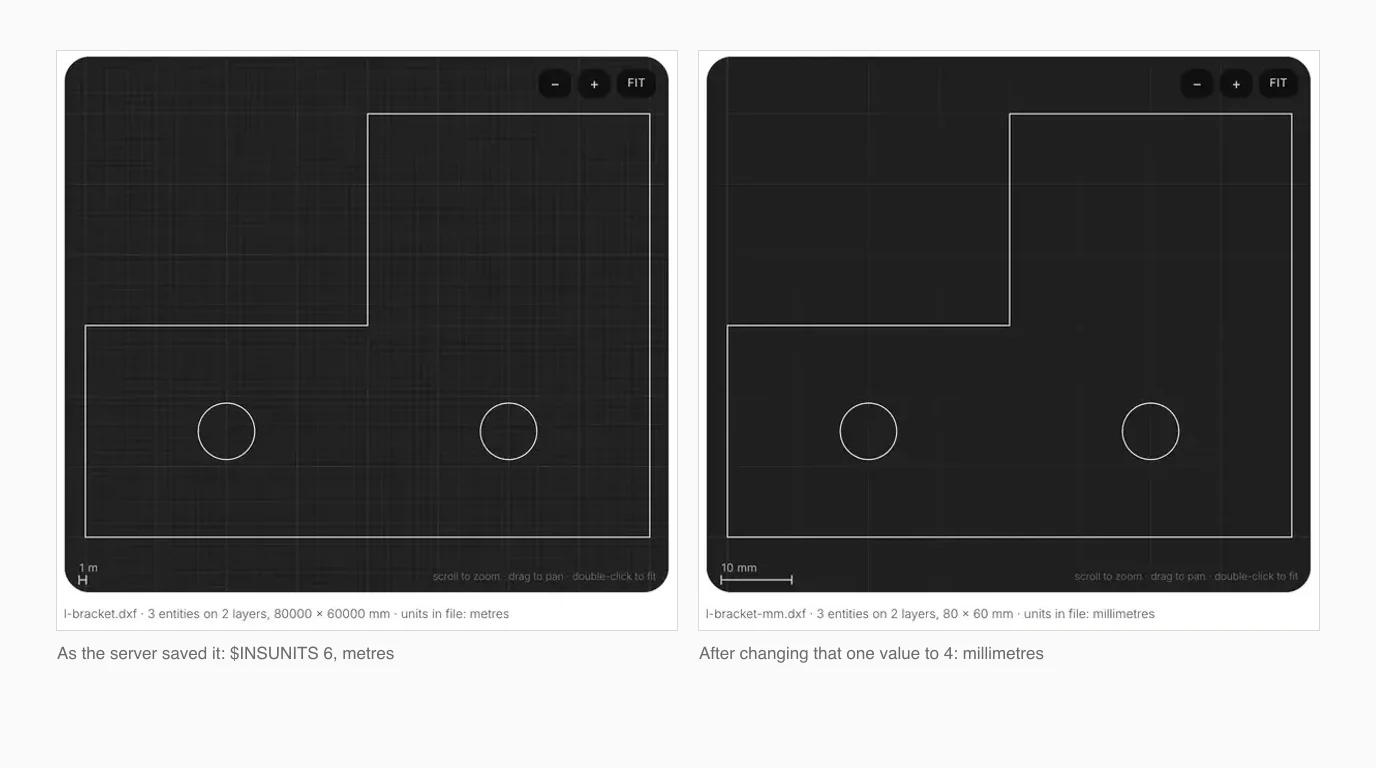
The server has no tool to change it, so the fix is yours. In a text editor, find $INSUNITS in the header and change the value two lines below it from 6 to 4. In AutoCAD, type INSUNITS and enter 4 before saving. We made that one edit to our file and it opened at 80 × 60 mm, with ezdxf's audit finding nothing wrong.
2. A read-only tool that runs any code
MCP servers can mark a tool as read-only, and ChatGPT uses that mark: in its writes approval mode it asks before running any tool that is not read-only and lets the rest through. This server marks its system tool read-only. That tool is mostly status checks, but it also contains execute_lisp, described in its own source as “Execute arbitrary AutoLISP code”. On Windows with AutoCAD and approvals on writes, that means a model could run any AutoLISP it writes without ChatGPT ever asking you.
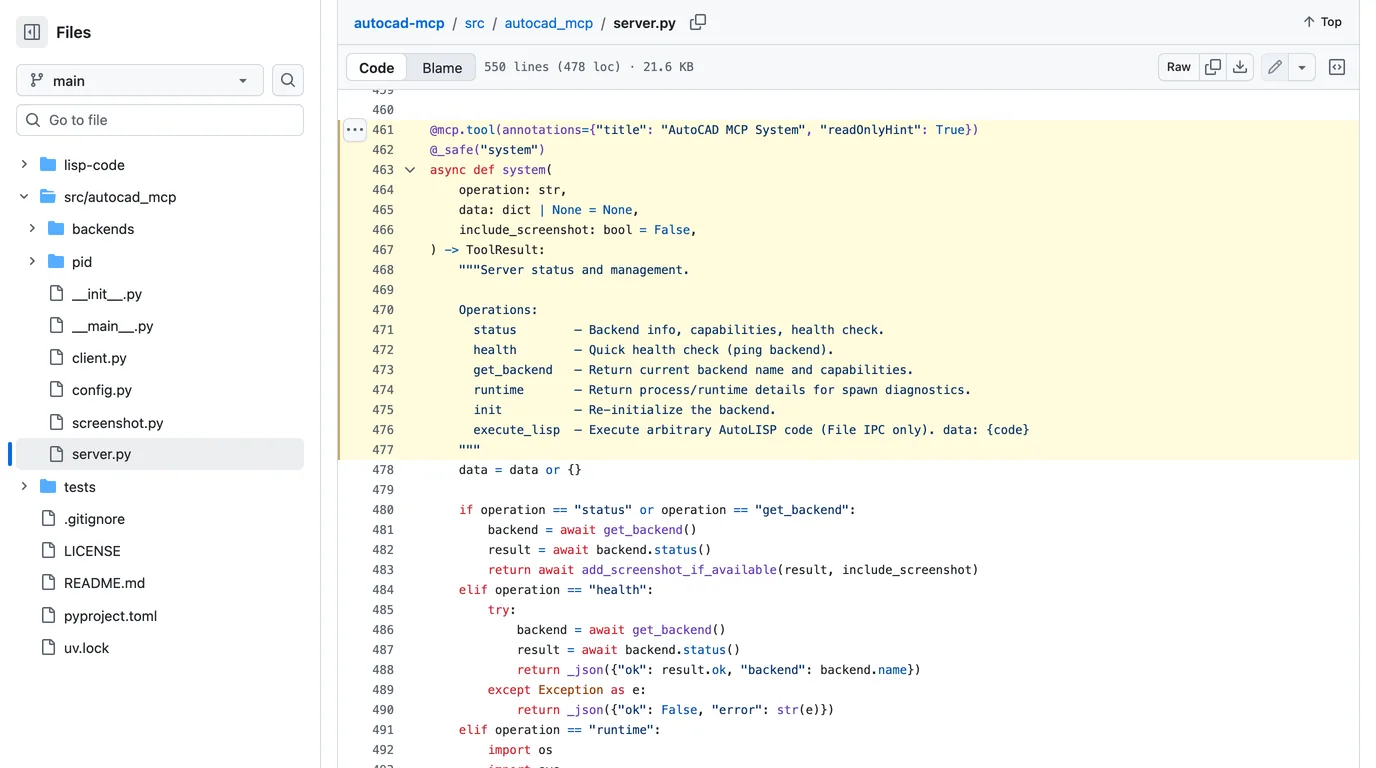
The per-tool override in the config above closes it: approval_mode prompt on system means you see and approve every call. On a Mac with the ezdxf backend execute_lisp does nothing, so the risk is Windows only, but configs get copied between machines. For what it is worth, OpenAI reports Sol's coding deception rate at 1.3 percent against 10.4 percent for GPT-5.6 Sol. That is a reason to be less worried about the model, not a reason to switch the prompt off.
What it still cannot do
A server gives Sol a command channel into AutoCAD. It can draw what you can describe, repeat an edit across a folder, clean up layers and write scripts. It cannot look at a real part and tell you its shape and size, because nothing in this chain can see the part. That is the job TechDraw AI does: you photograph the part, give one measurement, and get a dimensioned drawing as DXF or DWG, which Sol can then open and work on like any other file.
TechDraw AI has its own MCP server, so the same ChatGPT session can turn a photo into a drawing and then hand it to AutoCAD.
See TechDraw AI's MCP serverIf you use Claude rather than ChatGPT, the same servers and the same traps apply, and the setup is in how to connect Claude to AutoCAD. For the computer use route, where the model drives the AutoCAD window directly instead of going through a server, see the Astra guide linked above.
FAQ
Frequently asked questions
Can GPT-6 Sol control AutoCAD?
Yes, through an MCP server, the same way Claude and GPT-6 Astra do. MCP is a protocol, not a feature of one model, and OpenAI's API page for gpt-6-sol lists MCP among its supported tools. You point a ChatGPT client that accepts local MCP servers at a community AutoCAD server, and Sol calls its tools to draw, edit and save.
Can I use it with a free ChatGPT account?
Possibly, and we could not confirm it. OpenAI says Free and Go users can try GPT-6 Luna in the ChatGPT desktop app, and its documentation says the desktop app supports MCP servers, but neither page says whether MCP servers are available on the free plan. Sol itself rolled out to Plus, Pro, Business, Enterprise and Edu. If you try it on a free account, check the model picker and Settings, MCP servers before you rely on it.
Does it work on a Mac?
Partly. The servers that drive a running AutoCAD do it through Windows mechanisms, and AutoCAD LT for Mac has no AutoLISP at all, so that route is Windows only. But the most popular server, puran-water/autocad-mcp, has a headless ezdxf backend that writes DXF files on macOS with no AutoCAD installed. We ran it on a Mac and it produced a correct 80 by 60 mm part, with one units problem you have to fix yourself.
Should I use Sol, Luna or Astra for AutoCAD?
For most drafting work, Sol. OpenAI's own docs position Astra as the most capable and Sol for strong reasoning on demanding tasks, at a fifth of Astra's API price. On OpenAI's AutomationBench chart Sol scores about 33 percent at about 27 cents a task against about 41 percent at about 1.70 dollars for Astra. Luna is far cheaper and weaker, fine for repetitive batch edits you can check. None of these numbers is a CAD benchmark.
Why does my DXF from the MCP server open at the wrong size?
Because the server's headless backend saves every drawing with $INSUNITS set to 6, which means metres, while you almost certainly drew in millimetres. The geometry is right and the label is wrong, so anything that honours the units, including block inserts and most laser and CNC software, scales it by a thousand. Change the value after $INSUNITS from 6 to 4 in any text editor, or run INSUNITS 4 in AutoCAD, and it opens at the right size.
Is it safe to let Sol run commands in AutoCAD?
Only with approvals set deliberately. The server's system tool is marked read-only, yet it includes execute_lisp, which runs arbitrary AutoLISP on Windows. ChatGPT's writes approval mode only asks before tools that are not marked read-only, so that tool would run without asking. Set the system tool's approval_mode to prompt, work on copies of drawings, and read the source before you install anything.
Sources
- OpenAI Developer Community: Announcing GPT-6 Sol and GPT-6 Luna (22 Sep 2026)
- OpenAI API: GPT-6 Sol model page
- OpenAI API: GPT-6 Luna model page
- OpenAI API: GPT-6 Astra model page
- OpenAI API: latest model guide (Sol, Luna and Astra)
- ChatGPT Learn: Model Context Protocol in the desktop app, Codex CLI and IDE extension
- ChatGPT Learn: config reference (mcp_servers keys and approval modes)
- ChatGPT Learn: the ChatGPT desktop app
- puran-water/autocad-mcp: MCP server for AutoCAD LT with a headless ezdxf backend