
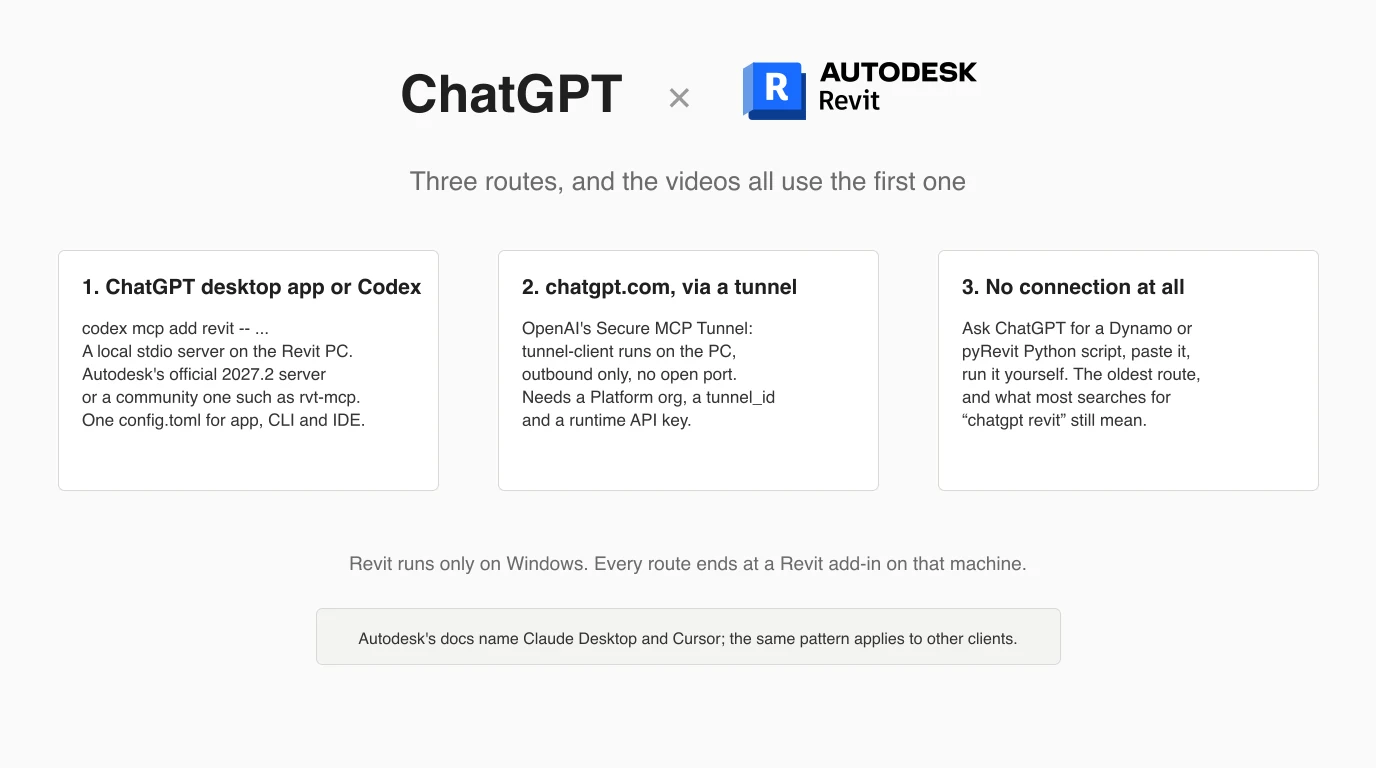
Connecting ChatGPT to Revit means running an MCP server on the Windows PC that has Revit open and pointing an OpenAI client at it. Revit is the unusual case in this series: Autodesk ships an official server, the community server behind every “GPT-6 Astra builds a house” video has a codex option in its installer, and one of them documents the ChatGPT website route through OpenAI's tunnel. We registered both the official server and the community one with Codex on this machine, read the installers and the docs, and watched the videos so you do not have to. We did not have Revit, Windows or a paid OpenAI account, and the article says so wherever that matters.
Our articles are still written by humans!
Get human written articles in your Google feed.


What connecting ChatGPT to Revit means
Three different things hide behind this phrase. The first is ChatGPT driving Revit: an AI client calls tools such as “list the walls on Level 2” or “create a sheet with these views” and the application does it, live, in the model on your screen. That takes an MCP server, a small program that wraps the Revit API and exposes it over the Model Context Protocol, plus a Revit add-in it talks to. The second is ChatGPT reading what Revit made: you give it an IFC or a PDF and ask questions, which needs nothing installed. The third, and by far the oldest, is ChatGPT writing a script for Dynamo or pyRevit that you run yourself.
Only the first is a connection, and it is the part this article walks through, because it is where people get stuck. The protocol does not care which model is on the other end: the servers written for Claude expose the same tools to ChatGPT. What differs is the client landscape on OpenAI's side, and that decides whether your server ever shows up.
The three routes, and which client each needs
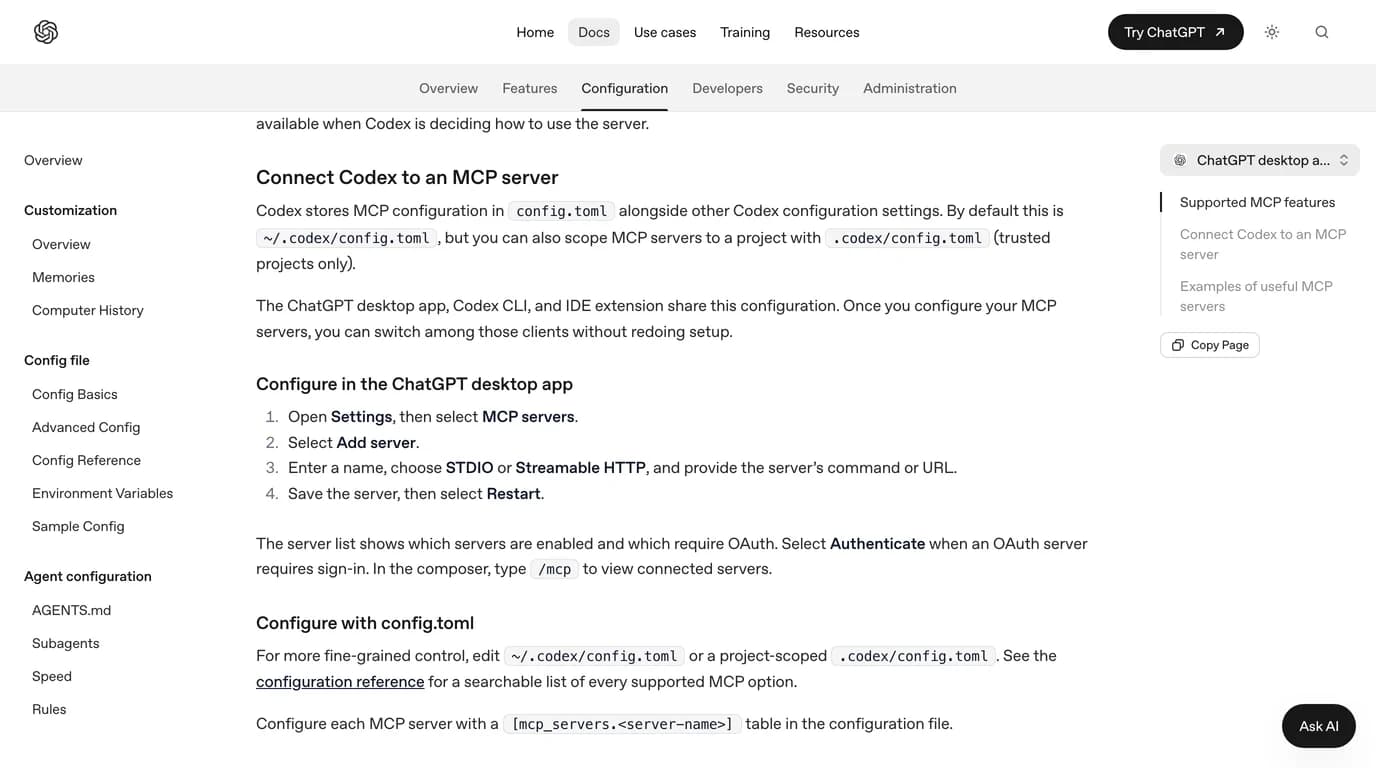
OpenAI's own MCP documentation states the split plainly: the ChatGPT desktop app, Codex CLI and the IDE extension share one configuration file, and ChatGPT web does not read it. The website uses remote tools supplied by plugins. So for a server on the PC where Revit runs, you want one of the local clients, and the desktop app is the one the Revit videos name.
Which OpenAI client can reach a Revit MCP server, as documented on 12 October 2026
The short clip below is the clearest statement of that split from someone who has done it: BIM Pure's description says it shows how to connect the ChatGPT or Codex desktop app to Revit using an MCP server, and the five minutes cover setup, an apartment layout and a cabin. Treat the “is it AGI” framing as a title, not a finding.
Autodesk's official server, and what its docs say about ChatGPT
Autodesk calls it the Revit Public MCP Server. Its setup page says it “is provided as a separate add-on and is supported only on Autodesk Revit 2027.2,” and that it is a Technical Preview. It comes as three installers, which Autodesk's tools page lists as Read-Tools with 8 tools, Write-Tools with 11 and Experimental-Tools with 39; we went through them for the Claude version of this guide. None of the 39 runs arbitrary code, which matters once you see the community servers below.
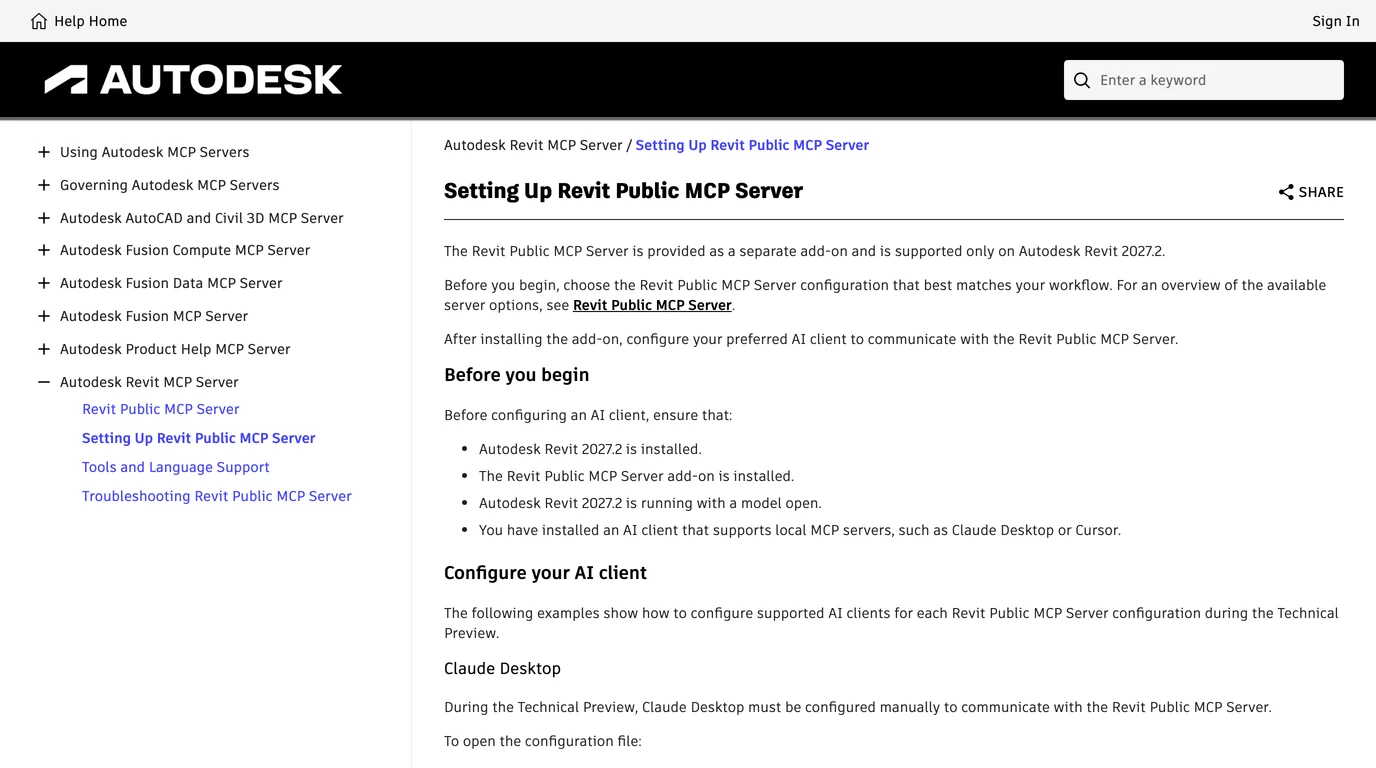
For ChatGPT the useful sentence is at the bottom of that page, after the Claude Desktop and Cursor examples: “The same configuration pattern generally applies to other AI clients that support local MCP servers.” That is the whole of Autodesk's position on OpenAI clients, and it is enough, because the server is a plain stdio executable with one argument. Anything that can launch a local process can launch it. The ChatGPT desktop app and Codex can.
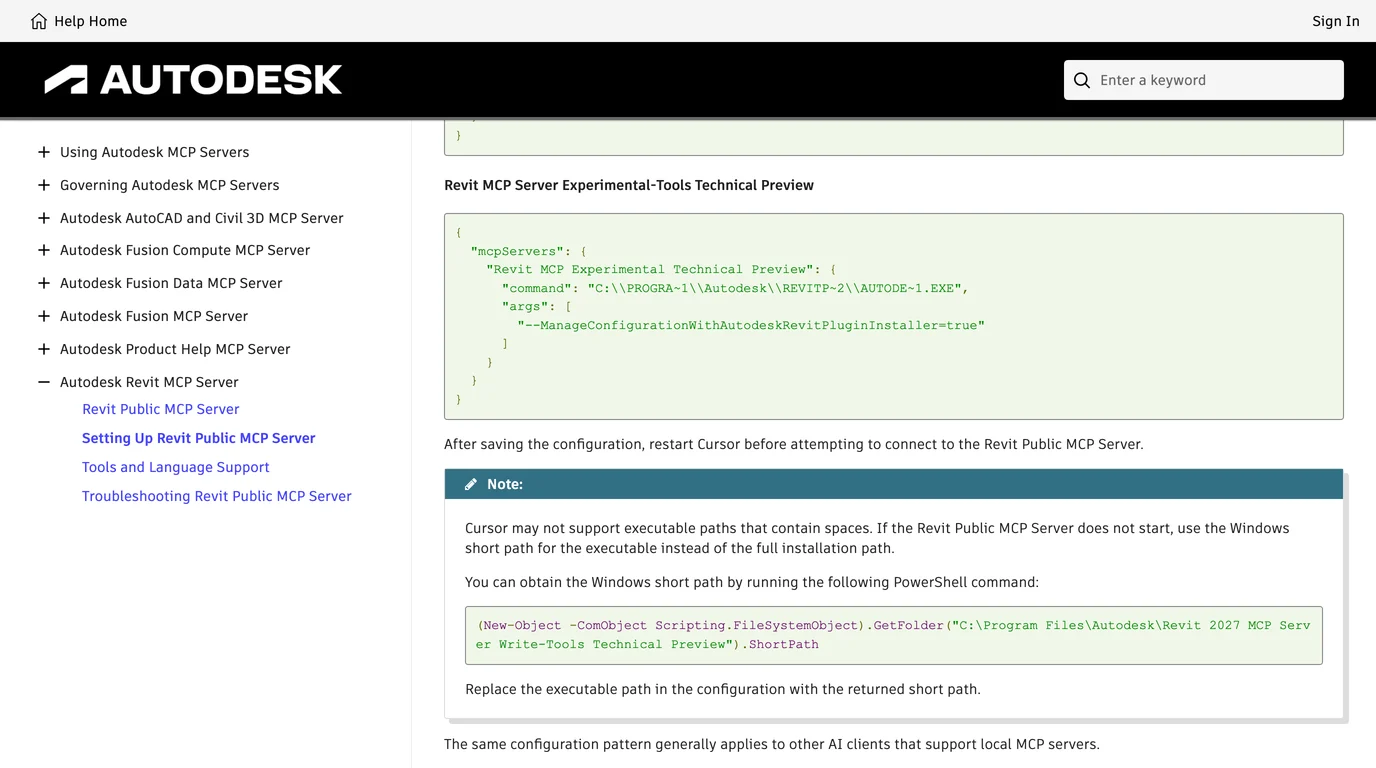
What Autodesk has not done is ship anything for ChatGPT web. There is no Autodesk entry you can add from ChatGPT's Plugins page, and the June announcement frames the whole thing around Claude. Revit 2027 also has Autodesk Assistant, a chat panel inside Revit that is its own Tech Preview. Autodesk's transparency card says only “Model source: Licensed, pre-trained.” It is not ChatGPT, and nothing on this page makes it ChatGPT.
The community servers, and which ones name ChatGPT or Codex
Autodesk's server leaves everyone on Revit 2026 or older with the community, and the community is where the Astra videos come from. We listed the Revit MCP servers and read their code for the Claude guide; for ChatGPT the narrower question is which of them say anything about OpenAI clients, and what exactly. Star counts, licences and dates are from the GitHub API on 12 October 2026.
Revit MCP servers and what their own documentation says about OpenAI clients, checked 12 October 2026
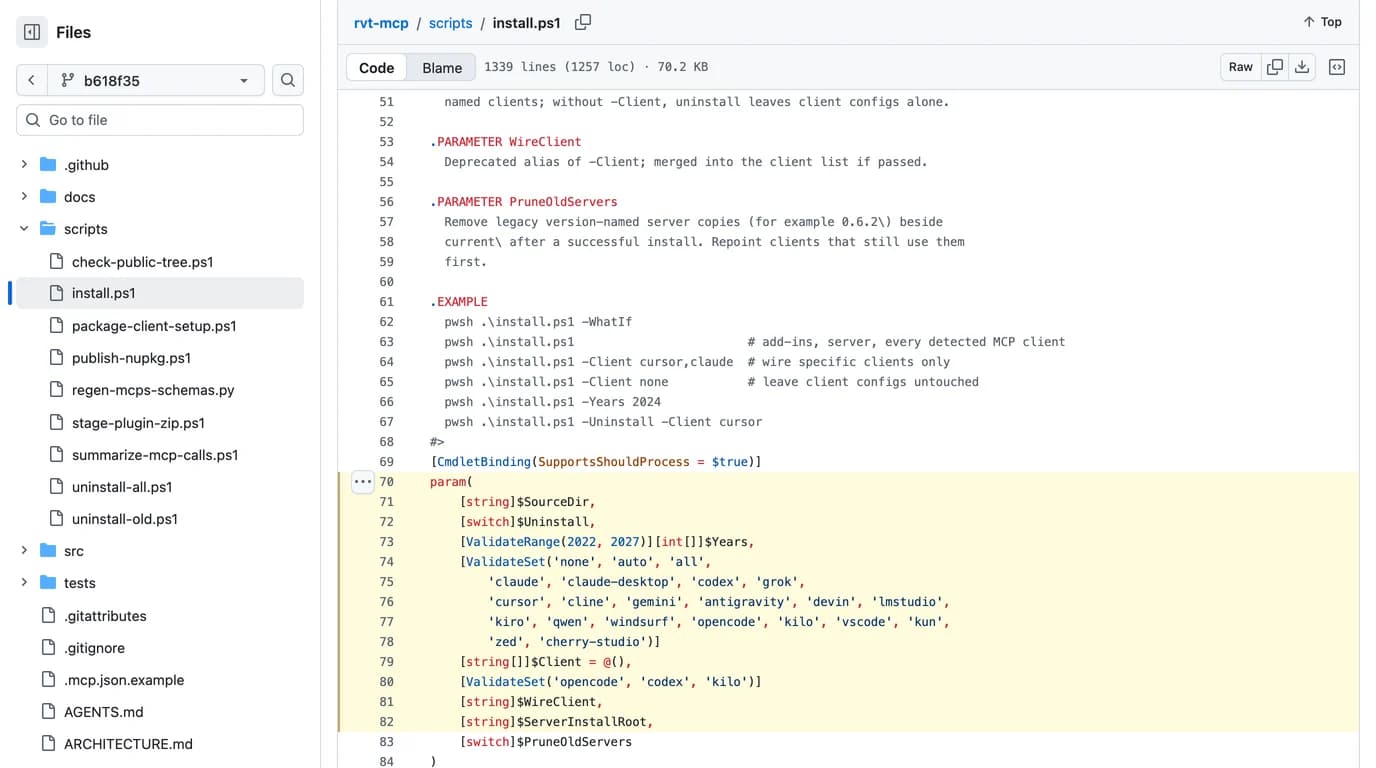
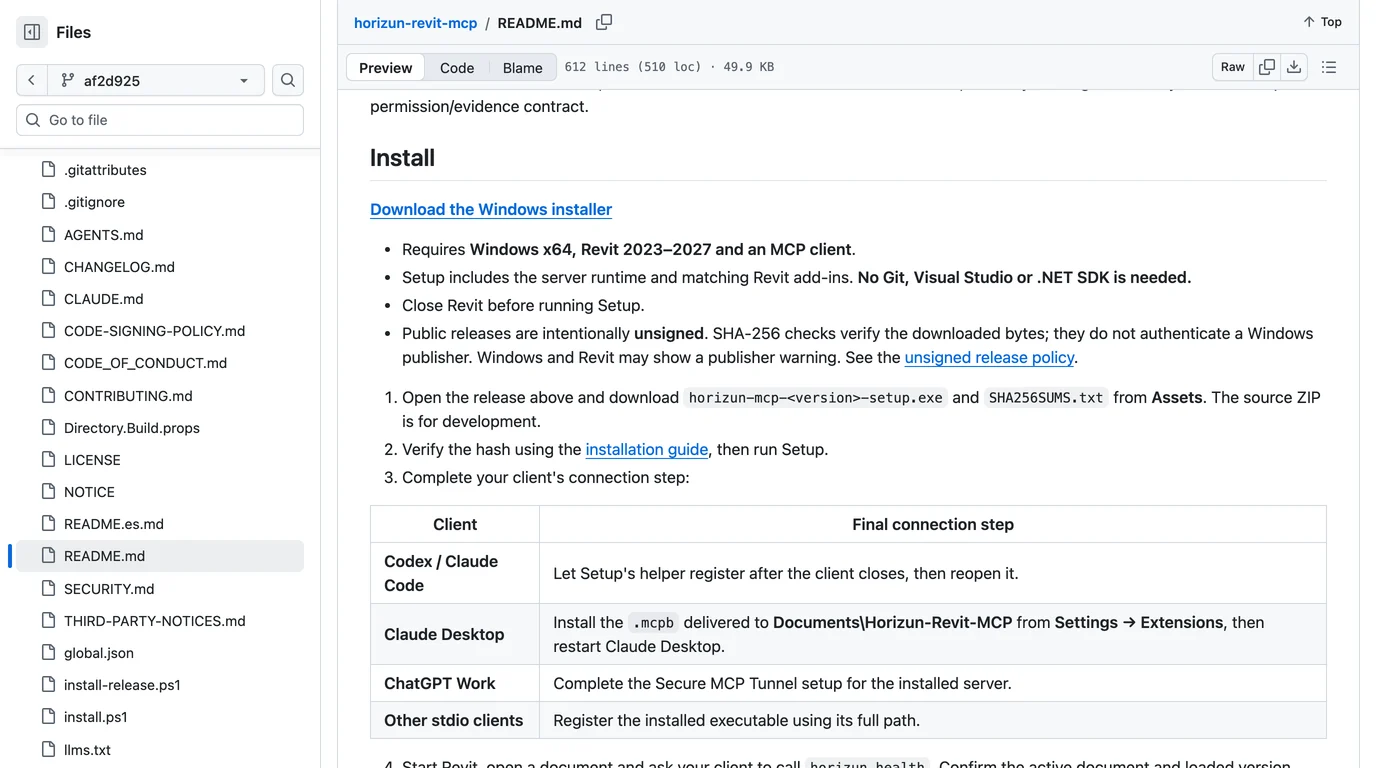
Two honest notes on that table. The server with the most stars is the one that says nothing about ChatGPT and has the worst network default, so stars are the wrong filter here. And the four that name OpenAI clients between them have fewer stars than that one; being ChatGPT-aware is a sign of a maintainer who reads the client docs, not of a crowd that has tested it. The crowd evidence is the videos, and they are all rvt-mcp.
Before you start
What every route in this article requires
On a Mac the answer is Windows in a virtual machine. Autodesk's Revit 2027 requirements document Parallels Desktop on Apple silicon, with accelerated graphics listed as not supported. Because the server is launched by the client, the ChatGPT desktop app or Codex has to run inside that VM too. One thing to settle before any of it: what you want the model to do. If the answer is “write me a script”, skip to the script route. If it is “answer questions about my model”, export an IFC and read the test in the Claude guide. The steps below are for the one case that needs wiring: the model working in a live Revit session.
Step 1: install a server on the Revit PC
Autodesk's server, on Revit 2027.2
In Autodesk Account, under Products and Services, then Product Updates, download the Revit MCP Server you want. Start with Read-Tools: it cannot change the model, and it is the one whose behaviour you can learn without risk. The installer puts the executable under C:\Program Files\Autodesk\Revit 2027 MCP Server Read-Tools Technical Preview\, and that path, with one argument, is all the client needs.
rvt-mcp, on Revit 2022 to 2027
The README's recommended route is to let an AI agent install it, and this is the trick the Archi Vlogs video means by “just paste the link in GPT-6 and it will download and install it.” Its AGENTS.md is an install protocol written for an agent that can run PowerShell and edit files on the Windows machine, and it names Claude Code, Codex and Cursor as examples. It also says that “a normal chat session without local execution tools cannot perform the install.” So the paste-the-link route works in the ChatGPT desktop app when it is acting as a Codex host with local tools, and not in a browser tab. The manual route is the PowerShell block in the README: download the Setup zip for the latest release, expand it, run install.ps1 -WhatIf -Client codex to preview, then the same line without -WhatIf.
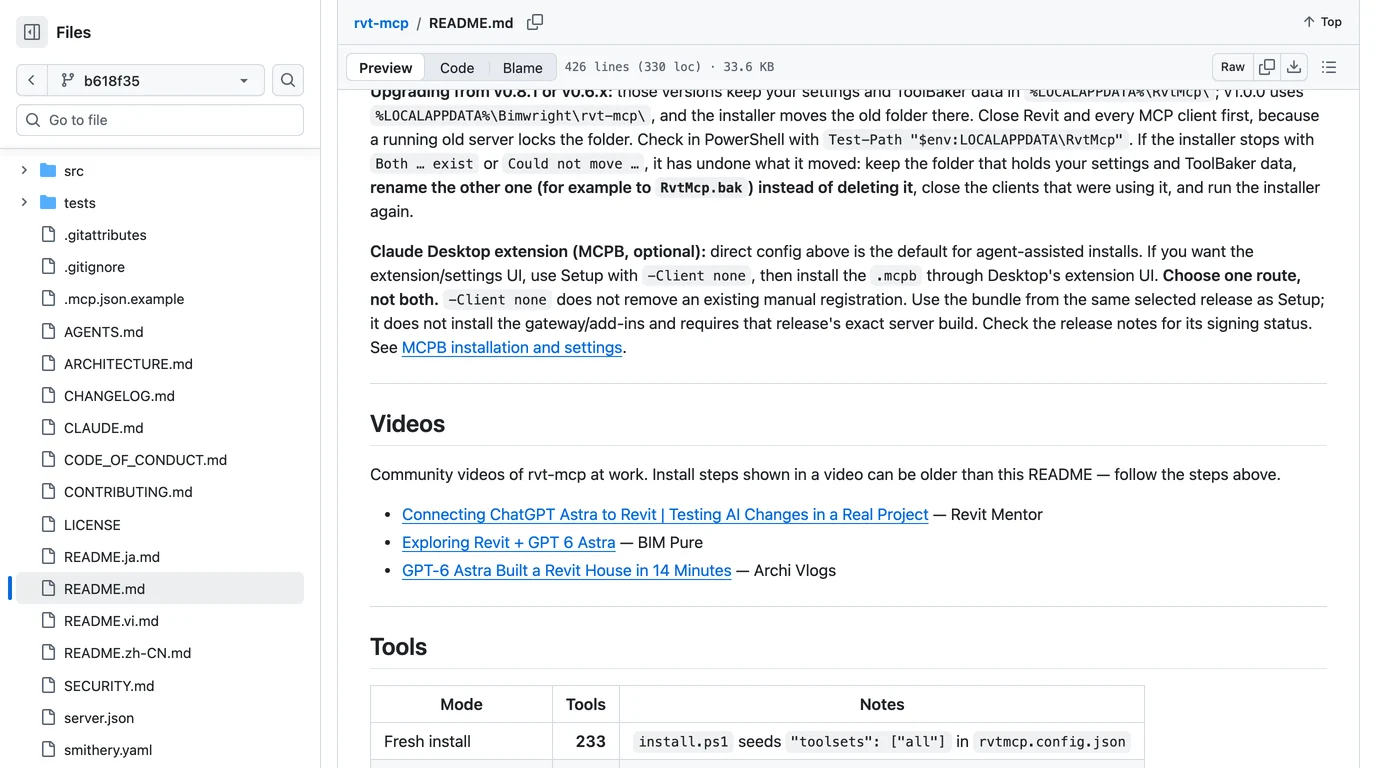
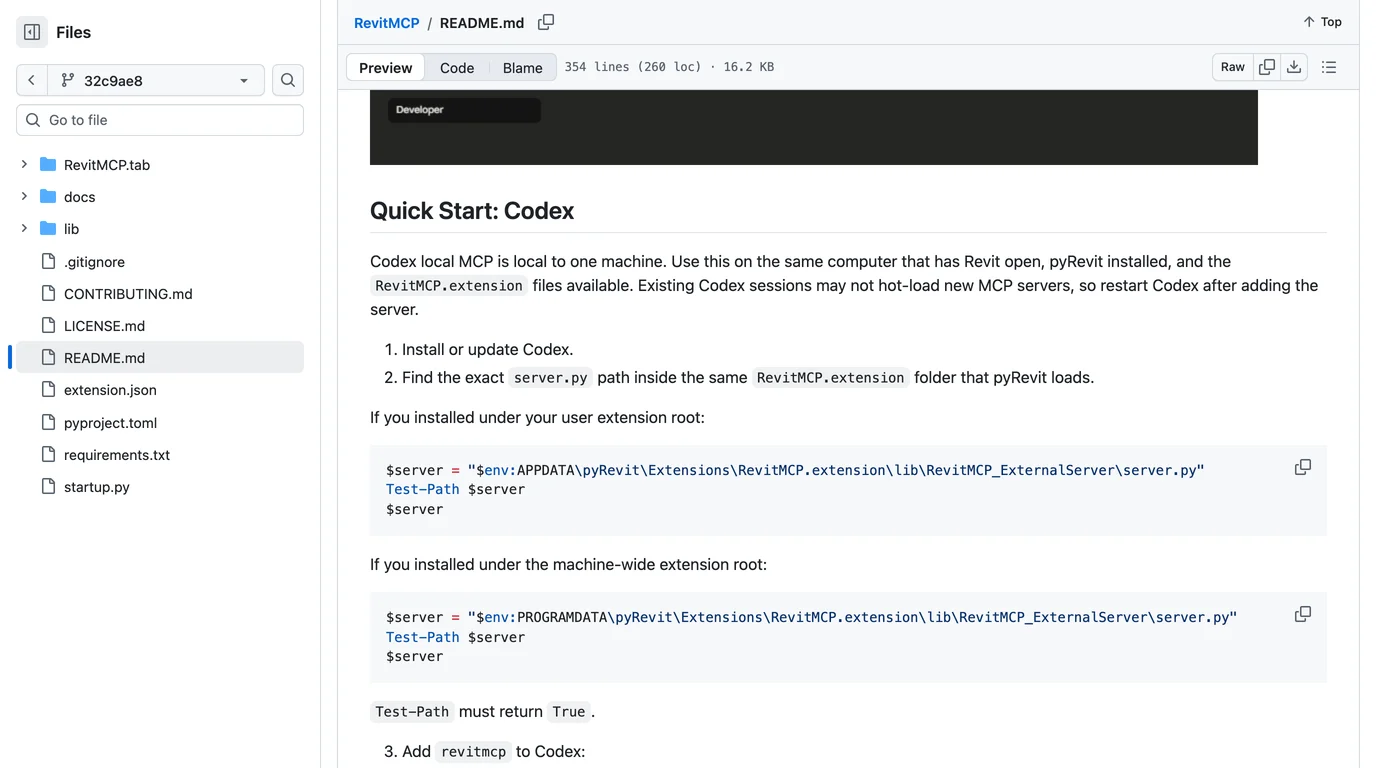
For the other servers: Horizun ships a Windows setup executable that registers Codex for you after you close it; Sam-AEC and oakplank are Python projects with a pyRevit or add-in step first. Each README is specific about paths, and the paths are where things go wrong, so keep the one you end up with in a text file. You will paste it in the next step.
Step 2: register it with ChatGPT
Two ways, same result. In the ChatGPT desktop app, OpenAI's path is Settings, then MCP servers, then Add server; enter a name, choose STDIO, paste the server's command, save, then Restart. Or, in a terminal on the same PC, use Codex, which writes the same file the desktop app reads. The syntax is codex mcp add <name> -- <command> <args>.
codex mcp add revit -- "C:\Program Files\Autodesk\Revit 2027 MCP Server Read-Tools Technical Preview\Autodesk.RevitMcpServer.Stdio.exe" --ManageConfigurationWithAutodeskRevitPluginInstaller=true

codex mcp add rvt-mcp -- "C:\Users\you\AppData\Local\Bimwright\rvt-mcp\server\current\rvt-mcp.exe" --read-only
We ran exactly those two lines on this Mac with Codex CLI 0.162.1. The first is Autodesk's documented executable and argument for the Read-Tools server; the second is the path rvt-mcp's client wiring page gives, with the read-only flag added. Revit is not installed here, so the servers were never launched. The commands and the file they write are real.
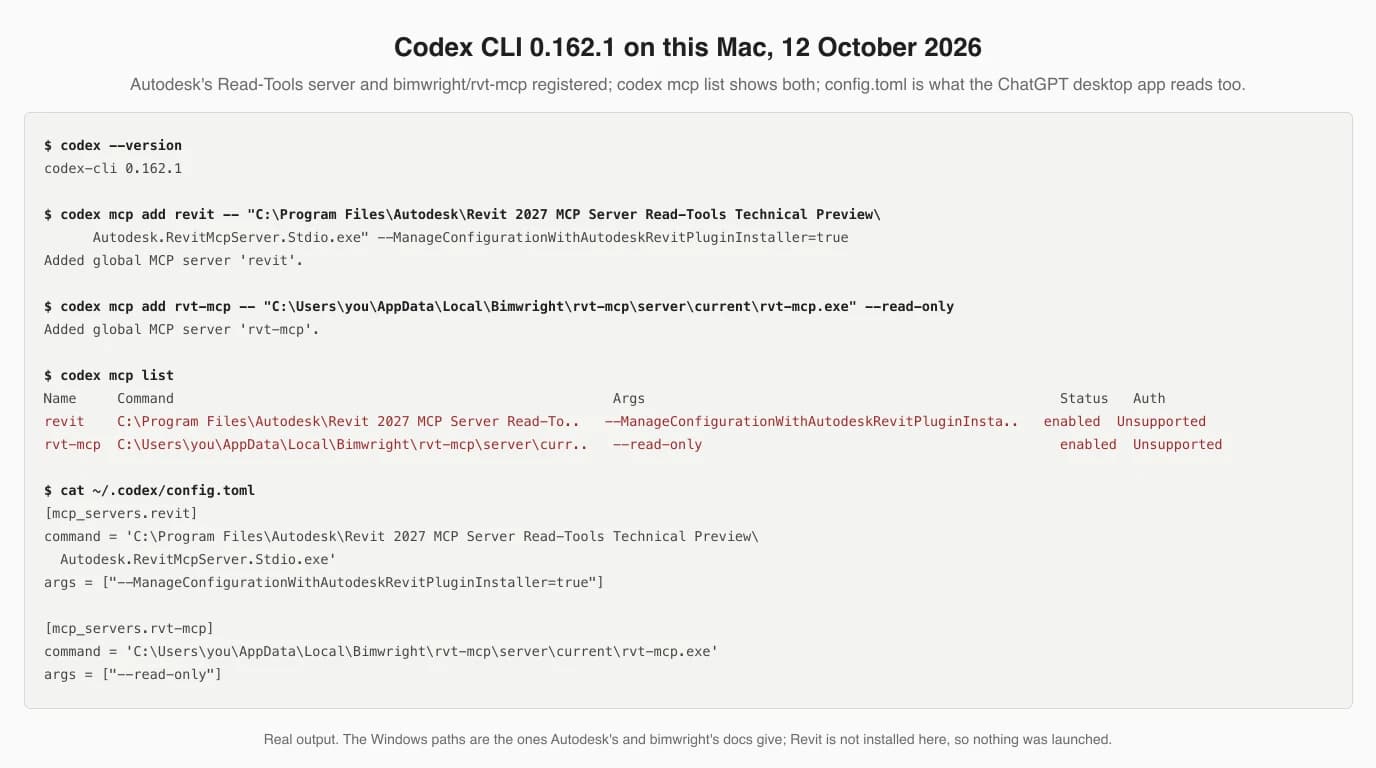
Three things in that output matter. The spaces in Autodesk's folder name went through untouched, because Codex single-quotes the command in config.toml; the short-path workaround on Autodesk's page is for Cursor, not for this. The file is ~/.codex/config.toml, which is why the desktop app and the IDE extension see the server too. And codex mcp add replaces the whole entry, a point rvt-mcp's wiring page makes with a warning about orphaned env tables breaking the config, so re-run it with every argument rather than editing half of one.
[mcp_servers.revit]
command = 'C:\Program Files\Autodesk\Revit 2027 MCP Server Read-Tools Technical Preview\Autodesk.RevitMcpServer.Stdio.exe'
args = ["--ManageConfigurationWithAutodeskRevitPluginInstaller=true"]

[mcp_servers.rvt-mcp]
command = 'C:\Users\you\AppData\Local\Bimwright\rvt-mcp\server\current\rvt-mcp.exe'
args = ["--read-only"]-Client codex, it writes this same entry and backs the config up first. Autodesk's help page says Claude Desktop must be configured manually during the preview and says nothing about Codex at all, so for the official server the line above is the setup.Step 3: check it is there, then ask for something small
- Open Revit with a model first. For rvt-mcp, also start the connection from the ribbon: Add-Ins, then RvtMcp. It stays off until you do, which is a feature.
- Fully restart the ChatGPT desktop app, or start
codexin a terminal, and type/mcp. OpenAI documents the same command in both. Autodesk's own check is to ask “List the available Revit MCP tools,” which also tells you which of the three servers you are talking to. - Ask for something you can verify with your eyes in five seconds. rvt-mcp's README suggests
revit_get_current_view_info, which should return the active view's name and type. Horizun's ishorizun_health. Ours would be “how many doors are on Level 1” on a model where you know the answer. - If the tools do not appear, it is the path nine times out of ten.
codex mcp get revit --jsonshows exactly what is stored. oakplank's advice toTest-Paththe server file before registering it is the cheapest fix there is.
What a working session looks like, with the most watched example: the Archi Vlogs test installs rvt-mcp from the ChatGPT desktop app, then works up from creating sheets and renaming families to schedules and a complete house, by its own description. The title says 14 minutes; the video runs 20. Watch it for what it retries, not for the headline.
Step 4 (optional): reach it from chatgpt.com through a tunnel
Skip this if the desktop app does what you need. It exists for one situation: you want the Revit server available in the ChatGPT website, for a colleague on another machine or a ChatGPT Work workspace, and you will not expose a public endpoint. OpenAI's answer is Secure MCP Tunnel: a daemon called tunnel-client runs on the Revit PC, opens an outbound connection to OpenAI, pulls queued MCP requests, forwards them to the local server and returns the answers. Horizun is the one Revit server whose install table names this route, for ChatGPT Work.
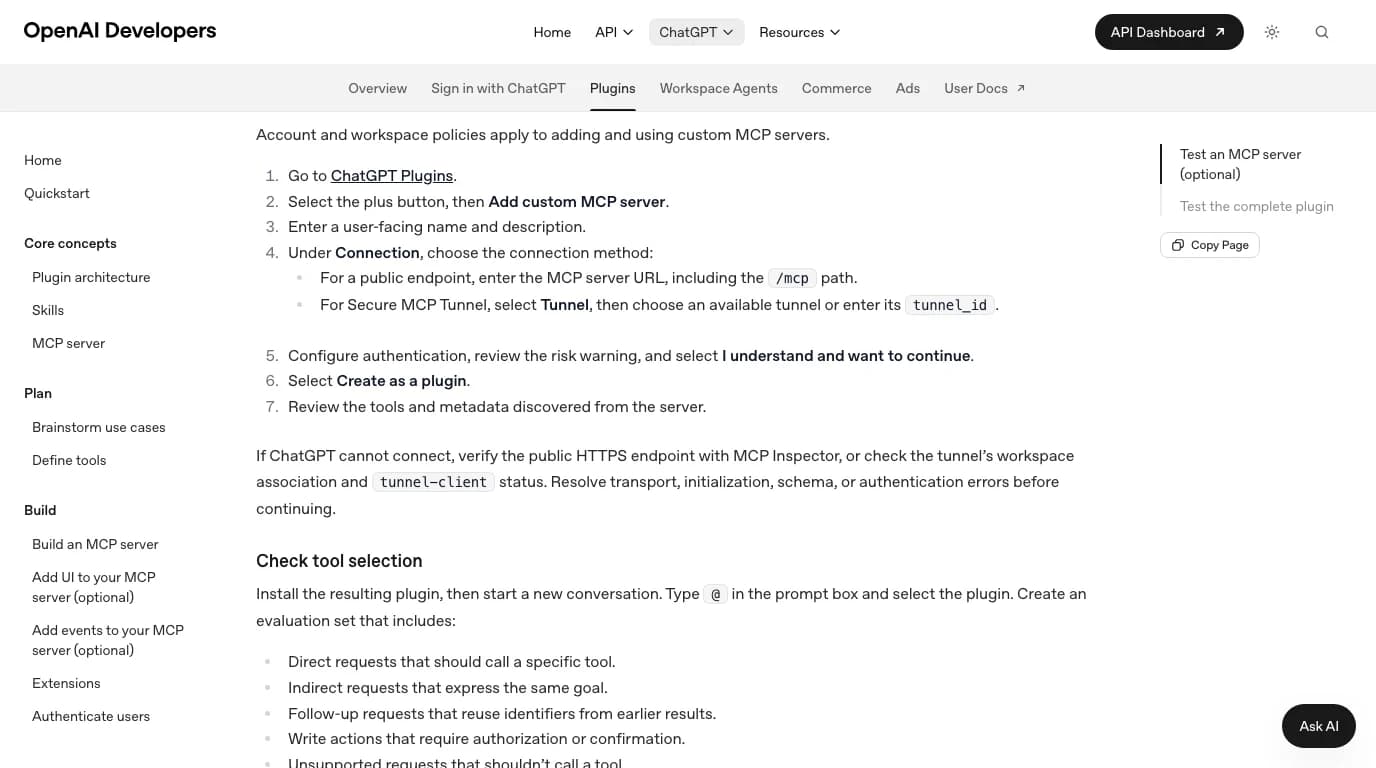
What you need: a Platform organization, which is the API side of OpenAI and separate from your chat plan; a tunnel_id created in Tunnels management; and a runtime API key restricted to Tunnels Read and Use. We ran the client half of this for the ChatGPT and SolidWorks guide two days ago, up to the point where it asks for that key, and nothing about it is Revit-specific: the same tunnel-client init with Autodesk's executable or rvt-mcp.exe as the MCP command. We have not completed a tunnel and will not pretend otherwise.
What the GPT-6 Astra videos actually show
Three videos appeared within ten days of each other in September 2026, and together they are most of the public evidence that ChatGPT can drive Revit. We read their descriptions and checked their dates, lengths and view counts; we did not reproduce them, and we are not going to describe scenes we have not sat through. Here is what each one claims, in its own author's terms, so you can calibrate.
The three rvt-mcp videos the server's README links, as of 12 October 2026
What none of them shows is the thing a firm would need before adopting it: the same prompt run twice, a count checked against a schedule, or a change audited afterwards. That is not a criticism of hobby videos. It is a reason to run the first week on a copy with Autodesk's Read server, or rvt-mcp in --read-only, and to check the model's answers against Revit's own schedules before you let it write.
Which ChatGPT plan you need
This is the question we could not answer from a primary source for SolidWorks, and nothing has changed in two days. OpenAI's MCP page for the desktop app names no plan. Its page for adding a custom MCP server to the website says only that account and workspace policies apply. Third-party guides contradict each other about whether Plus and Pro accounts get custom servers. Open your own Settings and look for MCP servers in the desktop app, or the plus button on the website's Plugins page; that is the real answer for your account.
What is not in doubt: the desktop app and Codex need a ChatGPT sign-in or an API key; the tunnel route needs a Platform organization whatever chat plan you have; Horizun says ChatGPT Work for its tunnel route; and a free account can do the script route below and nothing else on this page.
The route that needs no connection: Dynamo and pyRevit scripts
Type “chatgpt revit” into Google and the suggestions that follow include plugin, mcp, dynamo and astra. The Dynamo one is the oldest and still the most used. People have been asking ChatGPT to write Python for Dynamo's Python node and for pyRevit since 2023, and it covers most of what a working BIM manager wants from “AI in Revit”: rename views to a pattern, fill a parameter from a spreadsheet, create sheets from a list, find every unplaced room.
The method is the same in every tutorial, including IMAGINiT's from September 2025: describe the task, name your Revit version, ask for a Dynamo Python script, paste it into a Python node, run it. That article's own caution is the right one: the scripts “may need to be modified to fit current programming standards.” Three things go wrong, cheapest fix first. The model invents Revit API names and argument orders, so paste the relevant API page into the chat. It writes CPython that you paste into an IronPython node, or the reverse, so tell it which engine your Dynamo uses. And it forgets the transaction, so ask for one explicitly and read the code for it before you run it.
Be honest about what this route is and is not. It is ChatGPT writing code that you run; the model never sees Revit and never learns whether the script did what you meant. It is also the only route that involves no third-party server, no plan beyond the chat window and no trust in anyone's GitHub, which is why it is still the one we would hand to a colleague first.
What we tested, and what we could not
Exactly what this article is based on, 12 October 2026
What to read before you trust any of it
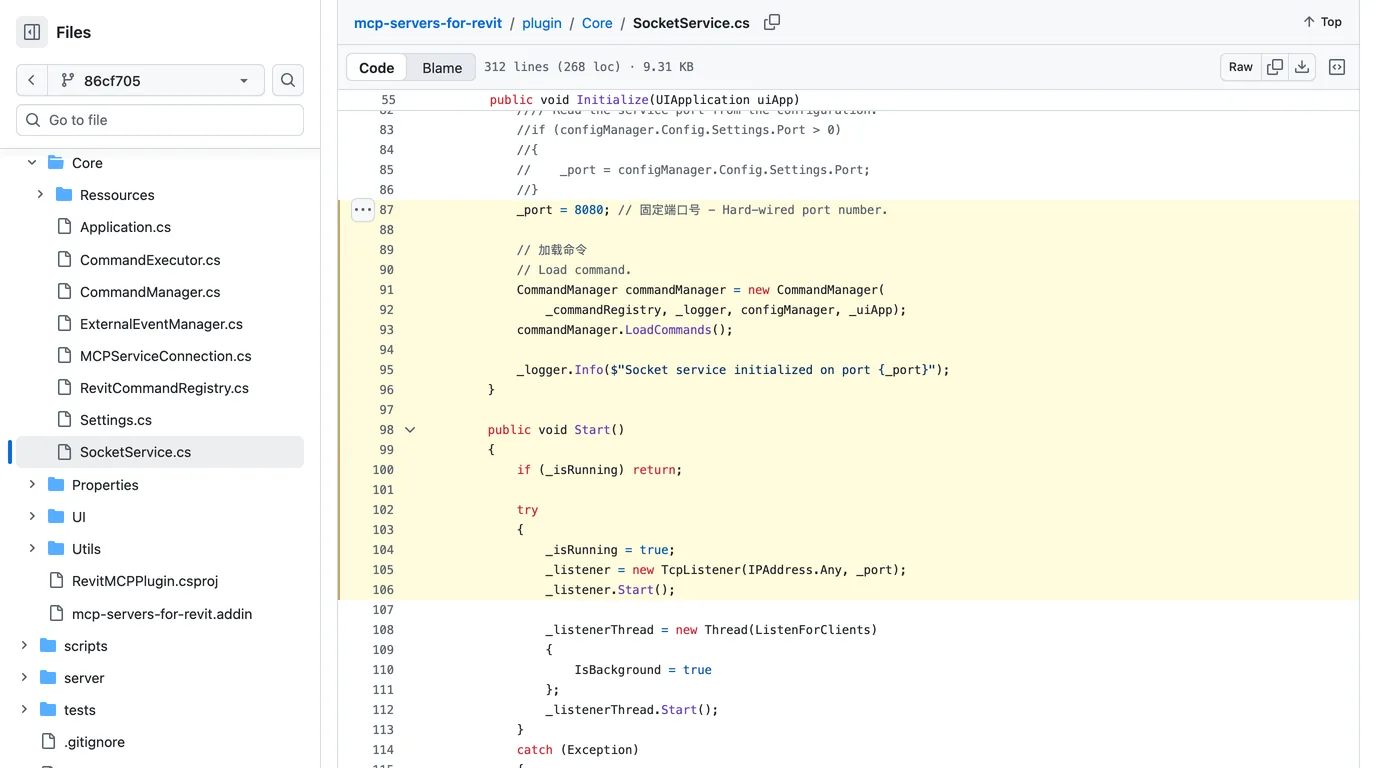
Everything in the Claude guide's security section applies unchanged, because the servers are the same. The finding worth repeating: in mcp-servers-for-revit, the add-in sets port 8080 in code and starts a TcpListener on IPAddress.Any, every interface, with no token, and the same project ships a tool that compiles and runs any C# inside Revit. Nothing about that changes when ChatGPT is the caller.
The ChatGPT-aware servers are, as a group, more careful, and it is only fair to say so. rvt-mcp binds to localhost or a named pipe, checks a token, and has --read-only; but its revit_send_code_to_revit tool, which compiles a C# body inside Revit, is on by default and its README says to keep it out of automatic permissions. Horizun makes Python execution an owner opt-in with a request shown in Revit, and ships releases it says are intentionally unsigned, so Windows will warn. Sam-AEC makes a person approve every change in a panel, and says plainly that its reflection and Python tools have the same permissions as the Revit process.
The OpenAI side adds its own layer. Codex's approval modes can ask before each action, OpenAI's API requires approval of each MCP tool call by default, ChatGPT shows a risk warning before it adds a custom server, and the tunnel guide tells you to create the daemon's key as Restricted with only Tunnels Read and Use. Add the usual rules: a copy of the model, never the central file; code tools off until you need them; and a look at what address the add-in listens on before you switch it on at the office.
What it can and cannot do once connected
- Good at: questions about a model that Revit can answer: how many doors of each type, which rooms have no tag, what is on Level 2. Autodesk's Read server does this without being able to change anything.
- Good at: repetitive documentation work, which is what the videos mostly show: sheets, schedules, view settings, renaming, takeoffs. rvt-mcp has 233 tools for it and prompts that make the agent survey before it writes.
- Good at: scripts and API questions, with or without a connection.
- Not good at: design. A server gives the model a command channel into Revit, not judgement about a building. The house in the video is a house because the prompt said so.
- Not good at: knowing it was wrong. None of the servers checks the result against intent; a person with a schedule open does.
If you came here from the AutoCAD side, the same client logic with different servers is in how to connect GPT-6 Astra to AutoCAD. For Claude users the Revit servers, with our file-reading test, are in how to connect Claude to Revit, and the wider list is in our guide to CAD MCP servers.
Where this fits in a real workflow
None of these servers starts from the thing many renovation and fit-out jobs start from: a paper plan, a site photo, or a part with no drawing at all. TechDraw AI turns a photo into a dimensioned drawing you can export as DWG or DXF, and Revit links or imports a DWG straight into a view, where ChatGPT can then work with it through any of the servers above. We have not tested that hand-off end to end, so treat it as a route to try rather than a promise.
Have a 3D model and need its front, top and side views? Drop it in your browser and get the drawing. Nothing is uploaded.
Open the orthographic projection toolFAQ
Frequently asked questions
Can ChatGPT connect to Revit?
Yes, through an MCP server running on the Windows PC that has Revit open. The ChatGPT desktop app, Codex CLI and the Codex IDE extension can launch a local server directly and share one config file. Autodesk ships an official Revit MCP server for Revit 2027.2 as a Technical Preview; its docs name Claude Desktop and Cursor and say the same pattern applies to other clients that support local MCP servers. On older Revit you need a community server such as bimwright/rvt-mcp, whose installer has a codex option and which is the server in every GPT-6 Astra Revit video we found. The chatgpt.com website cannot see your PC on its own; OpenAI's Secure MCP Tunnel can bridge it.
Is there an official ChatGPT plugin for Revit?
No. Autodesk's official Revit MCP server is a local Windows program that any MCP client can launch, not a plugin in ChatGPT's directory, and Autodesk's own setup page documents Claude Desktop and Cursor. Autodesk Assistant, the chat panel inside Revit 2027, is Autodesk's own Tech Preview and Autodesk does not say which model it runs on. Everything that lets ChatGPT drive Revit today is either that local server or community code.
Which Revit MCP server works with ChatGPT?
Any of them in principle, because MCP is the same protocol whichever model calls it. Four document OpenAI clients explicitly as of 12 October 2026: bimwright/rvt-mcp's installer accepts -Client codex and its README links three ChatGPT Astra videos; Horizun's installer table lists Codex and ChatGPT Work through Secure MCP Tunnel; Sam-AEC's aec-model-bridge says it works with Claude and Codex and shows every change in a Revit panel for approval; oakplank/RevitMCP has a Quick Start: Codex section. The most starred one, mcp-servers-for-revit, documents only Claude and Cline and listens on every network interface with no password.
Do I need the ChatGPT desktop app, or can I use the website?
For a server on your own PC, the desktop app or Codex is the direct route. OpenAI's docs give the path: Settings, MCP servers, Add server, STDIO, then Restart; or codex mcp add revit followed by the server's command. The website only reaches servers that are public over HTTPS or connected through OpenAI's Secure MCP Tunnel, which needs a Platform organization, a tunnel id and a restricted API key. Horizun's server documents the tunnel route for ChatGPT Work users.
Which ChatGPT plan do I need?
OpenAI's Codex documentation for MCP servers names no plan, and its page for adding a custom MCP server to the website says only that account and workspace policies apply. Third-party guides contradict each other about Plus and Pro, so check your own Plugins page. The desktop app and Codex need a ChatGPT sign-in or an API key, and Secure MCP Tunnel needs a Platform organization whatever your chat plan. A free account can do the Dynamo script route and nothing else on this page.
Does this work on a Mac?
Only through Windows. Revit 2027 needs Windows 11, and Autodesk's only documented Mac setup is Windows 11 in Parallels Desktop on Apple silicon. Every server is a Windows add-in plus a local program, so the ChatGPT desktop app or Codex has to run inside the same Windows machine or VM. What a Mac user can always do is give ChatGPT the IFC that Revit exports, which in our Claude test answered every question about a real model exactly.
Can ChatGPT write Dynamo or pyRevit scripts for Revit?
Yes, and that is what most people searching for this have done since 2023. Ask for a Python script for Dynamo's Python node or for pyRevit, paste it, run it. It needs no server, no plan beyond the chat window and no trust in third-party code. The failure modes are the usual ones: Revit API names the model half remembers, code written for CPython pasted into an IronPython node, and edits made outside a transaction. Pasting the relevant API page into the chat fixes most of it.
Is it safe to let ChatGPT control Revit?
It depends almost entirely on the server. rvt-mcp binds to localhost or a named pipe, asks for a token and can run with --read-only, but its send_code tool, which compiles and runs C# inside Revit, is on by default. mcp-servers-for-revit opens port 8080 on every network interface with no password. Sam-AEC's server makes a person approve each change in a Revit panel. On the OpenAI side, Codex has approval modes that ask before actions, the API requires approval of each MCP tool call by default, and the tunnel guide says to give the daemon a key restricted to Tunnels Read and Use. Work on a copy of the model, never the central file.
Sources
- OpenAI: Model Context Protocol in Codex, ChatGPT desktop app surface (Settings, MCP servers, shared config.toml)
- OpenAI: Connect and test your plugin (adding a custom MCP server to ChatGPT web, Tunnel option)
- OpenAI: Secure MCP Tunnel (API docs)
- Autodesk Help: Setting Up Revit Public MCP Server (Technical Preview)
- Autodesk Help: Revit MCP Server tools
- Autodesk AEC blog: Introducing the Revit Public MCP Server (June 2026)
- Autodesk: Autodesk Assistant transparency card (PDF)
- Autodesk: System requirements for Revit 2027 products
- bimwright/rvt-mcp (Apache-2.0)
- bimwright/rvt-mcp: docs/mcp-client-wiring.md (Codex section)
- bimwright/rvt-mcp: AGENTS.md, the agent install protocol
- HorizunGroup/horizun-revit-mcp (Apache-2.0)
- Sam-AEC/aec-model-bridge (GPL-3.0)
- oakplank/RevitMCP (MIT)
- mcp-servers-for-revit/mcp-servers-for-revit (MIT)
- mcp-servers-for-revit/mcp-server-for-revit-python (pyRevit, MIT)
- IMAGINiT: Chat GPT for Revit Use (Ramsey Sufian, September 2025)
- Model Context Protocol: official specification and docs