SVG to STL Converter
Extrude an SVG into a 3D printable STL. Your own paths, at a thickness and size you set in millimetres.

Drop a file here. It never leaves your browser.
DXF (ASCII or binary), DWG (R14 to 2018+), SVG · any size · free · STL first, DXF, DWG, PNG, JPG, PDF one click away
Have a different file? DXF to STL Converter · DWG to STL Converter


How to convert an SVG to STL
Add your SVG
Drop an SVG onto the tool, or click to choose one. It is read in your browser and never uploaded.
Check the preview
Zoom the preview, switch off any layers you do not want, set the thickness and the size.
Download STL
Click Download STL. DXF, DWG, PNG, JPG, PDF are one click away from the same file.
What happens to your file
The SVG's own paths are used as the outline — it is not traced, so there is no pixel noise and no vectorising step in between. Every filled or closed subpath becomes a contour, curves are flattened to 0.05 mm, holes are sorted from outlines by nesting, and the result is extruded to the thickness you set and written as a watertight binary STL at the artwork's real size. A path that is only stroked and never closed has no inside to fill, so it is left out and counted.
Whatever cannot be converted is listed under the preview by type and count, so a file whose artwork is really an embedded photo, or whose shape is painted by a gradient or a clip path, tells you so instead of coming out quietly incomplete. Need a photo or scan turned into a drawing instead? That is the image to DXF converter and the AI drawing generator.
From artwork to solid, in three steps
Each picture below is the real output of this converter, drawn by the same code that runs when you drop a file on it — the flat views from the reader, the isometric from the projection engine.

Your paths, already geometry
Nothing is traced. A raster converter has to guess where the edge of a shape falls between one pixel and the next, and every guess costs accuracy. An SVG has no pixels to guess about: the circle in this gasket is stored as a circle, so the converter reads a centre and a radius rather than inventing them.

Outlines sorted from holes
Every closed shape is ranked by what encloses it. A shape inside another is a hole, a shape inside a hole is solid again, and the count is shown before you export — this gasket reports one outline and seven holes. Shapes drawn as strokes have no inside, so they are listed as skipped rather than quietly left out.

Extruded, closed, at real size
The walls are built from the same points that bound the top and bottom faces, so every edge is shared by exactly two triangles and a slicer can tell inside from outside. Thickness is what you set. Width and height come from the file, so a gasket drawn at 76 mm arrives in the slicer at 76 mm.
Six files, six solids
Ordinary flat parts, each one an SVG in and an STL out at the thickness named under it. The counts are what the converter reports for that file, not a round number chosen to look good.
Flange gasket
One outline, one bore, six bolt holes
1 outline, 7 holes · 76 × 76 × 2 mm · 11,544 triangles
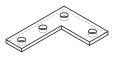
Angle bracket
An L cut from plate, four fixings
1 outline, 4 holes · 82 × 62 × 4 mm · 5,796 triangles
Keyring tag
Rounded outline, a hanging hole and a slot
1 outline, 2 holes · 66 × 30 × 3 mm · 9,748 triangles

Spacer ring
A hole inside a hole comes back solid
2 outlines, 1 hole · 66 × 66 × 6 mm · 4,316 triangles

Index plate
Twelve teeth and a hex bore
1 outline, 1 hole · 71.4 × 71.4 × 5 mm · 216 triangles

Stencil plate
Counters stay open, islands stay solid
3 outlines, 2 holes · 84 × 48 × 1.5 mm · 4,940 triangles
Two things decide whether your file works
Almost every SVG that refuses to become a usable STL fails for one of these two reasons, and both are fixed in the drawing, not in the converter. Worth knowing before you blame the file.
Strokes have no inside
A line drawn with a 2 mm stroke looks solid on screen, but the file holds a path with no width and an instruction to paint along it. There is nothing to extrude: no inside, no outside, no area. Filled shapes are the ones that become solids, and a fill closes its outline by definition, so a filled path works even when it never ends in a Z.
The fix takes a moment in the program that drew it: Path → Stroke to Path in Inkscape, Object → Expand in Illustrator. Both turn each stroke into a real outline with two sides. Text needs the same treatment — Path → Object to Path, or Type → Create Outlines — because a letter is a font reference until you outline it.
An SVG may not know how big it is
SVG was built for screens, so a file that says width="960" means 960 CSS pixels, and the only honest reading of that in the physical world is the web's own 96 pixels per inch: 254 mm. A file that says width="210mm", which is what Inkscape writes, means 210 mm and is mapped onto its viewBox exactly.
Both are handled, and the size read from the file is shown the moment it opens — check it there rather than in the slicer. If it is not what you drew, set the longest side in millimetres and the whole model is scaled to match. An STL carries no units at all, so a slicer simply assumes millimetres, which is what gets written.
One limit, stated plainly: two holes that overlap each other — a round bore with a keyway cut into it, say — are extruded as two holes rather than merged into one, and the surface where they cross is not closed. Most slicers repair that without complaint, and the STL repair tool will tell you whether yours needs it, but if the mesh has to be watertight, draw the bore and its keyway as one shape.
About formats
SVG (Scalable Vector Graphics) is the W3C's XML format for two dimensional vector graphics, first published as a Recommendation in September 2001 and now in its 1.1 and 2.0 editions. A file is plain text: paths written as move, line, cubic and quadratic Bézier and elliptical arc commands, plus rectangles, circles, ellipses, polygons, text, groups and transforms, with styling through attributes or CSS. It was designed for screens, which is why its units are CSS pixels at 96 per inch unless the document declares a physical width, and why it carries things a cutter has no use for, such as gradients, filters, clipping and raster images. Every browser renders it natively, and Inkscape, Illustrator, Affinity and Figma all treat it as a primary export, which makes it the most common way vector artwork arrives at a laser or CNC shop. The step from SVG to CAD is less about geometry, which is already vector, and more about units, curves and which elements count: a converter has to decide what a pixel is in millimetres, flatten the Béziers to a tolerance the machine can follow, and leave out the decoration.
- Developer:
- W3C
- Initial release:
- September 2001
Frequently asked questions
Is SVG to STL conversion free?
Yes, with no watermark and no file limit. Everything runs in your browser, so the file never leaves your computer; a free account is needed only to download a converted file. Viewing needs no account at all.
Is my SVG uploaded anywhere?
No. The file is opened by JavaScript running in your browser tab and never sent to a server. You can disconnect from the internet after the page loads and the tool keeps working. That is the main reason to prefer this over an upload-and-email converter for a drawing you are not allowed to share.
How is the size decided?
From the file. If the SVG declares a physical width or height (Inkscape writes width="210mm"), the viewBox is mapped onto it and the drawing comes out at that size. If it only has pixel dimensions, the CSS convention of 96 pixels per inch applies, so a 960 px wide SVG becomes 254 mm. The size is shown after the file opens, and on the STL pages you can override it.
What in the SVG is converted?
Paths (all commands, including arcs and relative coordinates), rectangles with and without rounded corners, circles, ellipses, lines, polylines, polygons, text as a label, and <use> references, with every nested transform applied. Groups become layers. Gradients, filters, masks, clip paths and embedded images have no geometry and are skipped; text is not outlined, so convert text to paths in your editor first if you need it cut.
Why does it say some paths were left out?
An STL is a closed solid, and only a closed outline can bound one. Artwork that is drawn as strokes rather than shapes — a signature, an outlined sketch, a line drawing exported straight from a pen tool — has a thickness on screen but no inside, so there is nothing to extrude and those paths are skipped and counted. The fix is in your editor: Path → Stroke to Path in Inkscape, or Object → Expand in Illustrator, turns each stroke into a real outline with two sides. A filled shape does not need this even if its path never ends in Z, because a fill closes the outline by definition.
How are holes handled?
By nesting. A closed outline inside another closed outline is a hole; an outline inside a hole is solid again, so the counter of a letter O and the island inside it both come out right. The mesh is built so every edge is shared by exactly two triangles, which is what a slicer needs to tell inside from outside. The exception, since it is easier to hear it here than to find out in the slicer: two holes that overlap each other — a bore with a keyway cut into it, say — are cut as two holes rather than merged, and the surface where they cross is left open. Draw that pair as one shape and it closes.
What size will the STL be?
The drawing's real size by default, taken from the SVG's own units, so a 100 mm plate prints at 100 mm. You can instead set the longest side, which scales the whole model. Thickness is the extrusion height. An STL carries no units, and every slicer assumes millimetres, so that is what is written.
Is this the same as an AI image-to-3D generator?
No, and for an SVG that is the point. An AI generator guesses at a shape it cannot see and hands back a mesh that approximates your artwork. An SVG already contains the exact outline, so there is nothing to guess: the same coordinates you drew become the wall of the solid, edge for edge. A circle stays round, a 40 mm square stays 40 mm, and running the file twice gives you the identical mesh. That makes this the right tool for a logo, a badge, a stencil, a gasket or a nameplate, and the wrong one for turning a photograph of an object into a model of the object.
Can I do this in Tinkercad, Inkscape or my slicer instead?
Yes, by several routes, and they are worth knowing. Tinkercad imports an SVG and lets you set the height, which is fine for one shape but asks you to sign in and works in its own units. Recent Bambu Studio and Orca Slicer can drop an SVG straight onto the plate as a part, which is the fastest path if you only ever print it there and never need the file itself. Inkscape is not an exporter here — it is where you fix a file first, by turning strokes into paths and text into outlines. This page exists for the case those leave out: you want the STL itself, at a size you set in millimetres, without an account, and without the file leaving your machine.
Can I keep the colours of a multi-colour SVG?
Not in an STL, and no tool can: the format stores triangles and nothing else — no colour, no materials, no names. Colour areas that sit side by side do come through as separate solids in the same mesh, correctly placed, so you can assign filaments to them in your slicer. One caveat worth knowing before you print: a shape that sits entirely inside another is read as a hole rather than as a second body, because that is what nesting means for an outline — it is what makes the counter of a letter O come out right, and it is not what you want if you meant the inner colour as a raised inlay. Split those into two files and print them as two parts.
What is not converted?
Anything in the file that is a picture rather than a shape: embedded or linked raster images, gradients, filters, masks and clip paths. Text stays text — it is carried as a label, not outlined — so convert it to paths in your editor if it has to be cut or printed. Whatever was skipped is listed under the preview after the file opens, by element type and count, so nothing disappears silently.
I have a DXF or DWG instead. Can I still use this?
Yes. The converter on every one of these pages accepts DXF, DWG and SVG, whichever page you started from, and offers every output it can produce from that file.
Is there an API for SVG to STL?
Not for this tool yet. The converter runs entirely client-side. The REST API, command line tool and MCP server currently cover image to DXF, DWG and STL; if you need vector conversion in a pipeline, say so at the contact page and it moves up the list.