
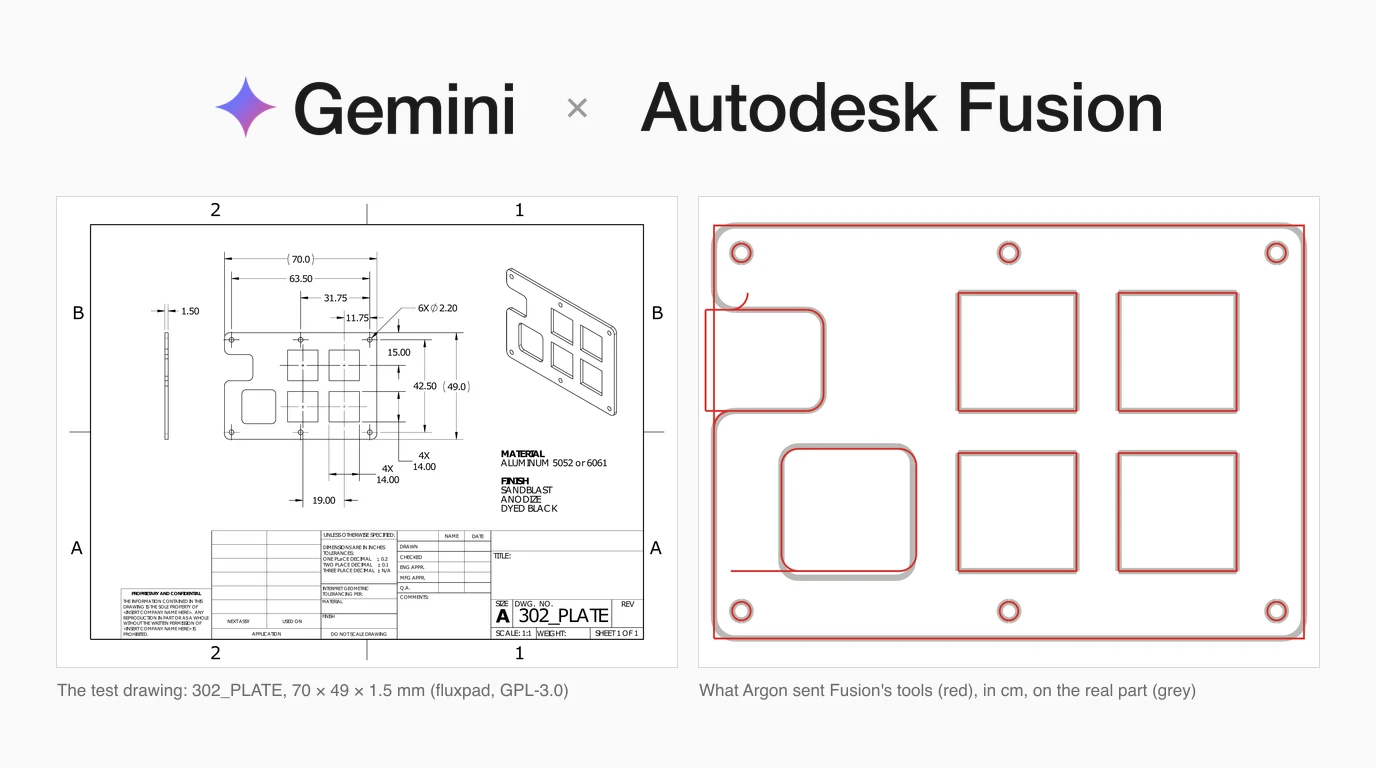
Fusion is the one program in our Gemini 4 Argon series where the vendor's own server is open to any client: tick a box in Fusion and it serves an MCP endpoint on your own machine. Getting Gemini 4 Argon onto it is a two-line Antigravity config, and neither Autodesk nor Google documents it. The real question is what Argon does once it is connected, so we ran it 12 times against the real tool lists of two Fusion MCP servers and measured every value it sent. We do not have Fusion on our test Mac, so these were dry runs, and we say exactly what that does and does not prove.
Our articles are still written by humans!
Get human written articles in your Google feed.

Can Gemini 4 Argon connect to Fusion 360?
Yes. Autodesk Fusion has a built-in MCP server that you switch on in Preferences, and it listens at http://127.0.0.1:27182/mcp over Streamable HTTP with no sign-in. Google Antigravity can connect to a server like that with a serverUrl entry, and Gemini 4 Argon supports the function calling that MCP tools rely on.
What neither company does is put the two together. We read all 33 pages of Autodesk's MCP documentation on 18 October: Gemini, Gemini CLI and Antigravity appear on none of them. The local server's pages name Claude Desktop, Cursor and VS Code, then say “any other client that supports MCP over Streamable HTTP can connect to the same URL”. Google's Argon announcement does not mention CAD. So this is a supported protocol, not a supported pairing, and the steps below are built from both sides' documentation. If you use Claude or ChatGPT instead, the same server is covered in how to connect Claude to Fusion 360 and how to connect ChatGPT to Fusion 360.
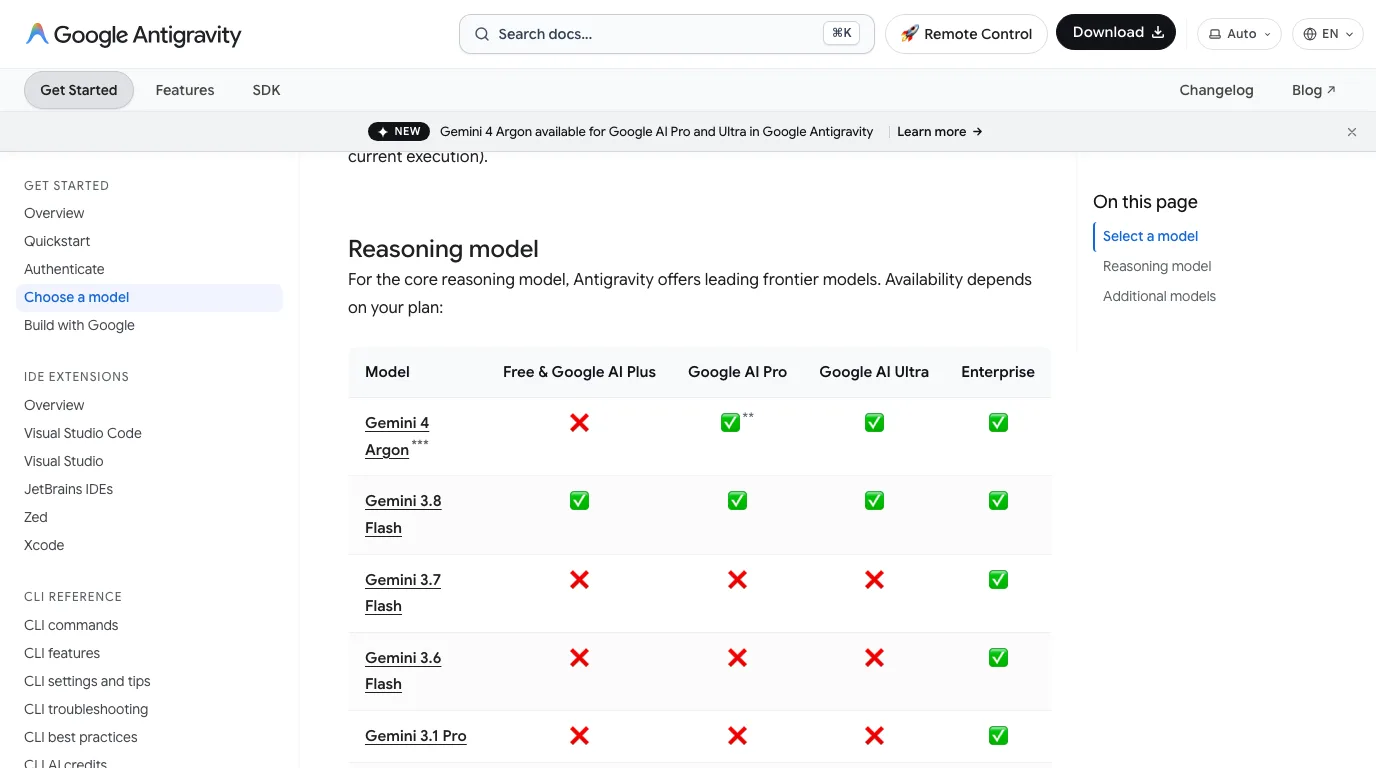
Gemini 4 Argon, from Google's model, pricing and Antigravity pages, 18 October 2026
What you need, and which Antigravity
- Fusion desktop, recent enough to have the MCP option. Autodesk's troubleshooting table says that if the checkbox and port are missing, your Fusion version does not include MCP support and you should update. Autodesk does not say whether the local server needs a paid subscription; we found no statement either way.
- A plan that includes Argon. Antigravity's model page lists it for Google AI Pro (non-trial subscriptions only), Ultra and Enterprise. Google's developer announcement is narrower and mentions Ultra subscribers, so check your own model picker.
- The right Antigravity. A footnote on the same page says Argon is “not available in Antigravity IDE”, only in the Antigravity App, the Antigravity CLI and the IDE extensions. Most Fusion setup videos use the IDE, which means they run a different Gemini model.
Step 1: switch the server on in Fusion
- Start Fusion and keep it open. The server only exists while Fusion runs.
- Open Preferences, go to General > API, and tick Fusion MCP Server (runs locally on this device).
- Leave the port at
27182unless something else uses it. If you change it, change the URL in Step 2 to match. - Click Apply, then open or create a design.
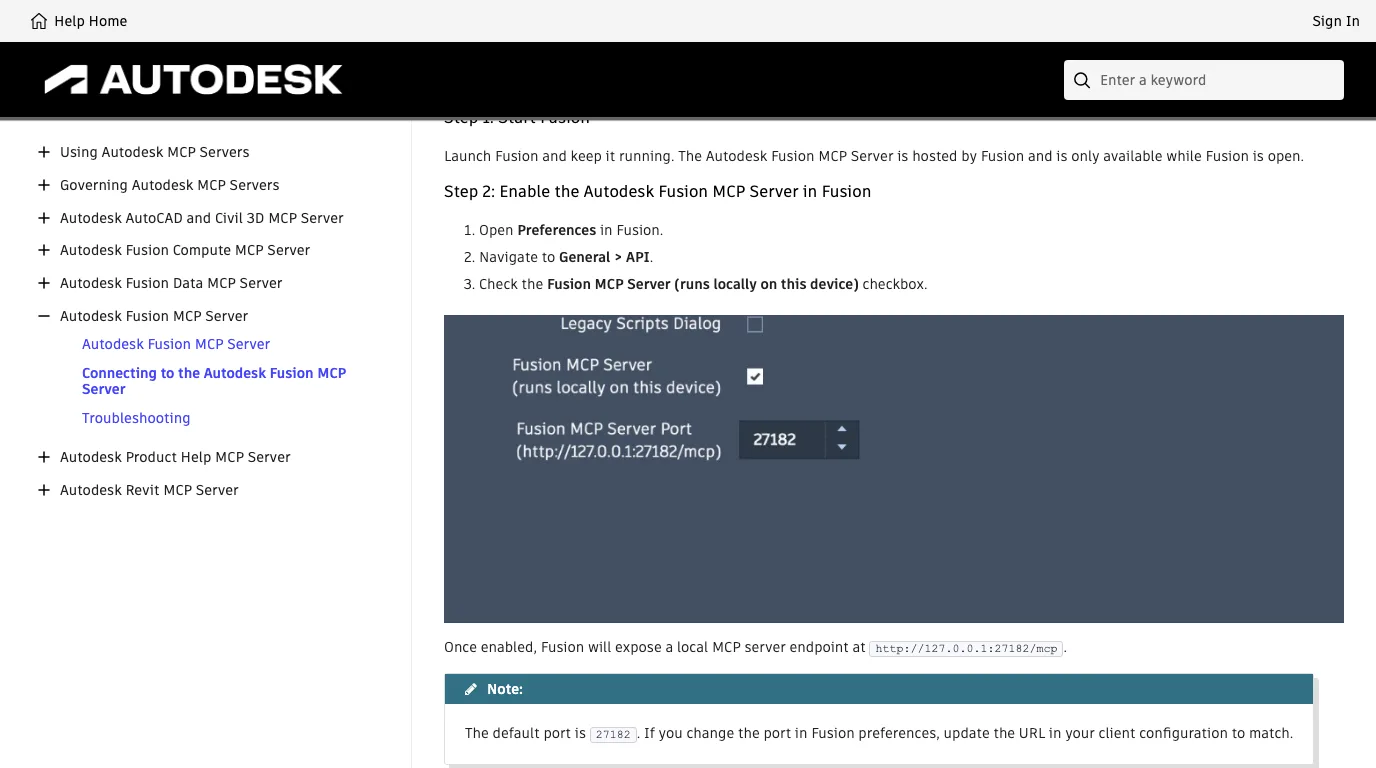
The server has no login. Autodesk's documentation calls it “local-only” and says local servers “are unauthenticated by design”, so nothing on your network can reach it, but any program on your own computer can while the box is ticked.
Step 2: add it to Antigravity
Antigravity's CLI reads global MCP servers from ~/.gemini/config/mcp_config.json, and project servers from .agents/mcp_config.json in the project folder. Add this:
{
  "mcpServers": {
    "fusion": {
      "serverUrl": "http://127.0.0.1:27182/mcp"
    }
  }
}serverUrl: Antigravity's MCP docs say “legacy fields like url or httpUrl aren't supported”, and those are the keys Cursor, VS Code and Gemini CLI configs use. Second, Antigravity's docs only show https examples and say nothing about a plain http://127.0.0.1 address. A third-party setup video (below) shows exactly this entry working, so we expect it to, but we have not run it ourselves.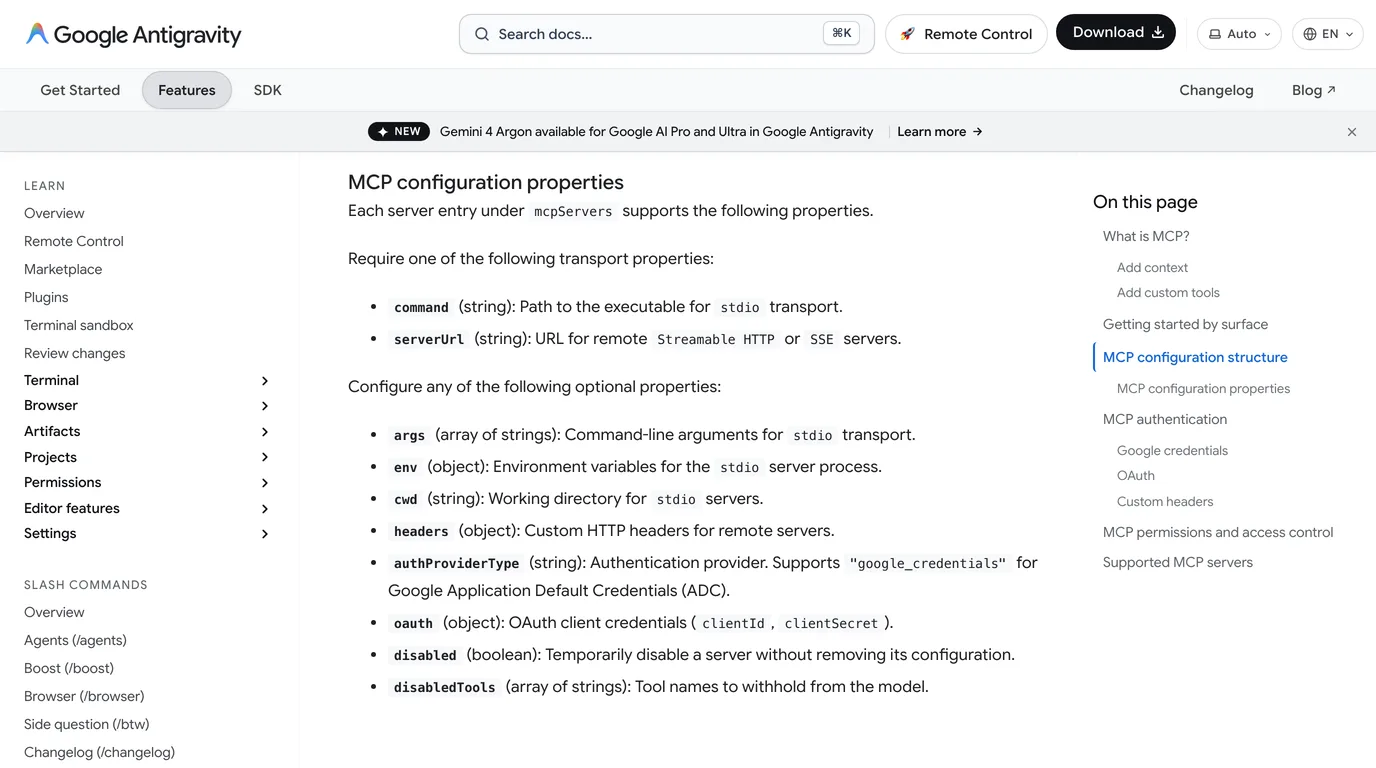
Leave Antigravity's default approval on. Its docs say unconfigured MCP tools run in Ask mode, so you confirm each call before it reaches Fusion. That matters more for Fusion than for most servers: every Fusion server we looked at has a tool that runs code inside Fusion.
Step 3: check it, then start small
Start Fusion with the server ticked first, then Antigravity. Ask it to list the Fusion tools it can see. Autodesk does not publish a fixed list for this server; its page says tools are “discovered by your MCP client at connection time and may change”. Two independent third-party sources report four: fusion_mcp_read, fusion_mcp_execute, fusion_mcp_update and fusion_mcp_electronics_read. Treat those names as unconfirmed until your own client lists them.
Then three prompts, in this order:
- “Describe the open design: its bodies, sketches and units.” This proves it can read, and shows you how it reports units before it writes anything.
- “Make a 20 mm cube at the origin, then tell me its bounding box in millimetres.” If the box comes back as 2 mm or 200 mm, you have found the unit problem in Test 1 before it cost you anything.
- Only then a real part, on a saved copy, with every call approved.
If it fails, Autodesk's troubleshooting table has a row for most cases. For clients other than Claude it gives two causes when they cannot connect, a wrong URL or a firewall blocking port 27182, and if commands connect but do nothing, no document is open in Fusion. Our Claude and Fusion guide walks through the rest of it.
The cloud server, and why Antigravity may not sign in
Autodesk also runs Fusion in its cloud through the Fusion Compute MCP server, at https://developer.api.autodesk.com/da/v3/mcp/fusion. Its launch post of 15 September lists Antigravity among its clients, next to Claude, ChatGPT and VS Code. It needs an Autodesk account, an active Fusion licence and a Fusion Team hub, and allows two sessions of up to an hour each, ending after 15 minutes idle.
The documentation tells a different story from the blog. Its connecting page covers Claude Desktop, VS Code, Claude Code, Codex and ChatGPT on the web, with no Gemini or Antigravity section, and its authentication page says sign-in uses CIMD, with dynamic client registration only “planned”. Antigravity's docs say it handles OAuth automatically for servers that support dynamic client registration, and otherwise needs a client id and secret you supply, which Autodesk does not document for this server. Put together, we would not expect Antigravity to sign in today. That is an inference from the two sets of docs; we had no Fusion licence to try it with. The local server in Steps 1 to 3 avoids the question entirely.
Community servers, and what their tool lists cost
Before Autodesk built its own, Fusion MCP servers were community add-ins, and two of them are worth knowing because we used their real tool lists in our tests:
- FusionMCPSample, Autodesk's own MIT-licensed reference server. Four tools: run a Python script in Fusion, take a screenshot, search the API docs, and load a best-practices file. Its authors call it “a functional sample, not a product”. It is the closest public stand-in for how the built-in server likely works, though we cannot confirm that.
- faust-machines/fusion360-mcp-server, MIT, 93 tools, one per operation: draw a rectangle, extrude, fillet, export, even CAM. It runs over stdio, so in Antigravity it is a
commandentry, plus an add-in inside Fusion. Its TCP socket has no authentication, which its README says to keep off any untrusted network.
Every tool reaches Argon as a function declaration, and the whole list is sent again on every turn. We sent each list to gemini-4-argon and read the token count the API returned. Argon accepted both as they are. Google's function-calling guide says to keep the active set to 10 to 20 tools, and faust-machines' 93 are far past that.
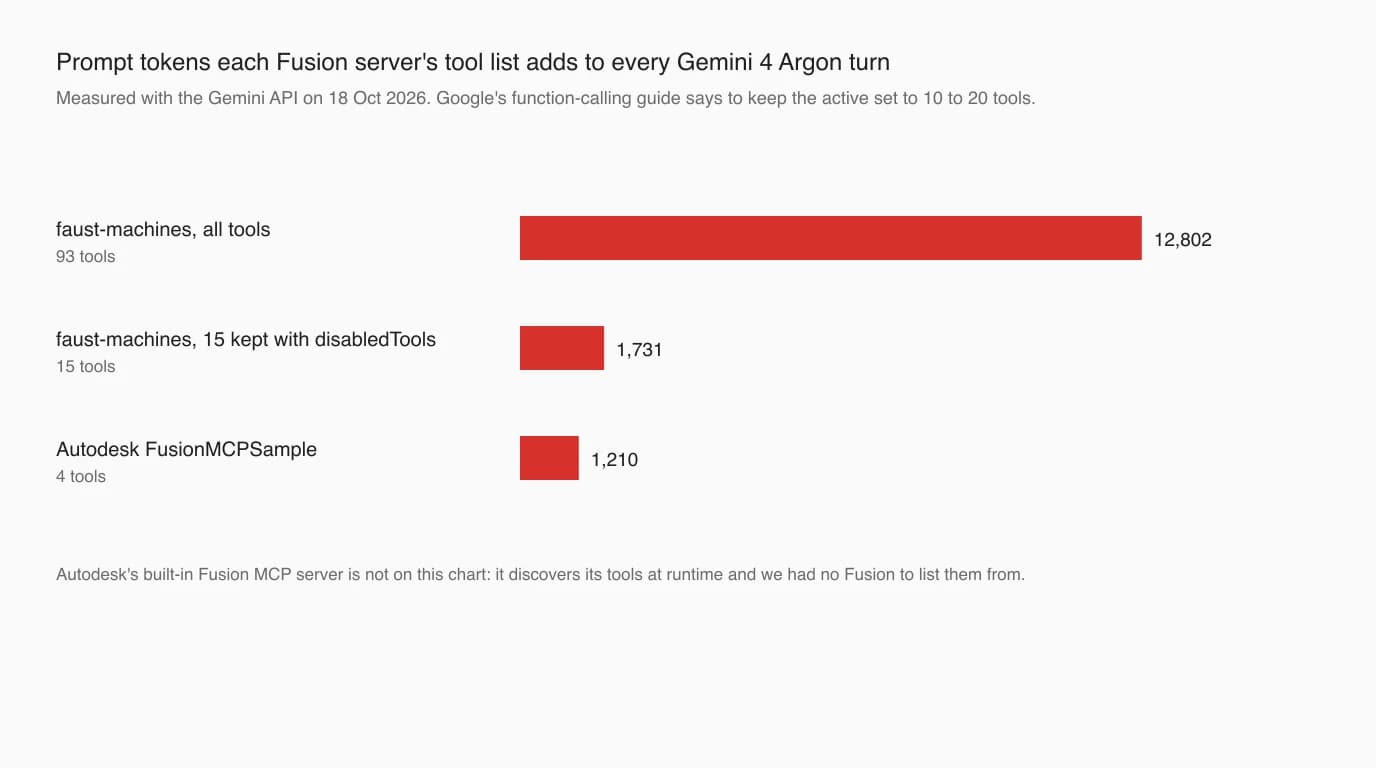
Antigravity's disabledTools fixes it. For part modelling we kept 15 tools (sketch, rectangle, circle, line, arc, extrude, fillet, hole, rename, scene info, bounding box, render, undo, STEP export and ping) and withheld the rest, including execute_code, which runs arbitrary Python:
{
  "mcpServers": {
    "fusion360": {
      "command": "uvx",
      "args": ["fusion360-mcp-server", "--mode", "socket"],
      "disabledTools": [
        "get_object_info", "revolve", "chamfer", "shell", "mirror", "move_body",
        "export_stl", "boolean_operation", "delete_all", "execute_code", "sweep",
        "loft", "create_polygon", "rectangular_pattern", "circular_pattern",
        "create_component", "add_joint", "list_components", "export_f3d",
        "export_view_sheet", "export", "import_mesh", "get_parameters",
        "create_parameter", "set_parameter", "delete_parameter", "add_constraint",
        "auto_constrain", "add_dimension", "create_construction_plane",
        "create_construction_axis", "create_ucs", "draw_spline", "offset_curve",
        "trim_curve", "extend_curve", "create_thread", "draft_faces", "split_body",
        "split_face", "offset_faces", "scale_body", "create_box",
        "create_box_parametric", "create_cylinder", "create_sphere", "create_torus",
        "create_as_built_joint", "create_rigid_group", "measure_distance",
        "measure_angle", "get_physical_properties", "create_section_analysis",
        "check_interference", "compare_meshes", "set_appearance", "set_color",
        "project_geometry", "suppress_feature", "unsuppress_feature",
        "patch_surface", "stitch_surfaces", "thicken_surface", "ruled_surface",
        "trim_surface", "create_flange", "create_bend", "flat_pattern", "unfold",
        "cam_create_setup", "cam_create_operation", "cam_generate_toolpath",
        "cam_post_process", "cam_list_setups", "cam_list_operations",
        "cam_get_operation_info", "get_design_type", "set_design_type"
      ]
    }
  }
}
We could not measure the built-in server's list, because it is only served by a running Fusion. If the four reported tools are right, it is a short list, closer to the reference server's 1,210 tokens than to 12,802.
How we tested it without Fusion
Without Fusion we could not watch Argon build a part, and we are not going to pretend we did. What we could test is what it sends, which is where Fusion goes wrong most often: the numbers.
- Two real tool lists. FusionMCPSample's four tools, with their descriptions copied from its source, and the 93 tools of faust-machines, read out of its source file without running it. Argon was told it was a dry run: calls would be accepted, but no screenshot or measurement would come back.
- A recorder in place of Fusion. Every script Argon sent the reference server, we ran against a stand-in for Fusion's Python API that records each point, circle, extrude and value, in centimetres as Fusion would read them, inside a sandbox with no network. For faust-machines, we scored the call arguments directly.
- Two parts, three runs each, per server. An L-shaped bracket described in words (80 × 60 × 5 mm, two Ø8 mm holes), the same one as in our AutoCAD test; and the drawing of the switch plate from the open source fluxpad keypad (GPL-3.0), attached as an image. It is a 70 × 49 × 1.5 mm plate with six Ø2.2 mm holes and four 14 mm squares on a 19 mm pitch, the same part as in our AutoCAD and SolidWorks tests, scored against the designer's own STEP.
The recorder's weakness is deliberate and important: it accepts any API call, so a script that would crash in Fusion runs to the end in ours. We never scored “it ran”. We scored the geometry, and then read every script by hand for the things a recorder cannot catch.
Test 1: Fusion's centimetre trap
Fusion's API has one rule that catches people and models alike. Autodesk's units page says lengths always use the internal unit, centimetres, “without any exceptions”, whatever units your design displays. A script that sends 70 for a 70 mm edge gets a 700 mm edge, and nothing warns you. The faust-machines code has a comment on exactly this bug in its own parameter handling, describing the real-versus-string choice as “the thing that was wrong”.
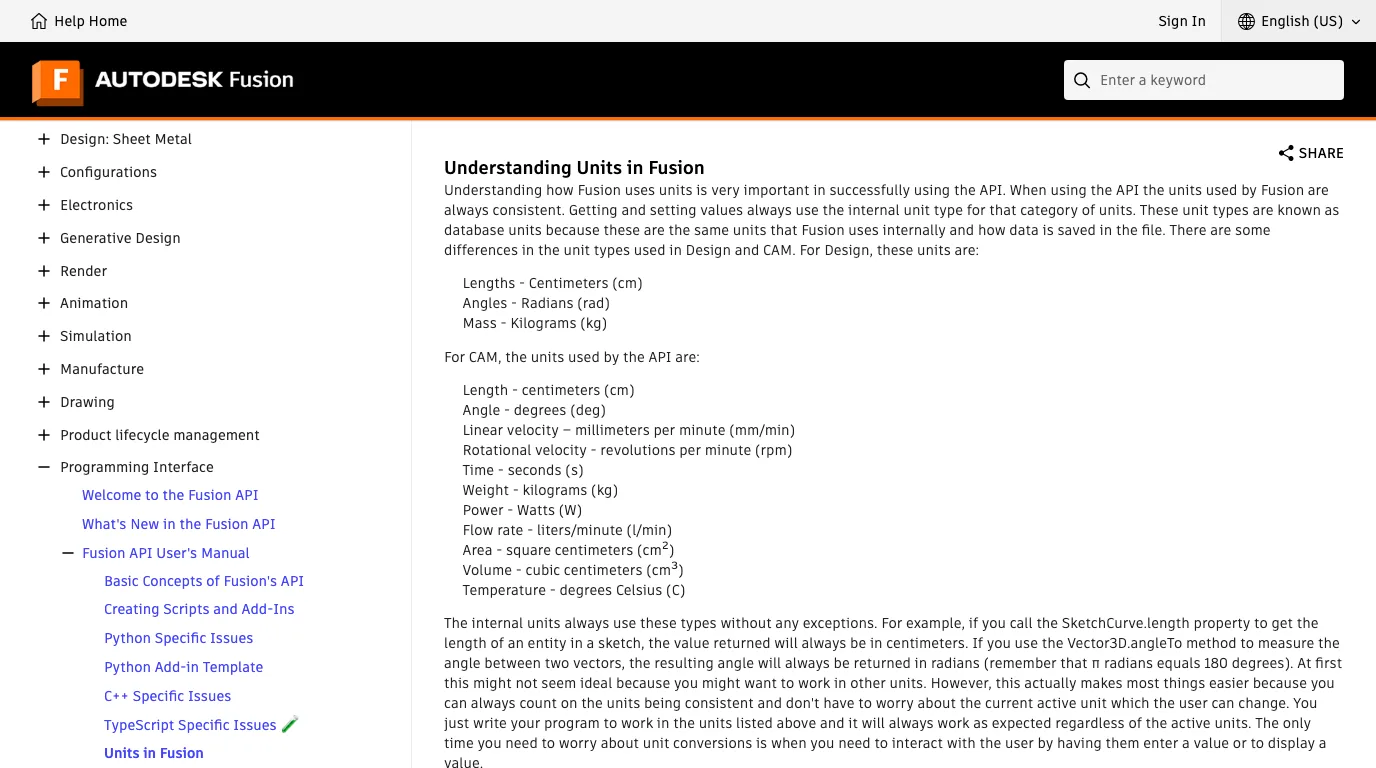
The result is simple: Argon sent centimetres in all 12 runs. In the script route it wrote the conversion into its own comments (“5 mm (0.5 cm)”) and used real values in centimetres throughout. In the tool route it sent 7 and 4.9 for a 70 × 49 mm plate, although the four tools it used most state no unit at all in their schemas. A few other faust-machines tools do say “cm” in their descriptions, so the list gives a hint; Autodesk's reference server's tools give none, and the result was the same.
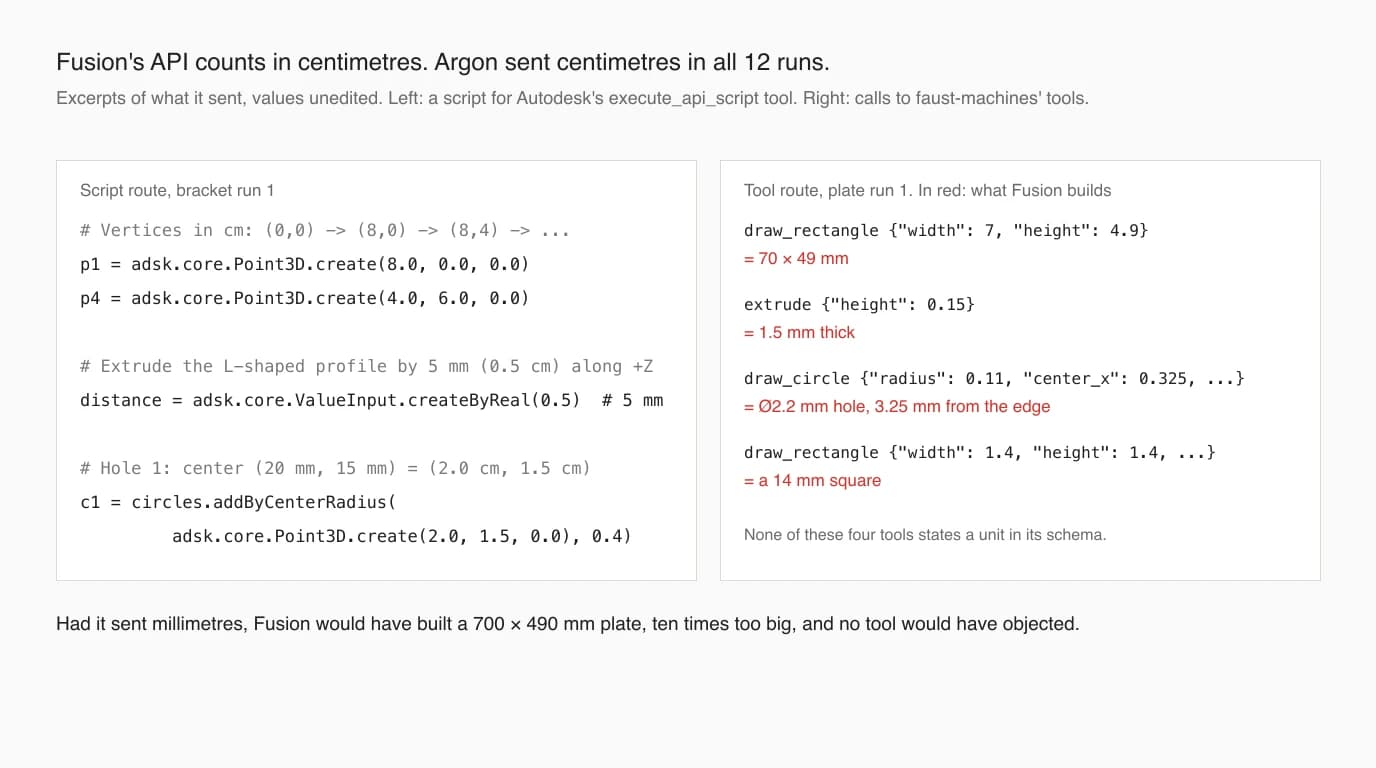
One more thing worth knowing: in all six script runs, Argon never called the reference server's best-practices or documentation tools. It did not need them for units, but the best-practices file also warns against one call it made, which comes up below.
Test 2: a part from a drawing
Six drawing runs, three per server, scored against the designer's part
The outline, the thickness and all six holes were exact in every run. The drawing never dimensions the holes from the plate's edges, and every run worked out the 3.25 mm margin from the two overall dimensions and said it had assumed it, which is the right inference. Every run also caught the title block's “DIMENSIONS ARE IN INCHES”, which the designer left from a template, and kept to millimetres. Our prompt said millimetres, so that was the easy version of this trap; in our SolidWorks test, Argon caught it from the PDF with no hint.
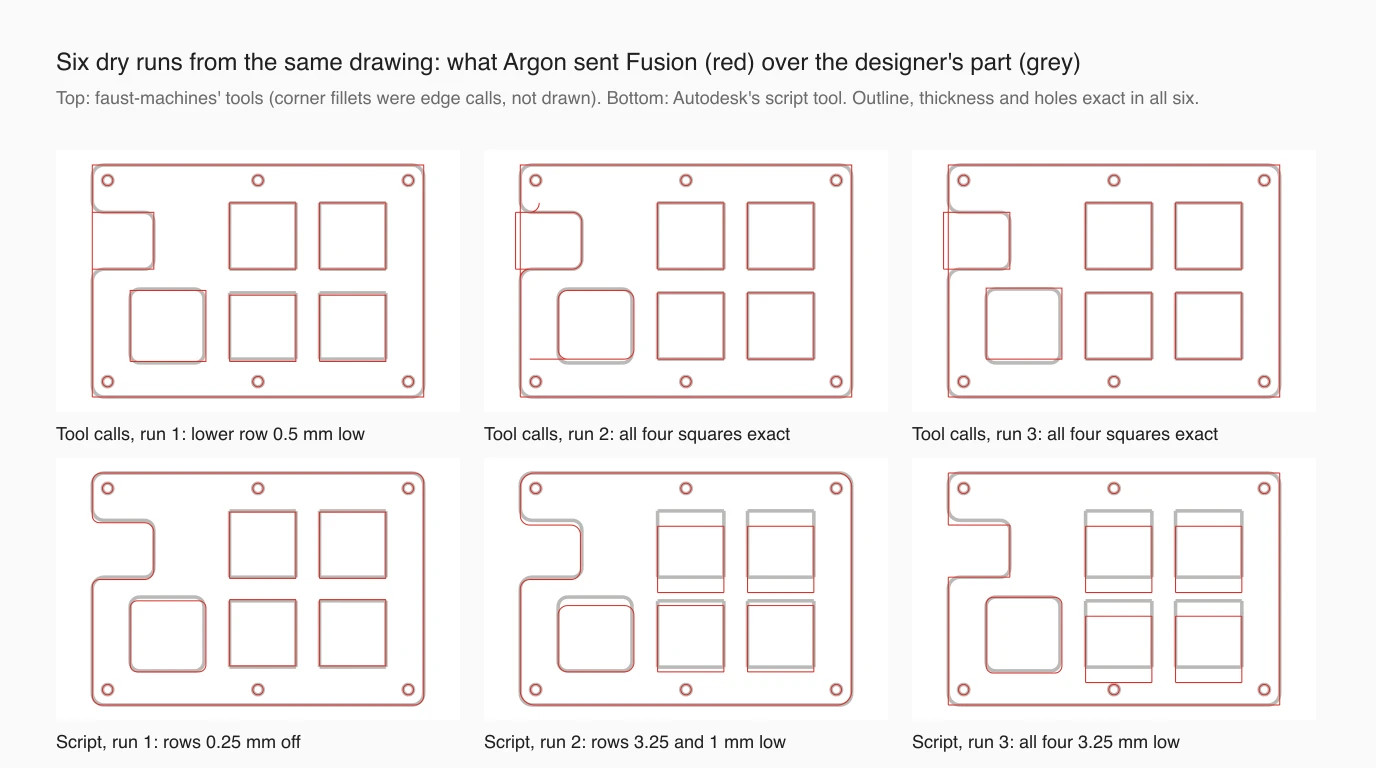
The squares are where it goes wrong, and it is the same place it went wrong before. The drawing locates the top row 15.00 mm down from the top edge of the plate. Script runs 2 and 3 both read it as 15.00 mm from the top row of holes, which sit 3.25 mm lower, and stated that as fact in their summaries. Run 3 put all four squares 3.25 mm low; run 2 did that to the top row. The drawing also never gives the vertical pitch, so each run chose one: 19 mm to match the horizontal pitch, or something it measured off the picture.
Two runs, both through faust-machines' tools, got every square exactly right. Across our three Argon tests that makes 2 exact out of 15 attempts from a picture of this drawing: 0 of 6 in AutoCAD, 0 of 3 in SolidWorks, 2 of 6 here. Three runs per server is far too few to say the tool route helped; it may simply be chance. The advice stands either way: give Argon the PDF or the DXF rather than a screenshot, and check every located feature before anything is cut.
What would have broken in real Fusion
Because our recorder accepts any call, we read all 12 runs' code against Autodesk's API reference for anything Fusion itself would reject. Three findings.
An API name that does not exist, in two of six
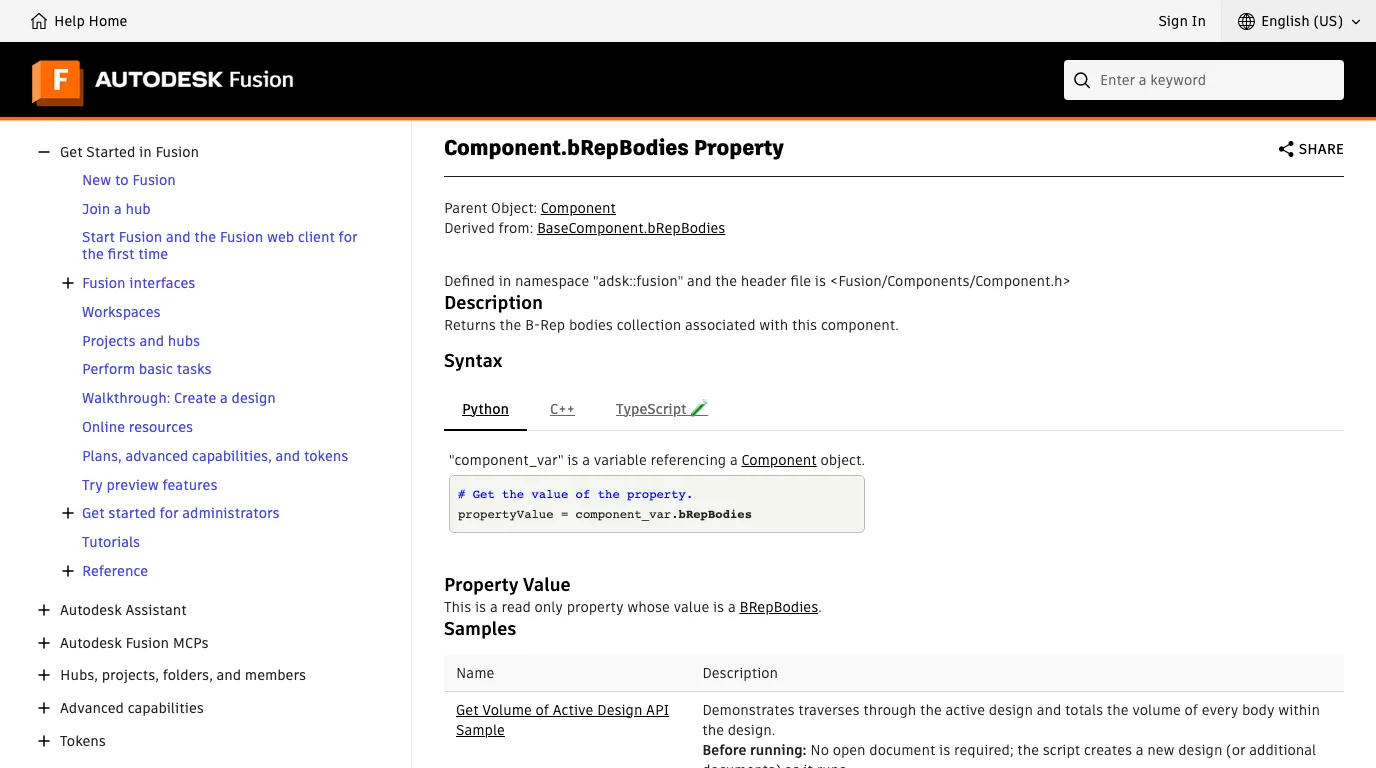
Tool runs 1 and 3 finished by filleting the plate's corners with a short script, and both started with component.brepBodies. The property is bRepBodies, and Python is case sensitive, so in Fusion that line raises an AttributeError and the fillets are never made. The server returns the error, so in a live session Argon would see it and could fix it on the next turn. In our dry run it sailed through. Both scripts also used FilletFeatureInput.addConstantRadiusEdgeSet, which Autodesk's reference marks as retired since November 2022 in favour of the edgeSetInputs methods.
A call Autodesk's own notes advise against
Script run 3 opened a new document with app.documents.add before modelling. The reference server's best-practices file says to use app.activeProduct instead because it “prevents crashes”. Argon had a tool that returns that file, and never called it in any run. If you use that server, tell it to read the best practices first.
Guesses reported as facts, sometimes
The good news first: every drawing run listed the notch, the rounded cut-out and the corner radii as estimates, because the drawing gives no numbers for them. The bad news is the datum: the runs that misread the 15.00 mm dimension did not list it as a guess. Script runs 2 and 3 named the top holes as the reference in the same confident voice as everything else. A model that tells you what it guessed is useful; it is only as useful as its sense of what counts as a guess.
Where this fits
Put together, Argon is a good operator of Fusion's API at the level that trips most people up: units, coordinates, profiles and holes from a clear description. It is a less reliable reader of a drawing's datums, and it does not check its own API calls against documentation it has been handed. Use it with a saved copy, approvals on, and a bounding-box check after the first feature. Do not use it as the last check before a part is cut.
All of that assumes you already have a drawing. If what you have is a physical part, TechDraw AI turns a photo of it, plus one measurement, into a dimensioned drawing you can export as DXF and import into a Fusion sketch; our Fusion workflow guide shows the steps.
TechDraw AI has its own MCP server, so the same Antigravity session can turn a photo into a drawing before it reaches Fusion.
See TechDraw AI's MCP serverFor the same model in other programs, see Gemini 4 Argon and AutoCAD and Gemini 4 Argon and SolidWorks. For what Gemini does with drawings without any server, see can Gemini make technical drawings.
FAQ
Frequently asked questions
Can Gemini 4 Argon control Fusion 360?
Yes, through Autodesk's Fusion MCP server, which is built into Fusion and serves http://127.0.0.1:27182/mcp once you tick it in Preferences > General > API. Antigravity connects to it as a remote server with a serverUrl entry. Neither Autodesk nor Google documents this pairing; Autodesk names Claude Desktop, Cursor and VS Code and says any Streamable HTTP client can use the same URL. We did not have Fusion, so our tests were dry runs against two servers' real tool lists.
How do I add the Fusion MCP server to Antigravity?
Add an entry with serverUrl set to http://127.0.0.1:27182/mcp under mcpServers in ~/.gemini/config/mcp_config.json, or in .agents/mcp_config.json inside a project. Antigravity's docs say remote servers must use serverUrl and that the url and httpUrl fields other clients use are not supported. Start Fusion and tick the server before you start Antigravity.
Does Gemini 4 Argon get Fusion's units right?
In our tests, yes. Fusion's API takes every length in centimetres, so 70 mm must be sent as 7.0. In 12 runs through two servers, Argon sent centimetres every time, including to tools whose schemas state no unit at all, and it said so in comments in its own scripts. Had it sent millimetres, the part would have come out ten times too big with no error.
Can I use Gemini 4 Argon with Fusion 360 for free?
No. Argon is not on the Gemini API's free tier, and Antigravity's model page lists it for Google AI Pro (non-trial subscriptions), Ultra and Enterprise only. Autodesk does not say whether the local Fusion MCP server needs a paid Fusion subscription; we found no statement either way. Through the API, our runs cost 3 to 11 cents each.
Why can't I pick Gemini 4 Argon in the Antigravity IDE?
Because Google does not offer it there. A footnote on Antigravity's model page says Argon is not available in the Antigravity IDE, only in the Antigravity App, the Antigravity CLI and the IDE extensions. Setup videos for Fusion that use the Antigravity IDE are therefore running a different Gemini model.
Does the Fusion Compute cloud server work with Antigravity?
Probably not yet. Autodesk's announcement blog lists Antigravity, but its documentation offers only CIMD sign-in, with dynamic client registration planned. Antigravity signs in automatically only to servers that support dynamic client registration, and otherwise needs a client id and secret that Autodesk does not document for this server. We have not seen it work, and we could not test it.
Can Gemini 4 Argon build a Fusion part from a drawing?
Partly. From a picture of a real drawing, all six of our runs got the outline, thickness and every hole exact. The four square cut-outs were exact in two runs and between 0.25 and 3.25 mm out in the other four, because one dimension was measured from the wrong line. Two of the six runs also used a Fusion API name that does not exist, which would have stopped their fillet step until the model fixed it.
Sources
- Autodesk MCP Server Documentation: Autodesk Fusion MCP Server (local)
- Autodesk MCP Server Documentation: Connecting to the Autodesk Fusion MCP Server
- Autodesk MCP Server Documentation: Connecting to the Fusion Compute MCP Server
- Autodesk MCP Server Documentation: Authentication and Access (CIMD, DCR planned)
- Autodesk Fusion blog: Autodesk Fusion Compute MCP, Public Beta (15 Sep 2026)
- Autodesk Fusion API: Understanding Units in Fusion
- Autodesk Fusion API: ValueInput.createByReal
- Autodesk Fusion API: Component.bRepBodies
- Autodesk Fusion API: FilletFeatureInput.addConstantRadiusEdgeSet (retired)
- AutodeskFusion360/FusionMCPSample (MIT)
- faust-machines/fusion360-mcp-server (MIT)
- Google: Gemini 4 Argon is now available for developers (13 Oct 2026)
- Gemini API: Gemini 4 Argon model page
- Gemini API: function calling, best practices
- Google Antigravity: Model Context Protocol (MCP)
- Google Antigravity: choose a model
- sssata/fluxpad: the open source keypad whose plate we tested (GPL-3.0)