
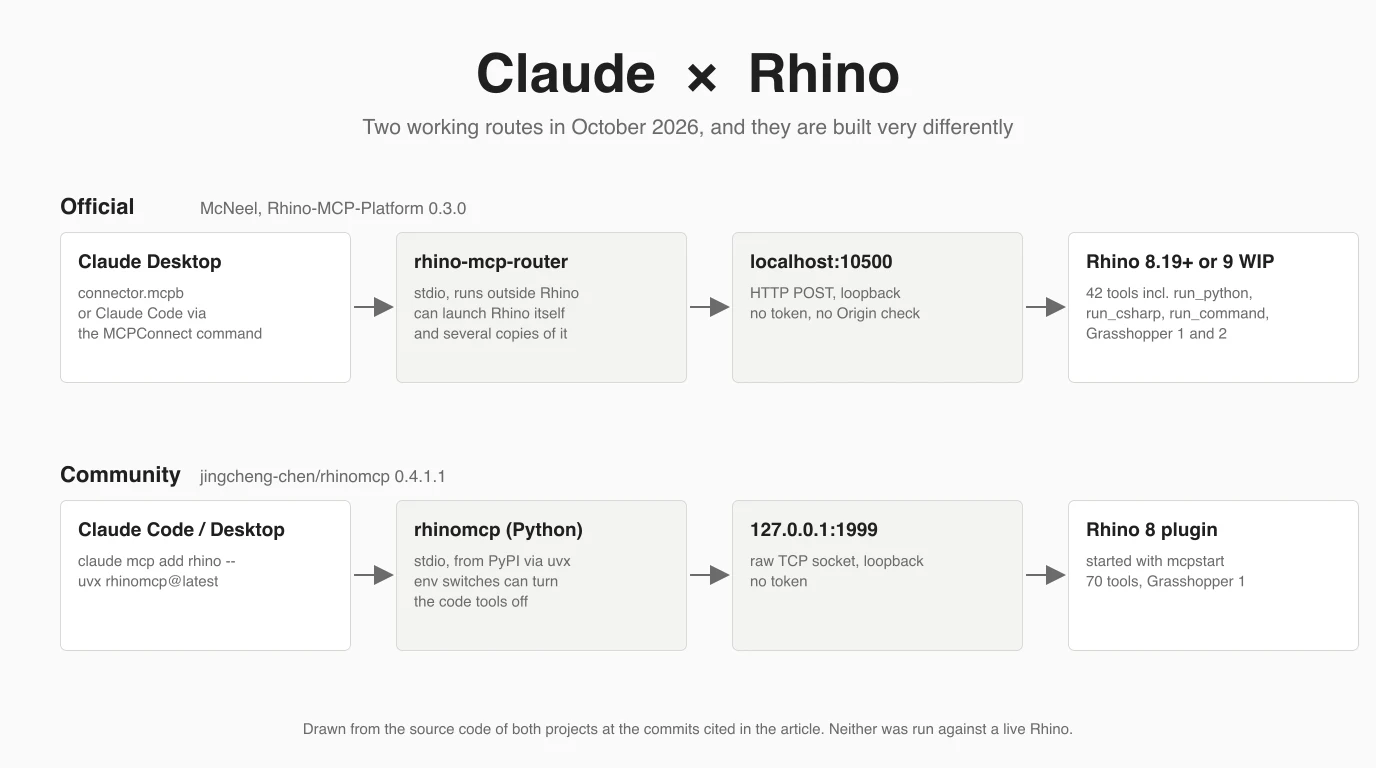
Yes, Claude can drive Rhino, and since May 2026 there is a way to do it that Rhino's maker builds itself. McNeel's Rhino MCP Platform and the older community server rhinomcp both let Claude model, read your document, look at the viewport, wire Grasshopper and run scripts inside Rhino 8. They are built very differently, and the difference matters more than the feature lists suggest. We read both codebases, ran both servers in Claude Code and checked what each returns. One caveat up front: Rhino is not installed on the Mac we tested on, so nothing below was run against a live Rhino. Where we say something about behaviour, it comes from code, documentation or McNeel's own forum, and we say which.
Our articles are still written by humans!
Get human written articles in your Google feed.


Can Claude connect to Rhino?
Yes. Claude connects to Rhino 8 (and the Rhino 9 WIP) through a local MCP server, and the two to choose between are McNeel's official Rhino MCP Platform and the community rhinomcp by Jingcheng Chen.
MCP, the Model Context Protocol, is the standard way Claude talks to programs on your computer. Each server is two parts: a plugin that runs inside Rhino and a small program Claude starts. Claude asks the small program to do something, it passes the request to the plugin, and the plugin does it in your open document. What you can do from there is wide: both servers have tools to create and edit geometry, list objects and layers, capture the viewport so Claude can see its work, build Grasshopper definitions, and, as a catch-all, run any Python or C# script or Rhino command. This is the same pattern we covered for Fusion 360 and FreeCAD.
McNeel's official server
McNeel's server is called the Rhino MCP Platform, it is MIT licensed, and it lives on GitHub as mcneel/RhinoAI. Callum Sykes of McNeel announced it on the Rhino forum on 7 May 2026, in reply to a user who had asked in March whether McNeel supported or planned one.
A few things about it are easy to get wrong, and several guides do. The repository started as mcneel/RhinoMCP and was renamed; the old address now holds a three-word README pointing to RhinoAI, described as the “old repo name for RhinoAI”. The package you install in Rhino is called Rhino-MCP-Platform, version 0.3.0, published 29 September 2026, with builds for Windows and Mac. The Claude Desktop connector is a separate file, version 0.1.6 from 15 September 2026. And it is not in Anthropic's connector directory: on 12 October 2026 the directory address for Rhino returned a 404, so unlike Autodesk's Fusion connector, you install it from a file. A Vagon guide dated 24 September 2026 says “most current Rhino MCP solutions are community-built”, never mentions McNeel's server, and points readers to a community project with eight GitHub stars. McNeel's server had been public for four months by then.
What makes the official server different is where the piece Claude talks to lives. It is not inside Rhino. Claude starts a small native program, rhino-mcp-router, which ships inside the Rhino package and talks to Claude over stdio. The router then talks to the plugin in Rhino over HTTP on localhost, from port 10500 upward. Its README lists why: Claude connects immediately without a reconnect, the router can start Rhino for you, it can run several Rhino windows (it calls them slots), it keeps its state in a small SQLite database, and when Rhino crashes it tells Claude why so Claude can relaunch.
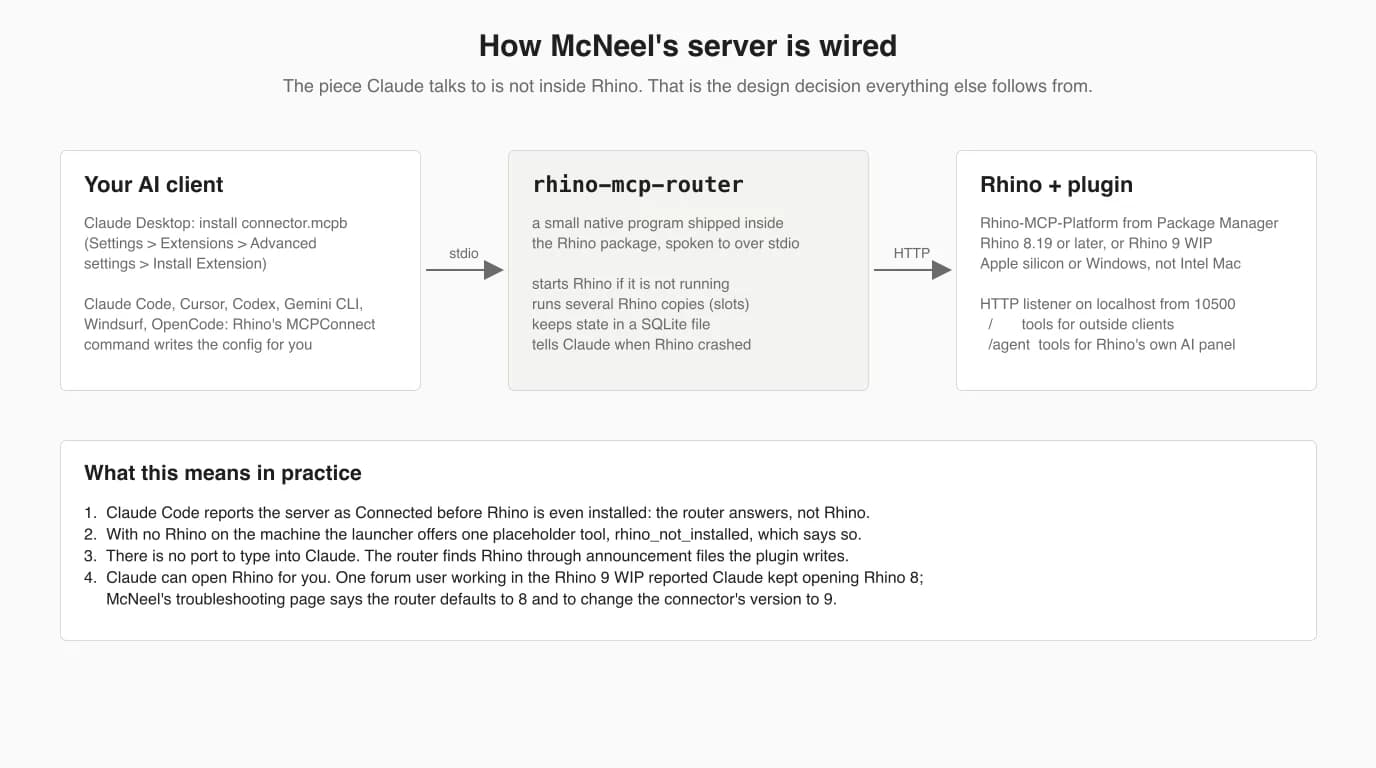
The plugin declares 42 tools. Twenty are for Grasshopper (ten for Grasshopper 1, ten for Grasshopper 2). The rest open, save and close documents, list objects, get and set the selection, set the camera, zoom, assign a material to a layer, capture the viewport, and three that run arbitrary code: run_python, run_csharp and run_command. That is by design. In the announcement Callum Sykes wrote that “Claude just loooooves writing Python so I made sure it can do that”, and that the viewport capture is low resolution “to save on tokens”. The router adds three tools of its own, spawn_slot, list_slots and close_slot. The plugin also has an AI chat panel inside Rhino that runs Claude Code, Codex or Gemini as agents; McNeel's docs do not cover it yet, so neither do we.
Official vs community vs Grasshopper
Pick McNeel's server if you use Claude Desktop, want Grasshopper 2 or several Rhino windows, or want the vendor behind it. Pick rhinomcp if you want the code tools switched off, a larger set of named modelling tools (loft, sweep, booleans, measuring), or the longer track record: it has been public since March 2025.
Rhino and Grasshopper MCP servers, 12 October 2026, from their code and READMEs
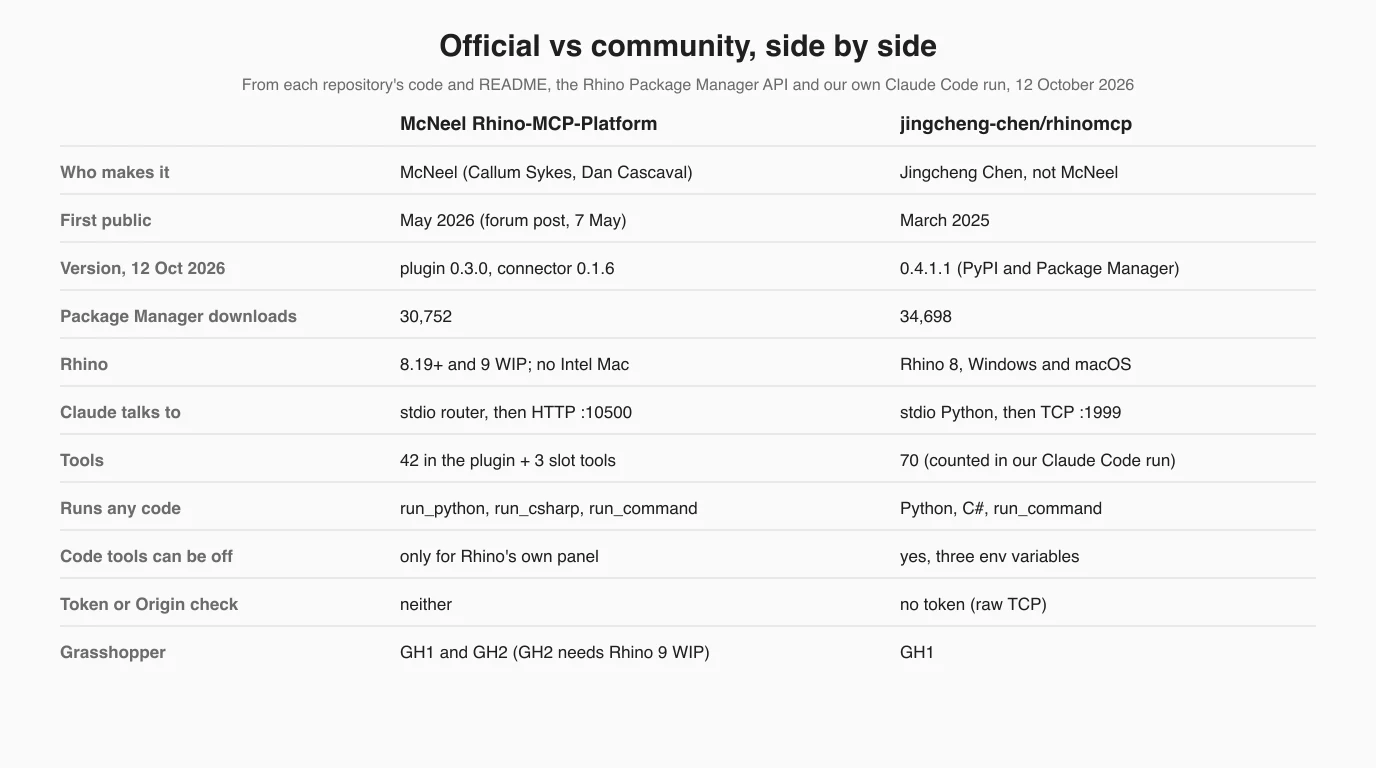
Star counts are from GitHub on 12 October 2026, and they flatter the older project: rhinomcp has 1,146, McNeel's repository 360. The Package Manager numbers are closer, and McNeel's current version alone was downloaded 4,634 times in the week before we checked. A GitHub search turns up at least ten smaller Rhino and Grasshopper servers besides these; we did not read them.
Setup with Claude Desktop
For Claude Desktop the official route comes down to three things: install a connector file in Claude, install a package in Rhino, ask for a box. The steps are McNeel's, from its docs page for Claude Desktop. The package targets Rhino 8 and the Rhino 9 WIP on Windows and Apple silicon Macs.
- Install Claude Desktop, and have Rhino 8 installed and licensed. McNeel's getting-started page assumes both.
- Download
connector.mcpbfrom the connector-v0.1.6 release. - In Claude Desktop open Settings > Extensions > Advanced settings, click Install Extension, pick the file and confirm with Install.
- In Rhino run
PackageManager, search forRhino-MCP-Platformand install it, then restart Rhino. McNeel's alternative is to ask Claude to do it: the connector can run Rhino'syakpackage tool for you, and if the package is missing it offers exactly one tool,install_rhino_mcp_platform, that does this. - Start a new chat and type McNeel's test prompt: Open a fresh Rhino doc and make me a box. If Rhino was closed it should launch, a box should appear, and Claude should describe what it did.
Setup with Claude Code
For Claude Code, McNeel's route is a Rhino command, MCPConnect, that writes the config for you. You do not type a port or a URL.
- Install
Rhino-MCP-Platformin Rhino's PackageManager, as above. - Run
MCPConnectin Rhino. The dialog has four tabs. The Install tab lists the AI tools it finds on your machine (in the code: Claude Code, Cursor, Gemini CLI, Windsurf, OpenCode and Codex) with an Install button that adds arhinoserver to that tool's config file, which for Claude Code is~/.claude.json. - If your tool is not listed, the Prompt tab has a text to paste into Claude Code, and the mcp.json tab the raw entry. Restart Claude Code afterwards.
The entry it writes has no URL in it, only the path of the router. Generated from the plugin's code, on a Mac it has this shape, with the full path of your home folder where we wrote the tilde:
{
  "mcpServers": {
    "rhino": {
      "command": "~/Library/Application Support/McNeel/Rhinoceros/ai/bin/rhino-mcp-router"
    }
  }
}
To target the Rhino 9 WIP, McNeel's troubleshooting page says to add "args": ["-v", "9"] to that entry. The repository also contains a Claude Code plugin with eight agents (among them rhino-drafter and grasshopper-scripter) and five slash commands, installed with /plugin marketplace add mcneel/RhinoAI, but the docs page currently hides that section, and the plugin's own README still describes an older HTTP setup. We did not install it.
Setup for the community rhinomcp
The community server is one command in Claude Code plus a package and a command in Rhino. You need uv installed, because the server runs from PyPI through uvx.
- In Rhino open Tools > Package Manager, search for
rhinomcp, install, restart Rhino. - In a terminal, add the server to Claude Code:
claude mcp add rhino -- uvx rhinomcp@latestFor Claude Desktop the same thing goes in its config file:
{
  "mcpServers": {
    "rhino": {
      "command": "uvx",
      "args": ["rhinomcp@latest"],
      "env": { "RHINO_MCP_HOST": "127.0.0.1" }
    }
  }
}- With Rhino open, type
mcpstartin the command line. This opens the plugin's socket on 127.0.0.1 port 1999. You do it once per Rhino session, andmcpstopcloses it. - Run only one rhinomcp server at a time. The README says so in capitals, because two clients would fight over the same socket.
Two version details matter. The server and plugin share one version number and should be updated together; since 0.4.0 the server warns when they differ. And the changelog records that fresh installs of 0.3.2 broke when version 2.0 of the MCP Python SDK came out on 28 July 2026, which 0.4.0 fixed. That is the reason the README uses @latest.
Grasshopper
Both general servers drive Grasshopper, so you do not need a separate one unless Grasshopper is all you use. McNeel's covers Grasshopper 1 and 2; rhinomcp covers the Grasshopper 1 that ships in Rhino 8.
- McNeel: ten
g1_tools and teng2_tools: search, describe and place components, place sliders, connect wires one at a time or in a batch, apply a whole graph, solve, clear. Grasshopper 2 needs the Rhino 9 WIP. The troubleshooting page calls the toolsgh2_, but in the code they are namedg2_. - rhinomcp: 27 tools prefixed
gh_, includinggh_build_graphandgh_mutate_graphfor building or changing a whole definition in one call. - Cordyceps is the Grasshopper-only option with the most care in its network code: it checks the Origin header against DNS rebinding, which neither general server does. It needs Rhino 8.21 or later.
- LAMCP, from the gramaziokohler GitHub organisation, is one Python tool into a live Grasshopper session, set up with
claude mcp add lamcp --scope user -- uvx lamcp. Its bridge comment says it binds to 127.0.0.1 only and to never expose it, because it runs arbitrary Python.
What we ran, and what Connected means
We added both servers to Claude Code on a Mac with no Rhino, and both showed Connected. That tick means the local program Claude started is answering. It says nothing about Rhino.
For McNeel's server we ran the same launcher script the connector uses, copied from the repository; for the community one, the README's own command. Then we listed and inspected them.
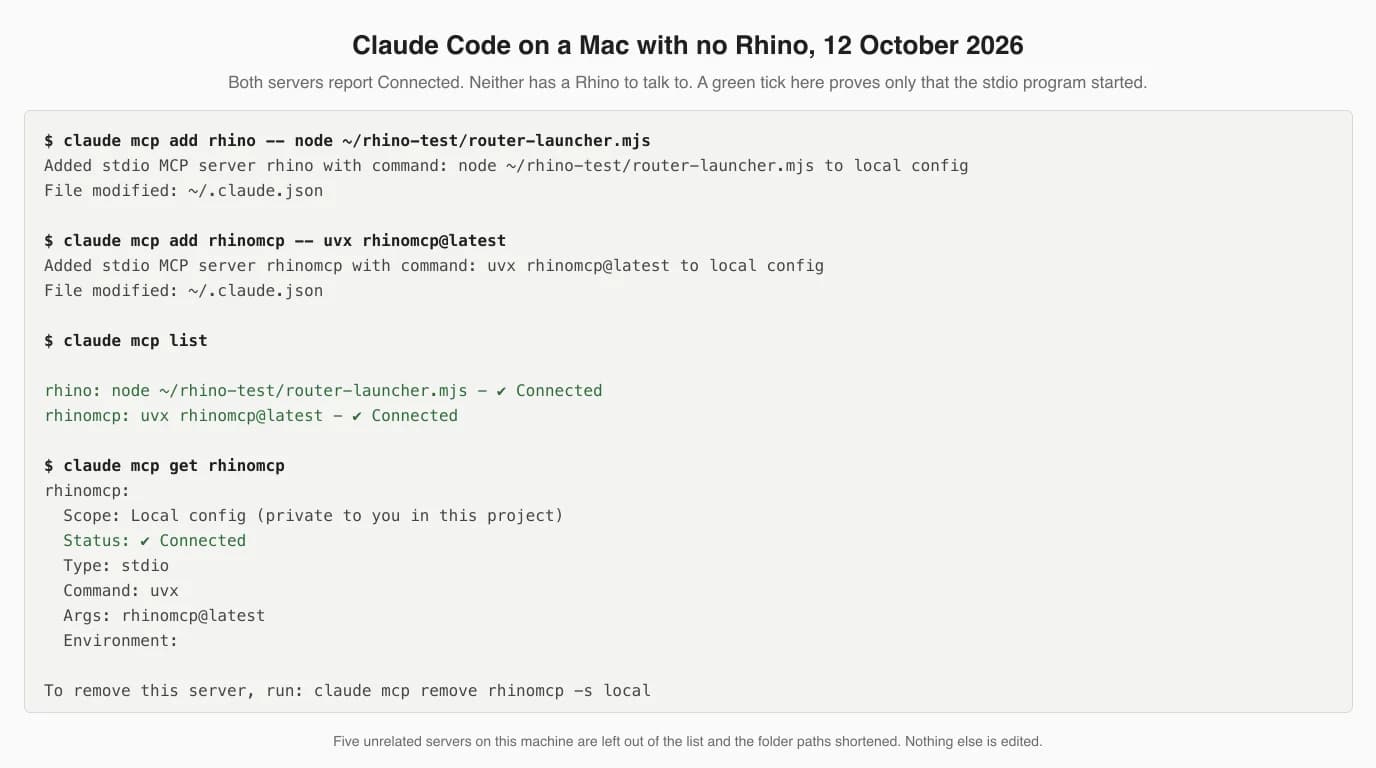
Compare that with our Fusion test, where the same check failed at once, because Fusion's server is an HTTP address inside Fusion and nothing was listening. With a stdio server you find out later. So we started a fresh Claude with only these two servers and asked it to call one tool on each.
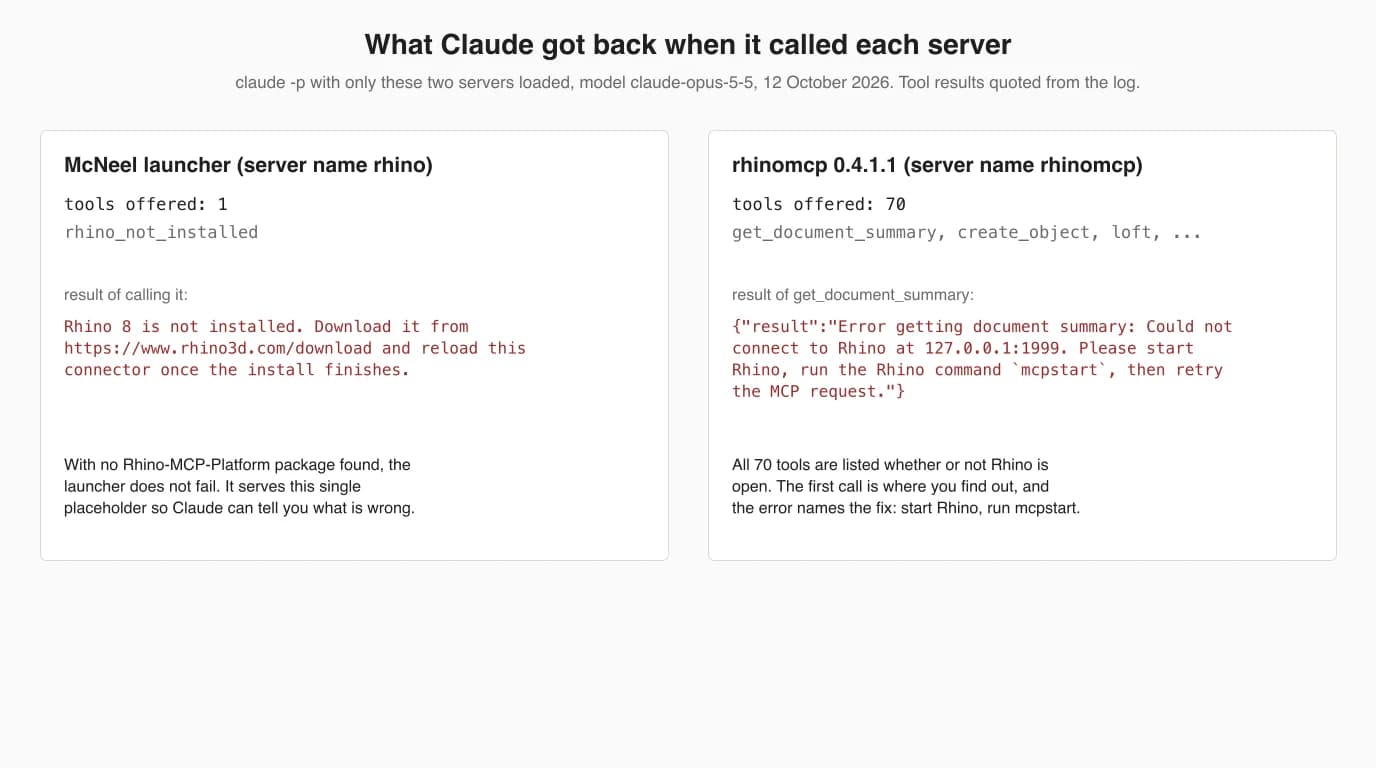
Both behaviours are reasonable, and both are useful to recognise. McNeel's launcher looks for the package before starting the router; if Rhino is missing it offers rhino_not_installed, and if Rhino is there but the package is not, it offers to install it. rhinomcp lists all 70 tools regardless, and its errors are specific enough that Claude can relay the fix. What we could not test is everything after that: geometry, speed, accuracy. For a measured run of this kind of setup, see our FreeCAD test, where Claude modelled a plate from a drawing to within 0.5% of its volume.
When it fails
The documented failures are mostly about the machine, not the AI: Intel Macs, the Rhino version, and Claude Desktop's moving settings. These come from McNeel's troubleshooting page and its forum thread, May to June 2026.
- Intel Mac. McNeel's troubleshooting page says Intel Macs are not supported, and the launcher only looks for an Apple silicon router on macOS. On the forum Callum Sykes confirmed the router is Apple silicon only and suggested connecting to the plugin's HTTP port directly, which he said he could not test. The user who tried that reported no response on port 10500.
- The plugin does not show up. The same page lists three causes: Rhino running on .NET Framework rather than .NET Core, an Intel Mac, or an out-of-date Rhino. The package is built against Rhino 8.19; a comment in the project file says 8.19 is the first Rhino 8 package with .NET Core assets.
- Claude keeps opening the wrong Rhino. One forum user spent three hours connecting to the Rhino 9 WIP while Claude kept launching Rhino 8. The router defaults to 8; set 9 in the connector settings or the
-v 9argument. - “It says it did something, but I don't see it.” McNeel's own list: you are looking at a different Rhino window, the geometry is far from the origin (use Zoom Extents), or it went onto a hidden layer.
- Token use. On the announcement thread a user testing rhinomcp for model takeoffs wrote that one conversation “chewed through half my daily token quota on Claude Pro”. Callum Sykes called it “one compromise”. McNeel already captures the viewport small to save tokens (480 by 270 pixels by default in the settings code); asking for summaries instead of full object lists is the other lever you control.
- rhinomcp says it cannot connect. You have not run
mcpstartin this Rhino session, or a second rhinomcp server is holding the socket. One more trap from the code: theRHINO_MCP_PORTvariable only changes where the Python server connects. The plugin always listens on 1999, so changing the variable alone breaks the connection.
What the code says about safety
Both servers listen only on your own machine, and both will run any code they are given, with no token. The difference is that rhinomcp lets you turn code execution off for Claude, and McNeel's does not.
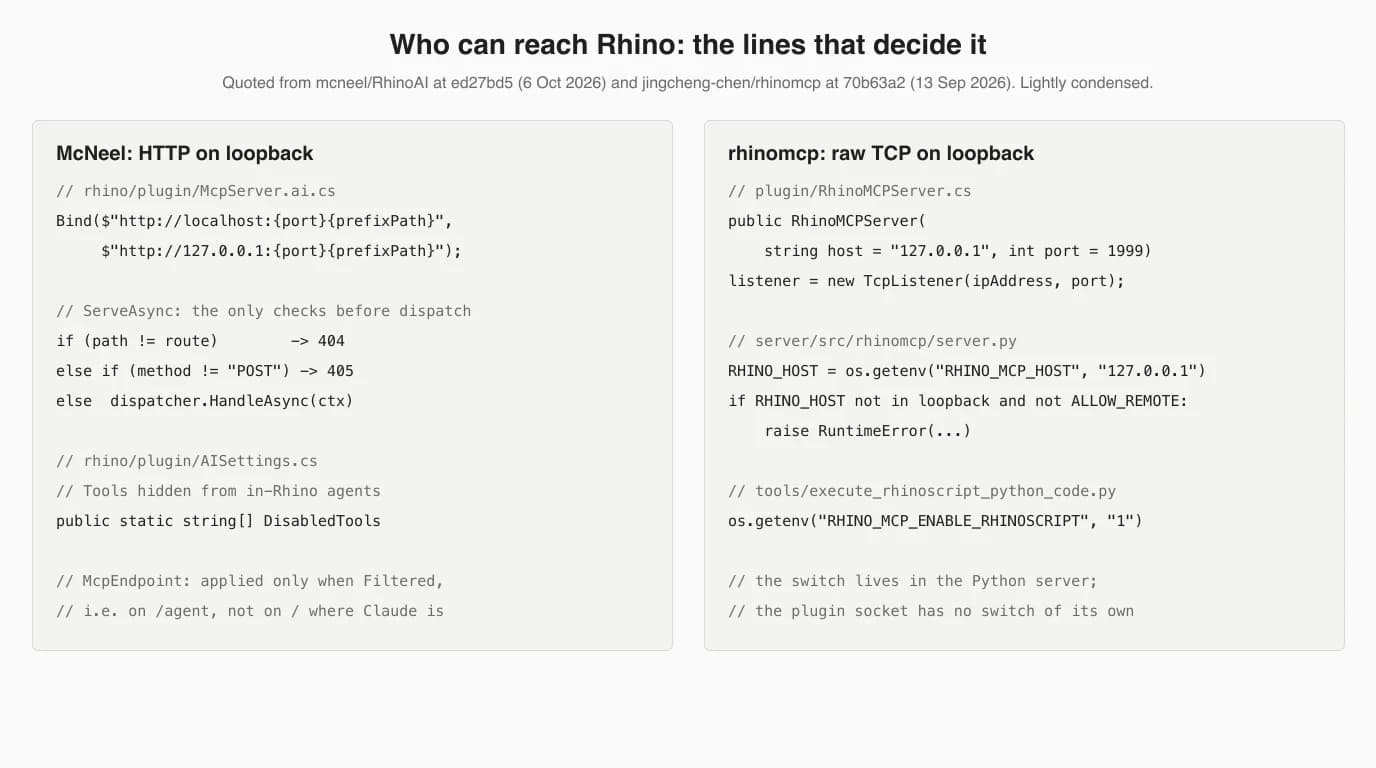
- Loopback only, for both. McNeel's plugin registers
localhostand127.0.0.1prefixes and nothing else. rhinomcp's plugin binds a TCP listener to127.0.0.1:1999, and its Python server refuses a non-loopback host unless you setRHINO_MCP_ALLOW_REMOTE=1. Nothing on your network can reach either by default. - No token, and in McNeel's case no Origin check. Before running a request, McNeel's listener checks only the path and that it is a POST. There is no token and no check of the Origin header, the kind of browser protection Cordyceps has (an Origin check) and the neka-nat FreeCAD server has (it refuses requests from a web browser). Whether a web page could reach the listener we did not test; browsers add their own limits on public pages calling localhost, but the plugin's code adds none.
- Arbitrary code, said plainly. McNeel's privacy policy states that the connector “exposes tools that can execute arbitrary code or commands in the Rhino process”, that these tools “can touch any file the user's account has access to”, and that tool results, including script output and viewport screenshots, leave your machine through your Claude client. It does no telemetry of its own. That is an unusually honest policy.
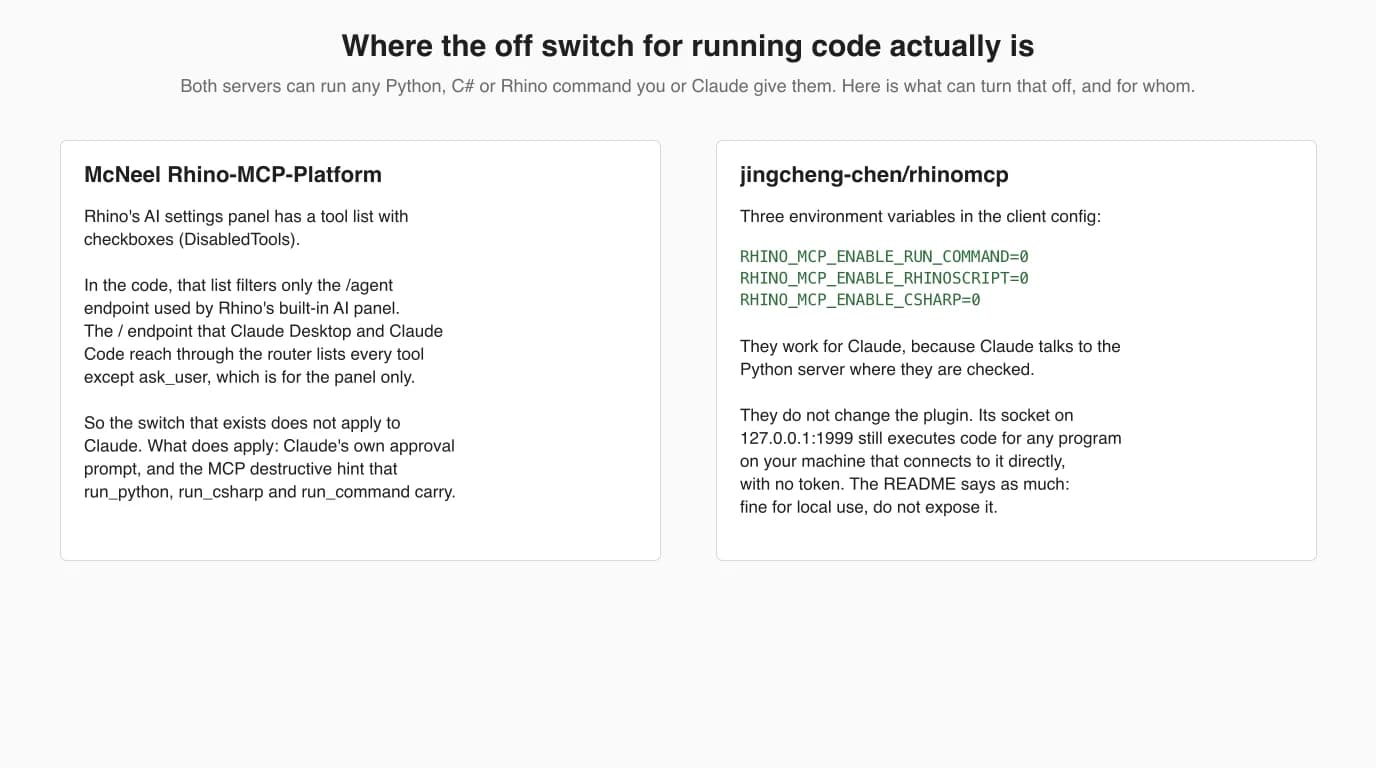
If you want Claude to model without being able to run arbitrary scripts, rhinomcp is the one that allows it. Add the three variables to the server's env block:
claude mcp add rhino \
  -e RHINO_MCP_ENABLE_RUN_COMMAND=0 \
  -e RHINO_MCP_ENABLE_RHINOSCRIPT=0 \
  -e RHINO_MCP_ENABLE_CSHARP=0 \
  -- uvx rhinomcp@latest
With McNeel's server, the protection you have is Claude's own tool approval. The three code tools are marked with MCP's destructive hint, so leave the approval prompt on rather than choosing “always allow”, and save the file before a session. A checklist of tools does exist in Rhino's AI settings, but the code applies it only to the /agent route used by Rhino's built-in panel, not to the route Claude uses.
What it is good at, and what we do not know
From the docs and the tool lists, these servers are strongest at scripting, batch edits and Grasshopper wiring, and weakest wherever Rhino's judgement matters more than its API. We have not measured either on a real model.
- Likely good, per the docs: writing and debugging RhinoPython and C# scripts, organising layers and names across a big file, explaining or building a Grasshopper definition, and plugin development. McNeel's docs have whole pages on porting plugins from WPF to Eto and upgrading Grasshopper 1 definitions to 2.
- A sketch to a first model: McNeel has a page on dropping a hand sketch into the chat. Its own warning is that missing dimensions are inferred from proportion and are “almost always almost right”, and that you should spot-check overall dimensions.
- Probably weak, in our judgement rather than measured: freeform surfacing where continuity and fairness matter, anything that needs judgement about whether a Brep is good rather than valid, and drawings (next section).
- Unknown to us: speed, accuracy and token cost on a real part, because we did not have Rhino. We will say more only when we have measured it.
Where a 2D drawing fits
Neither server has a tool for Make2D, layouts, detail views or dimensions, so a drawing from Rhino through Claude is a script Claude writes. That works, but nothing checks the result except you.
McNeel's own rhino-drafter agent shows the approach: it is told to use run_python for layouts, details and dimensions and run_command for commands such as Make2D, Layout and Dim, then to capture an image for you to review. rhinomcp's nearest tool, section_profile, measures cross-sections without drawing anything. The same gap showed up in every program in this series; in FreeCAD, Claude laid out a TechDraw sheet with a dimension crossing an extension line and called the layout clean.
If the job starts with a physical part rather than a model, there is a shorter route. TechDrawAI turns a photo of the part into a dimensioned 2D technical drawing, which you can export as DXF and bring into Rhino, or use as the numbers you give Claude to model from. We have not run that hand-off into Rhino end to end.
Have the part but not the drawing? Upload a photo and get a dimensioned 2D technical drawing you can bring into Rhino or hand to Claude as the numbers to model from.
Turn a photo into a dimensioned drawingRelated reading: the full CAD MCP server landscape, Claude with AutoCAD, Claude with Fusion 360 (the other vendor-built local server), Claude with FreeCAD (the one we ran and measured), and whether Claude can make technical drawings without any CAD program.
FAQ
Frequently asked questions
Can Claude connect to Rhino?
Yes. Claude connects to Rhino 8 through an MCP server, and there are two mature ones. McNeel, the maker of Rhino, publishes the Rhino MCP Platform (Rhino-MCP-Platform 0.3.0 on the Package Manager, September 2026), and the community project jingcheng-chen/rhinomcp (0.4.1.1) has existed since March 2025. Both let Claude create and edit geometry, read the document, capture the viewport, drive Grasshopper and run Python scripts inside Rhino.
Is there an official Rhino MCP server from McNeel?
Yes. McNeel announced it on its forum on 7 May 2026 and develops it in the MIT-licensed GitHub repository mcneel/RhinoAI, which was first called RhinoMCP. You install the Rhino-MCP-Platform package in Rhino's Package Manager and, for Claude Desktop, a connector file named connector.mcpb. As of 12 October 2026 we found no Rhino entry in Anthropic's connector directory, so the file is the route.
How do I connect Claude Code to Rhino?
For McNeel's server, install Rhino-MCP-Platform from Rhino's PackageManager, run the MCPConnect command in Rhino, and either click Install next to Claude Code or paste the prompt it shows into Claude Code, then restart Claude Code. For the community server, run claude mcp add rhino -- uvx rhinomcp@latest, install the rhinomcp package in Rhino, and type mcpstart in Rhino every session.
Can Claude use Grasshopper?
Yes. McNeel's server has ten Grasshopper 1 tools (prefixed g1_) and ten Grasshopper 2 tools (g2_), and the Grasshopper 2 ones need the Rhino 9 WIP. The community rhinomcp has 27 tools prefixed gh_ for Grasshopper in Rhino 8. Cordyceps, an MIT plugin with 105 GitHub stars, serves Grasshopper alone over HTTP on port 26929, and LAMCP runs Python inside a live Grasshopper session.
Does Rhino MCP work with Rhino 7?
Not the current versions. McNeel's package is built against Rhino 8.19 and its docs say Rhino 8 only, plus the Rhino 9 WIP. The community rhinomcp README says it targets Rhino 8, though an April 2025 tutorial for an earlier release listed Rhino 7 or newer. The one server we found that still states Rhino 7 is alfredatnycu/grasshopper-mcp, which is Grasshopper only and unchanged since March 2025.
Is there a Claude skill or plugin for Rhino?
McNeel's repository contains a Claude Code plugin in its cc-plugin folder: eight agents such as rhino-modeler and rhino-drafter, five slash commands and two skills for launching Rhino, installed with /plugin marketplace add mcneel/RhinoAI. The Claude Code page of McNeel's docs currently hides that section in a comment and recommends the MCPConnect command instead. We read the plugin but did not install it.
Why does Claude Code say Connected when Rhino is not running?
Because both Rhino servers are local programs that Claude Code starts over stdio, and the green tick only means that program answered. On our Mac with no Rhino installed, claude mcp list showed Connected for both. McNeel's launcher then offered one placeholder tool saying Rhino 8 is not installed; rhinomcp listed 70 tools and failed on the first call with could not connect to Rhino at 127.0.0.1:1999.
Is the Rhino MCP server safe to use?
It is local, not remote: McNeel's plugin listens only on localhost and rhinomcp's only on 127.0.0.1. But neither uses a token, McNeel's checks no Origin header, and both can run any Python, C# or Rhino command, with your user's file access. McNeel's privacy policy says so in plain words. Keep Claude's approval prompt on, save before you let it edit, and close Rhino's listener when done.
Sources
- mcneel/RhinoAI on GitHub: Rhino MCP Platform (MIT), read at commit ed27bd5, 6 October 2026
- Rhino MCP Platform docs: Claude Desktop
- Rhino MCP Platform docs: Claude Code
- Rhino MCP Platform docs: Troubleshooting
- mcneel/RhinoAI: privacy policy of the connector
- mcneel/RhinoAI releases (connector-v0.1.6, plugin-v0.3.0)
- Rhino Package Manager: Rhino-MCP-Platform
- McNeel Forum: Rhino MCP Server (thread with the 7 May 2026 announcement)
- McNeel Forum: Rhino MCP Server, page 2 (setup reports, May and June 2026)
- jingcheng-chen/rhinomcp on GitHub (MIT), read at commit 70b63a2, 13 September 2026
- jingcheng-chen/rhinomcp: changelog
- rhinomcp on PyPI
- Rhino Package Manager: rhinomcp
- brookstalley/cordyceps: MCP server for Grasshopper (MIT)
- gramaziokohler/lamcp: LAMCP for Grasshopper (MIT)
- alfredatnycu/grasshopper-mcp (MIT)
- Vagon: How to use Rhino with Claude, MCP and computer use guide
- Model Context Protocol: official specification and docs