
SketchUp joins Fusion and Onshape as a program whose vendor wrote the Claude connector itself. It also works differently from the others in this series: Trimble's connector never touches the SketchUp on your computer or any file you already have. Claude builds the model in a SketchUp session in Trimble's cloud and hands you a file. This guide walks the setup from Trimble's own help article, then covers what that design rules out and the community servers that fill the gap. The caveat up front: we have no SketchUp licence and no Trimble ID, so we could not build a model through the connector. What we did run, on 12 October 2026, was Claude Code against Trimble's endpoint, an unauthenticated probe of its sign-in metadata, and the two most popular community servers. Every claim below says which of those, or which document, it comes from.
Our articles are still written by humans!
Get human written articles in your Google feed.


Can Claude connect to SketchUp?
Yes. Since 28 April 2026 Trimble has offered an official SketchUp connector for Claude: you add it from Claude's connector directory, sign in with a Trimble ID, and Claude generates a new .skp model in the cloud that you download and open in any version of SketchUp.
Trimble announced it in a news release that calls it the first connector it has built to link SketchUp to other tools through MCP, the Model Context Protocol. Anthropic lists it in its directory as Trimble SketchUp, Anthropic verified, made by Trimble SketchUp, added April 2026, with the connector address https://api.sketchup.com/mcp/v1/sketchup/mcp. Trimble's help article, last updated 21 August 2026, calls the current release version 1 and says what it does in three lines: build 3D models from basic shapes and curved surfaces, organise them into groups and components, and produce .skp files compatible with all versions of SketchUp.
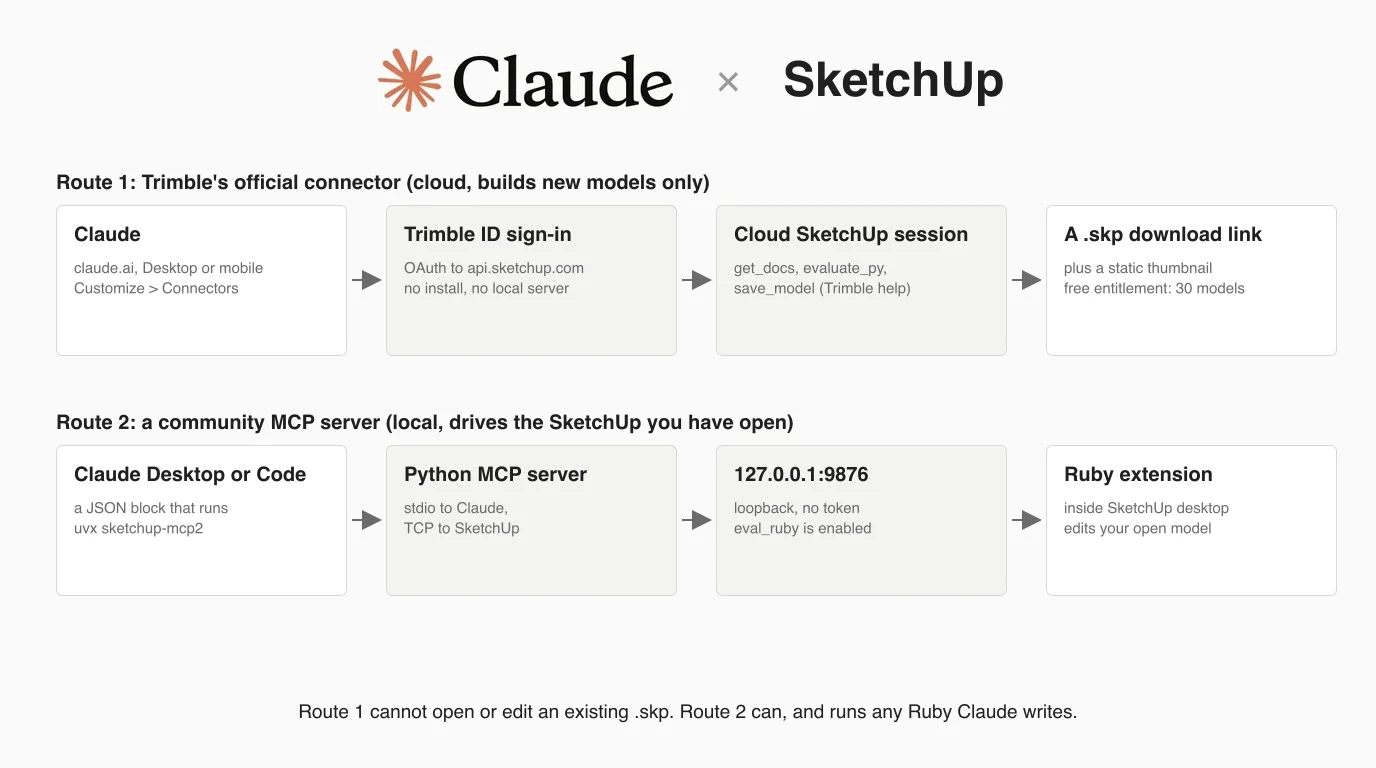
What it does not do is work on a model already open on your screen. That is the job of the community MCP servers, which are a different kind of tool, so the next section puts the two side by side before the steps.
Official connector or community server
Use Trimble's connector when you want a new model from a description, a sketch or a photo and you do not want to install anything. Use a community server when you want Claude to read or change the model you are working on in SketchUp desktop, and you are comfortable letting it run code on your machine.
Claude and SketchUp: the two routes, as documented on 12 October 2026
Before you start
You need two accounts, a Claude account and a Trimble ID, and nothing else for the official route. Trimble's help article says exactly that, and Anthropic's help says directory connectors are available to all Claude users on the web, Desktop and mobile apps.
- A Trimble ID. This is the same account you use to sign in to SketchUp. If you have never used SketchUp you can create one free.
- A SketchUp entitlement. The help article says a free SketchUp entitlement allows 30 generated models, after which you need a paid subscription. Trimble's own launch blog words it more narrowly, as “now available for SketchUp subscribers” with new users getting a free entitlement for 30 saves. We could not check which applies to an account like yours, and neither page states a price.
- Any Claude plan, as far as the documents go. Neither Trimble page names a Claude plan. Anthropic's help says directory connectors are for all users, and that on Team and Enterprise plans an owner must enable a connector for the organisation before members can authenticate.
- SketchUp itself is optional. You only need it to open the result, and Trimble says the file works in SketchUp for Web, Desktop and iPad.
Step 1: Add the connector in Claude
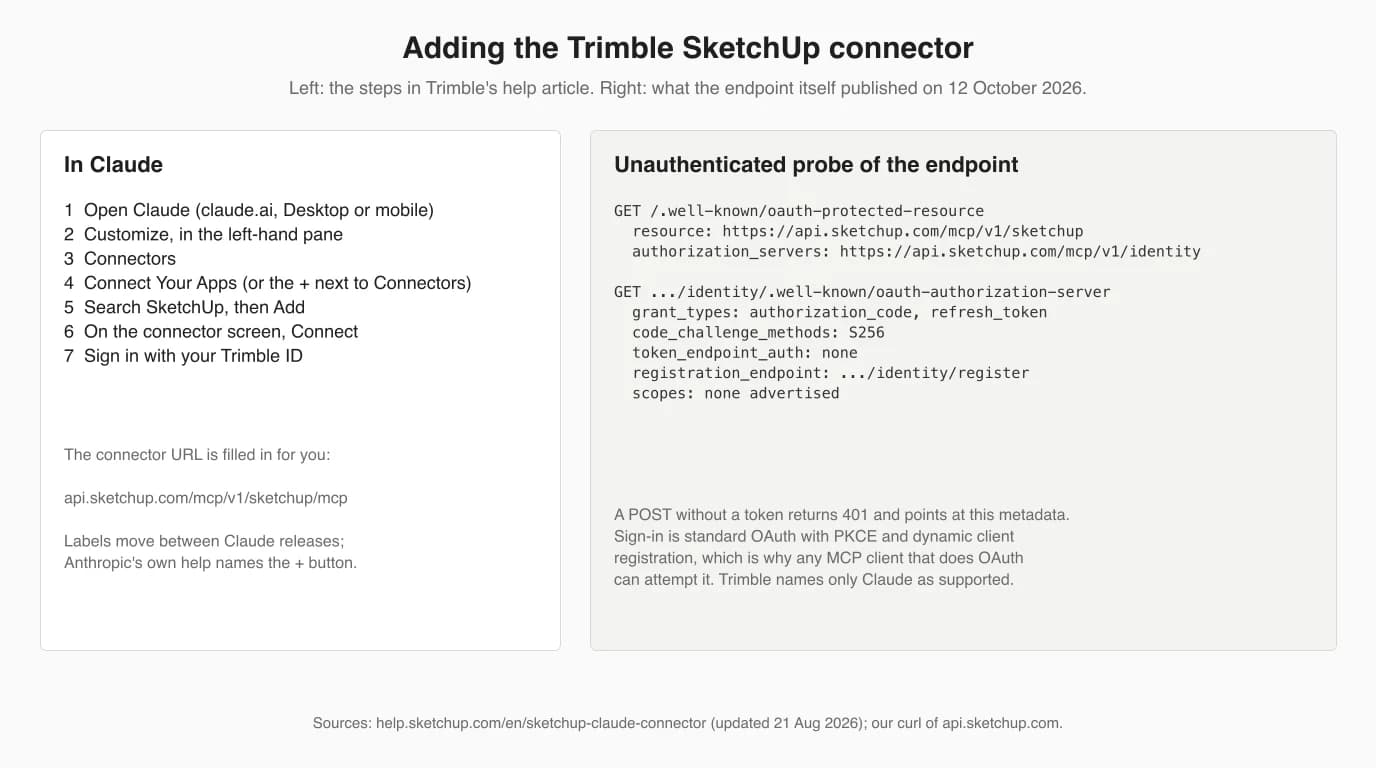
Open Claude, go to Customize, then Connectors, find SketchUp in the directory and click Add. These are the steps from Trimble's help article, with the one label that differs in Anthropic's help noted.
- Open Claude, on claude.ai or in the Desktop app.
- Select Customize in the left-hand navigation pane.
- Select Connectors.
- Select Connect Your Apps. Anthropic's help describes the same control as the + button next to Connectors; the label has moved between Claude releases. From inside a chat you can also use the + in the lower left, then Connectors, then Manage connectors.
- Search or browse for
SketchUpand click Add. The tile you want is Trimble SketchUp, described as “Create and iterate 3D models for use in SketchUp”.
You do not type a URL. The directory entry already points at https://api.sketchup.com/mcp/v1/sketchup/mcp. On a Team or Enterprise plan, if you cannot find the tile, ask your Claude owner to enable it first.
Step 2: Sign in with your Trimble ID
On the connector's details screen click Connect, and Claude sends you to a Trimble sign-in page. Once you approve, the connector shows as connected and its tools become available in new chats.
We could not go through that page ourselves, so here is what the endpoint published when we asked it without a token. A plain request returns 401 with a header pointing at Trimble's OAuth metadata, and that metadata describes a standard MCP sign-in: authorization code with PKCE (S256), refresh tokens, dynamic client registration, and no client secret. It advertises no scopes, so the metadata does not tell you what you are granting; the Trimble consent page is where to read that.
Step 3: The first prompt
Start a new chat and describe one object with its dimensions, the way you would describe it to someone modelling it for you. Trimble's help gives three example prompts and three rules, and the rules are the useful part.
Trimble's examples, verbatim:
Build me a 18" wide and 42" long mid-century modern coffee table with tapered legs
Model a simple two-story house with 30' x 45' base and a gable roof
Create a black rook chess piece- Give dimensions. In Trimble's words, they give “Claude less room to guess”.
- Add reference images if you have them. Sketches, photos and floor plans can go in the prompt.
- Ask for geometry, not a rendering. The help says Claude models form and proportion, not photorealism.
- Say metric if you mean metric. Claude works in inches by default. Trimble says you can give metric input and ask for a model with metric units set, so put “in millimetres, with model units set to millimetres” in the first prompt rather than finding out at the end.
When it finishes, Claude shows a thumbnail and a link to the .skp. The thumbnail is a still image, not a 3D view, so the only way to check the model is to download it and open it.
Step 4: Iterate, then download
Stay in the same chat and describe each change; Claude produces a new file with the same name and a version number every time. Download the version you want before you leave the chat, because Trimble does not keep models between sessions.
Trimble's iteration examples are the kind of edit that works: “Make the legs thinner and move them inward 2 inches”, “Add a lower shelf between the legs”. You can also take a screenshot of the model in SketchUp and paste it into the chat to point at the part that is wrong. Two things the help warns about, which are easy to miss:
- A new thread starts from zero. In the help's words, in new threads Claude “will start fresh with limited knowledge of previous work”. If you closed the chat, uploading your downloaded .skp will not help either, because the connector cannot edit an existing file.
- Do not build in parallel. Generating models across several chat threads at once “may lead to less stable output”.
Claude Code and other clients
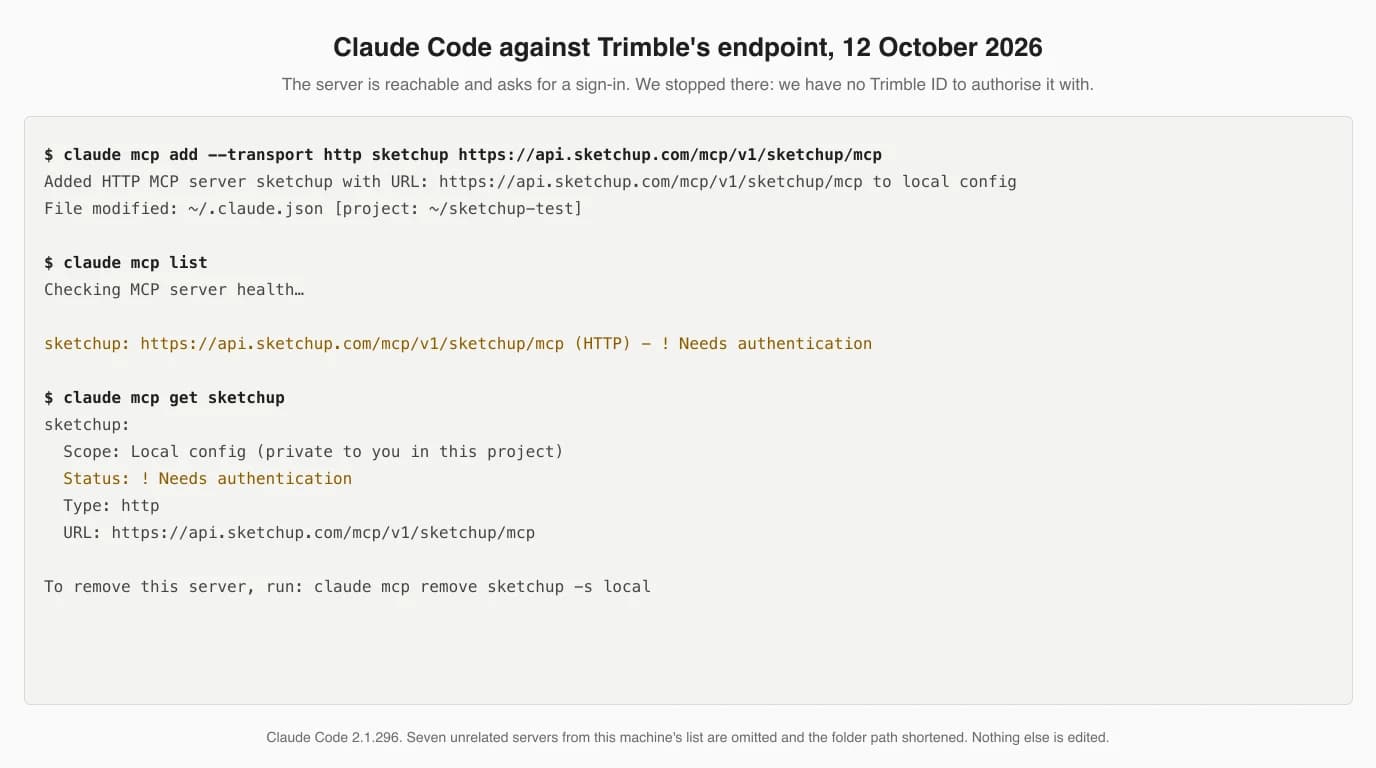
Trimble documents only Claude's own apps, and says Claude is the only supported AI provider. Claude Code can add the endpoint as an ordinary remote MCP server, and it gets as far as asking for a sign-in; we could not test past that point.
claude mcp add --transport http sketchup https://api.sketchup.com/mcp/v1/sketchup/mcpWe ran that, then claude mcp list. The status is ! Needs authentication, which is what an OAuth server reports before you sign in, and it is a better sign than the Failed to connect we saw for Fusion with nothing listening. The next step would be /mcp inside claude, choose sketchup and authorise in the browser. We have no Trimble ID, so we do not know whether Trimble's sign-in accepts Claude Code as a client, and we removed the server afterwards.
What happens inside the connector
Claude loads SketchUp's SDK documentation, writes Python that runs against a live model in Trimble's cloud, checks a snapshot of the result after each phase, and finally saves the model to a download link. That is three tool calls, as Trimble's help describes them.
get_docs, where “Claude loads the full SDK”.evaluate_py, which “executes Python code against the live model”. Claude may call it once per major component or phase, and after each successful call it gets a snapshot with the entities, names, statistics and other model details. This is what the launch release means when it says Claude checks dimensions iteratively as it works.save_model, which saves the finished model and returns a URL.
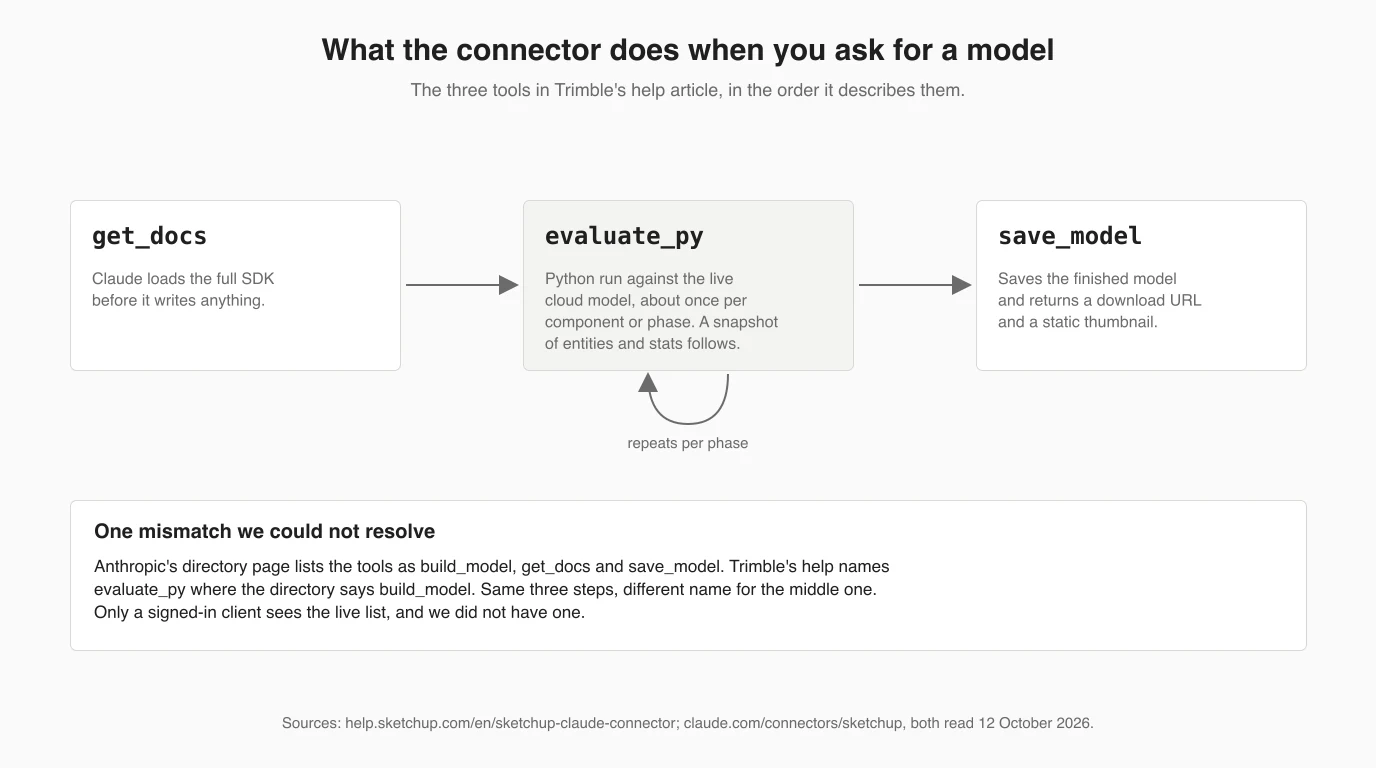
One detail we could not reconcile: Anthropic's directory page lists the tools as build_model, get_docs and save_model. Trimble's help has evaluate_py where the directory has build_model. It is probably a rename between the April listing and the August help update, but that is a guess, and the tool list is only served to a signed-in client.
The design is worth noticing. SketchUp's desktop extension API is Ruby, which is what every community server below uses. Trimble's connector runs Python against its own cloud SDK instead, which is why it needs no SketchUp on your machine, and also why it cannot reach a model that only exists on your disk.
What version 1 cannot do
Version 1 creates new models only. It cannot open, edit or render an existing .skp, does not keep models between chats, previews with a still image, works in inches by default, caps free use at 30 models, and supports no AI provider except Claude.
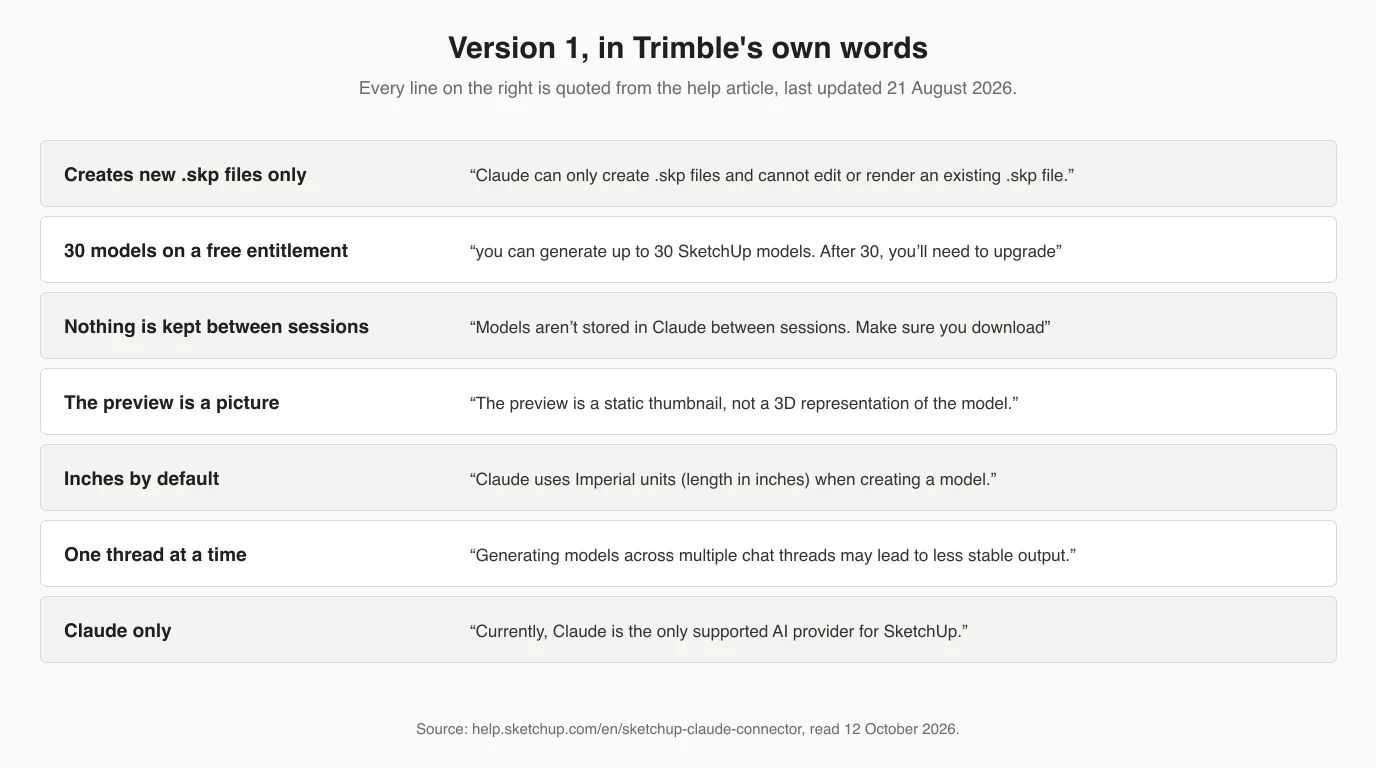
Trimble says the connector's capabilities will expand in future versions, without dates. Its launch materials also mention training Claude on your own skills and workflows for repetitive tasks; we found no Trimble-published skill to go with that, so read it as “Claude skills work alongside the connector” rather than a feature of it. What we cannot tell you is how good the models are, because we did not generate one. The Trimble video above is the vendor's own demonstration, not an independent test.
The community SketchUp MCP servers
A community SketchUp MCP server is two pieces: a Ruby extension inside SketchUp desktop that listens on a local port, and a small Python program that Claude starts and that forwards tool calls to that port. They work on the model you have open, which is exactly what the official connector cannot do.
SketchUp MCP servers on GitHub, 12 October 2026, from their READMEs and our runs
Install shape, using zinin's server as the example because it is the one that started cleanly for us. In SketchUp, open Window > Extension Manager > Install Extension, pick the .rbz from the project's Releases page and restart SketchUp. Then start the listener from Plugins > MCP Server > Start Server (that menu name is zinin's; mhyrr's README says Extensions). Finally add this to .mcp.json for Claude Code or claude_desktop_config.json for Claude Desktop, as the README gives it:
{
  "mcpServers": {
    "sketchup": {
      "command": "uvx",
      "args": ["sketchup-mcp2"],
      "env": {
        "SKETCHUP_MCP_HOST": "127.0.0.1",
        "SKETCHUP_MCP_PORT": "9876"
      }
    }
  }
}
The order matters, as it did for the local Fusion and FreeCAD servers: SketchUp open, extension started, then the Claude client. If Claude sees the tools but every call fails, the extension is not listening.
What we ran, and what broke
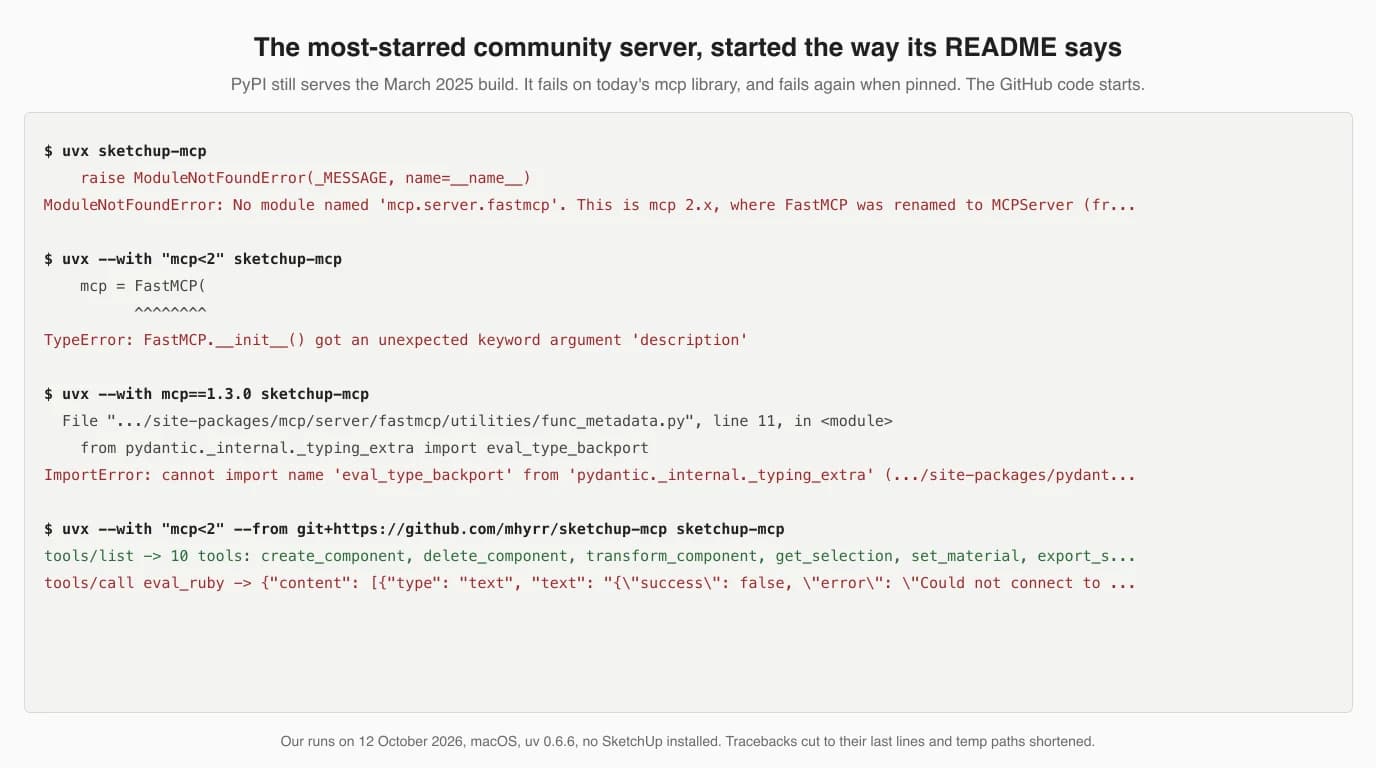
The most-starred community server does not start the way its README says. On 12 October 2026, uvx sketchup-mcp failed three different ways from PyPI, while the same project's GitHub code and zinin's newer server both started and served their tools.
mhyrr's README tells you to run uvx sketchup-mcp, which pulls version 0.1.17 from PyPI, uploaded on 13 March 2025. The fixes made since, including one on 25 April 2026, are on GitHub but were never published. Here is what each attempt did on a Mac with uv 0.6.6:
uvx sketchup-mcpinstalls the currentmcplibrary, 2.3.0, where FastMCP has been renamed, and stops withModuleNotFoundError: No module named 'mcp.server.fastmcp'. That is issue #32.- Pinning
--with "mcp<2"gets past that and stops atFastMCP.__init__() got an unexpected keyword argument 'description', issue #19. - Issue #32's own workaround,
--with mcp==1.3.0, failed for us on a third error: anImportErrorwheremcp1.3.0 imports a pydantic internal that the pydantic installed alongside it no longer has. - Running the GitHub code instead, with
uvx --with "mcp<2" --from git+https://github.com/mhyrr/sketchup-mcp sketchup-mcp, started, answered our MCP handshake and listed 10 tools.
If you want mhyrr's server, put the GitHub form in your Claude config instead of the README's:
{
  "mcpServers": {
    "sketchup": {
      "command": "uvx",
      "args": ["--with", "mcp<2", "--from",
               "git+https://github.com/mhyrr/sketchup-mcp", "sketchup-mcp"]
    }
  }
}
Two more things the handshake showed. mhyrr's README promises get_scene_info and get_selected_components; neither is in the server's tool list (issue #15 reports Claude itself noticing). The server does have three woodworking joints the README does not mention, mortise and tenon, dovetail and finger joint. And when we called eval_ruby with no SketchUp running, both mhyrr and zinin returned the failure as ordinary text with isError: false, so a client sees a successful call whose text says it failed. Claude reads the text and copes; a script that checks the flag would not.
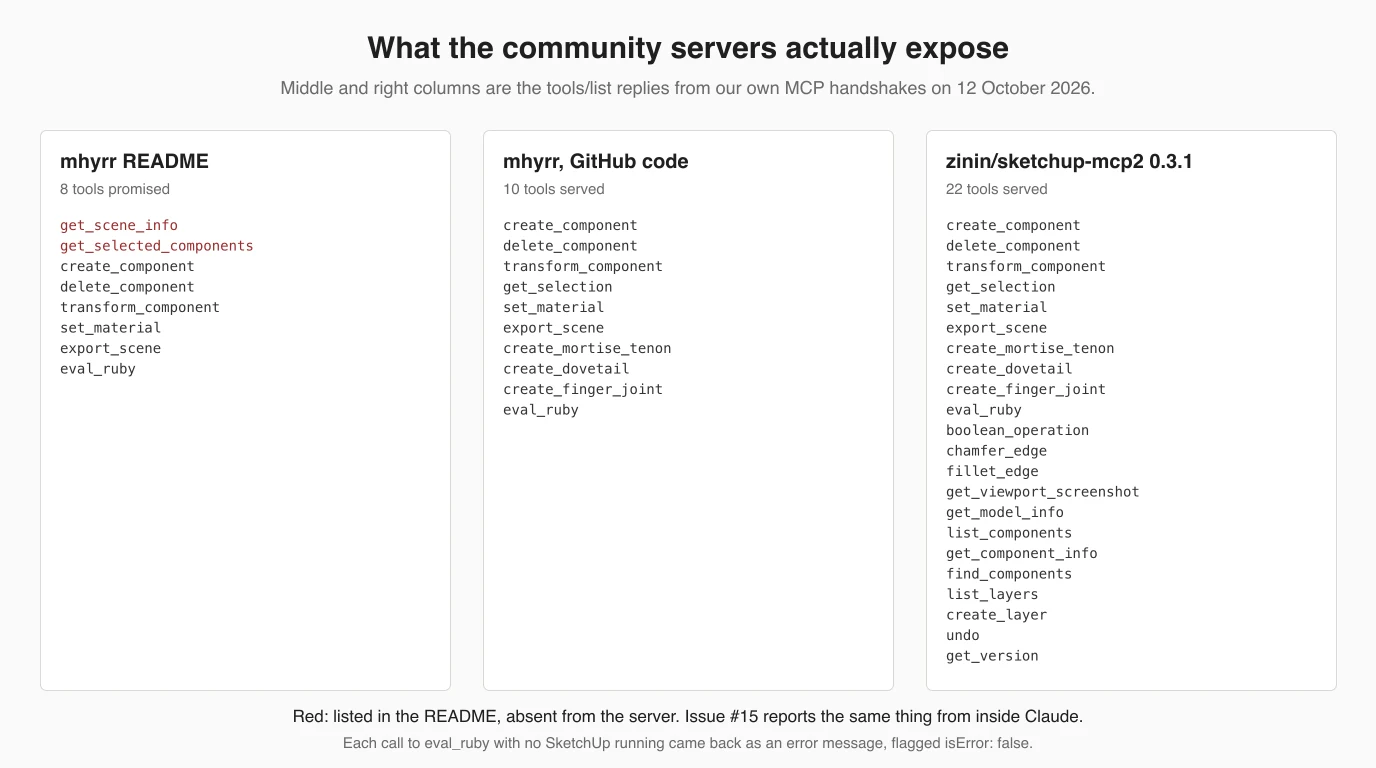
zinin's server, by contrast, started first time from PyPI with uvx sketchup-mcp2 and served 22 tools, including undo, introspection tools that read components and layers, and a viewport screenshot so Claude can look at what it built. Its package pins mcp<2, which is why the library change that broke mhyrr did not break it. That is as far as our test goes: without SketchUp we could not run a single modelling call, so we cannot tell you how well either server builds.
What the code says about safety
Trimble's connector runs Claude's code in Trimble's cloud, not on your computer. The community servers we checked run Claude's Ruby inside your SketchUp, with your user's permissions, on a local port with no password.
- Loopback only. mhyrr's extension opens
TCPServer.new('127.0.0.1', 9876), and zinin and Shattenjagger also default to 127.0.0.1. Nothing on your network can reach it, and any program on your computer can, while the server is started. - eval_ruby is plain eval. In mhyrr's code the tool is
eval(params["code"], binding)on a copy of the top-level binding. A comment calls it a safe binding; it is not a sandbox, and Ruby inside SketchUp can read and write files and open network connections. zinin's README says the same in plain words and gives you a setting, Enable Ruby evaluation, to switch the tool off. - Your approval prompt is the guard. Claude Desktop and Claude Code show each tool call's arguments, including the Ruby, before it runs. Leave that on, keep a saved copy of the model, and stop the server from the Extensions or Plugins menu when you are done.
- Licences matter if you ship this at work. mhyrr has no LICENSE file, which an open issue points out means default copyright, even though its README and package metadata say MIT. SidhNor's server is AGPL-3.0.
Where a 2D drawing fits
Neither route gives you a dimensioned 2D drawing. Trimble's connector returns a .skp and a thumbnail, and no community server we read mentions LayOut, SketchUp's drawing app, so if the goal is a shop drawing or a DXF for a cutter, you still need a separate step.
If you are starting from a physical part or a photo, TechDraw AI turns the photo into a dimensioned technical drawing with DXF export, and that DXF imports into SketchUp Pro through File > Import, where you Push/Pull it into a solid; the steps are on our SketchUp workflow page. TechDraw AI also has its own MCP server, so the drawing step can happen inside the same Claude session; we have not tested it side by side with a SketchUp server.
Have a photo of the part you want to model in SketchUp? Get a dimensioned technical drawing from it first, then build the model to real numbers.
Turn a photo into a drawingRelated reading: Claude with Fusion 360 (the other vendor-built connector, which does run on your machine), Claude with Onshape, Claude with Revit, Claude with AutoCAD, the full CAD MCP server landscape, and TechDraw AI's own MCP server.
FAQ
Frequently asked questions
Can Claude connect to SketchUp?
Yes. Trimble released an official SketchUp connector for Claude on 28 April 2026. You add Trimble SketchUp from Claude's connector directory, sign in with a Trimble ID, and Claude builds a new model in a cloud SketchUp session and hands you a .skp download link. It cannot open or edit a model you already have. For that you need a community MCP server running inside SketchUp desktop.
How do I connect Claude to SketchUp?
In Claude, open Customize, then Connectors, then the option to add one (Trimble's help calls it Connect Your Apps). Search for SketchUp, click Add, then Connect, and sign in with your Trimble ID. Start a new chat and describe a model with dimensions. When Claude finishes it shows a thumbnail and a link to the .skp file, which you open in any version of SketchUp.
Is the Claude SketchUp connector free?
Partly. Trimble's help says a free SketchUp entitlement lets you generate up to 30 models through the connector, and after that you need a paid SketchUp subscription. You also need a Claude account; Anthropic says directory connectors are available to all Claude users, including the free plan. Trimble's launch blog words it differently, as available for SketchUp subscribers, so check your own account before relying on the free route.
Can Claude edit an existing SketchUp model?
Not with Trimble's connector. Its help article says Claude can only create .skp files and cannot edit or render an existing one, and models are not kept between chat sessions. Within one chat you can keep asking for changes and each comes back as a new versioned file. To have Claude change a model you already own, use a community MCP server, which drives the SketchUp desktop app you have open.
Is there a SketchUp MCP server on GitHub?
Several. The most starred is mhyrr/sketchup-mcp, about 488 stars in October 2026, a Ruby extension plus a Python server on port 9876. Its PyPI package is from March 2025 and failed to start for us on current libraries. zinin/sketchup-mcp2 (MIT, 43 stars, 22 tools) started cleanly. Others include dtzhlq/local-mcp-for-sketchup with 48 tools and Shattenjagger/sketchup-mcp-bridge for SketchUp Pro 2026 on Windows.
Does the SketchUp connector work with Claude Code?
Trimble does not document Claude Code. The endpoint is an ordinary remote MCP server with OAuth, so claude mcp add --transport http sketchup https://api.sketchup.com/mcp/v1/sketchup/mcp is accepted, and claude mcp list then reports Needs authentication. We stopped there because we have no Trimble ID, so whether the sign-in completes from Claude Code is untested. The community servers are built for Claude Code and Claude Desktop.
Is there a Claude plugin or extension for SketchUp?
Not in the usual sense. Trimble's route is a connector you add inside Claude, with nothing installed in SketchUp. The community routes are the opposite: a SketchUp extension, an .rbz file installed through Window, Extension Manager, that opens a local socket, plus a small Python MCP server Claude starts. None of the community extensions we checked is published by Trimble.
Does SketchUp work with ChatGPT or Codex?
Not through Trimble. Its help article says Claude is currently the only supported AI provider for SketchUp. The community servers speak plain MCP, so any MCP client can use them: andyluu98/vn-sketchup-mcp names Claude Code and Codex, and laowang-wy/adai-sketchup-skill-mcp is built for Codex. Whether a given server works well with a given model is something none of them measures.
Sources
- SketchUp Help: SketchUp Connector for Claude (last updated 21 August 2026)
- Trimble news release: Trimble Links SketchUp with Anthropic's Claude (28 April 2026)
- SketchUp blog: Design with dialogue, meet the SketchUp Connector for Claude (8 May 2026)
- Anthropic connector directory: Trimble SketchUp (added April 2026)
- Claude Help Center: Use connectors to extend Claude's capabilities
- SketchUp Help: SketchUp AI FAQ
- Trimble SketchUp on YouTube: How good is Claude at SketchUp modeling? (12 May 2026)
- mhyrr/sketchup-mcp on GitHub
- mhyrr/sketchup-mcp issue #19: FastMCP got an unexpected keyword argument 'description'
- mhyrr/sketchup-mcp issue #32: mcp 2.0 breaking changes cause a server error
- mhyrr/sketchup-mcp issue #15: get_selected_components and get_scene_info not working
- mhyrr/sketchup-mcp issue #10: cannot find the .rbz files
- mhyrr/sketchup-mcp issue #33: Please add a LICENSE file
- sketchup-mcp on PyPI (0.1.17, 13 March 2025)
- zinin/sketchup-mcp2 on GitHub (MIT)
- sketchup-mcp2 on PyPI (0.3.1)
- dtzhlq/local-mcp-for-sketchup on GitHub (Apache-2.0, 48 tools)
- Shattenjagger/sketchup-mcp-bridge on GitHub (MIT, SketchUp Pro 2026 on Windows)
- SidhNor/sketchup-mcp-server on GitHub (AGPL-3.0)
- Model Context Protocol: official specification and docs