
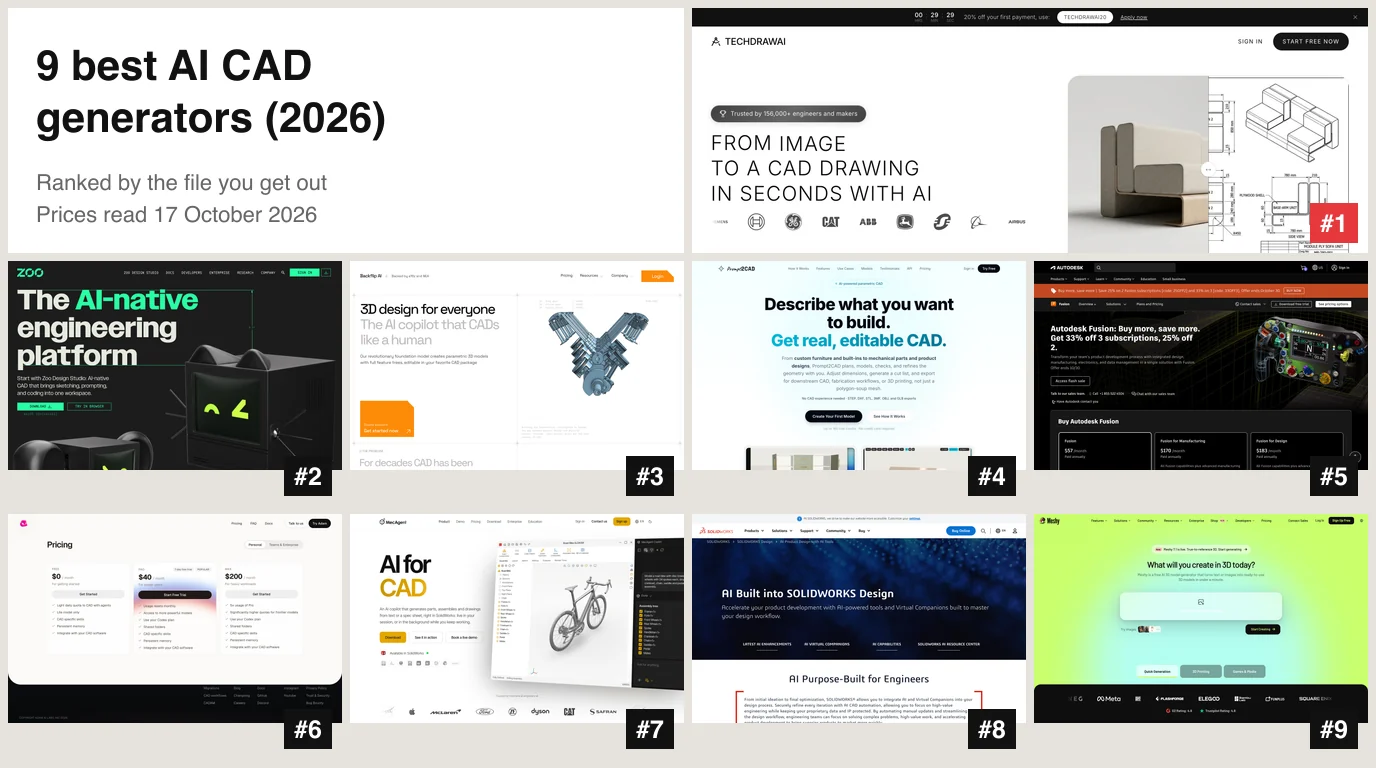
The best AI CAD generator depends on the file you need: TechDraw AI for a dimensioned 2D drawing of a real part, Zoo for an editable 3D solid from a description, Backflip for a parametric model rebuilt from a drawing, scan or photo, and Meshy for a mesh to print. We ranked nine by one question that most lists skip: what file do you get out, and can you check it? TechDraw AI is ours and is first. It is also the only tool on this page whose output we opened and measured, and the measurement found a real limitation, which we show you below.
Our articles are still written by humans!
Get human written articles in your Google feed.
 #1 TechDraw AI
 #2 Zoo
 #3 Backflip
 #4 Prompt2CAD
 #5 Autodesk Fusion
 #6 Adam
 #7 MecAgent
 #8 SolidWorks AI
 #9 Meshy

The short answer
- A dimensioned drawing of a part you already have: TechDraw AI.
- A new solid from a description, as STEP: Zoo Design Studio, or Prompt2CAD if you want DXF and SketchUp out as well.
- A drawing, scan or photo rebuilt as an editable model: Backflip, if you work in Fusion.
- AI inside the CAD you already pay for: Autodesk Assistant in Fusion, MecAgent or LEO in SolidWorks, Adam in Onshape, Fusion or SolidWorks.
- A mesh for printing, games or a render: Meshy.
The nine, ranked
Read on each vendor's own pages, 17 October 2026, in US dollars unless stated. Only TechDraw AI was run by us.
Three kinds of file, one search term
An AI CAD generator is software that produces CAD output from a prompt, a photo, a sketch or a scan instead of from your mouse. That definition hides the question that decides everything, which is what kind of file comes out:
- A solid (B-rep), as STEP or native CAD. Exact surfaces, often a feature tree you can edit by changing a number. This is what a machine shop asks for. Zoo, Backflip, Prompt2CAD, MecAgent, LEO and Adam work here.
- A 2D drawing, as DXF, DWG or PDF. Views, dimensions and a title block, for quoting, documenting an existing part or a workshop wall. This is TechDraw AI's lane. If you are unsure which format to ask for, see DWG versus DXF.
- A mesh, as STL, OBJ or GLB. Triangles with a shape and no dimensions. Fine for a 3D printed figurine or a game asset, useless for changing a hole from 6 to 8 mm. Meshy, and most “image to 3D” tools, live here.
Most roundups for this search mix all three in one list, and most are written by a vendor that ranks itself first. So is this one. What we can add is a measurement and the date we read every price.
How we ranked them
- Can you check the output? A STEP you can measure or a DXF you can open beats a picture. A file with no dimensions ranks lowest.
- Can someone without a CAD seat use it today? A browser tool with a published price ranks above an add-in that needs a CAD licence first. That is the main reason Fusion, MecAgent and SolidWorks are in the second half: they are good, and they assume you already own the program.
- Does it start from something you have? Most real jobs start from a part on the bench, a photo or an old drawing, not from a blank prompt.
- Is the price published, and what does the free tier export?
If you design new parts from scratch all day and own a CAD seat, that order is wrong for you. Start at Zoo, then look at the assistant inside your own program.
1. TechDraw AI
Verdict: the quickest way to get a dimensioned drawing of a part you can photograph and have no CAD model of. It is not a solid modeller, and its DXF is a drawing, not a part at true size.
You upload a photo (up to three angles), draw a line over an edge and type its real length, as many as you like. You choose ISO or ANSI, sheet size, units, first or third angle and the views, and you get a sheet with orthographic views, dimensions, a projection symbol and a title block, usually in under a minute. There is also text to technical drawing for simple parts, and Photo to 3D, which returns a mesh.
What we measured
In the 10 October test, every one of 39 typed lengths on 13 photos landed on the right edge of the drawing. That covers what you tell it. For this post we checked the part everybody skips: the CAD file. We took two of those drawings, a printed bracket and a flange hub, ran them through the same trace the app uses for its DXF download, opened the files with ezdxf and measured every labelled dimension.
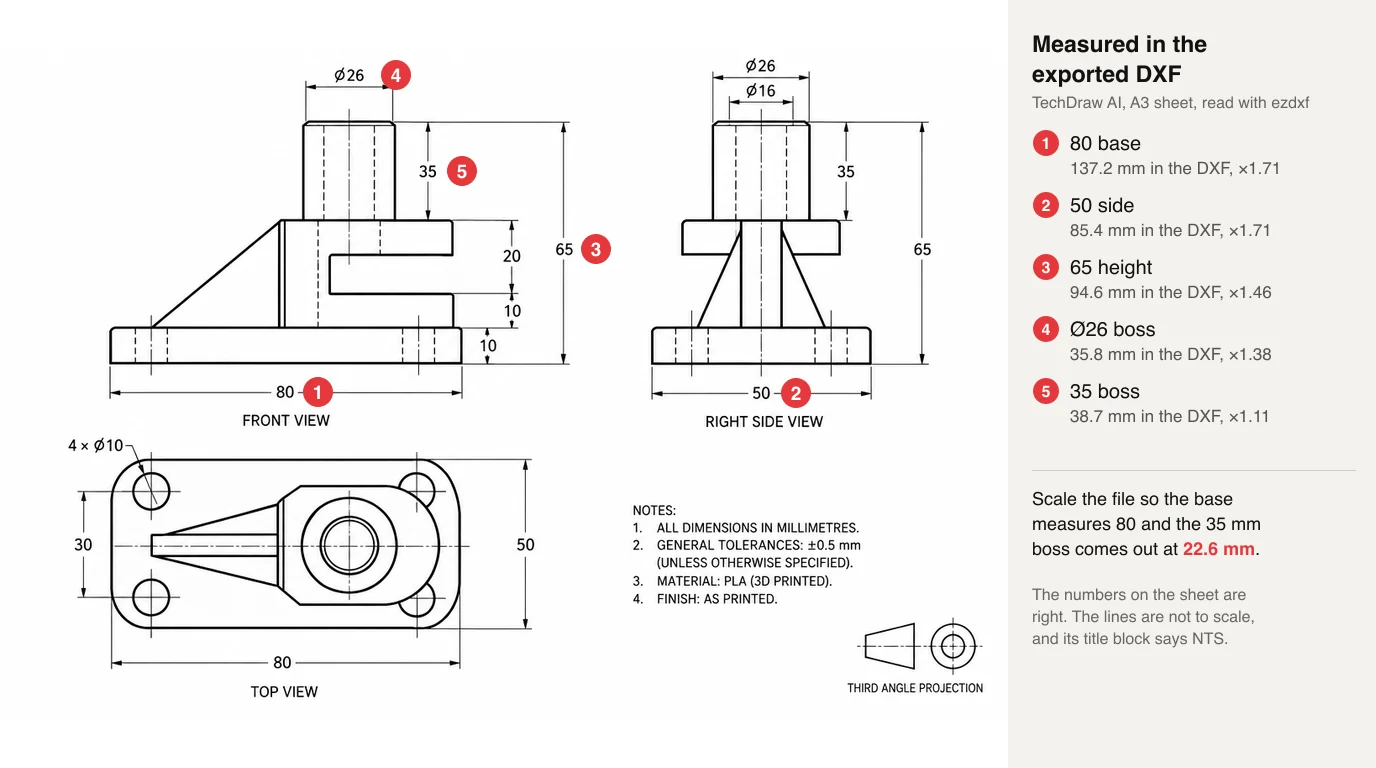
TechDraw AI DXF export, two production drawings, A3, measured 17 October 2026
Three things follow, and we would rather you read them here than find them in AutoCAD:
- The file is valid. Both DXFs passed ezdxf's audit with 0 errors, in millimetres, with real layers for views, lettering and the frame.
- The geometry is not to scale. The views are traced from a drawn image and placed on the paper, so a length in the file is paper millimetres, and the drawing itself is out of proportion: on the bracket the height is drawn shorter than the width relative to their labels, and on the flange the same Ø160 is 12% smaller in the top view than in the front view. No single scale factor fixes that. The title block says NTS, not to scale, and it is right.
- The numbers are lines, not dimensions. Only the title block is real text. The dimension values are traced shapes, so CAD will not read them as dimensions you can edit.
So use it for what it is good at: a clear, dimensioned drawing to quote from, document an existing part, hand to a machinist or redraw from in CAD. Do not cut from it. Separately, the 10 October test found that in two of three mechanical parts one dimension the model worked out by itself did not add up with its neighbours, so check every chain you did not measure, as we said in AI in mechanical engineering.
- Pro: Starts from a photo of a real part, which none of the text-first tools can do.
- Pro: Typed lengths came back on the right edge 39 times out of 39.
- Pro: ISO or ANSI, A4 to A0 or ANSI A to E, first or third angle, a title block.
- Pro: Valid DXF and DWG that open in any CAD program, plus a mesh from the same photo.
- Con: The DXF is a drawing sheet traced from an image: not to scale, and its dimensions are not CAD dimensions.
- Con: Not a solid modeller. For a STEP you can machine, use Zoo or Prompt2CAD.
- Con: DXF, DWG, PDF and SVG need the Studio plan; PNG is on every plan.
- Con: Photo to 3D is Studio only, costs 80 credits, and returns a Meshy mesh, not a solid.
Price: 5 credits per drawing, not charged when a drawing fails, and new accounts get free credits. Starter is $29 a month for 120 credits, Studio $89 a month for 750 credits with the CAD exports and 3D. Billed yearly they are $132 and $588.
Upload a photo of a part, mark one real length, and get a dimensioned drawing back, with free credits to try it.
Make a drawing2. Zoo Design Studio
Verdict: the best text to CAD for engineers, because the output is an editable solid with exact geometry and not a mesh.
Zoo's agent, Zookeeper, turns a description into a model written in Zoo's own CAD language, KCL, with a feature tree you can edit by hand or by asking again. It exports STEP, STL, glTF and GLB, OBJ and PLY, and Zoo's own docs say only STEP keeps “exact curves and surfaces” and to always use it for manufacturing. It runs as a desktop app or in the browser. Like every text first tool it is for new parts. It cannot document a part you are holding.
- Pro: A real solid with a feature tree, and STEP that goes into any CAD program.
- Pro: The model is code, so a change is a diff you can review.
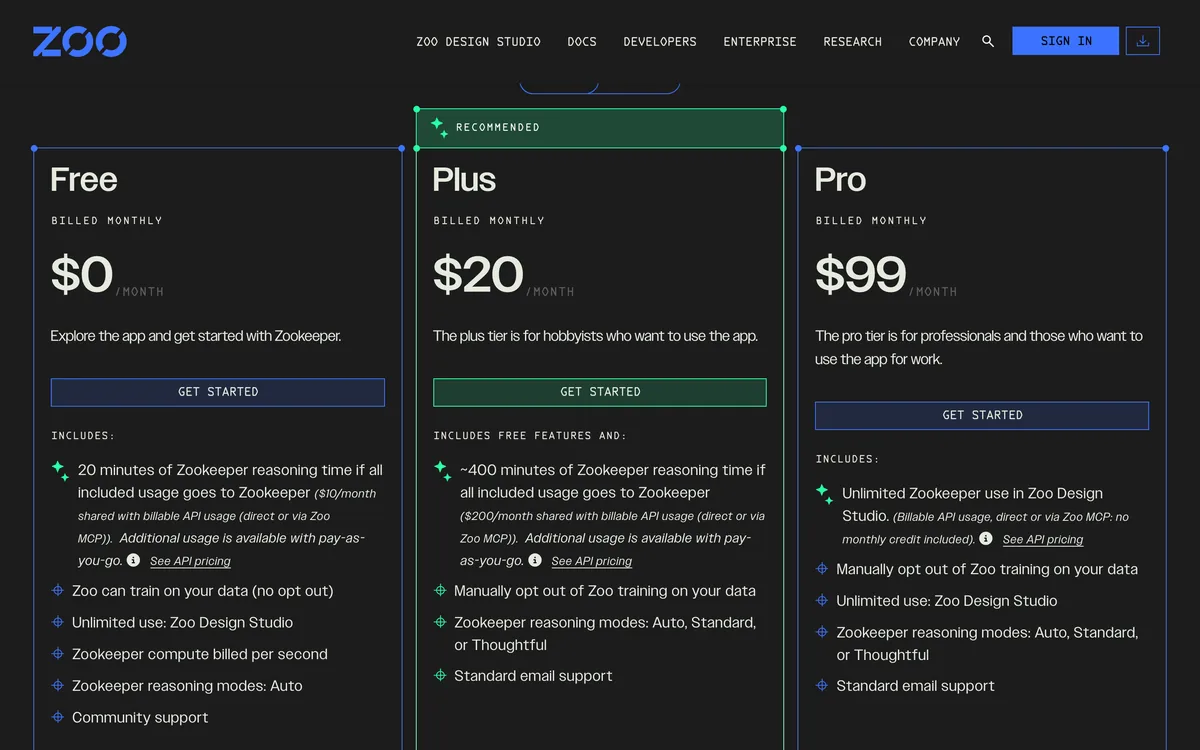
- Pro: $10 of usage a month free, with no card.
- Con: The free plan card says Zoo can train on your data, with no opt out; Plus and Pro let you opt out.
- Con: A vague prompt gives a vague part; you have to describe it like a drawing.
- Con: KCL is one more language for the team to learn. Its only Trustpilot review was 2 stars.
Price: Free with $10 of credit a month, Plus $20, Pro $99 and Team $399 per user a month, or pay as you go per second of reasoning.
3. Backflip
Verdict: the closest thing to a reverse engineering generator: it rebuilds a drawing, a scan or a few photos as a parametric model with a full feature tree, if you work in Fusion.
Backflip has three entry points. Drawing to CAD reads the geometry and dimensions off a drawing. Scan to CAD converts STL, OBJ, GLB and other meshes into CAD geometry. Photo to CAD builds a model from a few photos and, like TechDraw AI, needs one known dimension to scale it. That requirement is the honest one: a photo has proportions, not size. The output lands in Autodesk Fusion through Backflip's add-in, or in its web app. Onshape and other plug-ins are listed as coming soon, and its SOC 2 Type II audit as in progress.
- Pro: Starts from what you have: a drawing, a scan or photos.
- Pro: Parametric output with sketches, constraints and a feature tree.
- Pro: Asks for a known dimension instead of pretending a photo has scale.
- Con: Fusion only for now, plus a web app.
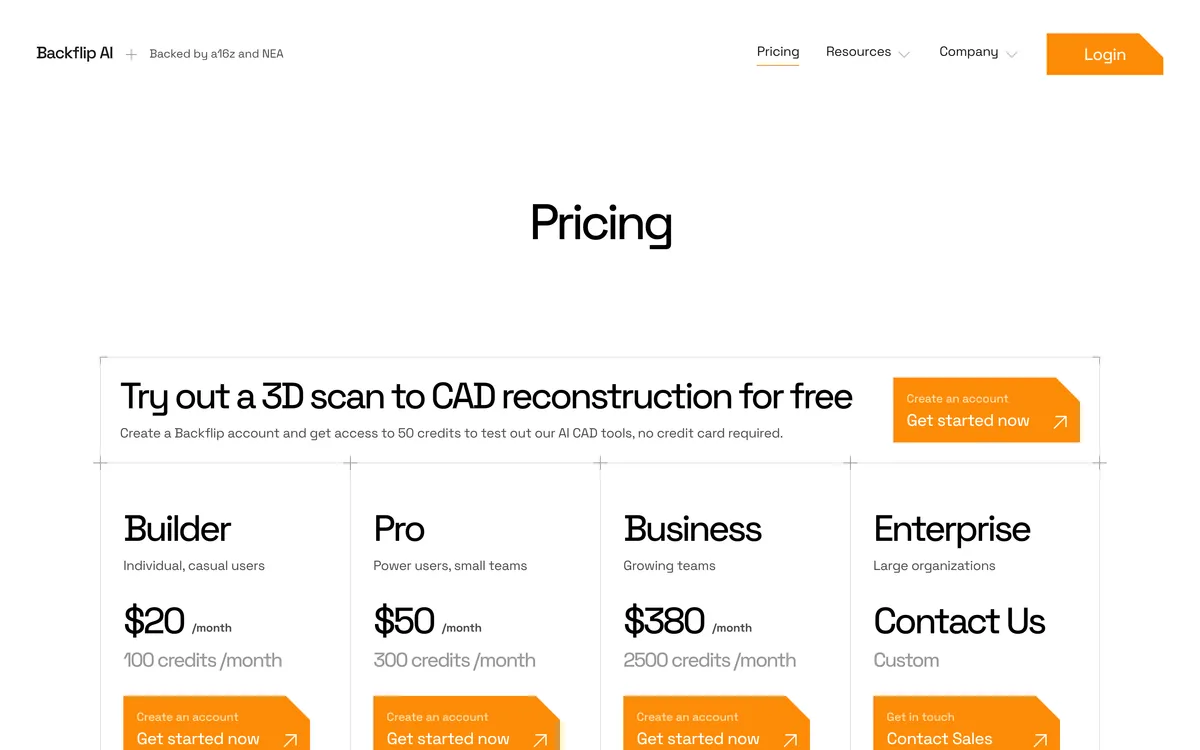
- Con: Builder's 100 credits buy about two Thinking jobs a month at 50 credits each, and credits do not roll over.
- Con: No published accuracy figures; test it on a part you have already measured.
Price: a 50 credit trial with no card, then Builder at $20 a month for 100 credits. A Fast job costs 10 credits and a Thinking job 50.
4. Prompt2CAD
Verdict: the widest export list of any generator here, including DXF and SketchUp, and a free tier that cannot download any of it.
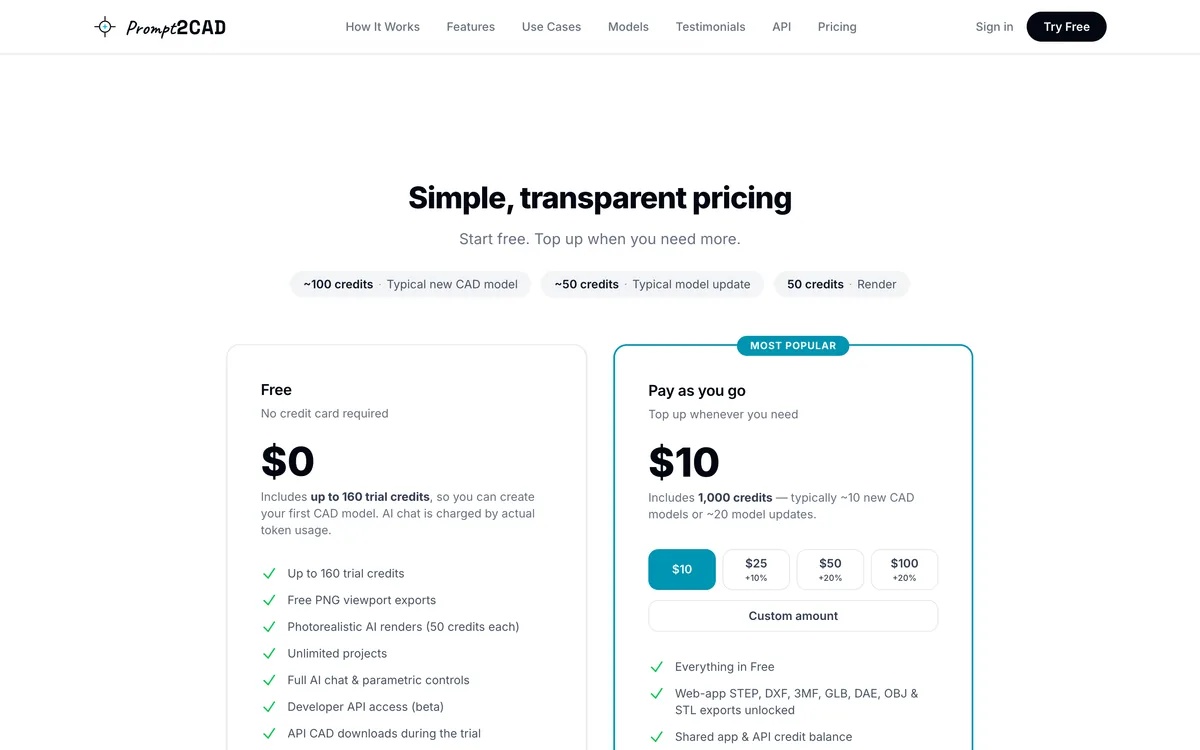
Prompt2CAD turns a description, an image or a sketch into a parametric model, then lets you adjust dimensions, produce a cut list and export STEP, DXF, SKP, DAE, GLB, OBJ, STL or 3MF. It leans toward furniture and built-ins as much as mechanical parts, which makes it the most useful text to CAD for woodworkers. It also imports DWG, DXF, SKP, OBJ, STL and GLB to edit. Two things to know before you sign up: the 160 trial credits make models you can only export as PNG, and credits expire after three months. Prompt2CAD also publishes its own “best AI CAD” comparison that ranks itself first, the same conflict of interest as this page.
- Pro: STEP and DXF out, plus SketchUp, 3MF and four mesh formats.
- Pro: Cut lists and furniture work, not only machine parts.
- Pro: Pay as you go, no subscription.
- Con: Free tier exports PNG only.
- Con: Credits expire after three months.
- Con: A new model costs about 100 credits and a complex one 150 or more.
Price: $10 buys 1,000 credits, about ten new models or twenty updates, with bonus credits on the $25, $50 and $100 packs.
5. Autodesk Fusion
Verdict: the best AI inside a full CAD program you can start for under $60 a month, with a token allowance that runs out fast.
Autodesk Assistant works on the design you have open: you ask, and it runs the modelling or manufacturing steps in Fusion, so the result is native Fusion geometry with history. From 6 October 2026, design actions draw on monthly Flex tokens, 20 a month for commercial users and 10 for personal use, while questions about how to do something are free. Autodesk's own post adds that a personal user who buys more tokens is moved to the commercial version. Autodesk has also previewed AI that generates editable geometry straight from a prompt; that is not what ships in the Assistant today. For connecting Claude instead, see Claude and Fusion.
- Pro: Native, editable Fusion geometry with a timeline.
- Pro: A full CAD, CAM and simulation program around it.
- Pro: Free for personal, non-commercial use.
- Con: 20 design actions a month on a commercial seat is not many.
- Con: You need to know Fusion to judge what it did.
- Con: Generation from a bare prompt is still a preview, not the shipping Assistant.
Price: Fusion at $57 a month billed yearly on Autodesk's page when we looked, with Manufacturing and Design bundles from $170 and $183 a month, and a free trial.
6. Adam and CADAM
Verdict: two products under one name now: a paid copilot inside your CAD program, and the free, open source text to CAD app it started as.
If you read an older list, Adam was a text to 3D website. Today adam.new opens on a sign-in screen for “the AI CAD workspace for hardware teams”: it connects to Onshape, Autodesk Fusion and SolidWorks, reviews and changes CAD there, and works with drawings and bills of materials. Its docs do not describe generating geometry from a bare prompt. The original idea lives on as CADAM, GPLv3 on GitHub with about 5,300 stars: text or an image becomes a parametric OpenSCAD model in the browser, exported as STL, SCAD or DXF. There is no STEP, which matters if a shop is on the other end.
- Pro: CADAM is free, open source and parametric.
- Pro: The copilot works in three CAD programs, not one.
- Pro: CADAM exports DXF for laser and CNC profiles.
- Con: CADAM has no STEP export.
- Con: The copilot needs a CAD program and a paid plan for real use.
- Con: The free tier is a light daily quota on the Lite model.
Price: Free with a light daily quota, Pro $40 a month with a 7 day trial, Max $200 a month.
7. MecAgent
Verdict: the most complete generator inside SolidWorks, priced for people whose time is worth more than $84 a month.
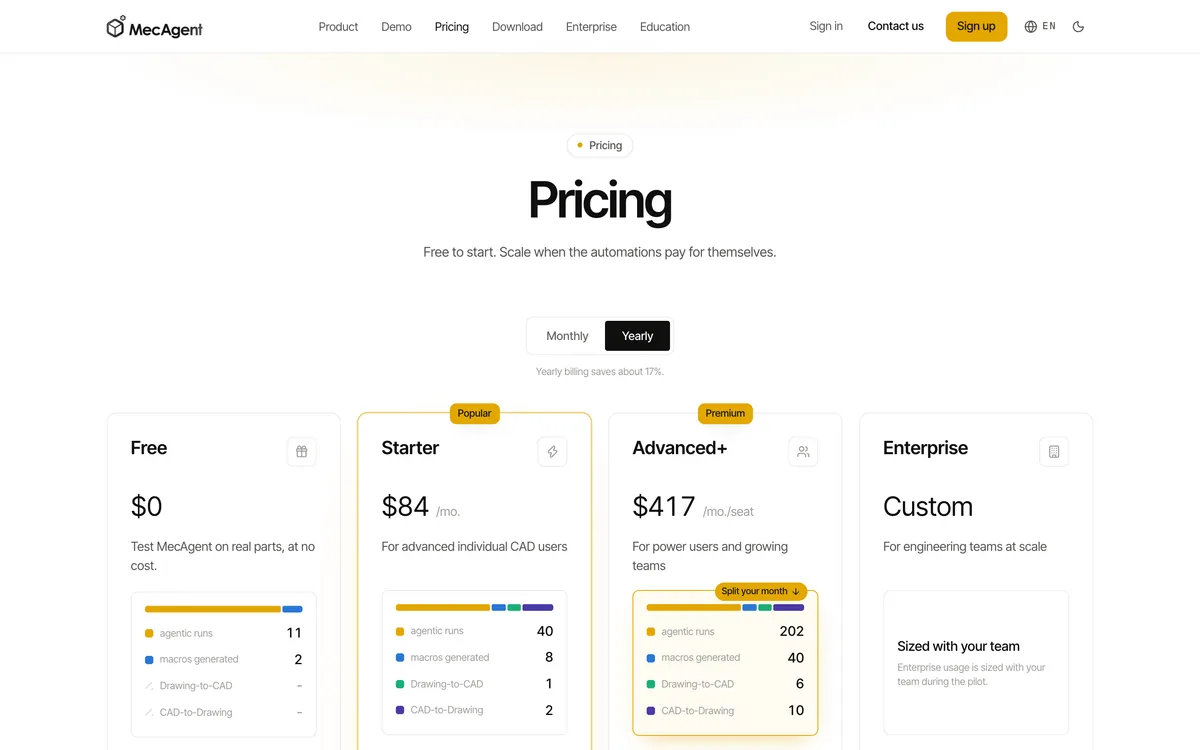
MecAgent is a SolidWorks add-in that generates parts, assemblies and drawings from text or a spec sheet, live in your session or in the background, with Drawing to CAD and CAD to Drawing among its actions. Everything draws on one monthly token budget. The pricing page's own example month on Starter is 40 agent runs, 8 macros, one Drawing to CAD and two CAD to Drawing, and the free plan's example has no Drawing to CAD at all. Other CAD programs are shown on its homepage as coming soon.
- Pro: Native SolidWorks parts, assemblies and drawings.
- Pro: Drawing to CAD and CAD to Drawing in one tool.
- Pro: A free plan to try it on real parts.
- Con: SolidWorks only.
- Con: Starter, $84 a month billed yearly, covers only a handful of the heavy actions.
- Con: Needs a SolidWorks licence on top.
Price: Free, Starter $84 a month (15,000 tokens) and Advanced+ $417 a month per seat (90,000 tokens), both billed yearly, which MecAgent says saves about 17%.
8. SolidWorks AI
Verdict: worth turning on if you already pay for SolidWorks, and not a reason to buy it.
Dassault ships two “virtual companions”. AURA answers questions from documentation and your company's knowledge. LEO is the generator: Dassault says it converts natural language prompts into structured parametric CAD and turns legacy or imported data into parametric models, “available today with capabilities expanding through 2026”. Dassault publishes no separate price for either. Do not confuse LEO with Leo AI, an unrelated startup.
- Pro: Native SolidWorks features, so your normal checks apply.
- Pro: Converts imported dumb geometry into parametric models.
- Pro: Comes from the CAD vendor, so it tracks new releases.
- Con: Requires SolidWorks, sold through resellers.
- Con: Capabilities are still being rolled out.
- Con: No public price or usage limit to plan around.
9. Meshy
Verdict: the best known image to 3D generator, and not a CAD tool: it gives you a mesh with a shape and no dimensions.
Meshy turns text or an image into a textured model in FBX, OBJ, USDZ, GLB, STL or BLEND. It has the biggest review base of anything here, 4.7 on Trustpilot from 3,827 reviews when we looked, with complaints about billing after cancelling and meshes that would not print. We should disclose that TechDraw AI's own Photo to 3D runs on Meshy's image to 3D, so we know its limits first hand: in our own set of eight reconstructions, six were good enough to show, and a split pipe clamp lost its counterbores and came back rounded. Fine detail and exact size are exactly what a mesh does not carry. If you need a solid later, STL to STEP converts the file but cannot add the precision that was never in it.
- Pro: Fast, good looking models from a single image.
- Pro: Every common mesh format, including BLEND and USDZ.
- Pro: A large user base and a free monthly allowance.
- Con: A mesh, not CAD: no feature tree and no dimensions.
- Con: Free models are CC BY 4.0, so commercial use needs attribution.
- Con: Thin walls and small holes often come back closed or rounded.
Price: Free with 100 credits and 10 downloads a month; Pro €19 a month for 1,000 credits, as shown to us in euros.
What we left off
- Onshape AI Advisor. PTC's own page says it “does not generate designs”. The interesting Onshape piece is its FeatureScript MCP server, covered in Claude and Onshape.
- Leo AI. An engineering knowledge and part search copilot, not a generator, and with no published price.
- Tripo and other image to 3D tools. The same mesh category as Meshy; Tripo's free tier is non-commercial.
- Shapr3D and Vizcom. Excellent tools whose AI makes renders, not geometry.
- TexoCAD, Neural4D, Katalyst, CADGPT. Either early access, formats we could not confirm on their own pages, or no live product we could find.
- ChatGPT and Claude. Not generators on their own, but both write OpenSCAD and CadQuery well, and Claude can drive FreeCAD, SolidWorks and Fusion through MCP. See Claude and SolidWorks and whether ChatGPT can make technical drawings.
What the research says
Text to CAD is a research field, not only a product category, and the papers are more candid than the landing pages:
- Text2CAD (NeurIPS 2024) built the first large dataset for it: about 170,000 CAD models with 660,000 text descriptions written from beginner to expert level.
- CADPrompt (Alrashedy et al.) is a benchmark of 200 prompts with expert written CAD code. Letting GPT-4 look at its own render and correct itself raised its success rate by only 5 percentage points. Self checking helps a little; it does not make a model reliable.
- CAD-Coder (NeurIPS 2025) treats text to CAD as writing CadQuery code and trains on 110,000 text, code and shape triples. Generating code you can read is where the field is going, and it is what Zoo's KCL and CADAM's OpenSCAD already do.
The practical reading: generated parts are good first drafts for simple geometry, and the error rate climbs with every feature. Budget for checking.
Which generator for which job
Check any AI CAD file in ten minutes
The commonest failure is still the oldest one: a file with no declared unit, which opens in the reader's default and comes out the wrong size.
Watch: free AI CAD tools compared
HAIZOL, a manufacturing marketplace and not one of the vendors above, tried free AI CAD tools for CNC, sheet metal and 3D printing, and separates the ones that give you STEP from the ones that give you a mesh, which is the distinction this page is built on.
FAQ
Frequently asked questions
What is the best AI CAD generator?
It depends on the file you need. To get a dimensioned 2D drawing (DXF, DWG, PDF) of a part you can photograph, TechDraw AI. To generate an editable 3D solid from a description with STEP export, Zoo Design Studio. To rebuild a drawing, scan or photo as a parametric model with a feature tree in Autodesk Fusion, Backflip. For a printable or game-ready mesh, Meshy. No single tool does all four, and every vendor list ranks its own tool first, this one included.
Is there a free AI CAD generator?
Yes, with limits. Zoo's free plan includes $10 of usage a month. Meshy gives 100 credits a month, and free models carry a CC BY 4.0 licence that requires attribution. Prompt2CAD's 160 trial credits generate models, but its free tier exports PNG only. Backflip has a 50 credit trial. CADAM, Adam's text to CAD app, is open source under GPLv3. TechDraw AI gives new accounts free credits and exports PNG on every plan; DXF and DWG need its Studio plan.
Can AI generate a CAD model from text?
Yes, for simple and medium parts. Zoo turns a prompt into a solid written in its KCL language that you can edit, and exports STEP. Prompt2CAD and CADAM also generate parametric models from text. Research benchmarks show the limit: on CADPrompt, a set of 200 text prompts with expert written CAD code, a self-checking loop improved GPT-4's success rate by only 5 percentage points. Expect to fix or redo anything with many features.
Can AI turn a photo into a CAD file?
Two ways. TechDraw AI turns a photo plus one or more measured lengths into a dimensioned 2D drawing with DXF and DWG export. Backflip's Photo to CAD builds a parametric 3D model from a few photos and needs one known dimension to scale it. Image to 3D tools such as Meshy return a mesh, which has shape but no dimensions. A single photo never carries true size on its own, which is why the serious tools ask for a measurement.
What is the difference between an AI CAD model and an AI 3D model?
A CAD model is a solid with exact geometry, usually saved as STEP or a native format, and often a feature tree you can edit by changing a dimension. A 3D model from an image generator such as Meshy is a mesh of triangles, saved as STL, OBJ or GLB. A mesh is fine for 3D printing a figurine or for a game, but you cannot change a hole from 6 to 8 mm in it, and most machine shops will ask for STEP.
Can ChatGPT or Claude generate CAD?
Not on their own, but both can write the code that does. Ask for OpenSCAD, CadQuery or a FreeCAD script and you get geometry you can run and check, which is the approach several research papers now build on. Connected to a CAD program through MCP, Claude can also build and edit models directly. The weak point is checking: in our tests, an assistant called a drawing clean that had a line through a number.
Is an AI generated DXF ready for a laser cutter or CNC?
Not without checking. Open it, confirm the units, and measure one edge you know. The DXF TechDraw AI exports is a drawing sheet: in our test the dimension numbers were right but the lines were not to scale, so it is a drawing to read, not a profile to cut. A DXF from a solid modeller such as Zoo, Prompt2CAD or your own CAD program, made from true geometry, is the one to cut from.
Sources
- Zoo: pricing
- Zoo: Design Studio export formats
- Zoo: FAQ (KCL, editing, usage)
- Backflip: homepage (Drawing, Scan and Photo to CAD)
- Backflip: pricing
- Prompt2CAD: homepage and pricing
- Autodesk: Fusion overview and pricing
- Autodesk Fusion blog: changes to Autodesk Assistant beginning October 6th
- Adam: pricing
- Adam: documentation
- CADAM on GitHub (open source text to CAD, GPLv3)
- MecAgent: pricing
- SolidWorks: AI overview (AURA and LEO)
- Meshy: pricing
- Trustpilot: Meshy reviews
- Onshape: AI Advisor
- Khan et al., Text2CAD: Generating Sequential CAD Models from Beginner-to-Expert Level Text Prompts (NeurIPS 2024)
- Alrashedy et al., Generating CAD Code with Vision-Language Models for 3D Designs (CADPrompt)
- Guan et al., CAD-Coder: Text-to-CAD Generation with Chain-of-Thought and Geometric Reward (NeurIPS 2025)
- ezdxf documentation