
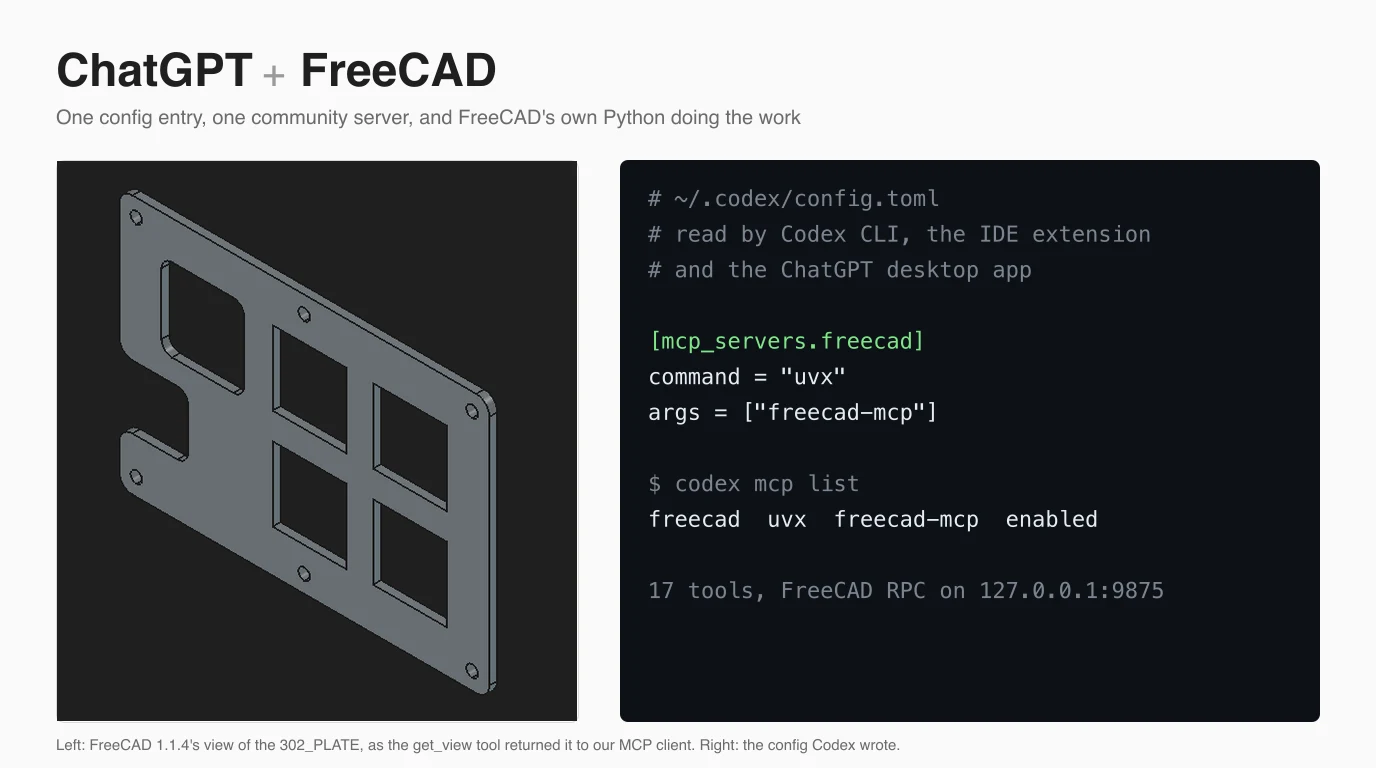
You connect ChatGPT to FreeCAD with a free community MCP server, neka-nat/freecad-mcp, registered in the ChatGPT desktop app or in Codex. Once it is in place, the model can create objects, run Python inside FreeCAD and look at the 3D view to check its own work. FreeCAD runs on a Mac, so unlike our SolidWorks and Revit guides we could wire this up for real: we registered the server with Codex CLI, watched Codex launch it, and drove a live FreeCAD 1.1.4 through the exact command Codex stores. What we could not do is put a GPT model on the other end, because we had no paid ChatGPT plan and no OpenAI API key for this test. Every place where that matters says so.
Our articles are still written by humans!
Get human written articles in your Google feed.


Can ChatGPT connect to FreeCAD?
Yes. The ChatGPT desktop app and Codex can launch a local MCP server, and the neka-nat FreeCAD MCP server gives the model 17 tools inside a running FreeCAD, including one that runs any Python. The chatgpt.com website cannot see your computer on its own, and nobody, neither OpenAI nor the FreeCAD project, ships an official FreeCAD connector.
That last point is less of a problem than it sounds. FreeCAD is run by volunteers and the FreeCAD Project Association rather than a company, and its whole interface sits on a complete Python API. A server that lets the model run Python in FreeCAD can do anything you could do with the mouse, which is why every FreeCAD MCP server we read has a code tool. The interesting question is not whether ChatGPT can connect, but through which client, and what it is then good at.
The five routes, compared
Three routes give a GPT model live control through the same MCP server, one puts an OpenAI model inside FreeCAD without MCP, and one has no connection at all. The client decides which ones are open to you, so pick the route before you install anything.
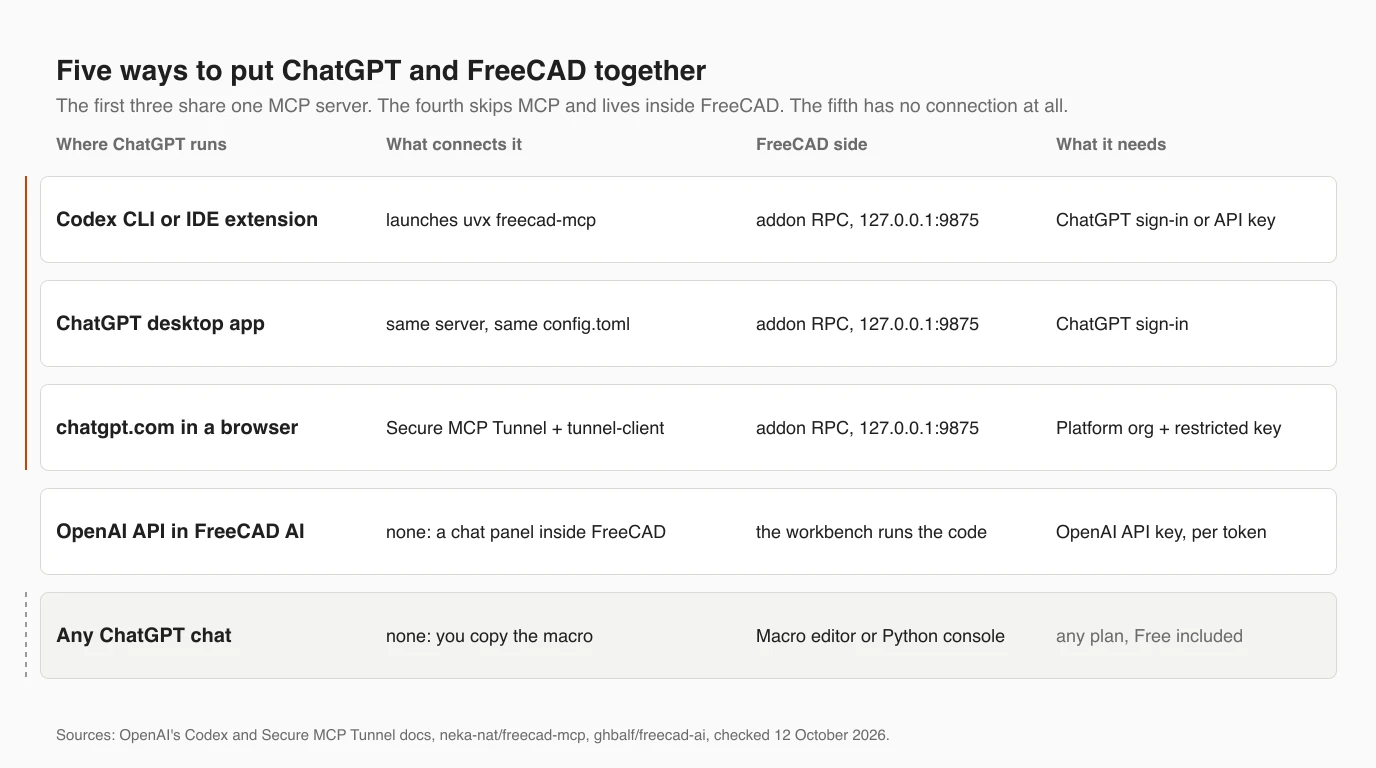
Which client can reach FreeCAD on your own computer, as documented on 12 October 2026
The Claude column is there because it is the only one with a measured result. In our Claude and FreeCAD test, Claude built a 70 by 49 mm plate from a real engineering drawing in 68 seconds through this same server, and the solid differed from the designer's by 0.5% of its volume. We wanted to run the identical test with a GPT model and could not, for the reason in the introduction. The server, the tools and FreeCAD are the same either way; the model is the variable we did not get to measure.
Which FreeCAD MCP server to use
Use neka-nat/freecad-mcp. It has ten times the GitHub stars of any other FreeCAD MCP server, it is the server in both ChatGPT-with-FreeCAD videos we found, and its code is the most careful about security of any CAD server we have read. It does not mention ChatGPT or Codex anywhere, and neither does any other FreeCAD server we checked.
FreeCAD MCP servers and what they say about OpenAI clients. Stars from the GitHub API, 12 October 2026; docs searched for codex, openai and chatgpt
So when a video or a guide calls this “the FreeCAD connector for ChatGPT”, it means the same neka-nat server Claude users install. That is not a weakness. MCP is a protocol, and the server answers whoever asks; we show Codex doing exactly that further down. It does mean that none of these projects documents a test against OpenAI's clients, so a breaking change on either side would likely be found by users first.
Step 1: install the FreeCAD addon
The server has two halves: an addon that runs inside FreeCAD and listens on 127.0.0.1 port 9875, and a small Python program, launched by ChatGPT or Codex, that talks to it. This step is the same for every client, and it is the same as in the Claude guide.
- Install FreeCAD 1.1 from freecad.org (we used
brew install --cask freecad, which gave 1.1.4) and uv, which providesuvxand fetches the Python 3.12 or later that the server needs. - Download neka-nat/freecad-mcp and copy its
addon/FreeCADMCPfolder into FreeCAD'sModfolder. On a Mac with FreeCAD 1.1 that is~/Library/Application Support/FreeCAD/v1-1/Mod/; on Windows,%APPDATA%\FreeCAD\v1-1\Mod\. Versions before 1.1 have nov1-1level. - Restart FreeCAD, choose the MCP Addon workbench and click Start RPC Server. The Auto-Start Server option in the same menu saves you the click next time.
Step 2a: add it in the ChatGPT desktop app
In the ChatGPT desktop app, add a STDIO server named freecad with the command uvx and the argument freecad-mcp, then restart the app. OpenAI's documentation gives the path as Settings, MCP servers, Add server.
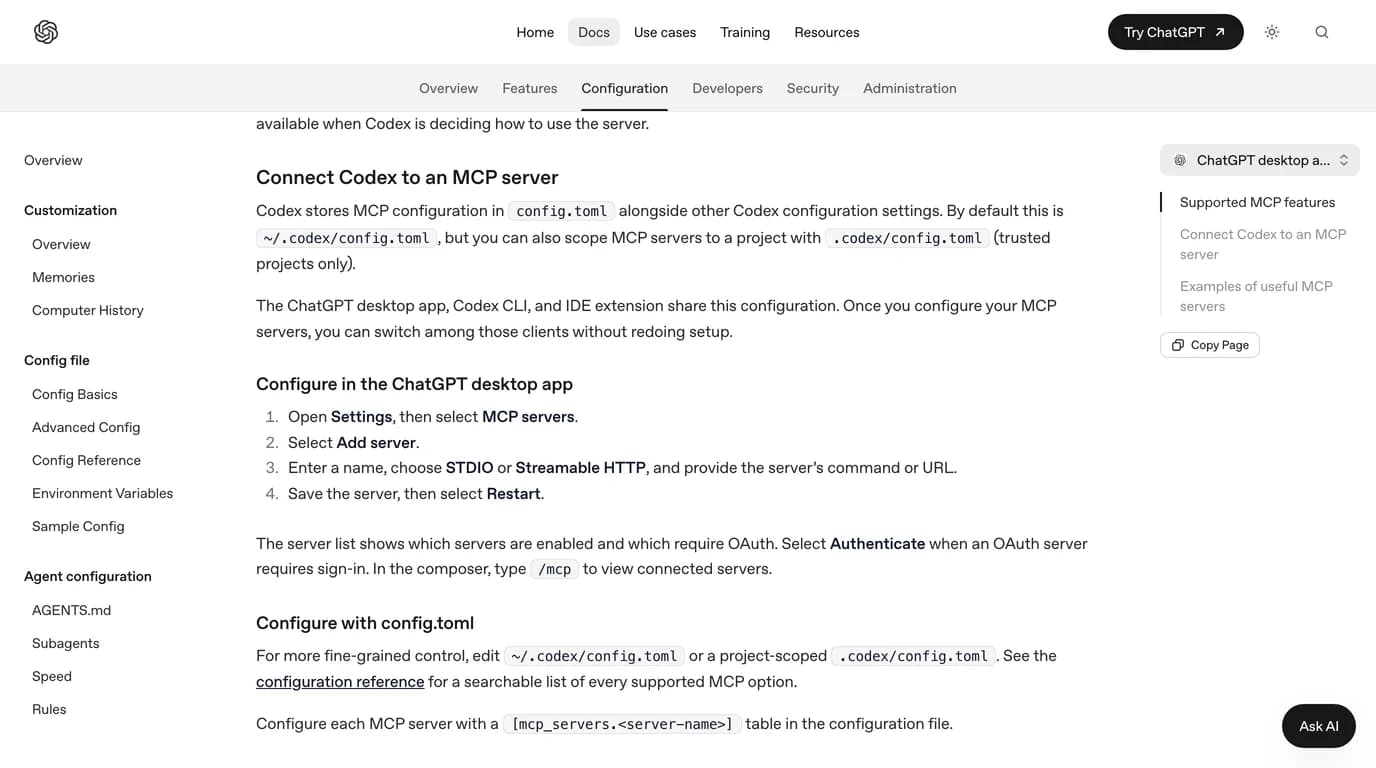
The menu label is not stable. In Make Form's walkthrough of 29 September, recorded on Windows, the same form sits under Settings, Plugins, an Add drop-down, then Add MCP server, which opens a page called Connect to a custom MCP. The four fields are the same either way: name freecad, type STDIO, command to launch uvx, arguments freecad-mcp, everything else blank. In the video the server then has to be switched on under the MCP tab, and a tool call can bring up a permission box.
Three things in that video are worth knowing before you copy it. It says plainly that this works only in the desktop app, not in ChatGPT in a browser, which matches OpenAI's docs. The knob it builds from a dimensioned drawing comes out as a Part Design body with a feature tree, which is better than what Claude gave us by default, a plain solid; we have not reproduced that, so treat it as one demonstration. And the 95.9% BenchCAD score it opens with is OpenAI's figure for one task, image to CadQuery code scored by volume overlap. It says nothing about FreeCAD, as we explain in what the 95.9% actually measures.
Step 2b: add it in Codex
In Codex the whole setup is one command, codex mcp add freecad -- uvx freecad-mcp. It writes a [mcp_servers.freecad] table to ~/.codex/config.toml, and because the desktop app and the IDE extension read the same file, the server appears in all three.
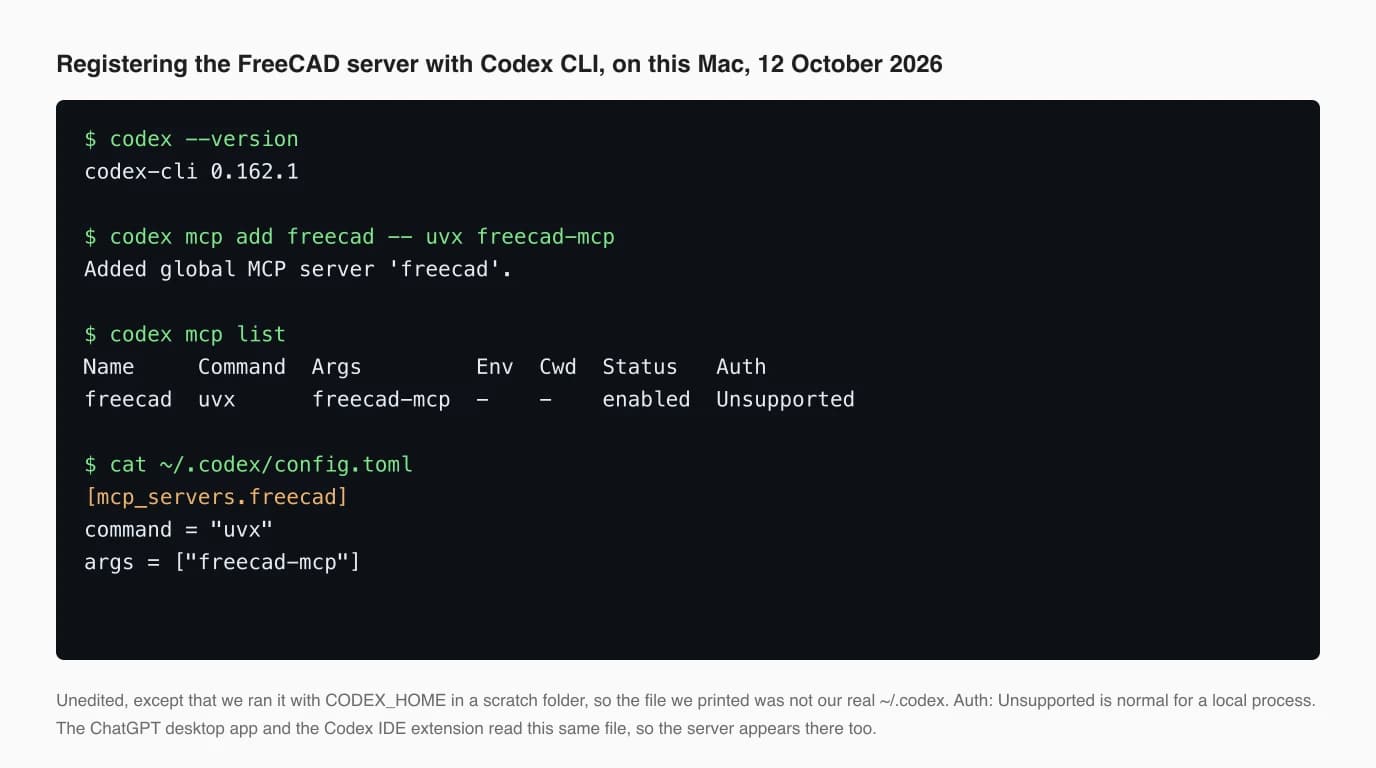
On a Mac, add one more argument. The server has a tool, execute_code_headless, that runs a script in a separate FreeCAD with no window, and it looks for freecadcmd on your PATH. FreeCAD.app does not put it there, so our first call failed with “freecadcmd not found”. Pointing the server at the copy inside the app fixed it:
codex mcp add freecad -- uvx freecad-mcp \
  --freecadcmd /Applications/FreeCAD.app/Contents/Resources/bin/freecadcmd
Two other arguments are worth knowing. --only-text-feedback stops the server attaching a screenshot to its answers, which saves tokens but takes away the model's only way of seeing what it built. And if you set a token in the addon, pass it with --env FREECAD_MCP_TOKEN=... on codex mcp add, not as a command-line flag, which the project's docs point out other users can read in the process list.
Codex also picks a model for you. With nothing set, Codex CLI 0.162.1 chose gpt-6.1-sol on this machine. If you want GPT-6 Astra, pass -m gpt-6-astra or put a model line in the same config file. The model changes how well the part is planned; it changes nothing about whether FreeCAD connects.
Step 3: check it works
Start FreeCAD before ChatGPT or Codex, then ask for something small you can check by eye. Most failures at this stage are a stopped RPC server, an open dialog in FreeCAD, or a client that cannot find uvx.
- Start FreeCAD first and make sure the RPC server is running. The Report view (View, Panels, Report view) prints a line when it starts.
- Close every dialog in FreeCAD. This is the trap we fell into, described below.
- In Codex, run
codex mcp list, startcodexand type/mcp. In the desktop app, OpenAI documents the same/mcpin the composer. - Ask for something you can check by eye: an empty document, or a 70 by 49 by 1.5 mm plate. If the tools are missing, the command is wrong or
uvxis not found. Desktop apps started from the Dock often do not see your shell's PATH, as Claude Desktop does not, so put the full path fromwhich uvxin the command field.
What we ran on this Mac
We proved every link in the chain except the model. Codex launched the FreeCAD server from its config and completed the MCP handshake, and the same command, driven by a small script instead of a model, created a document, imported a part and returned a picture from a live FreeCAD.
Codex launches the server, then stops at the model
We ran codex exec with no sign-in and debug logging on. Codex started uvx freecad-mcp anyway, and about two seconds after the session began the log recorded the handshake with a server calling itself FreeCADMCP. Every request to the model failed with 401 Unauthorized, through ten retries, and the run ended there.
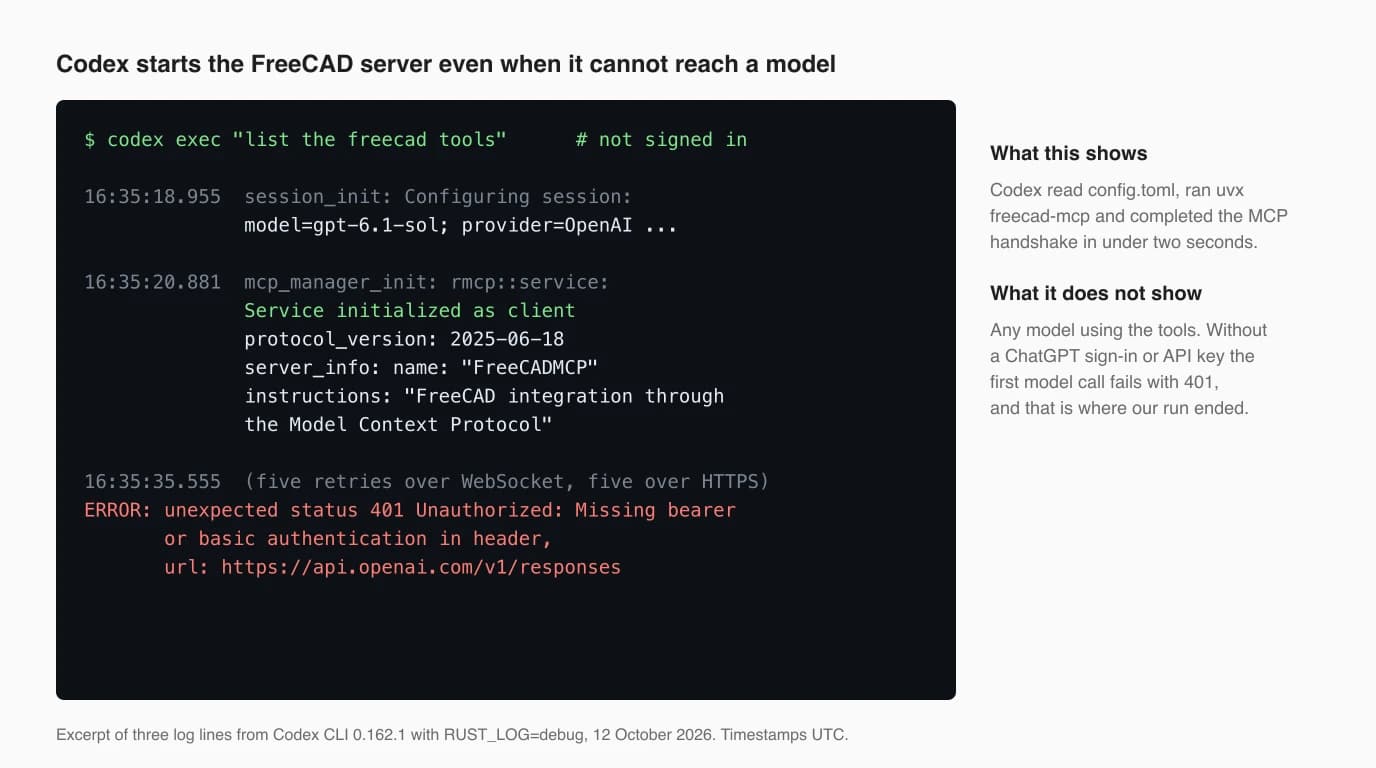
The same server, driven against live FreeCAD
To test the FreeCAD side, we wrote a 20-line MCP client in Python that reads Codex's config file and launches whatever command it finds there, so it starts the server exactly as Codex does. It listed 17 tools. We then asked it to create a document, run code that imports the designer's STEP of the 302_PLATE from the open source fluxpad keyboard, the part we use across this series, and return an isometric view.
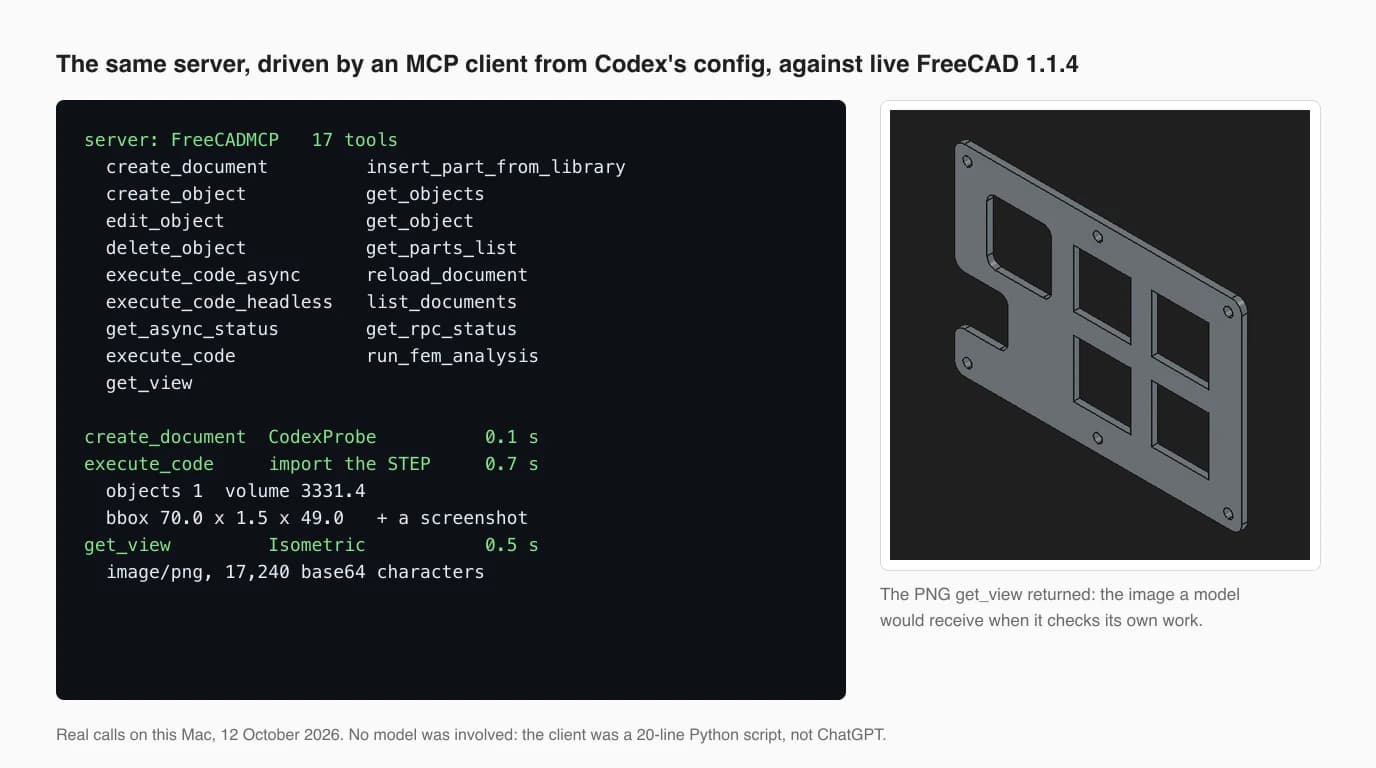
Every call came back in under a second. The import reported a volume of 3,331.4 mm³ and a 70 by 49 by 1.5 mm box, the same numbers as the original in our Claude test. The detail that matters for ChatGPT is that execute_code returned a screenshot as well as its text, without being asked. That picture is how the model checks its work, and it is also where much of each answer's size goes: about 17,000 characters of image per call, against about a hundred of text.
The trap: one dialog blocks everything
Our first attempt failed in a way none of the setup videos mention. FreeCAD opened with a Document Recovery dialog left over from an earlier session that had been closed by force. While it was open, the RPC server was running and reported itself healthy, but every tool that touches the FreeCAD window waited 60 seconds and failed.
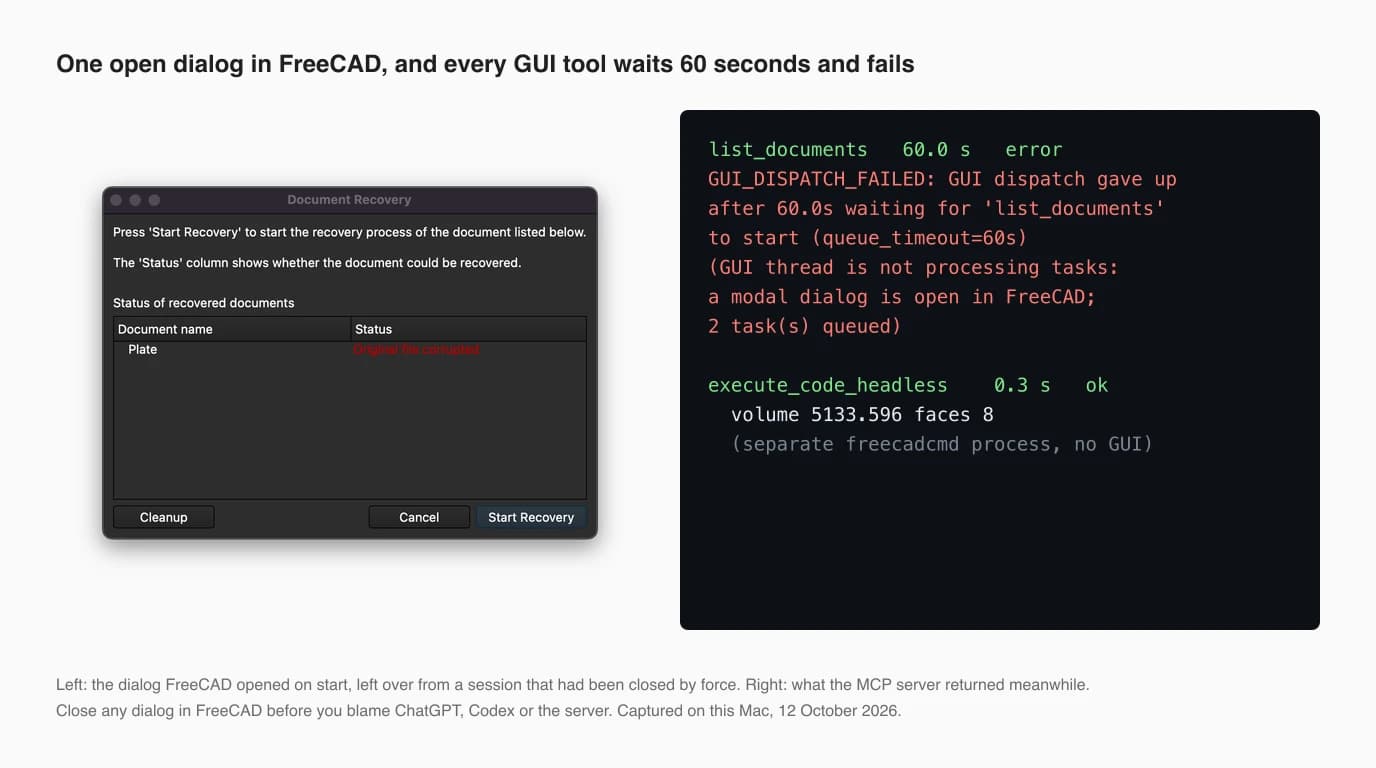
The server's error message is good: it names the modal dialog. But a model that sees “Error executing tool” after a minute may retry, give up or blame the connection, and a user watching the chat sees nothing at all. If ChatGPT says FreeCAD is not responding, look at the FreeCAD window before anything else. A recovery prompt, a save dialog or an open Preferences window is enough.
chatgpt.com: only through a tunnel
The ChatGPT website cannot launch a server on your computer. OpenAI's docs say ChatGPT on the web does not read local Codex configuration, so a FreeCAD server on your machine is invisible to it unless you connect it through OpenAI's Secure MCP Tunnel.
The tunnel works like this: a program called tunnel-client, open source under Apache-2.0 and at version 0.0.16 since 6 October, runs next to FreeCAD, keeps an outbound HTTPS connection to OpenAI, collects the queued tool calls and passes them to your local server. Nothing listens on the internet. In ChatGPT you then go to Plugins, the plus button, Add custom MCP server, choose Tunnel under Connection, accept the risk warning and create it as a plugin.
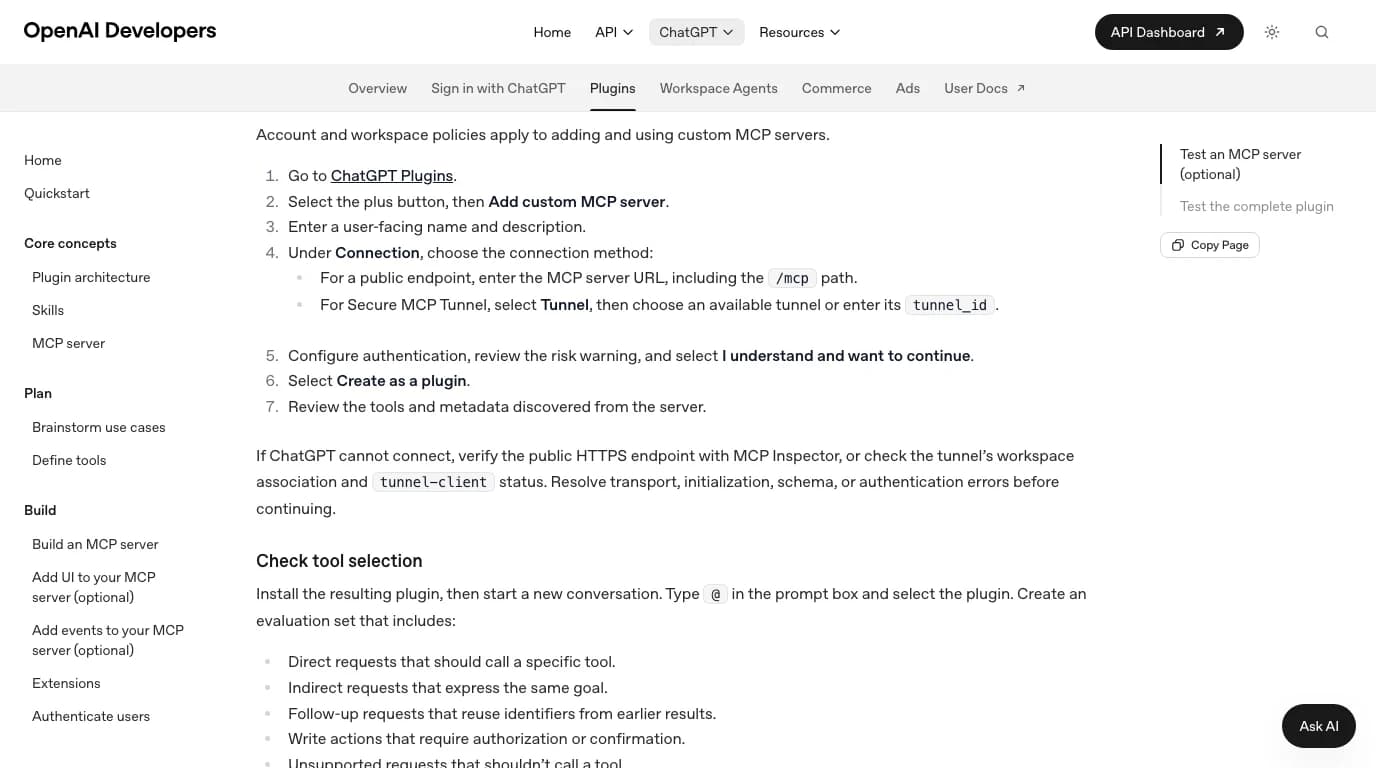
The price of admission is a Platform organization, a tunnel_id from its Tunnels settings, and an API key restricted to Tunnels Read and Use; for ChatGPT the tunnel also has to be associated with your workspace. We ran the local half of this, up to the point where it asks for the key, in the SolidWorks guide, and the FreeCAD case is no different. For one person on one computer the desktop app does the same job with none of that. One more route exists: a 2025 Korean walkthrough by CaN Tips connects the same neka-nat server to the ChatGPT website through MCP SuperAssistant, a third-party Chrome extension that relays tool calls from the page to local servers. We have not tried it, and it puts a browser extension between a web page and a tool that runs code on your computer, which is a lot of trust to extend.
Which ChatGPT plan you need
No primary source says. OpenAI's MCP pages for the desktop app and Codex name no plan, and the page for custom MCP servers on the web says only that account and workspace policies apply. Third-party guides disagree, so open Settings in your own desktop app and look for MCP servers or Plugins; that is the real answer for your account.
- Free: the macro route below. Our account is on Free, which ran GPT-5.6 Luna and not Astra when we last read OpenAI's pricing page, in September. The page refused our automated check today.
- Codex: a ChatGPT sign-in or an OpenAI API key.
- GPT-6 Astra: Plus and above, on the same September reading of the pricing page.
- Tunnel: a Platform organization, whatever your chat plan.
- FreeCAD AI workbench: an OpenAI API key, billed per token, separate from any ChatGPT plan.
No connection at all: ChatGPT writes a FreeCAD macro
You can skip every step above. Ask ChatGPT for a FreeCAD Python macro, create a macro in FreeCAD, paste the code and run it. This works on the Free plan, needs no server, and is what Google's suggestions for “freecad python chatgpt” point at.
- Describe the part with every dimension and say which FreeCAD version you run. Ask for a macro for FreeCAD 1.1 using the Part or Part Design workbench.
- In FreeCAD, open the Macro menu, then Macros, then Create, name it, paste the code into the editor and run it. Macros are plain Python saved with the
.FCMacroextension. For one-off lines, the Python console (View, Panels) is quicker. - When it fails, open the Report view, copy the error and paste it back into ChatGPT. Two or three rounds is normal.
The best trick we have seen comes from Tuza Olukan's tutorial: build a rough version of the shape by hand with the console visible, copy the Python that FreeCAD recorded, and give that to ChatGPT as the starting point. The model then starts from API calls that already worked on your version of FreeCAD, instead of from memory. FreeCAD's own documentation describes the same recorder: every action you take in the interface is a Python command.
If you use Codex, there is a middle way. Codex loads skills, folders with a SKILL.md file, from ~/.agents/skills, and GitHub's awesome-copilot collection has a freecad-scripts skill written for exactly this kind of scripting. It gives the model FreeCAD API guidance without giving it control of anything. One caution from reading it: its prerequisites still name PySide2, while FreeCAD 1.1 ships PySide6, so check any dialog code it produces.
Be clear about what this route is. ChatGPT writes code and you run it; the model never sees FreeCAD and never learns whether the result is what you meant. That is a limit, but it also means no third-party server and no code running without you reading it first.
The FreeCAD AI workbench: OpenAI inside FreeCAD
If you search for a FreeCAD ChatGPT plugin, this is the nearest real thing. ghbalf/freecad-ai is a FreeCAD workbench with a chat panel inside FreeCAD that sends your request to a model, gets Python or structured tool calls back and runs them. OpenAI is one of 22 providers it supports, alongside Anthropic, Gemini and local models through Ollama.
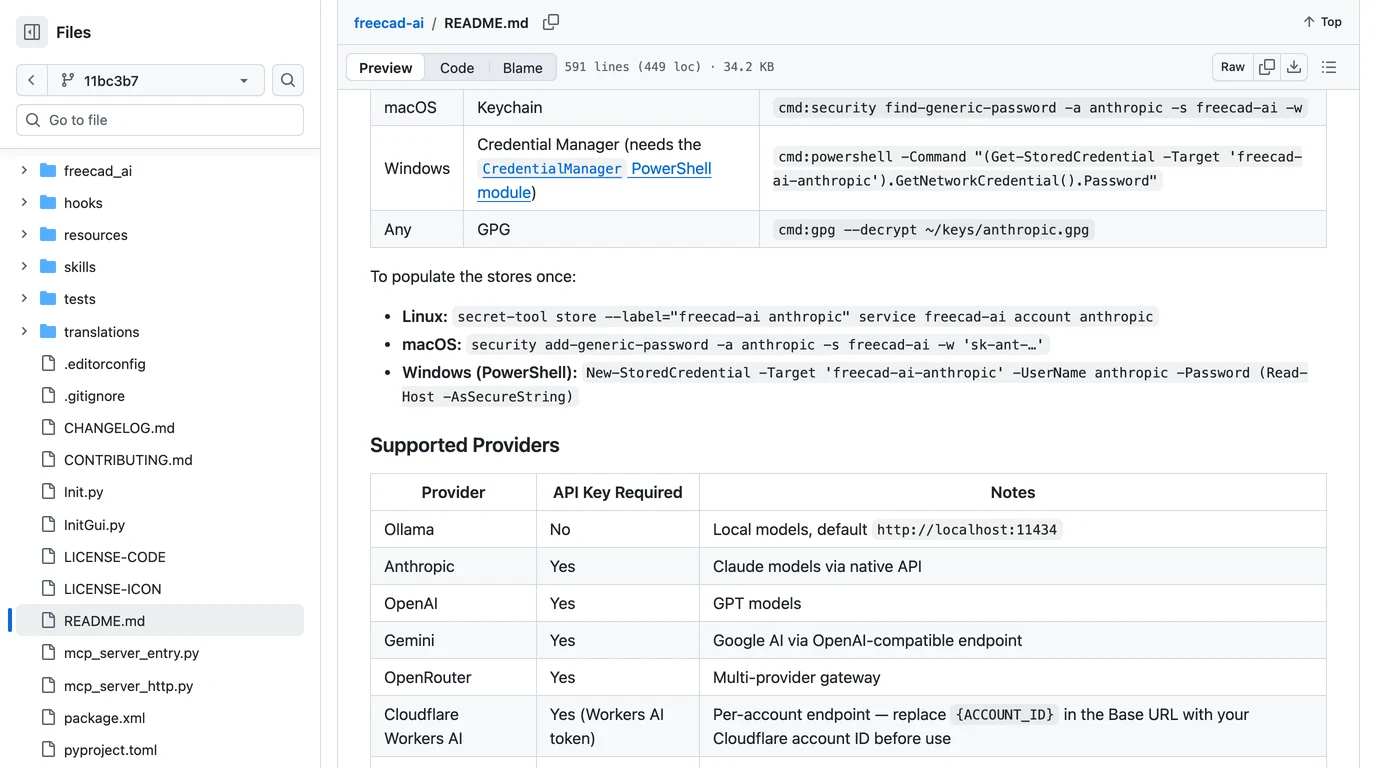
- It is not ChatGPT. It calls OpenAI's API with your own key and you pay per token. A ChatGPT Plus or Pro subscription does not cover it.
- It is alpha software. The README warns of breaking changes and “the occasional FreeCAD crash from LLM-generated code”, and says it is developed and tested on Linux, with macOS and Windows key storage unverified by the maintainer.
- It has the controls you want. A Plan mode shows code before it runs and an Act mode runs it; failed code is sent back to the model up to three times. It has 557 stars and an LGPL-2.1 licence.
We read its README and did not install it. Pick it if you want the chat inside FreeCAD and are happy paying for API tokens; pick the MCP route if you already pay for ChatGPT and want to stay in its app.
What to check before you trust it
The risk is the same whichever model is on the other end: the server can run any Python on your computer. The neka-nat server is careful about the network and cannot limit what that Python does.
- Network: the addon listens only on 127.0.0.1, refuses requests from web browsers, and supports an optional token compared in constant time. We checked this in its code and with
lsoffor the Claude guide, and the listener was again on 127.0.0.1:9875 only. - Code:
execute_coderuns arbitrary Python inside FreeCAD with your user's permissions, and there is no setting to switch it off. That includes your files and your network. - Approvals: in Codex, keep an approval mode that asks before tool calls. In the desktop app, the permission box offers always allow; for a tool that runs code, think twice before you click it, even though the video above does.
- Files: work on copies. If you need a DXF from FreeCAD, remember the trap we found in the Claude test: a TechDraw page exported to DXF is at the sheet's scale, so a 2:1 sheet gives a part twice its real size.
What we tested, and what we could not
We tested the connection end to end on a Mac and did not test a GPT model using it. This is the line between the two, claim by claim.
Exactly what this article is based on, 12 October 2026
Where a 2D drawing fits
Every route here starts from words or from a dimensioned drawing. None starts from a physical part. A model in FreeCAD can only build what someone has measured, and the test that worked best in this series, Claude rebuilding a plate to 0.5%, worked because it was given a real engineering drawing. That first step, from a photo of a part to a dimensioned drawing, is what TechDraw AI does: photograph the part, give one known measurement, and get a drawing you can export as DXF, which FreeCAD imports into a sketch. We have not tested that hand-off with a GPT model in FreeCAD; treat it as a route to try.
Upload a photo of a part and get a dimensioned technical drawing you can export as DXF and open in FreeCAD.
Turn a photo into a drawingFor other programs, the same client logic is in how to connect ChatGPT to Revit, how to connect ChatGPT to SolidWorks and how to connect GPT-6 Astra to AutoCAD. For a survey of the servers themselves, see our guide to CAD MCP servers.
FAQ
Frequently asked questions
Can ChatGPT connect to FreeCAD?
Yes, through a community MCP server. Install the neka-nat FreeCAD MCP addon in FreeCAD, start its RPC server, then add a server named freecad with the command uvx and the argument freecad-mcp in the ChatGPT desktop app or in Codex. The chatgpt.com website cannot reach FreeCAD on your computer by itself; it needs OpenAI's Secure MCP Tunnel. There is no official FreeCAD connector from OpenAI or from the FreeCAD project.
Is there a ChatGPT plugin for FreeCAD?
Not an official one. The closest things are the neka-nat/freecad-mcp addon, which the ChatGPT desktop app and Codex can use as an MCP server, and ghbalf/freecad-ai, an alpha FreeCAD workbench with a chat panel that calls OpenAI models with your own API key. Neither is listed in ChatGPT's plugin directory, and the workbench is billed per token through the OpenAI API, not through a ChatGPT plan.
How do I use the FreeCAD MCP server with Codex?
Run codex mcp add freecad -- uvx freecad-mcp, which writes a [mcp_servers.freecad] table to ~/.codex/config.toml. Check it with codex mcp list, keep FreeCAD open with the RPC server started, then start codex and type /mcp. On a Mac, add --freecadcmd /Applications/FreeCAD.app/Contents/Resources/bin/freecadcmd to the arguments, or the headless code tool fails because freecadcmd is not on your PATH.
Does the FreeCAD MCP server work in the ChatGPT website?
Not directly. OpenAI's docs say ChatGPT on the web does not read local Codex configuration and uses remote MCP tools. To reach FreeCAD on your machine from chatgpt.com you run OpenAI's tunnel-client next to it, which needs a Platform organization, a tunnel id and an API key restricted to Tunnels Read and Use, then add the tunnel as a custom MCP server. The desktop app is far simpler.
Can ChatGPT write FreeCAD Python macros?
Yes, on any plan including Free, and it needs no server. Ask for a FreeCAD Python macro, open Macro, Macros, Create in FreeCAD, paste, and execute. When it fails, copy the error from the Report view back into the chat. It works best if you record the steps once with the macro recorder and ask ChatGPT to generalise that code, because models mix in code for older versions, such as the Path workbench that FreeCAD 1.0 renamed CAM.
Which ChatGPT plan do I need to connect FreeCAD?
OpenAI's documentation for MCP in the desktop app and Codex names no plan, and its page for custom MCP servers on the web says account and workspace policies apply. Check Settings in your own desktop app. What is certain: the macro route works on Free, Codex needs a ChatGPT sign-in or an API key, the tunnel needs a Platform organization, and the FreeCAD AI workbench is billed per token.
Does ChatGPT with FreeCAD work on a Mac?
Yes. FreeCAD, the neka-nat addon, uvx, Codex and the ChatGPT desktop app all run on macOS. We registered the server with Codex CLI 0.162.1 and drove FreeCAD 1.1.4 through it on an Apple silicon MacBook. Two Mac details: the addon goes in ~/Library/Application Support/FreeCAD/v1-1/Mod, and the headless tool needs the --freecadcmd path inside FreeCAD.app.
Is it safe to let ChatGPT control FreeCAD?
Treat it like giving the model a Python prompt on your computer. The neka-nat server listens only on 127.0.0.1 by default and refuses browser requests, but its execute_code tool runs any Python inside FreeCAD with your user's permissions and cannot be switched off. Keep tool approvals on in Codex, do not click always allow in the desktop app for code tools, and work on copies of your files.
Sources
- OpenAI: Model Context Protocol, ChatGPT desktop app surface (Settings, MCP servers, shared config.toml)
- OpenAI: Connect and test your plugin (custom MCP server on ChatGPT web, Tunnel option)
- OpenAI: Secure MCP Tunnel (API docs)
- openai/tunnel-client on GitHub (Apache-2.0, v0.0.16)
- OpenAI: Build skills (where Codex looks for SKILL.md folders)
- neka-nat/freecad-mcp on GitHub (commit 4751f95)
- neka-nat/freecad-mcp: configuration (auto-start, text feedback, token, remote)
- freecad-mcp on PyPI (0.1.26, Python 3.12 or later)
- ghbalf/freecad-ai: FreeCAD AI workbench (LGPL-2.1, commit 11bc3b7)
- github/awesome-copilot: freecad-scripts skill
- spkane/freecad-addon-robust-mcp-server
- FreeCAD documentation: Macros
- Make Form: I Gave GPT-6 Astra Control of FreeCAD (YouTube, 29 September 2026)
- CaN Tips: FreeCAD MCP in Claude, ChatGPT and Gemini via MCP SuperAssistant (YouTube, August 2025, Korean)
- sssata/fluxpad: the open source keypad whose plate we used (GPL-3.0)
- Model Context Protocol: official specification and docs