
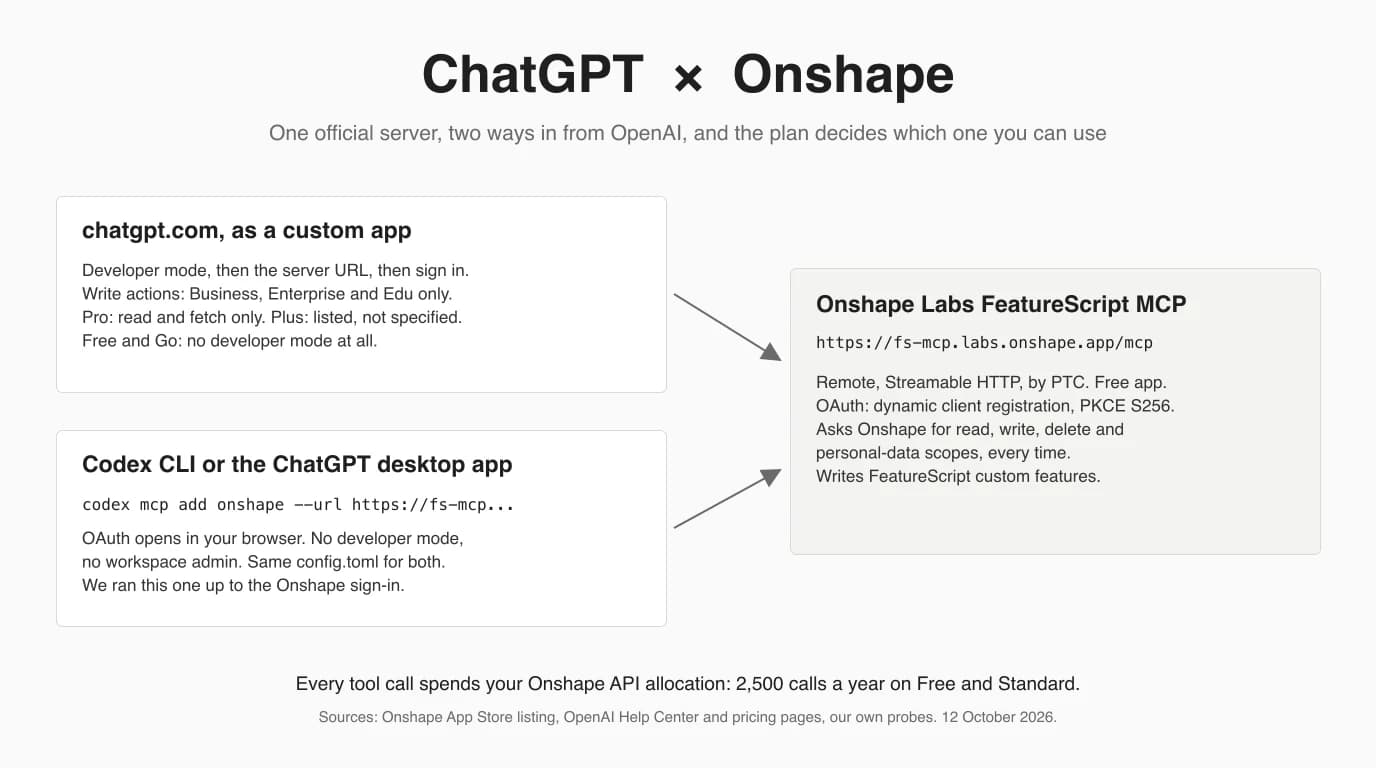
ChatGPT connects to Onshape through Onshape's own FeatureScript MCP Server, a free Onshape Labs app by PTC that runs in Onshape's cloud. Because it is a remote HTTPS server with standard OAuth, ChatGPT needs no tunnel and no software on your machine, unlike our SolidWorks and Revit routes. What it does need is the right OpenAI client: Codex reaches it with one command on any plan that includes Codex, while OpenAI documents write access from the chatgpt.com website only for Business, Enterprise and Edu. We added the server to Codex CLI on this Mac, followed its OAuth flow to Onshape's sign-in page, and registered a test client with a ChatGPT-style redirect to see whether Onshape accepts it. We did not sign in to Onshape or use a paid ChatGPT plan, and every section says where that stops us.
Our articles are still written by humans!
Get human written articles in your Google feed.


Can ChatGPT connect to Onshape?
Yes. Onshape's official FeatureScript MCP Server lives at https://fs-mcp.labs.onshape.app/mcp, and its App Store listing tells you to add it to “the AI client of your choice (Claude, ChatGPT, Gemini, or another MCP-compatible tool)”. From the OpenAI side there are two ways in. Codex, in the terminal or inside the ChatGPT desktop app, adds it with one command and signs in through your browser. The chatgpt.com website adds it as a custom app in developer mode, but OpenAI documents the write actions this server is built on only for Business, Enterprise and Edu workspaces.
It does not let ChatGPT model a part in a Part Studio. It lets ChatGPT write FeatureScript, Onshape's feature language, test it against real geometry and save it as a custom feature you then use like Extrude. If you want an assistant that sketches and extrudes for you, that is a community server with API keys, covered further down.
What you are connecting to
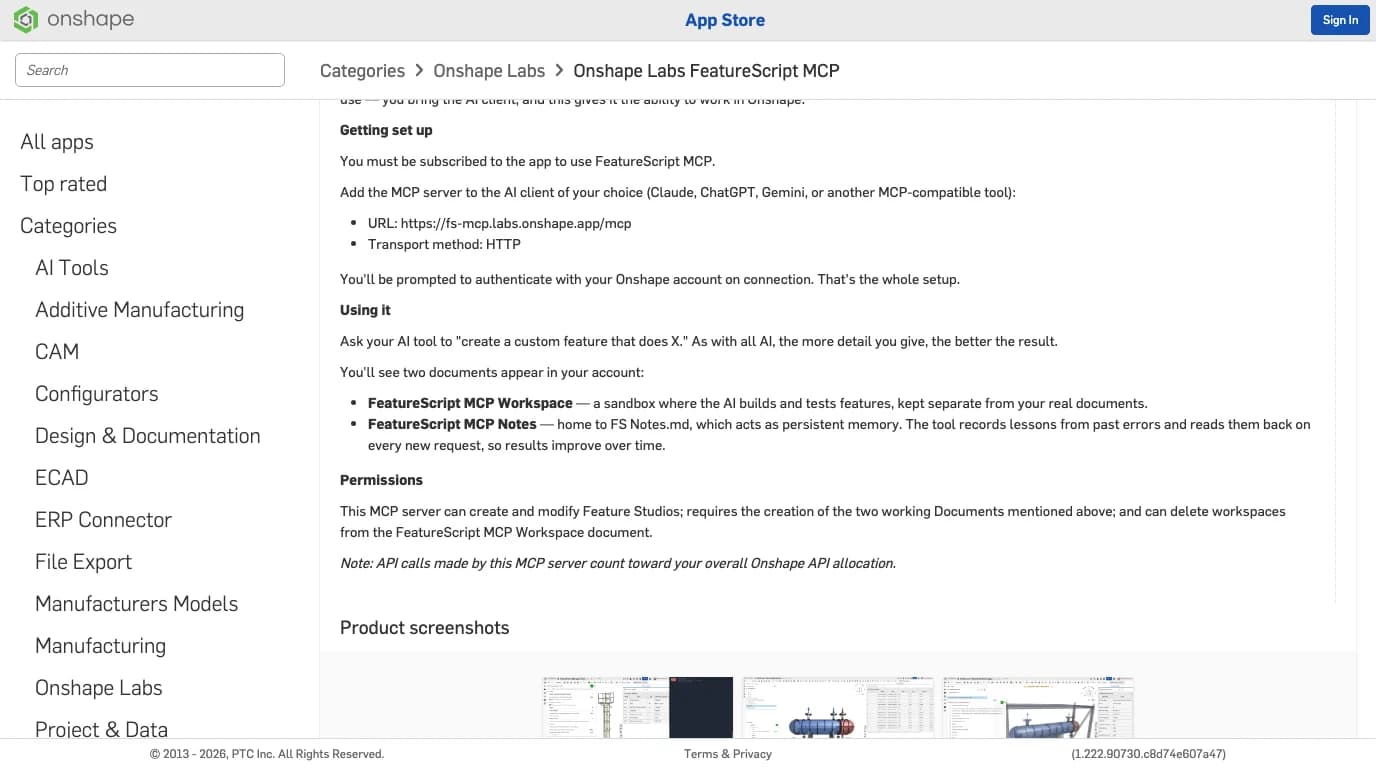
The FeatureScript MCP Server is a hosted MCP endpoint run by Onshape Labs, PTC's early-access program, with no interface inside Onshape. Our Claude and Onshape guide covers it in depth; here is what matters for an OpenAI user.
- It is remote. Unlike the SolidWorks and Revit servers or Autodesk's desktop Fusion server, nothing runs on your computer. That is why the chatgpt.com website can reach it at all; OpenAI's Help Center says ChatGPT “connects to remote MCP servers” and needs a tunnel for anything else.
- It signs in with OAuth. No API keys. The first connection sends you to Onshape to authorise, and the server keeps working on your account with the token.
- It writes into your account. The listing says it creates and modifies Feature Studios, creates two documents of its own, FeatureScript MCP Workspace (a sandbox) and FeatureScript MCP Notes (a file of lessons it reads back on every request), and can delete workspaces in the sandbox.
- It costs API calls, not money. The app is free; every call it makes counts against your Onshape API allocation.
The two OpenAI routes, compared
Codex is the route that works on the most plans and is the one we could run; chatgpt.com is the route most people expect and the one with a plan gate. The table puts both next to the Claude route and the community servers so you can see what each costs you.
Ways to connect an AI client to Onshape, as documented on 12 October 2026
One distinction confuses people because OpenAI ships both in one window. Autodesk's instructions for its own cloud MCP server put it clearly: Codex inside the ChatGPT desktop app is set up like Codex, while the chat view of the same desktop app follows the website rules. If you are on Free, Go or Plus and want the server to write, you want the Codex side.
Before you start: the Onshape side
You need an Onshape account with Onshape Labs enabled and a subscription to the app; the steps are the same whatever AI client you use, and they take two minutes.
- Sign in at
cad.onshape.comand enable Onshape Labs under My account > Preferences, at the bottom of the page. On a company account an administrator may have to allow it first. - Open the App Store, find FeatureScript MCP Server under Onshape Labs and click Subscribe. Nothing installs.
- Create an empty document and keep its URL. Onshape's first test prompt needs one.
- Decide which plan's rules you are living under. On Onshape Free every document is public, including the two the server creates. More on that under data.
The screenshots for each of those steps, from Onshape's own tech tip, are in the Claude guide; they do not change for ChatGPT.
Route 1: Codex CLI or Codex in the ChatGPT desktop app
One command adds the server, and Codex handles Onshape's OAuth by itself: it finds the metadata, registers a client, and opens the sign-in page. OpenAI's Codex docs list Streamable HTTP servers and OAuth with dynamic client registration as supported, and the configuration is shared by the CLI, the IDE extension and the ChatGPT desktop app.
codex mcp add onshape --url https://fs-mcp.labs.onshape.app/mcpHere is that command on this Mac on 12 October 2026, with Codex CLI 0.162.1, a fresh configuration folder and no ChatGPT login. Two things are worth noticing before you read the output: adding a server does not require a ChatGPT sign-in, and Codex started Onshape's sign-in without being asked.
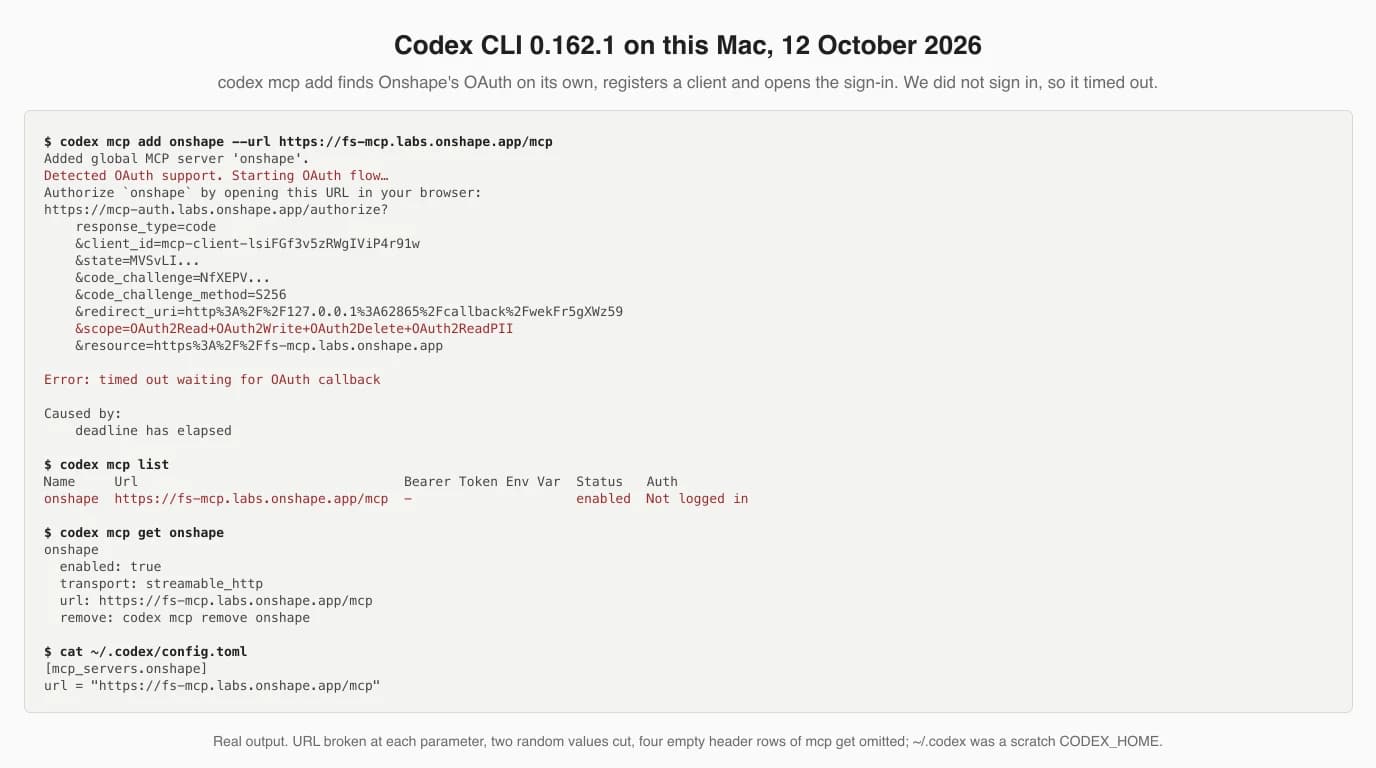
Read it line by line and you have the whole setup:
- Detected OAuth support: Codex found the server's metadata on its own. You do not paste a client id or a secret anywhere.
- client_id=mcp-client-...: Onshape's authorization server registered Codex as a new client on the spot. That is dynamic client registration working.
- scope=OAuth2Read+OAuth2Write+OAuth2Delete+OAuth2ReadPII: the grant you will be asked for. Codex requests whatever the server advertises.
- Not logged in: the server stays registered after the time-out. Run
codex mcp login onshapewhenever you are ready to sign in; add--no-browserto get the URL printed instead of opened.
In the ChatGPT desktop app the same entry is made by hand. OpenAI's steps: open Settings, select MCP servers, Add server, choose Streamable HTTP, enter the URL, save, then Restart. The list marks servers that need OAuth; select Authenticate. Because the file is shared, a server added in the terminal shows up in the desktop app and the other way round. Inside a session, /mcp lists what is connected.
After that, test with Onshape's own prompt and a document URL:
Create a new Feature Studio named FS1 in this document: https://cad.onshape.com/documents/<your-document-url>If FS1 appears in the document's tabs, everything below works for you. If Codex says the tools are unavailable, run codex mcp login onshape again: Onshape's server answers an expired token with a message telling the client to “clear authentication tokens” and reconnect.
Route 2: chatgpt.com as a custom app
On the website you add the server as a custom MCP app in developer mode, sign in to Onshape once, and then pick the app in a chat. The steps exist; whether you can use them, and with which tools, depends on your plan, which the next section covers.
OpenAI documents the path in two places that use different words for the same thing, because ChatGPT is renaming apps to plugins. The Help Center version, which names plans:
- Turn on developer mode. On Enterprise and Edu an admin grants access, then you toggle it in Settings > Apps > Advanced settings. On Business only admins and owners can use it, and each one enables it for themselves.
- Create the app from Apps > Create: enter
https://fs-mcp.labs.onshape.app/mcp, choose OAuth, click Scan Tools, complete the Onshape authorisation, then Create. - Use it: the app appears as a draft labelled Dev. Select it from the tools menu in a new chat, or mention it in the prompt. ChatGPT asks you to confirm write actions.
The developer docs describe the newer labels: Plugins, the plus button, Add custom MCP server, the URL, configure authentication, accept the risk warning, Create as a plugin. Autodesk's guide for its own server calls the button Create MCP App and shows an Advanced OAuth settings panel with a registration method. For Onshape that choice is dynamic client registration: Onshape's metadata offers a registration endpoint and no client metadata document, and OpenAI's docs say ChatGPT falls back to dynamic registration in that case. That last sentence is our reading of the docs, not something we clicked.
Which ChatGPT plan you need
For chatgpt.com, the primary sources say write actions need Business, Enterprise or Edu, Pro gets read and fetch only, and Free and Go have no developer mode. For Codex, every paid plan includes the CLI and Free and Go get Codex in the desktop app, subject to rollout. In our SolidWorks and Revit guides we could not answer this question from a primary source, because the Help Center returned errors; it loaded this time, and it answers most of it.
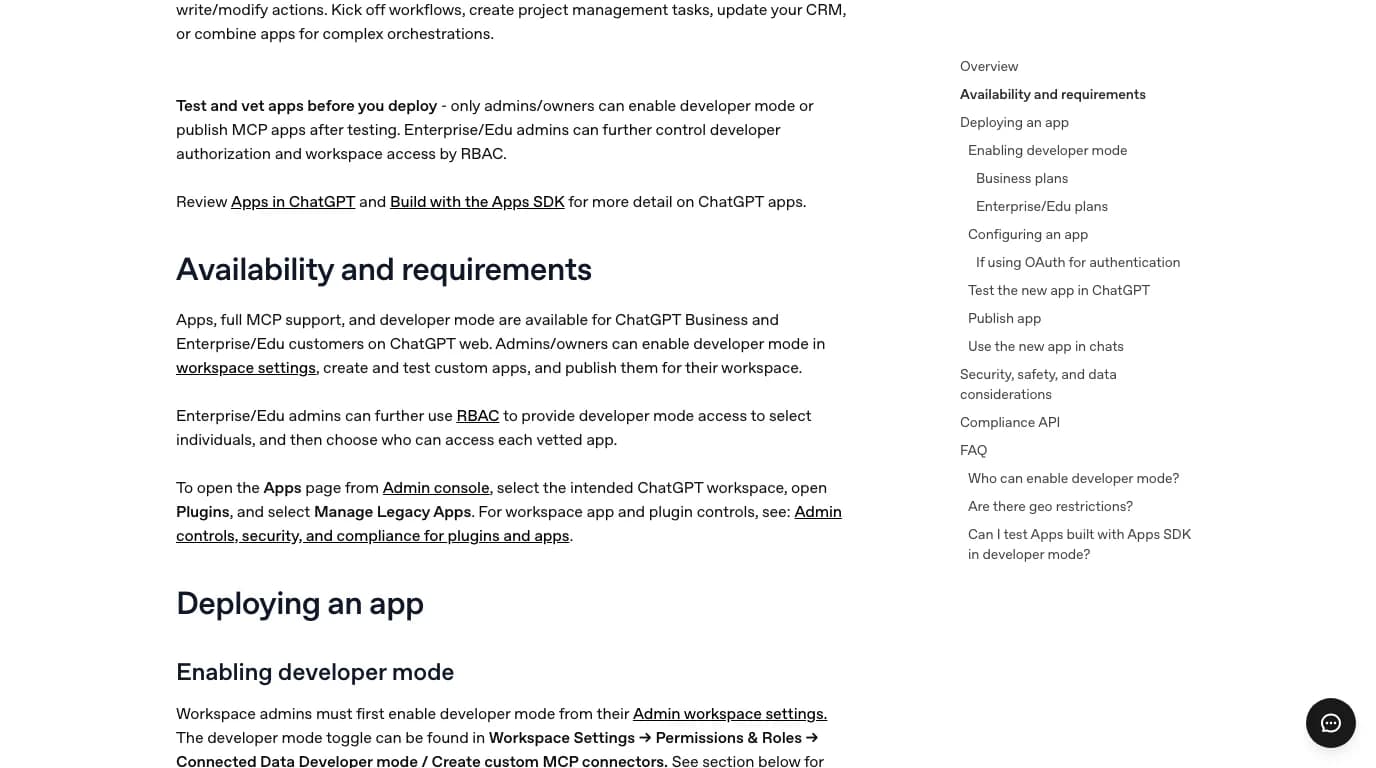
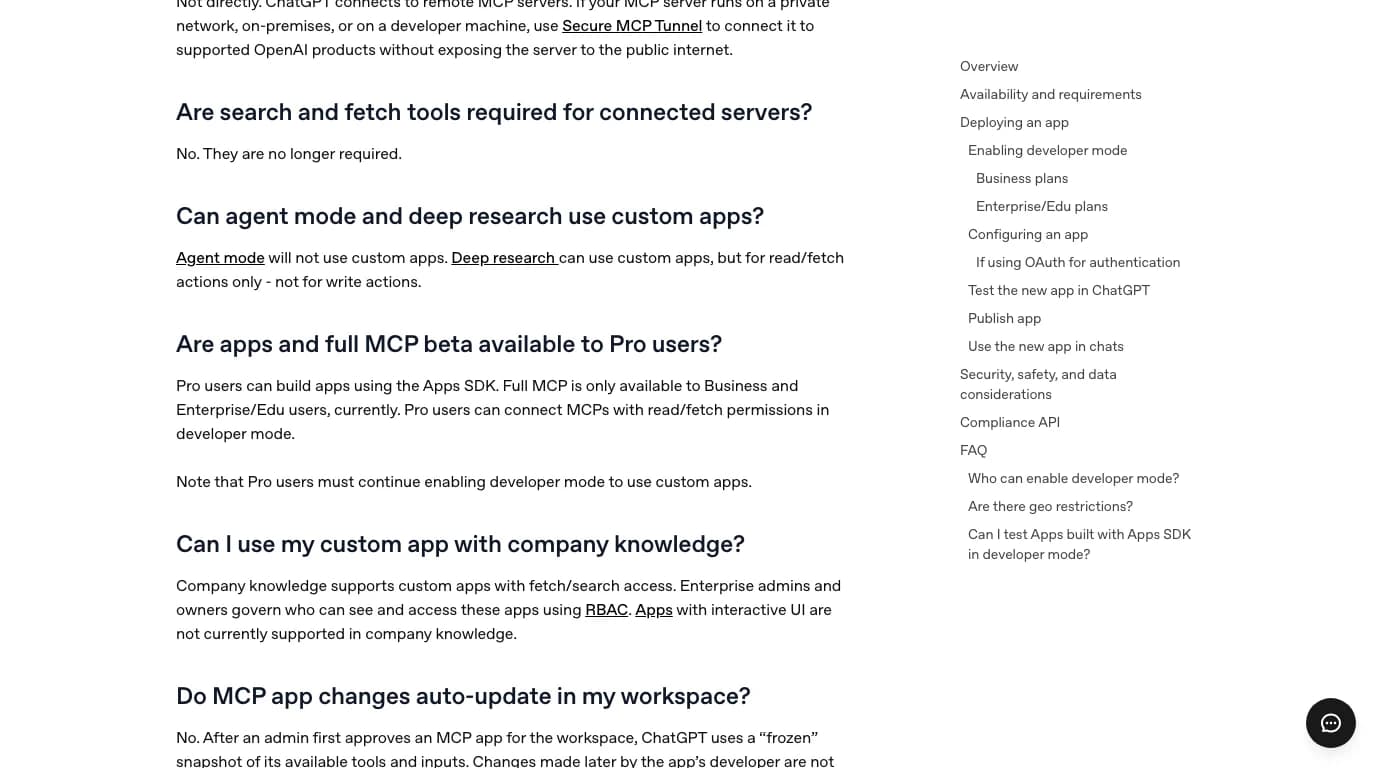
The pricing page adds a wrinkle. Its feature table ticks Developer mode (beta) for Plus and Pro, and Create & share Plugins for Go, Plus and Pro. The Help Center does not mention Plus at all. Put together, the honest reading is that a Plus or Pro account can probably add the server, and that you should expect only its read-only tools to be callable. We could not check which of the server's tools are marked read-only, because listing them needs a signed-in session.
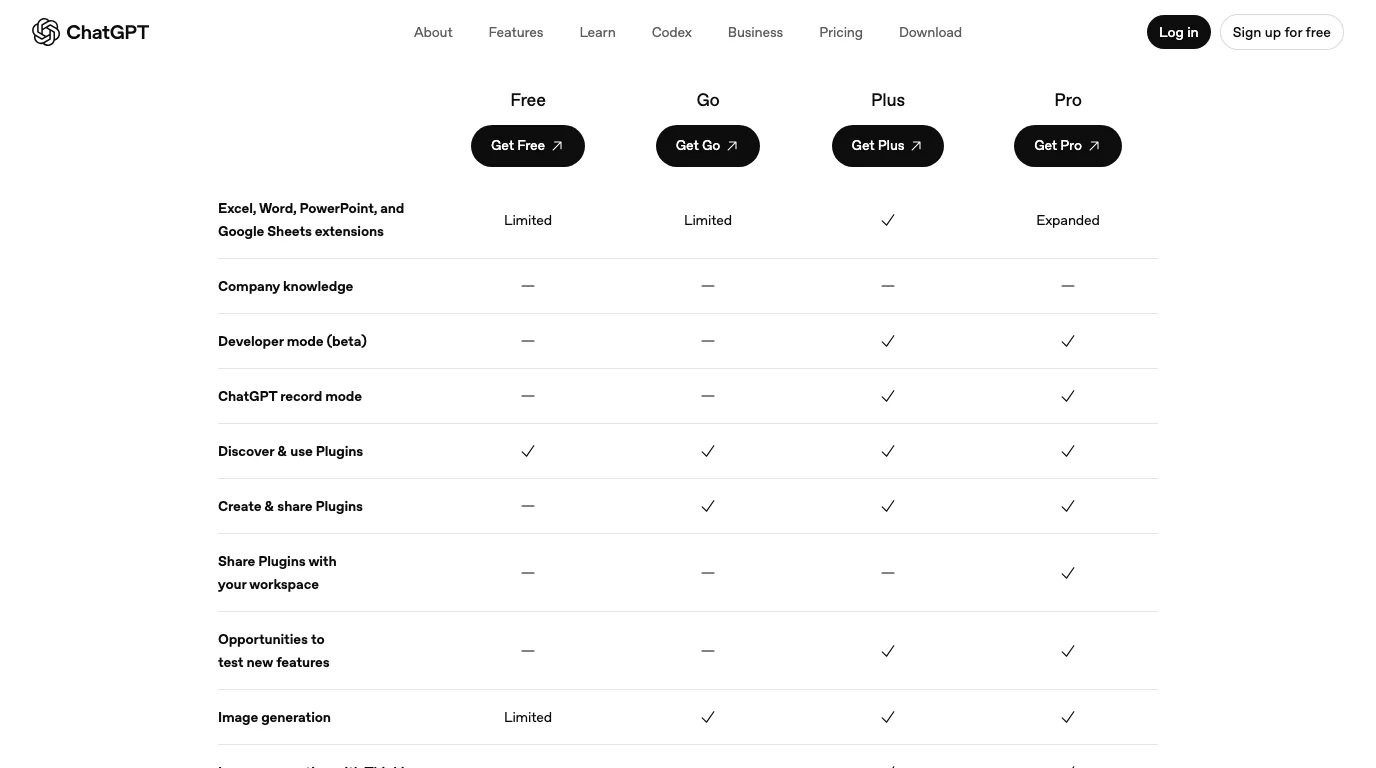
What each ChatGPT plan gets for the Onshape server, from OpenAI's pages on 12 October 2026
Which model you run changes the quality of the FeatureScript, not whether the server connects. Codex's pricing page lists GPT-6 Luna for Free and Go and GPT-6.1 Sol and GPT-6 Luna for Plus. The server itself does not care; one tester ran it with DeepSeek.
Does Onshape's sign-in work with ChatGPT? What we probed
Everything we could test without an account says yes: Onshape's authorization server meets the requirements OpenAI publishes, accepted a client registered with a chatgpt.com redirect URI, and passed it on to Onshape's own sign-in page. The last step, ChatGPT exchanging the code for a token and listing the tools, we could not run, and there is a public report of exactly that step failing against a different Onshape server.
OpenAI's authentication guide lists what ChatGPT needs from an MCP server's OAuth: protected resource metadata, an authorization server that advertises S256 for PKCE (servers without it are “unsupported”), and either a client metadata document or a registration endpoint. Onshape's metadata, fetched without signing in, has the first, the second and a registration endpoint. Then we registered a client the way ChatGPT would, with a redirect URI in the format OpenAI documents for servers like this one, https://chatgpt.com/connector/oauth/{callback_id}.
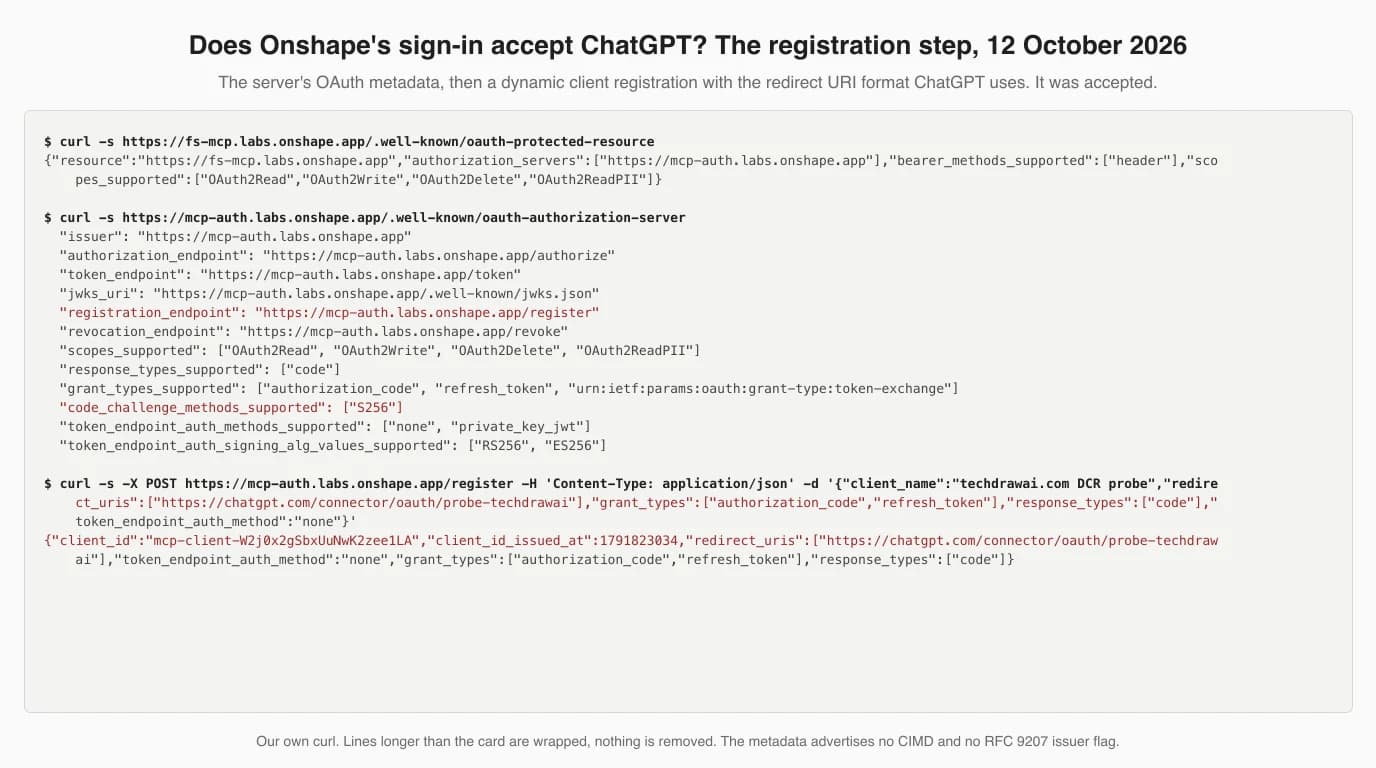
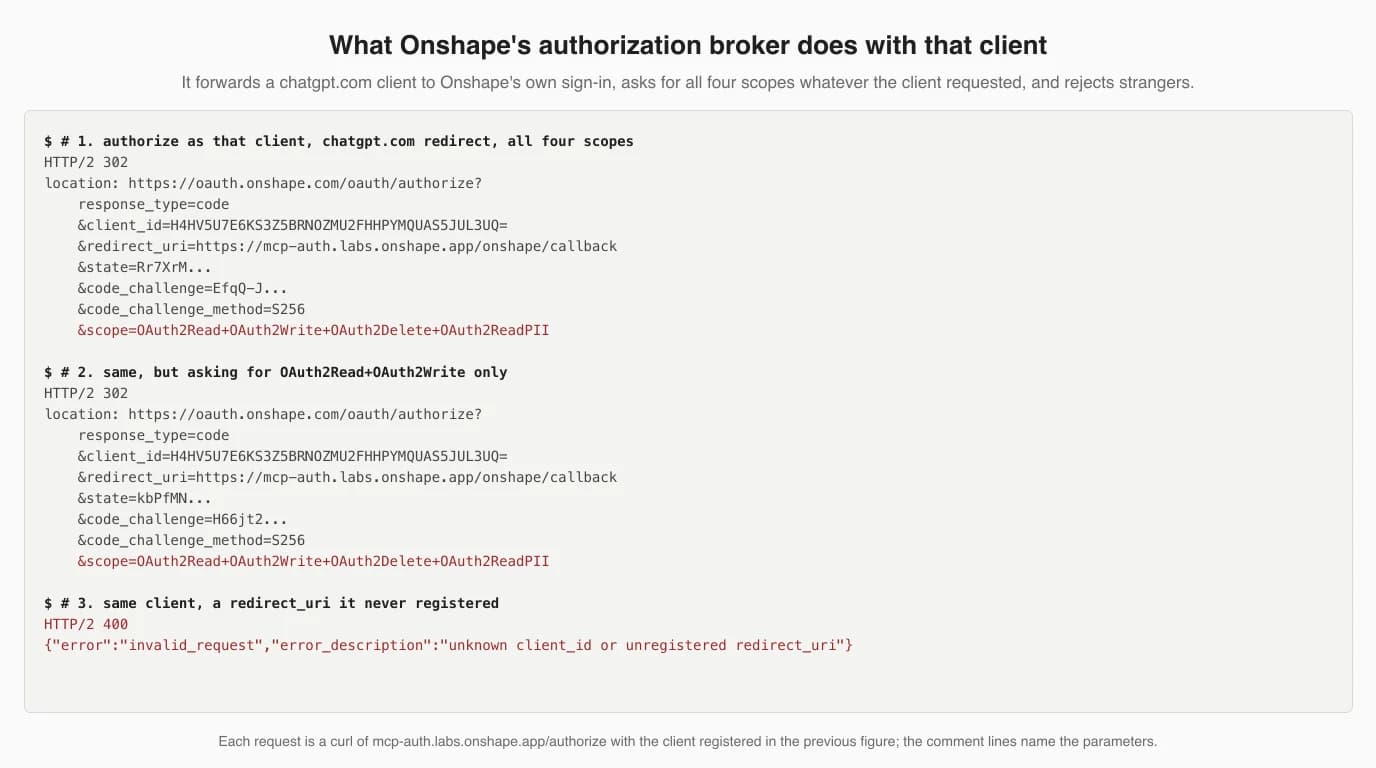
That second figure says three things you will not find in Onshape's documentation. First, mcp-auth.labs.onshape.app is a broker: it registers your AI client itself, then signs you in with Onshape's normal OAuth as a single App Store application. Second, it rejects a redirect URI the client did not register, which is the behaviour you want. Third, it ignores a narrower request and always asks Onshape for read, write, delete and personal-data access. In our Claude guide two days ago we could not say which scopes it requests by default. Now we can: all of them, every time, so a client option like Codex's --scopes will not narrow the grant.
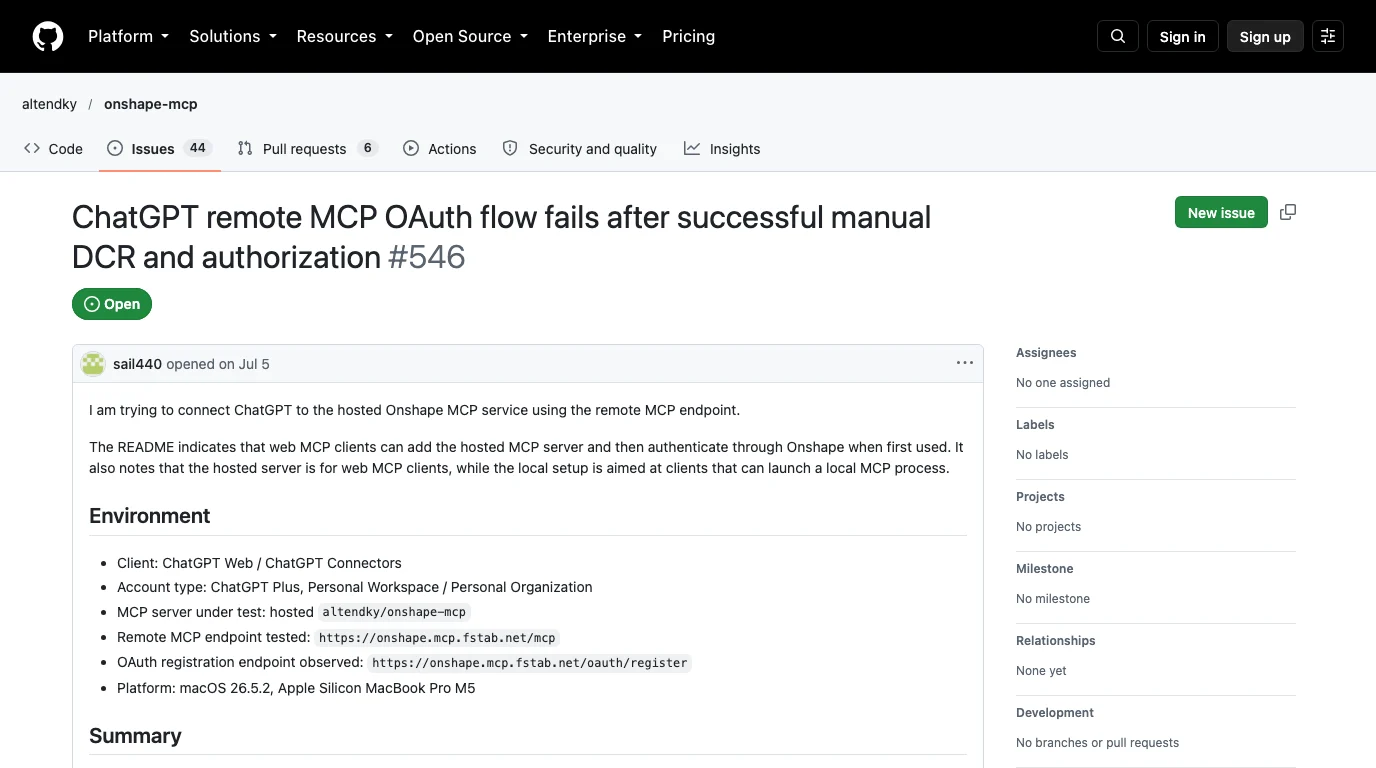
That report is the reason for our caution. Its author registered and authorised by hand without trouble, exactly as we did, and ChatGPT still could not finish, with symptoms the author attributes to how ChatGPT uses its registered client. It is a different server with its own OAuth code, and it is still open with no reply. It proves that “manual registration works” is not the same as “ChatGPT connects”. If your attempt fails at that step, Codex is the fallback, and the Help Center's note on refresh tokens is the first thing to suspect if a working connection drops after a while: reconnect and it should come back.
The first prompt, and what the tools really do
Start with Onshape's FS1 test, then a small feature with numeric inputs, and expect to copy errors from Onshape back into the chat. The App Store reviews describe the tools more precisely than Onshape's own pages, and one finding changes how you should work.
A reviewer who ran a full session, Orla Finch on 13 August 2026, names the tools: put_featurescript and get_featurescript write and read code in any document you can access; test_featurescript evaluates it against a real Part Studio and returns the full boundary representation, so the model can check that four faces really have a 12.000 mm radius; create_geometry runs only in the sandbox document and makes a new branch each time; and get_api_usage reports your remaining calls. Her warning is the one to remember: put_featurescript returned success on code that had an error-level notice, and no tool read the error panel back, so she screenshotted it and pasted it in. Her review is three stars and says Claude helped her write it; we could not reproduce any of it without signing in.
Good first requests, from Onshape's own examples:
- A bolt circle feature with inputs for face, hole count, pitch circle diameter, hole diameter and angular offset.
- A mounting boss that adds a hole and a base fillet.
- A check that flags walls under a minimum thickness.
Ask ChatGPT to run test_featurescript and report the measured geometry before it calls the job done, and open the document yourself after every put_featurescript. That costs a few calls and saves a broken feature in your real document.
The API quota, now with real numbers
Every call the server makes counts against your Onshape API allocation, which is 2,500 calls per user per year on Free, Standard and Student plans, and reviewers report using a fifth of that in one session. Plan for a few hundred iterations a year, not thousands.
Annual Onshape API call limits, from Onshape's developer documentation, 12 October 2026
When we wrote the Claude guide, nobody had published what one feature costs. The App Store reviews now do, and they agree with each other:
- About 2 calls per
test_featurescriptrun and about 6 per write-and-verify iteration;get_api_usageitself costs about 6 (Orla Finch, 13 August). - 500 calls in a two-hour session, “20% of free/educator quota” (altendky, 1 September, a reviewer who says he runs his own broader Onshape MCP server).
- Two more three- and five-star reviews say the same in one line: the quota is yearly and no plan offers enough for an agent.
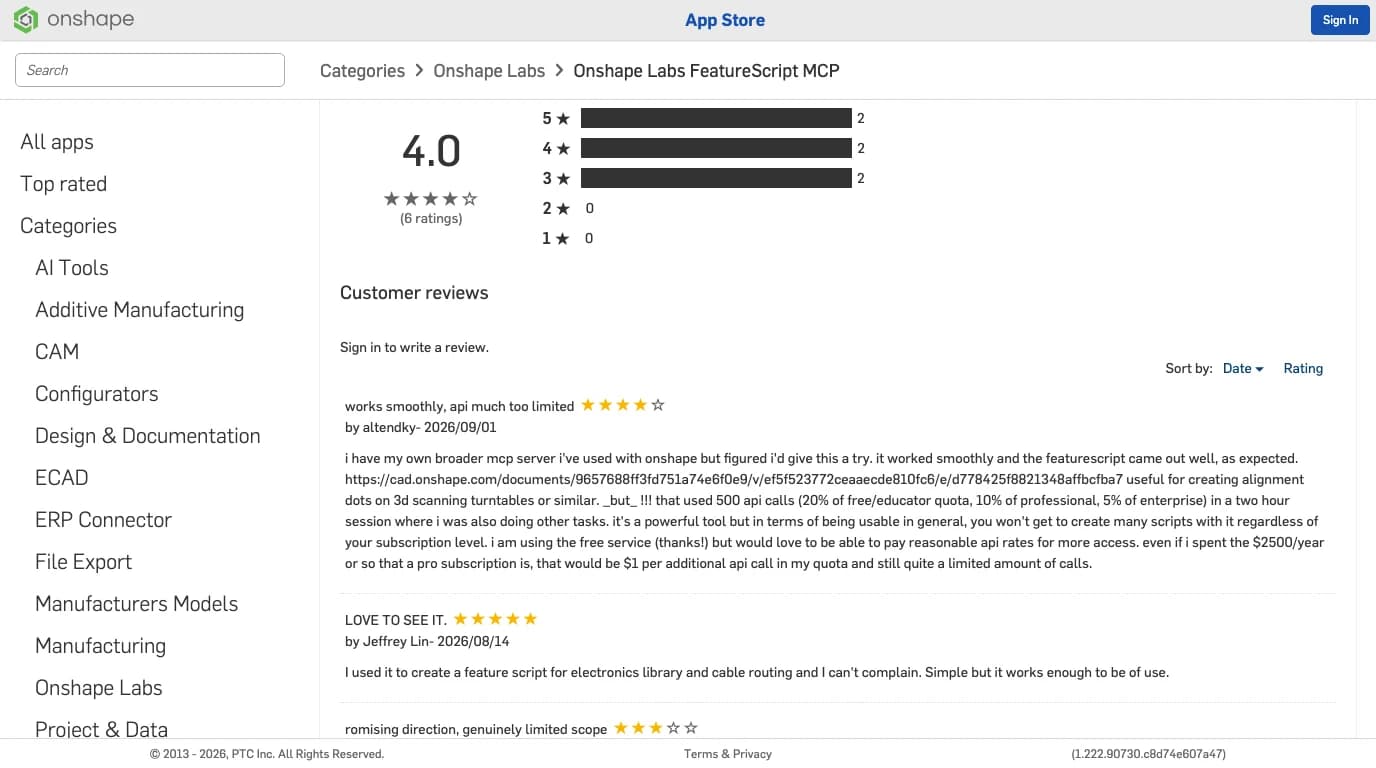
One contradiction remains in Onshape's documents. The limits page says calls from public App Store OAuth apps do not count, and the FeatureScript MCP Server is a public App Store OAuth app; the listing says its calls do count. The reviews settle it in practice: people are watching their allocation drain. At the limit Onshape answers HTTP 402 until the next cycle. Developer settings in your Onshape account show the count, and Onshape's tech tip has an optional prompt for company accounts: “Use the Onshape company API allocation, not my user API allocation.”
ChatGPT writing FeatureScript with no connection at all
You can ask ChatGPT for FeatureScript and paste it into a Feature Studio yourself, on any plan including Free. It has gone from useless to usable since 2022, but without the server nothing tests the code, so you do the checking.
The Onshape forum keeps an honest record. In December 2022 a long-time member opened “ChatGPT/Copilot for FeatureScript?” to report that it “just makes up code which may be more like Javascript”, and another member agreed it was “way wrong”. In a 2025 to 2026 thread the same member reports doing “a bunch of work” on two features, Bridging Curve Plus and Edit Curve Plus, by “cutting and pasting back and forth between the ChatGPT app and the Onshape document”, then moving to Codex in VS Code so he no longer had to find his place in more than 3,000 lines by hand. Another regular links GitHub Copilot to a mirrored copy of the FeatureScript standard library and his own features, and says that cleans up 95% of the hallucinations.
That last trick is the useful one if you stay off MCP: give the model the real library to read. The 2022 complaint was code that looked like JavaScript; real FeatureScript in the context is the cheapest cure. The MCP server solves the same problem differently, by running the code in Onshape and handing back the errors.
Community Onshape servers and OpenAI clients
The community servers drive Part Studios directly through the Onshape REST API, and from OpenAI they work in Codex as local servers; none of them is a tested chatgpt.com route. Their READMEs on 12 October 2026:
- altendky/onshape-mcp (20 stars, Apache-2.0) is the only one that addresses ChatGPT, and it says “ChatGPT connectivity is currently known to fail”, linking the issue above. It runs locally with your own Onshape OAuth app; its remote mode is experimental and has no public endpoint.
- ARES-23247/ares-onshape-local (0 stars, MIT) documents
codex mcp add ares_onshape_local -- ...and works through your signed-in browser session to avoid the annual API allowance. We have not read its code. - ReshefElisha/jarvis-onshape-mcp (175 stars), the most capable, is written as a Claude Code plugin. As a stdio server it should register with
codex mcp add, but its README never mentions an OpenAI client. - nathanb87-a11y/onshape-chatgpt-connector, created on 8 October 2026 with no stars, has “ChatGPT” in its name, but its README is jarvis's Claude Code README. A search result, not a ChatGPT server.
All of them need Onshape API keys or an OAuth app of your own, and their calls count against the same yearly allocation. The benchmark that matters before you pick one, Reshef Elisha's 27-part test of jarvis, is summarised in the Claude guide, and the wider list is in our CAD MCP server overview.
What we tested, and what we could not
We ran the Codex setup and every OAuth step that needs no account; we did not sign in to Onshape, open developer mode in ChatGPT or build a feature. The table is exact.
What this article is based on, 12 October 2026
Where your data goes
Your prompts go to OpenAI, the tool calls go to Onshape's server acting on your account, and the code ends up in your Onshape documents, which are public on the Free plan.
- Onshape Free is public. The pricing page says “All Onshape Documents are accessible to the public”. That includes the Workspace and Notes documents the server creates, and the Notes file is a running log of its past mistakes.
- The grant is broad. Read, write, delete and personal data, as shown above. The listing limits deletion to workspaces in the server's own sandbox document; the scope itself is not that narrow.
- On a ChatGPT workspace, the admin decides. Only admins and owners can publish a custom app to a workspace, and on Enterprise and Edu, conversations that use apps are available to the Compliance API.
- Cutting it off: unsubscribe from the app in Onshape's Application Settings, then
codex mcp remove onshape, or delete the app in ChatGPT's settings.
Where a 2D drawing fits
The FeatureScript server turns a description with numbers into a feature; it cannot measure a part for you, so the numbers have to come from somewhere. If what you have is a photo or a sketch of a part, a dimensioned drawing is the step that turns it into the inputs a bolt circle or boss feature needs, and that is what this site makes. Models given dimensions are reliable and models given a picture guess, which is what Reshef Elisha's Onshape benchmark and our own FreeCAD test both found.
Upload a photo of the part, add one known measurement, and get a dimensioned 2D drawing to read the feature inputs from before you prompt ChatGPT.
Turn a photo into a dimensioned drawingRelated reading: Claude with Onshape (the same server, with Onshape's screenshots and the benchmark), ChatGPT with SolidWorks and ChatGPT with Revit (desktop programs, where the tunnel matters), GPT-6 Astra with AutoCAD, and the CAD MCP server landscape.
FAQ
Frequently asked questions
Can ChatGPT connect to Onshape?
Yes. Onshape's official FeatureScript MCP Server is a remote HTTPS server at https://fs-mcp.labs.onshape.app/mcp, and its App Store listing names ChatGPT as a supported client. The dependable route is Codex: codex mcp add onshape --url https://fs-mcp.labs.onshape.app/mcp, then sign in to Onshape in the browser. The chatgpt.com website can add it as a custom app in developer mode, but OpenAI limits write actions there to Business, Enterprise and Edu plans.
Which ChatGPT plan do I need to use Onshape's MCP server?
It depends on the route. On chatgpt.com, OpenAI's Help Center says full MCP support with write actions is for Business, Enterprise and Edu, and Pro gets read and fetch tools only; creating or changing a Feature Studio is a write. The pricing page lists developer mode on Plus and Pro, not Free or Go. Codex has no such split: OpenAI lists Codex on every plan, the CLI from Plus, and the desktop app on Free subject to rollout.
How do I add Onshape to Codex?
Subscribe to FeatureScript MCP Server in the Onshape App Store with Onshape Labs enabled, then run codex mcp add onshape --url https://fs-mcp.labs.onshape.app/mcp. Codex detects the OAuth support, registers itself and opens Onshape's sign-in. If you close that, run codex mcp login onshape later. codex mcp list shows Not logged in until you finish. In the ChatGPT desktop app the same entry is Settings, MCP servers, Add server, Streamable HTTP.
Does Onshape's OAuth work with ChatGPT?
The parts we could test without an account do. Onshape's authorization server supports dynamic client registration and PKCE S256, it accepted a client registered with a chatgpt.com redirect URI on 12 October 2026, and it forwarded that client to Onshape's own sign-in page. We could not complete the flow inside ChatGPT, and one public bug report shows ChatGPT failing against a different Onshape server whose manual registration also worked, so treat the last step as unproven.
What permissions does ChatGPT get in Onshape?
All four scopes the server supports: OAuth2Read, OAuth2Write, OAuth2Delete and OAuth2ReadPII. We checked what Onshape's broker forwards to oauth.onshape.com, and it asked for all four even when our test client requested only read and write. The App Store listing says the server creates and modifies Feature Studios, creates two working documents and can delete workspaces in its own sandbox document. Unsubscribe in Onshape to revoke it.
How many Onshape API calls does the MCP server use?
More than most people expect. Every call counts against the annual Onshape API allocation, 2,500 per user on Free, Standard and Student plans. Two App Store reviewers published numbers: about 2 calls per test run and 6 per write-and-verify iteration, and 500 calls, a fifth of a Free year, in one two-hour session. At the limit Onshape answers HTTP 402 until the next cycle.
Can ChatGPT write FeatureScript without the MCP server?
Yes, by copy and paste, and Onshape users have done it since 2022 with mixed results. Early ChatGPT invented JavaScript-like code; by 2026 forum regulars report building real features by pasting code back and forth, or by using Codex in VS Code with a copy of the FeatureScript standard library in the repository. The MCP server's advantage is that it runs the code in Onshape and reads the result back.
Is my Onshape data public if I use the Free plan?
Yes. Onshape's pricing page says all Onshape documents on the Free plan are accessible to the public, and that includes the two documents the MCP server creates in your account, FeatureScript MCP Workspace and FeatureScript MCP Notes, plus any document you paste into a prompt. ChatGPT adds its own layer: what you type goes to OpenAI under your plan's data settings. Paid Onshape plans keep documents private.
Sources
- Onshape App Store: Onshape Labs FeatureScript MCP (by PTC Inc.), listing and customer reviews
- Onshape blog: How to Get Started with the Onshape FeatureScript MCP Server (Michael LaFleche, 3 September 2026)
- Onshape Tech Tip: How to Connect the FeatureScript MCP Server and Claude Code
- Onshape developer docs: API limits
- Onshape: Plans and pricing (Free plan terms)
- OpenAI Help Center: Developer mode and MCP apps in ChatGPT
- ChatGPT: Pricing (plan feature table)
- OpenAI: Codex pricing (which plans include Codex, and where)
- OpenAI: Model Context Protocol in Codex, CLI surface
- OpenAI: Model Context Protocol in Codex, ChatGPT desktop app surface
- OpenAI: Plugins authentication (DCR, CIMD, redirect URIs, PKCE)
- OpenAI: Connect and test your plugin (adding a custom MCP server to ChatGPT)
- Autodesk Help: Connecting to the Fusion Compute MCP server (Codex versus ChatGPT on the web)
- altendky/onshape-mcp issue #546: ChatGPT remote MCP OAuth flow fails after successful manual DCR and authorization
- altendky/onshape-mcp on GitHub (Apache-2.0)
- ARES-23247/ares-onshape-local on GitHub (MIT)
- ReshefElisha/jarvis-onshape-mcp on GitHub
- nathanb87-a11y/onshape-chatgpt-connector on GitHub
- Onshape forum: ChatGPT/Copilot for FeatureScript? (December 2022)
- Onshape forum: ChatGPT Atlas for FeatureScript vibe coding (October 2025 to January 2026)