
A CNC router earns its bench space the day you stop cutting test squares and start cutting things you actually use, give away or sell. Here are 25 CNC router projects sorted by skill and purpose, with the material, bit and setup that make each one work, plus the honest part most lists skip: which of the projects that sell are already saturated, where free CNC files really come from, and how to make your own file when the thing you want to cut only exists as a photo.
Our articles are still written by humans!
Get human written articles in your Google feed.
The short answer
If you are new, cut a set of coasters, a monitor riser and a tool hanger strip from a single offcut of plywood. If you want gifts, cut a cutting board with a handle hole or a house number plaque. If you want to make money, cut personalised boards and signs, and read the saturation section before you list anything. Every one of these is a flat vector outline plus a few holes or a pocket, which is exactly what a hobby CNC does best. The rest of this post is the full list, then where the files come from.
Beginner projects: one sheet, one bit
The right first projects have three things in common: they cut from one piece of sheet material, they use one bit, and you never flip the stock. That lets you learn zeroing, hold-down, tabs and depth per pass without a hardwood blank on the line. Use 12 or 18 mm baltic birch and a 6 mm (1/4 in) downcut or compression bit for clean top edges; a 3 mm (1/8 in) bit for small holes and tight inside corners.
- Coaster set. Four 100 mm squares or circles from 6 mm plywood, optional shallow pocket. Teaches tabs and depth per pass in ten minutes.
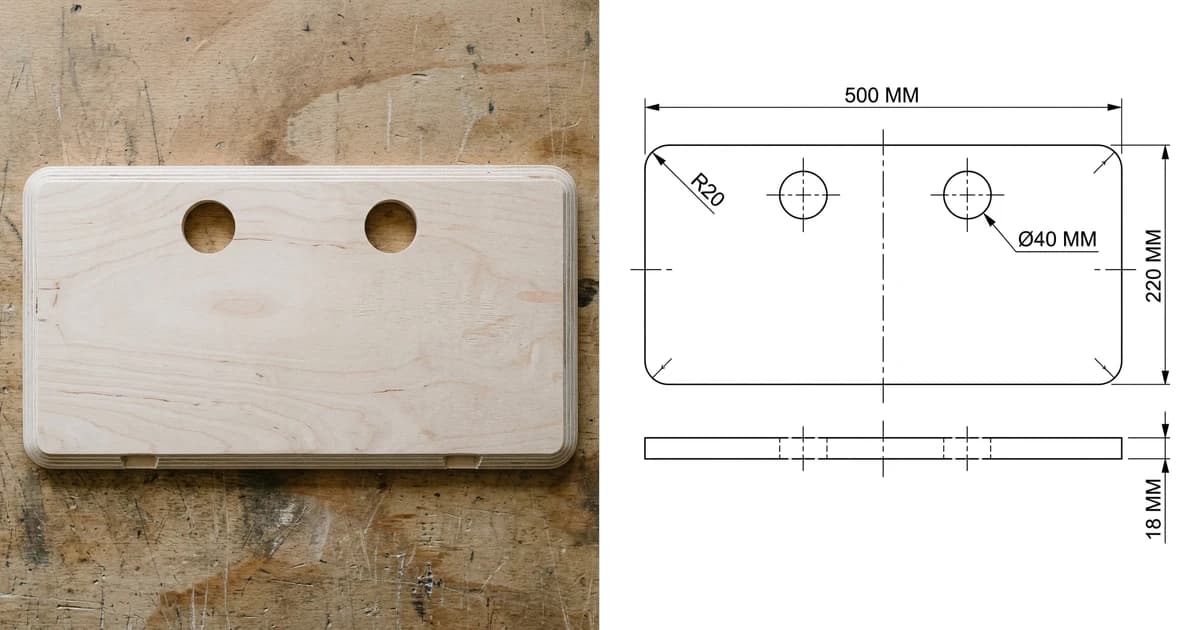
- Monitor riser top. A 500 by 220 mm plate with two 40 mm cable holes and rounded corners, plus two simple side supports. One outline, two holes, done.
- Phone or tablet stand. Two slot-together pieces. The slot must match your actual sheet thickness, which is the first lesson in measuring plywood rather than trusting the label.
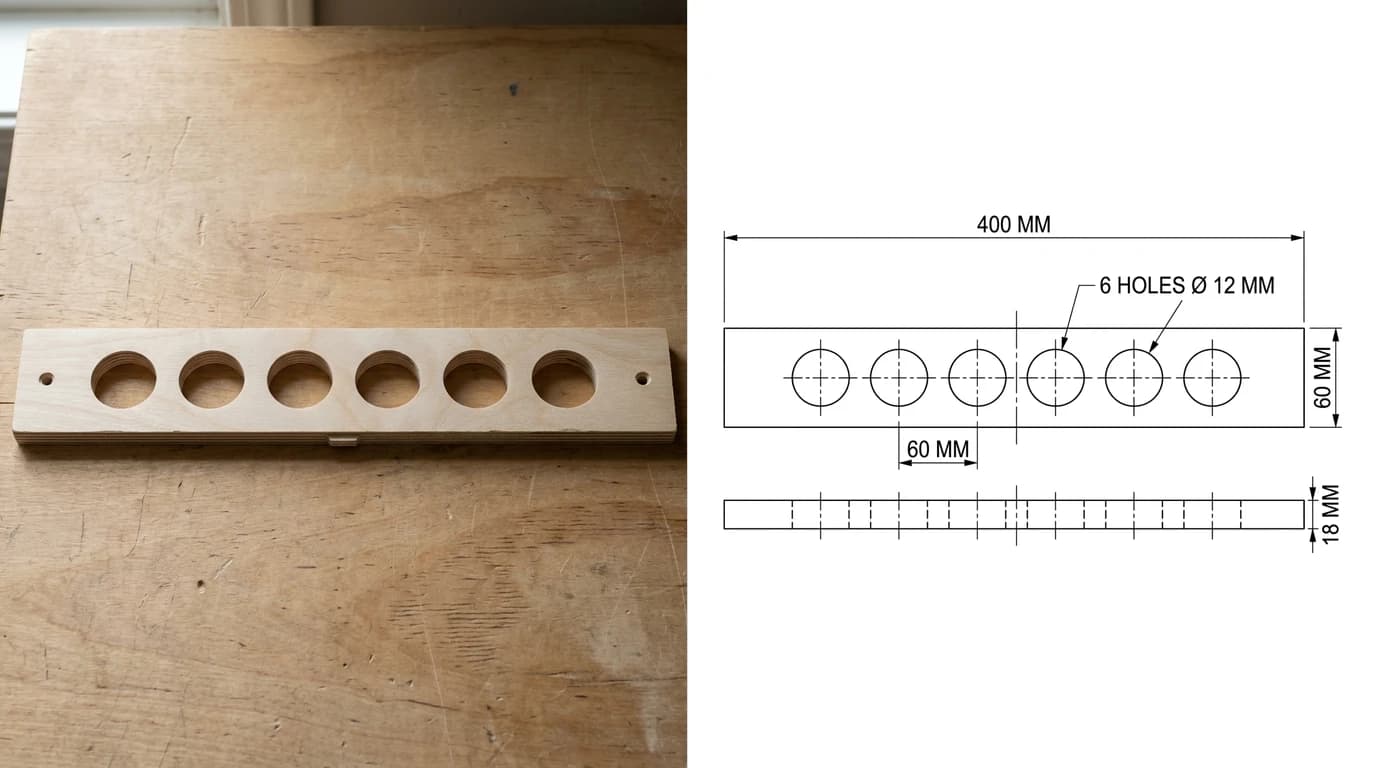
- Tool hanger strip. A 400 by 60 mm strip with a row of 12 mm holes for screwdrivers or chisels. Every hole is a plunge, so you learn why a downcut bit leaves a clean top.
- Simple cutting board. A rectangle with a 25 mm handle hole and rounded corners in 18 mm hardwood or plywood. Your first part that people will actually keep.
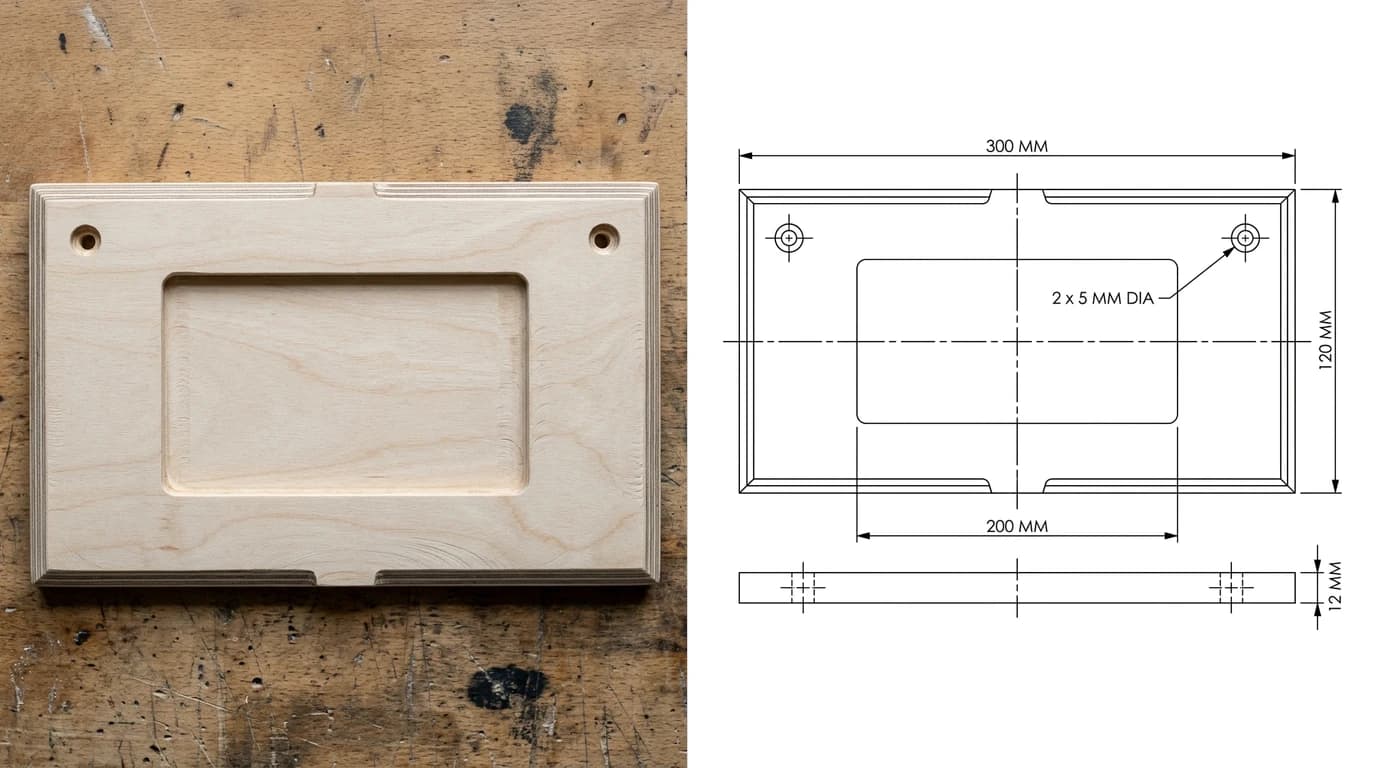
- House number plaque. A 300 by 120 mm plywood plate, two mounting holes, a shallow pocket for painted numbers or a contrasting inlay.
- Keychains and gift tags. Small outlines with a 5 mm hole, cut in batches from offcuts. Good for testing new bits and feeds on scrap.
Home and gift projects
Once the beginner set cuts cleanly, these add pockets, inlays and two-sided work, and they are the projects people ask you to make again.
- Serving tray with cut-out handles. A pocketed tray in 18 mm walnut or maple; the handles are just two through-slots.
- Hexagon wall shelves. Six-sided frames from 12 mm plywood, glued from mitred strips or cut as flat frames and stacked.
- Wall clock. A 300 mm disc with a centre hole for a quartz movement and engraved or inlaid hour marks.
- Topographic lake or mountain map. Layered contours from 3 or 6 mm plywood; the classic advanced-beginner showpiece.
- Jigsaw puzzle. Engrave a photo transfer or paint, then cut the pieces with a 2 mm bit. Tabs matter here.
- Chess, cribbage or backgammon board. Pocketed squares filled with contrasting inlay, or V-carved lines on a solid blank.
- Slot-together planter box. Five panels with finger joints or slots, no glue, sized to your sheet thickness.
- Desk nameplate. A wedge or a flat blank with V-carved lettering; the gift that turns into an order for the whole office.
Shop fixtures and jigs
The best CNC projects for the shop are the ones that make the next project easier. They cost you offcuts and pay you back every day.
- Drill bit index. A block or strip with a stepped row of holes, sizes engraved beside each.
- Router bit tray. Holes for 6 mm and 12 mm shanks in an 18 mm blank, so bits stop rolling around a drawer.
- Spoilboard with a hole grid. A fresh MDF wasteboard with a grid of holes for threaded inserts, surfaced flat on the machine itself. Wear a mask; MDF dust is the worst thing in the shop.
- French cleat tool holders. Holders for clamps, squares and drills that hang on a cleat wall; every one is a flat profile with a 45 degree bevel added on the table saw.
- Push sticks and sanding blocks. Cut six at a time from 12 mm plywood; give the spares away.
- Dust boot or hose adapter. A 2.5D stack of rings that adapts your shop vac to the spindle. Measure your hose, then measure it again.
Projects that sell (and which are saturated)
Every CNC owner ends up on Etsy or at a craft market eventually. What actually sells is not what is easiest to cut; it is what carries a name, a date or an address, because personalisation is the one thing a factory in bulk cannot do for a customer standing at your table.
- Personalised cutting and charcuterie boards. Engraved family names, wedding dates, recipe handwriting. The board is the blank; the engraving is the product.
- House, family-name and wedding signs. V-carved hardwood or painted plywood. Local pickup and a fast turnaround beat the big shops.
- Earring blanks and jewellery displays. Tiny cuts, high margin, sold in packs to other makers.
- Cornhole boards and yard games. Two boards, one weekend, and a price customers accept because they know the effort.
Signs and engraving ideas
Engraving is where a router overlaps with a laser, and most of the same ideas work on both. With a 60 or 90 degree V-bit you can V-carve lettering that reads crisply from across a room, which a laser cannot do at that depth. Ideas that keep selling: welcome and established signs, address plaques, coordinates of a place that matters, pet memorial plaques, bar and workshop signs, and engraved lids for boxes you cut anyway. If your logo or artwork exists only as a picture, logo to vector for laser engraving covers the trace, and it applies to the router just the same.
All 25 at a glance
The 25 projects: material, difficulty and whether people pay for it
Where to get free CNC files
Most of the projects above already exist as a downloadable DXF or SVG, and downloading one is the fastest way to learn what a well-made cut file looks like. These sites were live and free when this was written; the licence line is the honest part, because “free” almost always means free for personal use, not free to sell.
- 3axis.co. Thousands of free DXF files for routers, lasers and plasma. Quality ranges from clean vectors to traced clip art; check for open paths before you cut. Personal use unless stated.
- DXFforCNC free collection. A curated free section from a paid file shop, so the vectors are usually clean. Good for decor and sign blanks.
- DXF Downloads. Free DXF vectors and plans for routers and lasers, heavier on decorative art than on functional projects.
- Ameede. Layered decorative designs, ornaments and frames; many free files alongside paid ones.
- Vectric free projects. A free project every month with files and a walkthrough, made for VCarve and Aspire but the vectors export. The best free source for functional and gift projects.
- Ponoko free templates. Laser-oriented templates (boxes, enclosures, organisers) that cut fine on a router with a small bit.
- Vector Painter free files. Free SVG and DXF cut files in a laser shop; check the sheet thickness each design assumes.
- Thingiverse and Instructables CNC. Search Thingiverse for CNC and DXF, and browse Instructables for full build write-ups with files attached. Licences are per project, usually Creative Commons.
Two things to check on every download, whoever made it. First, the units: a file drawn in inches opens at 1/25 the size in a metric CAM program, and the fix is in why a DXF imports at the wrong size. Second, the material thickness the designer assumed: slots and finger joints for 12 mm plywood will not fit 11.6 mm plywood, and almost all plywood is under its nominal thickness.
Make your own file from a photo or sketch
The best projects are the ones nobody has a file for: the shelf that fits your van, the bracket that broke, the template your neighbour wants copied. That is when a photo has to become a cut file, and a photo on its own cannot be cut, because a JPG has no lines for a toolpath to follow. Something has to draw the geometry.
TechDraw AI does that from a photograph or an image: it produces a dimensioned 2D drawing, the plan and edge view you see in the figures above, and exports it as DXF, SVG or DWG that opens in Carbide Create, Easel, VCarve, Fusion or LightBurn. For an image or logo, image to DXF and JPG to DXF are the direct routes. For a pencil sketch, sketch to CNC-ready DXF walks through it end to end, and photo to Glowforge and xTool cut file covers the laser side of the same job.
Photograph the part or upload the image and get a dimensioned DXF you can open in your CAM software.
Try image to DXFBefore you cut: file prep in one paragraph
Whether the file is downloaded or your own: open it in your CAM program, confirm the units and overall size against a ruler, join or close any open paths, delete duplicate lines sitting on top of each other, set the material thickness to what your calipers say, add tabs or leave an onion skin so parts do not fly, and run the first cut in scrap. The full checklists live in how to prepare a DXF for cutting and why your DXF will not cut; they were written for lasers and every point applies to a router. Feeds and speeds are the one thing this post will not give you numbers for: they depend on your machine, bit and material, so use your bit maker's chart and your ears.
Frequently asked questions
What can you make with a CNC router?
Anything flat or nearly flat that a spinning bit can carve out of sheet material: cutting boards, signs, coasters, shelves, slot-together boxes and furniture, drawer organisers, jigs and shop fixtures, wall art, clocks, puzzles, guitar bodies and cabinet parts. Add a V-bit and you get engraved lettering; add a ball-nose bit and you get 3D relief carving. The limit is the machine's bed size and the thickness it can cut in passes, not the idea.
What are the best beginner CNC projects?
Projects cut from one piece of 6 to 18 mm plywood with one bit and no flip: coasters, a monitor riser, a phone stand, a tool hanger strip, a house number plaque, keychains and simple cutting boards. They teach you zeroing, tabs, holding the sheet down and depth per pass without risking expensive hardwood. Once those cut cleanly, move to pockets, then to two-sided work.
What CNC projects sell best?
Personalised items with low material cost and a name or date on them: cutting boards and charcuterie boards, house and family-name signs, wedding and event signs, coasters, earring and jewellery blanks, and seasonal decor. Be honest with yourself about saturation: plain state cut-outs, generic wall clocks and unbranded coaster sets are everywhere on Etsy and sell on price. Local, personalised and finished-well beats generic every time.
Where can I get free CNC files?
3axis.co, DXFforCNC's free collection, DXF Downloads, Ameede, Ponoko's free templates, Vector Painter's free section, Thingiverse (search for CNC and DXF), Instructables' CNC section, and Vectric's free monthly projects if you use VCarve or Aspire. Read the licence on each: most free files are for personal use only, and quality varies from clean closed vectors to traced clip art you will spend an hour fixing.
What file type does a CNC router use?
The router itself runs G-code, which your CAM software (Carbide Create, Easel, VCarve, Fusion 360, Estlcam and others) generates from a vector drawing. That drawing is usually a DXF or SVG for 2D and 2.5D work, and an STL or STEP for 3D carving. So the file you download or draw is DXF or SVG, and the file the machine reads is G-code you make from it.
Can I turn a picture into a CNC file?
Yes, but the picture has to become vectors first, because a JPG or PNG has no lines for the toolpath to follow. For a logo or silhouette, a vector trace works. For a physical object such as a board, bracket or template you want to reproduce, TechDraw AI turns a photo into a dimensioned 2D drawing that exports as DXF or SVG, which you then open in your CAM software. Check units and closed paths before you cut, as with any file.
What wood is best for CNC projects?
Baltic birch plywood for almost everything you learn on: flat, stable, few voids and it cuts cleanly with a downcut or compression bit. MDF is cheap and flat but the dust is nasty and edges soak up finish. Hardwoods such as maple, walnut, cherry and oak for boards, signs and anything you will sell, cut with sharper bits and slower feeds. Avoid cheap construction plywood with voids, and treat exotic and oily woods as advanced.
How thick a material can a hobby CNC router cut?
Most hobby machines cut 18 to 20 mm plywood or hardwood comfortably in several shallow passes, and many will do 25 to 40 mm with a long enough bit and patience. The real limits are the Z travel of your machine, the cutting length of the bit and how rigid the frame is. Two-sided machining lets you carve thicker parts than the bit reaches by flipping the stock on registration pins.