
GPT-6 Astra shipped on September 3, 2026, and within a day people were asking it to open DWG files. Before we could test any of that, our own account walked us into the real story: we asked ChatGPT which model we were talking to, it said it was not Astra, we assumed it was making that up, and it turned out to be right. This is the honest version of that afternoon — what we verified with screenshots to show for it, what we got wrong, and what a current ChatGPT model can actually do with a DXF, a DWG and a drawing.
Our articles are still written by humans!
Get human written articles in your Google feed.
The short answer
A current ChatGPT model reads DXF usefully when you hand it the text, the same way every capable language model does, because DXF is ASCII. It cannot open DWG at all, because DWG is a binary format and nothing changes that. It reads printed dimensions off a clean drawing image well, which is closer to OCR than to true geometric measurement. And before any of that: on the Free plan, you are very possibly not talking to GPT-6 Astraat all, which is the part almost nobody checks before publishing a “we tested it” post. We did, and it changed what we could honestly claim.
First: are you even talking to Astra?
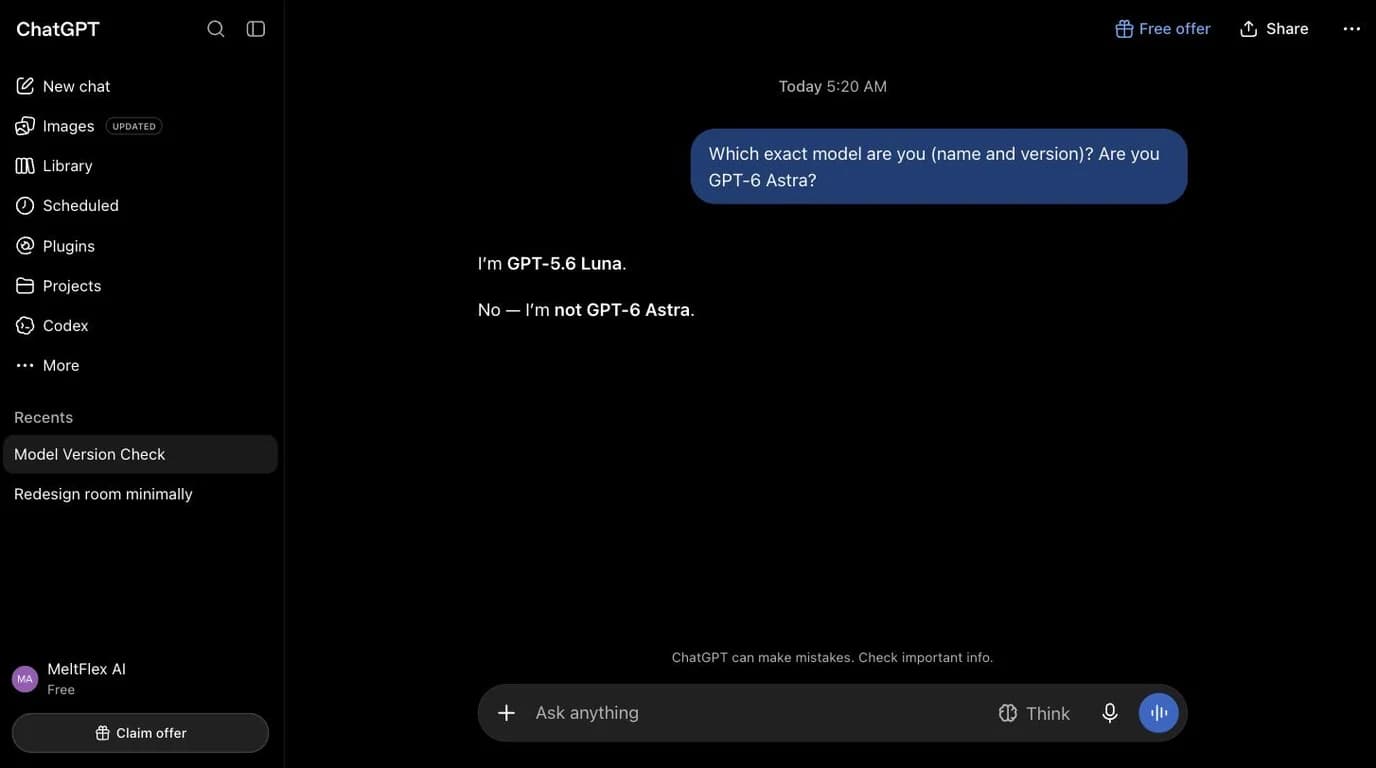
We opened a fresh ChatGPT conversation on our own account and asked it directly: “Which exact model are you (name and version)? Are you GPT-6 Astra?” The answer came back in two lines: “I'm GPT-5.6 Luna. No — I'm not GPT-6 Astra.”
Our first instinct was that it had made the name up. GPT-5.6 Solis the model OpenAI benchmarks Astra against all over the launch post, “Luna” appears nowhere in it, and a model inventing a plausible version number for itself is a well-known failure mode. We were wrong.
ChatGPT's own pricing page settles it: the Free plan is listed as “Unlimited text chats with GPT-5.6 Luna”. Luna is a real model, it is the one the free tier runs, and the answer we got was accurate on both counts. Sol is a different, higher-tier model in the same 5.6 family. So the lesson is not the tidy “never trust a model about itself” we expected to write. It is narrower and more useful: the plan page is the authority, and the model happened to agree with it.
Here is the plan side stated by OpenAI rather than by us. Their availability section says Astra became available “to all ChatGPT Plus, Pro, Business, and Enterprise users, as well as through the OpenAI API, Microsoft Azure, and AWS Bedrock”. Two details in that paragraph are worth more than the headline: Pro, Business and Enterprise users additionally get GPT-6 Astra Pro, and for Enterprise workspaces access is off by default at launchuntil an administrator turns it on. So “my company pays for ChatGPT” is not the same as “I have Astra” either.
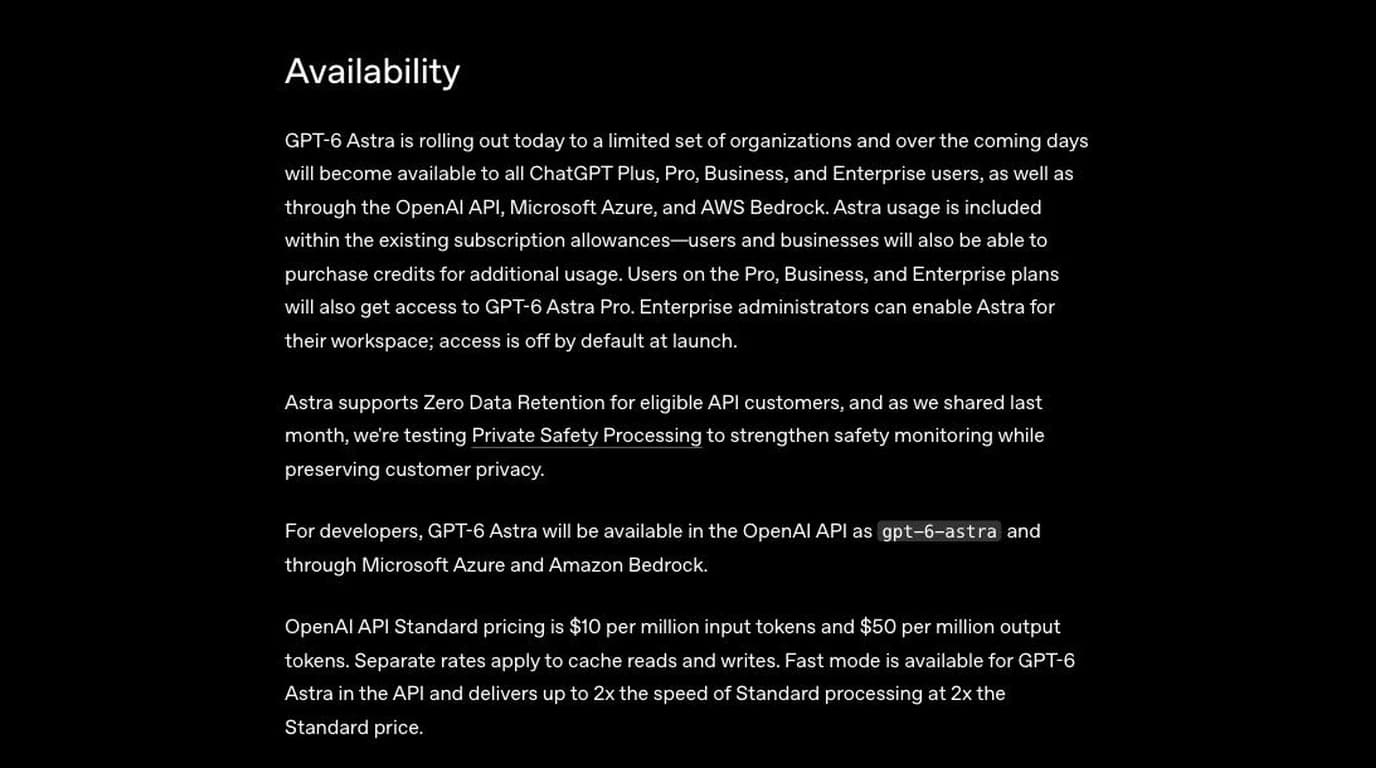
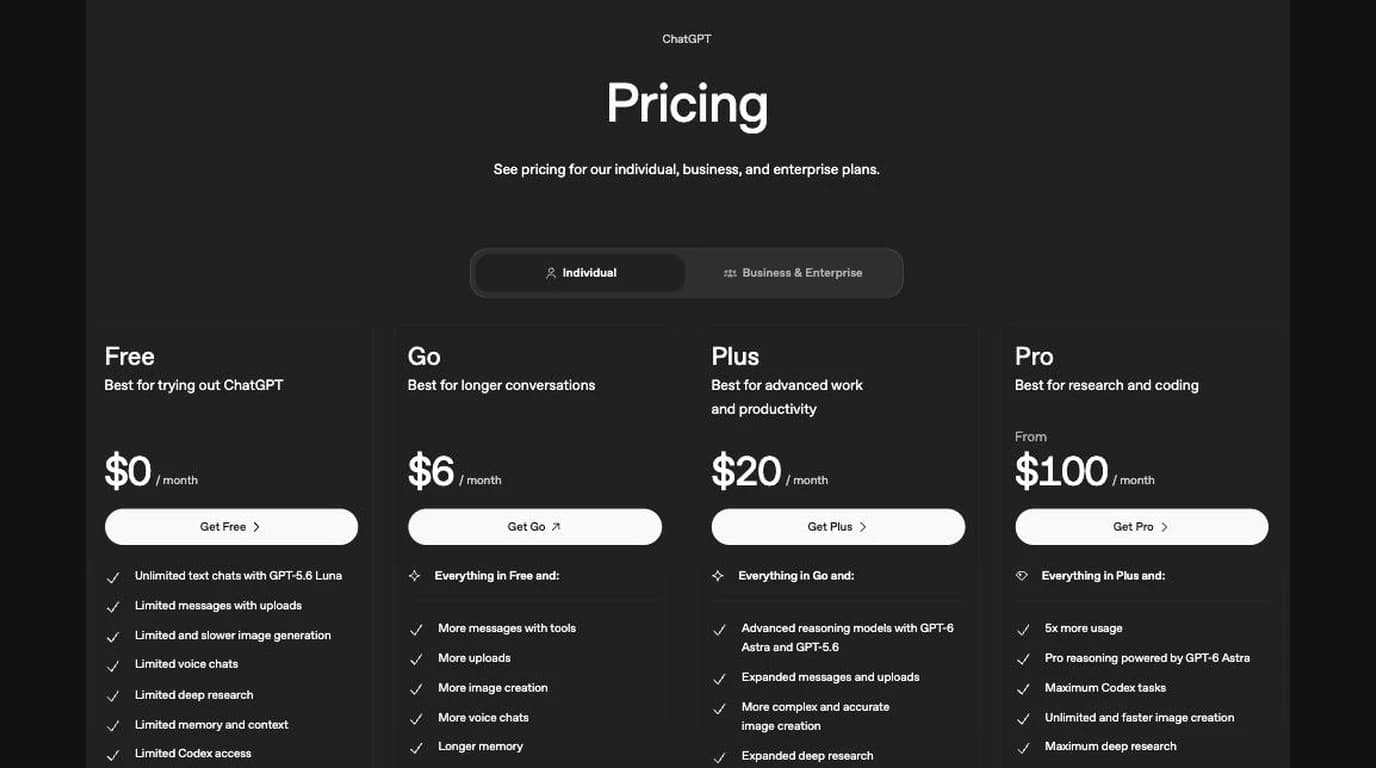
Which ChatGPT plan has GPT-6 Astra (chatgpt.com/pricing, September 2026)
The same page is worth a second look if you plan to test anything on the free tier, because two of its rows decide whether a CAD experiment is even possible. File uploads and vision are both marked “Limited” on Free, and the reasoning context window goes from “Varies” on Free to 256K on Plus and 400K on Pro. A long DXF is exactly the kind of file that meets those limits first.
The failure we expected to find, and didn't
There is a published metric for the thing we wrongly accused the model of. OpenAI reports a capability hallucination rate: how often a model makes “inaccurate representations about its capabilities and affordances”. Astra is described as roughly three times better than GPT-5.6 Sol on it, and on their internal hallucination benchmark Astra scores 4.2% against Sol's 12.2%, lower being better.
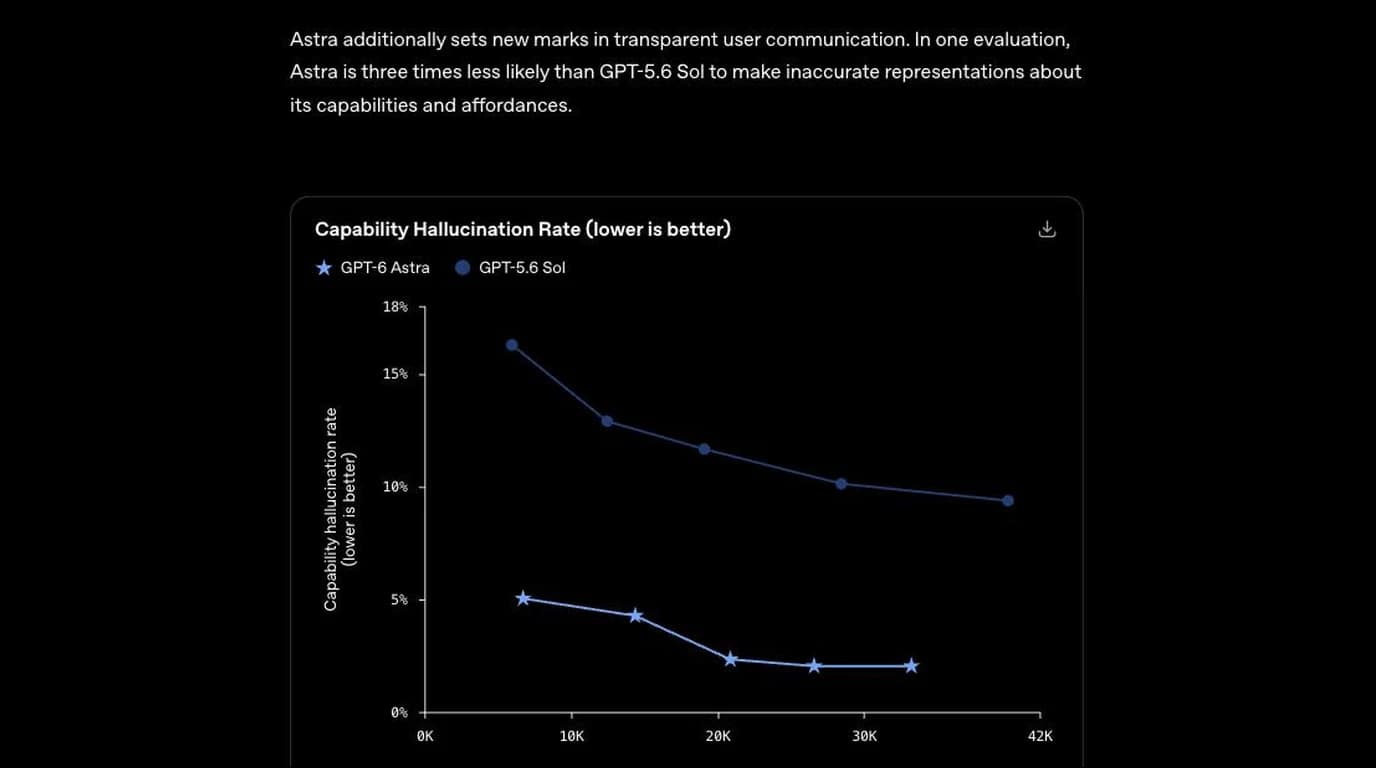
Worth keeping in view anyway, because the CAD version of this failure is the expensive one. “Yes, I can read your DWG” and “these dimensions are correct” are exactly the sentences that metric exists for, and unlike a model name, you cannot settle those by opening a pricing page. You settle them by opening the file, which is what the rest of this article does.
We did not upgrade the account to chase this specific claim, so everything from here is split cleanly into two piles: what we ran ourselves, with screenshots, against a current ChatGPT model, and what OpenAI has published about Astra specifically, cited and clearly marked as their claim rather than our result.
Format by format
The format-level facts here are not really about any one model. They are about what the file actually contains, which is exactly why they held up the same way for Claude when we ran this same test on it.
DXF as text: what we actually got back
We hand-wrote a small DXF: an L-shaped bracket, 80 by 60 mm, with two 8 mm holes, the same test part the site has used to check other models before. We saved the ENTITIES section as a plain .txtfile, uploaded it, and asked for every entity's type and geometry plus the overall bounding box.
The answer was correct in full: an LWPOLYLINE with six vertices at exactly the coordinates we wrote, closed, and two CIRCLEentities at the right centers and the right 4 mm radius. The bounding box came back as 80 × 60 file units, which is exactly right.
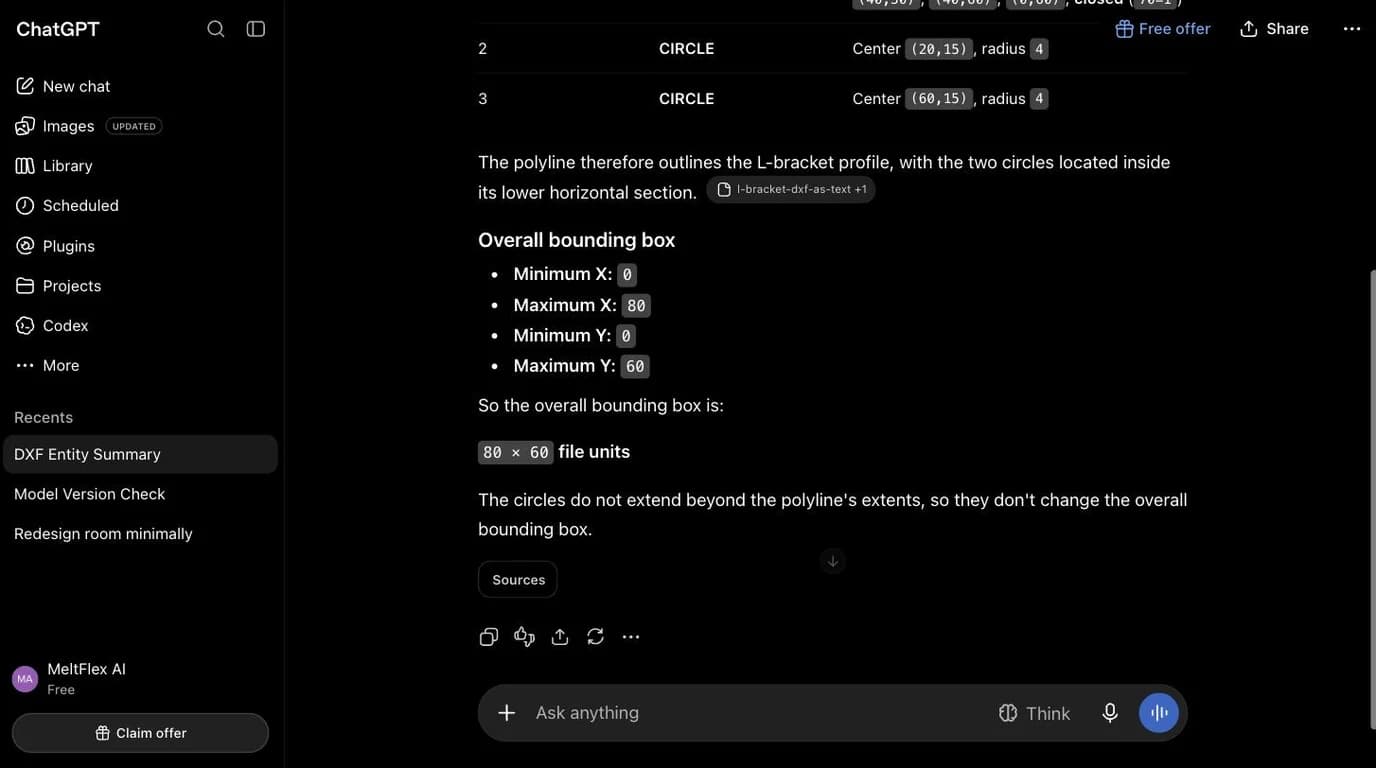
This is not a hard trick and it is not Astra-specific. Any language model with reasonable text comprehension can do this, because DXF was designed to be human-readable in the first place. The useful takeaway for a reader is practical, not impressive: if you have a DXF and a chat model refuses to make sense of it, the fix is usually upload it as, or paste it as, plain text rather than expecting the model to open a .dxf the way a CAD program would.
Want to actually see the file rather than a text description of it? Our DXF viewer opens it in your browser, nothing uploaded to a server, and it will tell you plainly if something in the file won't render, instead of guessing.
Open DXF ViewerReading dimensions off an image
The genuinely new variable with Astra is vision, not text. The number that matters here is not a generic image benchmark but ScreenSpot-Pro, which measures how precisely a model locates things on a screen: OpenAI reports Astra at 92.7% with no tools, against 76.9% for GPT-5.6 Sol. Locating a dimension line and reading the number attached to it is the same class of task. So we tested the part we could test on the model available to us: can a current ChatGPT model read printed dimensions off a rendered technical drawing and get the numbers right?
We rendered the same L-bracket as a dimensioned drawing, arrows, extension lines, a Ø8 callout, a small title block, and asked for the overall width, height, the upper step width, hole diameter and count, and the X,Y center of each hole from the bottom-left corner.
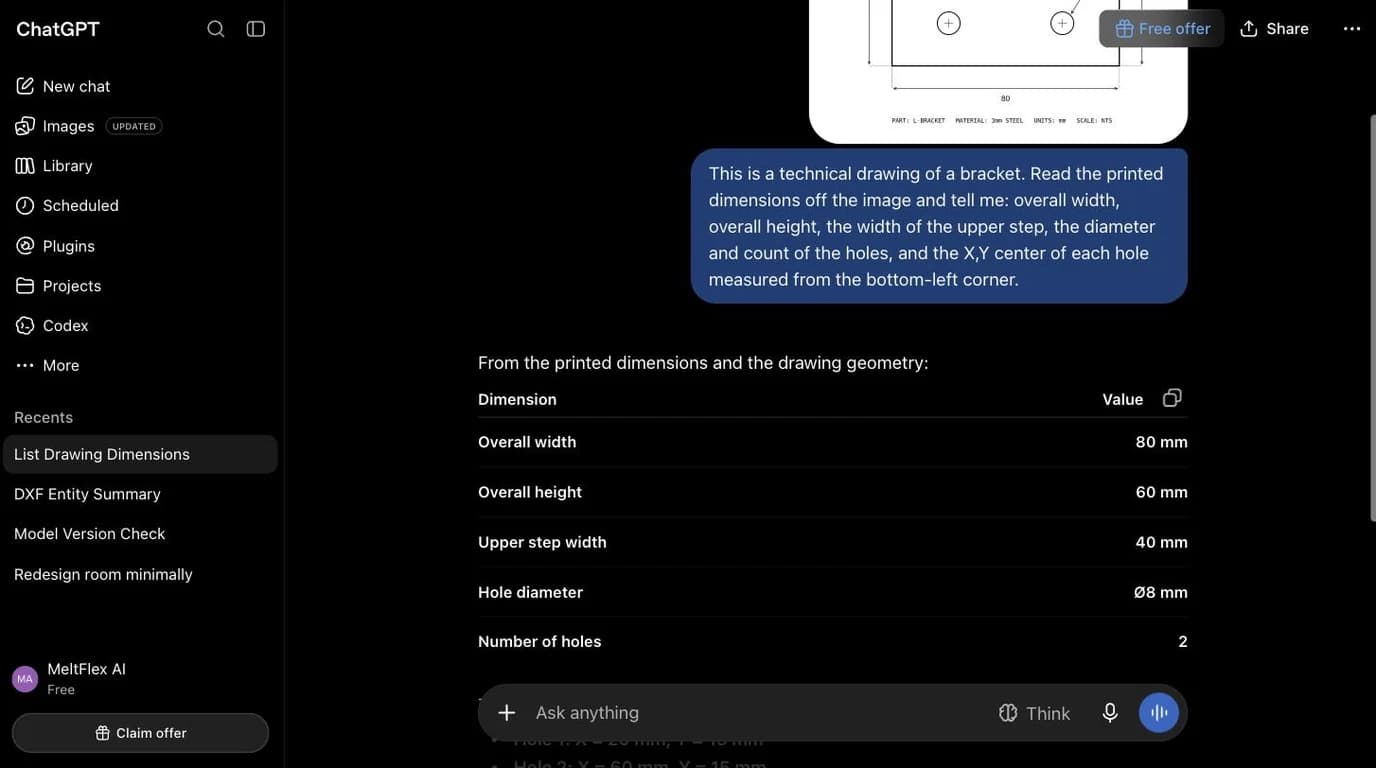
Every value was correct. Worth being precise about what that does and does not prove: this drawing had the dimensions printed on itas text, next to arrows pointing at what they measure. That is a layout-and-OCR task, reading numbers and matching them to labelled features, not the harder task of inferring an unlabelled shape's real-world size from pixels alone. Claude's equivalent test found that asking a model to render geometry purely from imagination, with no printed numbers to anchor it, is where things go wrong. We would expect the same ceiling here regardless of which model is behind the chat window, and OpenAI's own materials do not claim otherwise; the Astra-specific claim is a vision benchmark score, not a claim about inferring un-printed measurements.
DWG: still a binary wall
We did not fabricate a fake DWG test by renaming a text file, because that would test extension-sniffing, not DWG parsing, and would be exactly the kind of dishonest shortcut this article is arguing against. The underlying fact is well established and does not depend on which chat model you ask: DWG is Autodesk's proprietary binary format, undocumented in the way DXF is, and no publicly available chat model reads its geometry directly. Better vision benchmarks do not touch this, because there is nothing to see until something renders the file first.
The practical fix is unglamorous and it works: convert the DWG to DXF with a free tool, then hand a chat model the text. Or skip the chatbot for viewing entirely.
No AutoCAD, no conversion step, no chatbot guessing. Our DWG viewer opens R14 through 2018+ files straight in your browser.
Open DWG Viewer
Can it write a CAD file?
Through code, yes, in the sense that any capable coding model can write a valid DXF if you describe the geometry precisely enough for it to emit the right group codes. That is not the same as generating a technical drawing from a description or a photo. Our separate test of ChatGPT's built-in image generator, covered in Can ChatGPT Make Technical Drawings?, found it produces a picture that resembles a blueprint, with dimension numbers the model invented and that do not agree with each other run to run. Writing DXF through code sidesteps that specific failure, but only if a human supplies every real dimension. Neither route measures anything.
The honest limits
- It cannot measure a physical part. Every number in every test above was either already in the file or already printed on the drawing. Nothing here infers a real-world size from an unlabelled photo.
- DWG stays closed until something else converts it, regardless of which model is asking.
- Self-reported model identity is not evidence.Ours told us a name that does not appear in OpenAI's own materials. Check your plan, not the model's word for itself.
- We have not verified Astra's specific numbers firsthand. The vision benchmark claims above are OpenAI's, cited, not ours. If you have Plus or Pro access and want to compare notes, the DXF and drawing we used are simple enough to reproduce in a few minutes.
When the part exists and the file doesn't
Everything above assumes you already have a file, a DXF to paste, a drawing to photograph. The much more common situation is a part in your hand and nothing else: no DWG, no DXF, just a shop asking for one. That is not a reading problem, and no amount of model capability touches it, because the missing ingredient is measured geometry, not comprehension. Our AI technical drawing generator was built for exactly that: photograph the part, give it one reference measurement, and it rebuilds a dimensioned 2D technical drawing you export as DWG, DXF, SVG or PDF. The walkthrough is in image to DWG: convert a picture to a DWG file and how to reverse-engineer a part from a photo.
Frequently asked questions
Can GPT-6 Astra read a DWG file?
No. DWG is Autodesk's proprietary binary format, and nothing in OpenAI's own material on Astra claims it parses that binary structure directly. The workaround is the same one that works for every chat model: convert to DXF first, free, with the ODA File Converter or any CAD package, because DXF is a documented text format a language model can genuinely read.
How do I know if I'm actually talking to GPT-6 Astra?
Check chatgpt.com/pricing, not the chat window. As of September 2026 the Free plan runs GPT-5.6 Luna, Astra starts on Plus at $20 a month, Pro adds Astra Pro, and on Enterprise an admin has to switch it on. Asking the model directly is not worthless — in our test it named its own model correctly — but the plan page is what actually settles it.
Can ChatGPT read a CAD file at all?
Yes, within limits, and this part is not specific to Astra. DXF is plain text, and we confirmed a current ChatGPT model correctly read an uploaded DXF's entity list: polyline vertices, circle centers, circle radii, and an accurate bounding box, all extracted correctly. STEP files are also ASCII text and tend to follow the same pattern to a lesser degree. DWG is the exception, because it is binary.
Can GPT-6 Astra generate a DWG or DXF file?
Not the way TechDraw AI does, as a direct download from a photo. It can write code that outputs a DXF, which any capable coding model can do, but that code is only as accurate as the dimensions you feed it. It has no way to measure a physical part from a photo, and it does not know your part is 82.5 mm wide unless you tell it.
What is the fastest way to get a DXF or DWG from a photo of a part?
Not through a chatbot, Astra or otherwise. A purpose-built tool like TechDraw AI takes the photo plus one reference measurement you supply and rebuilds the part as a dimensioned 2D technical drawing, exported as DWG, DXF, SVG or PDF directly.
Does GPT-6 Astra's better vision fix the DWG problem?
No, and it would not, even if we could confirm it firsthand. Vision quality changes how well a model reads what is drawn on a page, printed dimensions, symbols, layout. It does nothing for a binary file format, because there is nothing to look at until something renders it first. The DWG wall is a fact about the file, not a fact about how sharp the model's eyes are.
Sources
- ChatGPT pricing: which plan includes GPT-6 Astra
- OpenAI: GPT-6 Astra
- OpenAI: GPT-6 Astra, the next generation in intelligence for work
- CNBC: OpenAI begins rolling out Astra model after warning of its advanced cyber capabilities
- OpenAI API docs: GPT-6 Astra model reference
- Open Design Alliance: ODA File Converter (free DWG to DXF conversion)
- Autodesk: About the DWG file format