
Claude can make technical drawings through TechDraw AI, which has its own MCP server and Claude plugin. Can it also check one? We wrote a drawing-check skill and ran Claude Code 32 times on 8 drawings with 16 known errors, half the runs with the skill and half without. The result surprised us, and it was not the one we wanted.
Our articles are still written by humans!
Get human written articles in your Google feed.
Is there a Claude skill for technical drawings?
Yes, for both halves of the job. To make drawings, TechDraw AI plugs into Claude with its own MCP server: paste https://techdrawai.com/api/mcp/claude into Claude's connectors, or in Claude Code run /plugin marketplace add MeltFlexDevs/techdrawai-skills and /plugin install techdrawai@techdrawai. Claude can then turn a photo or a description into a dimensioned drawing, a DXF or DWG, or a STEP part. Setup is on our MCP page, and our test of a skill that drafts DXF files is in Claude CAD skills.
To check drawings, you need a different skill, and this page is the test of one.
Three ways to add technical drawing skills to Claude
How we tested it
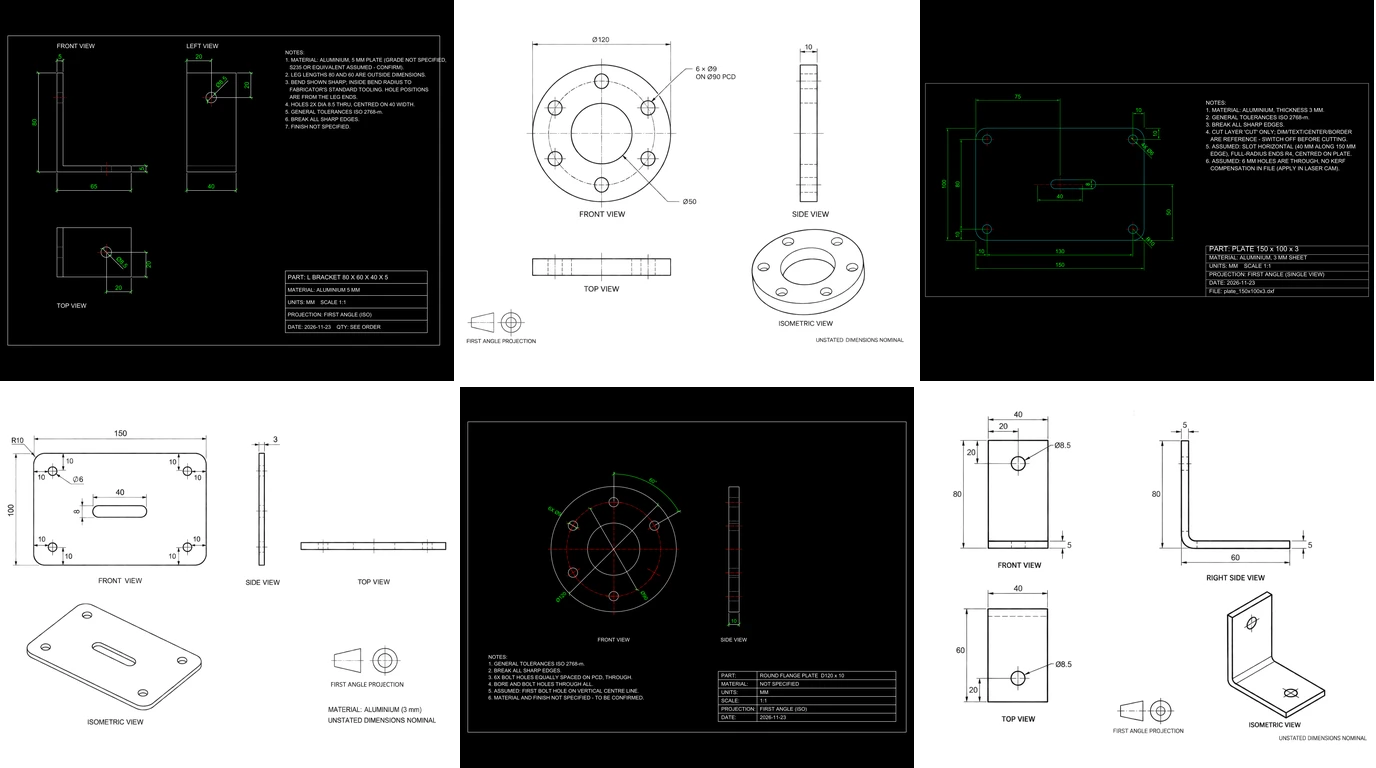
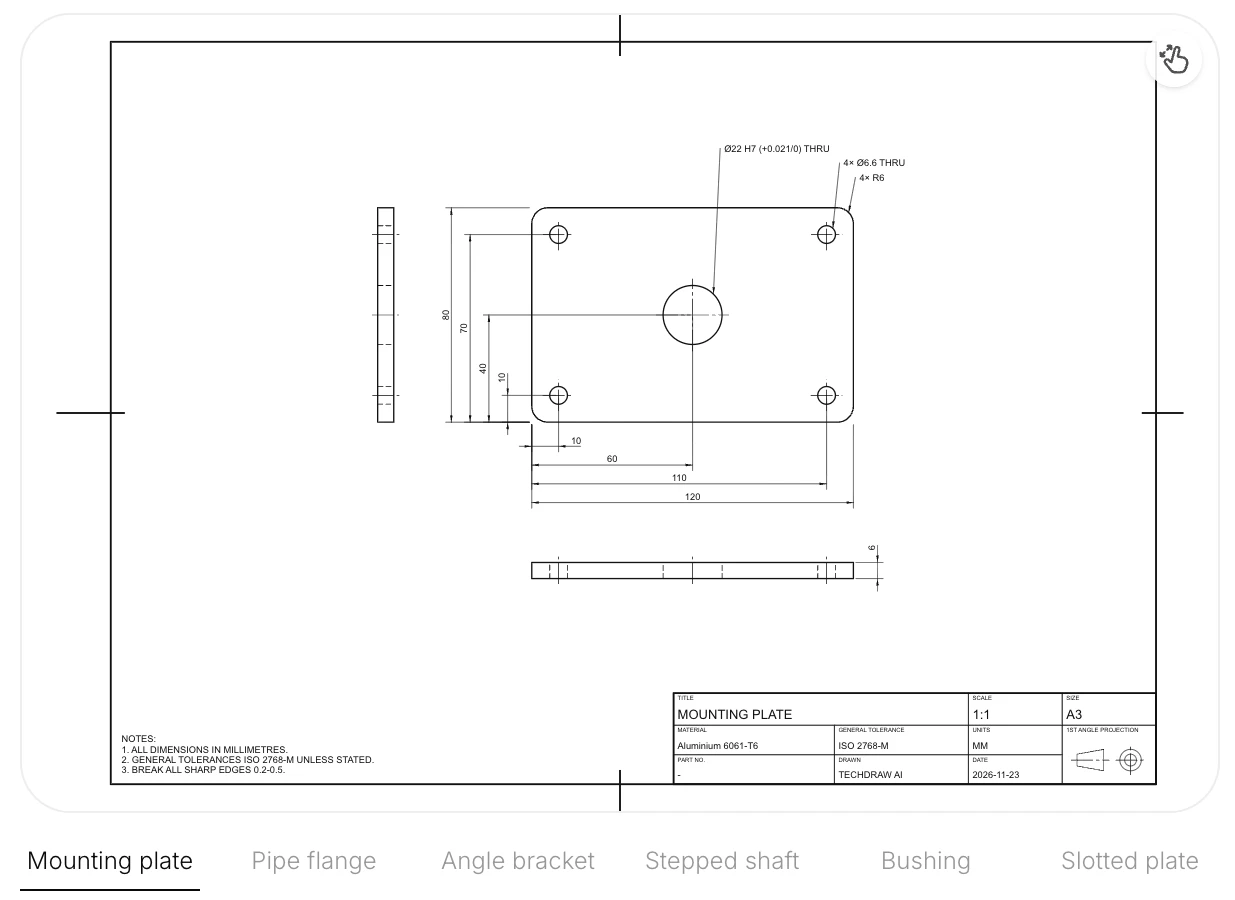
Eight drawings, each with the request it was made from. Claude got one PNG and one sentence: check this drawing before it goes to the shop, list every problem, most serious first.
The test set: 8 drawings, 16 real errors
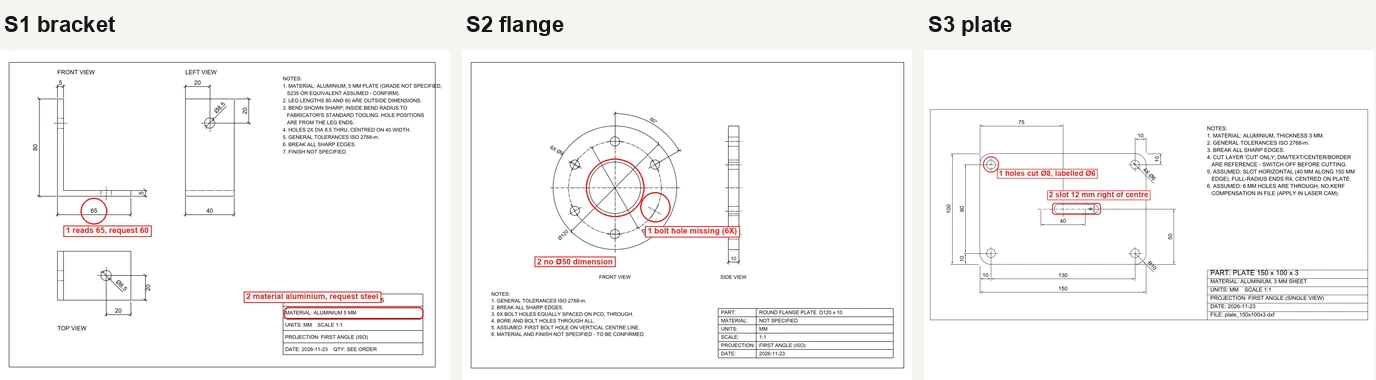
Each drawing ran twice without the skill and twice with it: 32 runs of Claude Opus 5.5 in Claude Code, about a minute each. A second model graded every report against the answer key, and we re-checked every verdict by hand.
Results: the skill found nothing extra
32 Claude Code runs, measured by us on 23 November 2026
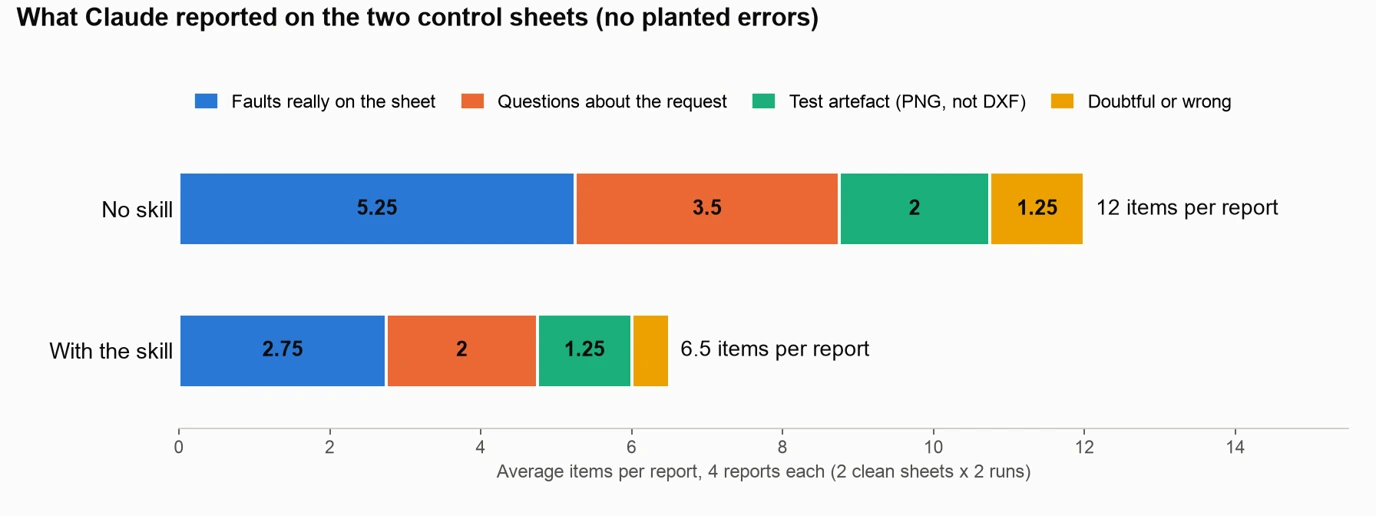
We expected the skill to catch more. It did not: without it, Claude Opus 5.5 already found every error, including the ones that need measuring. On the plate it reported the holes drawn at Ø8, but the callout says Ø6, having found the pixel scale from the 150 mm edge on its own.
What the skill changed was the report. Without it, Claude listed everything it could think of; with it, it ranked findings by severity and gave the measured numbers for each.
Claude found errors we missed
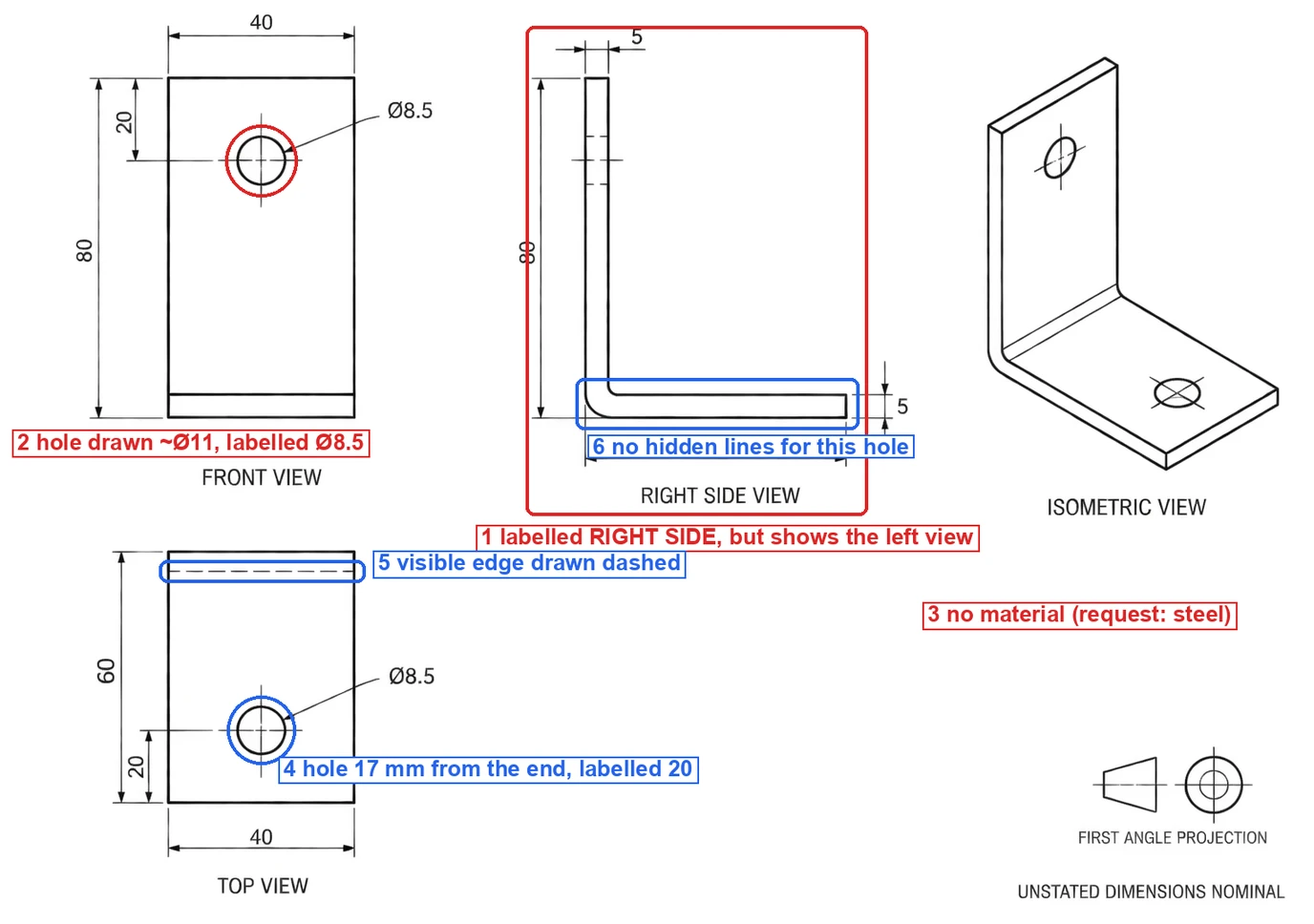
Our answer key for the TechDraw AI bracket listed three errors. We were wrong about one: we said the side view sat on the wrong side for first angle projection. Three of four runs pointed out that the view is placed correctly; it is the label that is wrong, because it shows the bracket from the left. They were right.
All four runs also found three more real errors (blue below). We measured them ourselves before believing them: the top view hole centre is 85 pixels from the end of the leg at 4.95 pixels per millimetre, so 17.2 mm, where the label says 20.
TechDraw AI's own sheets, checked
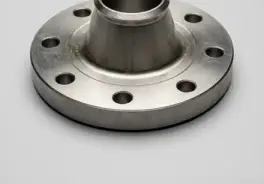
Three of the eight drawings came from our own product, so this part is about us. Across the three sheets Claude found 10 real errors: 6 on the bracket, 1 on the flange, 3 on the plate. None of them is a wrong number written on the sheet; they are lines drawn the wrong size, sizes left off, and leaders and views put in the wrong place.
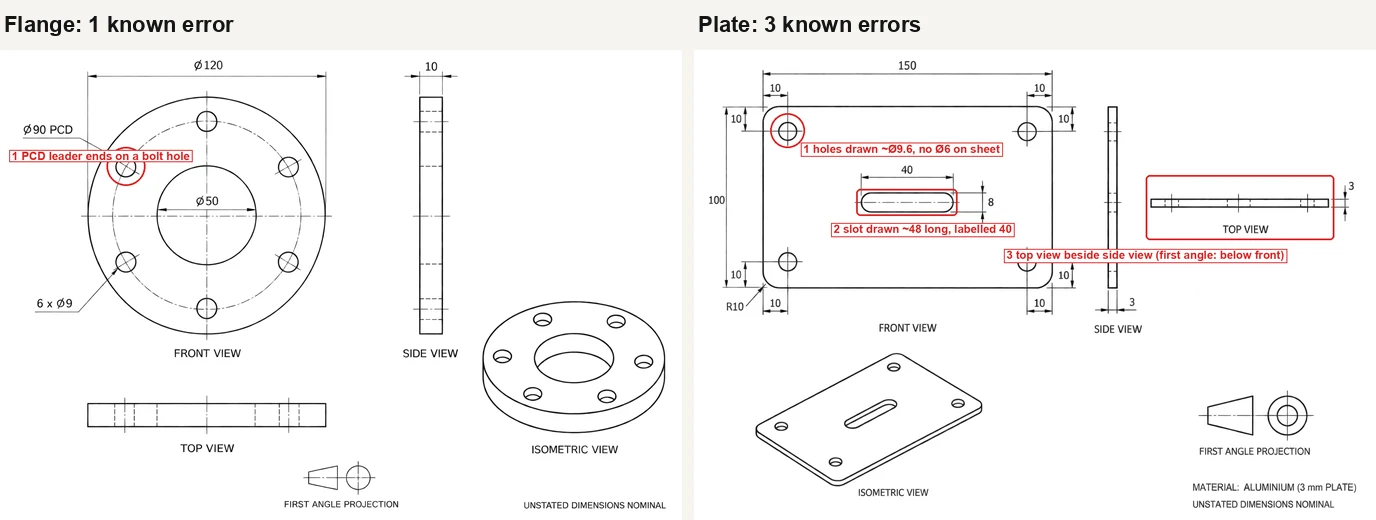
TechDraw AI sheets: what Claude found
That is why a TechDraw AI sheet says unstated dimensions nominal and lets you edit any number or label before you download. It is also why the two work well together: TechDraw AI draws the sheet in about 30 seconds, then Claude, in the same chat, checks it against your request.
The skill, free to copy
Get it as drawing-check.zip (the skill plus its pixel measuring script) or as a plain SKILL.md. Install it like any skill: unzip into ~/.claude/skills/ for yourself or .claude/skills/ in a project; the install steps are the same as for our drafting skill. It is the same file we tested, condensed here:
---
name: drawing-check
description: Check a technical drawing (PNG, JPG or PDF page) against the
  request or spec it was made from, before it goes to a shop.
---
1. Turn the request into a checklist: every size, count, material, view.
2. Read the sheet: every dimension and what it points to.
3. Request against sheet: present, different or missing. Count holes.
4. Measure: px per mm from the longest dimension, then holes, positions
   and slots. Report anything over 5% off, with both numbers.
5. Drafting rules: view placement for the projection symbol, title
   block, general tolerance, centre lines.
6. Report: table with severity, where, what, evidence. No padding.
The raw test is public: claude-drawing-check-test-data.zip (1.2 MB) holds the 8 drawings, all 32 reports, the answer key, the grader and its verdicts.
What it cannot do
- Measure a part. Pixel measuring catches a drawing that disagrees with itself, to about half a millimetre on our sheets. It is not inspection.
- Check the file the machine reads. Every run pointed out that it saw a PNG, not the DXF. For cut files, use our DXF checker too.
- Know what you meant. It flags open questions, like whether 10 mm from an edge means the hole centre or its edge, but cannot answer them.
- Replace reading skill. You still need to judge its findings; see how to read a technical drawing and the review prompts in Claude prompts for technical drawing.
The best way to judge a checker's report is to know what a complete print looks like. This video from tarkka is the clearest walk through we found: views, dimensioning, title block and notes, with real detail drawings. It follows the US ASME standards, so its view placement differs from the ISO first angle sheets in our test; everything else applies as is.
If you do not have a drawing yet, start with TechDraw AI's photo to technical drawing or text to technical drawing tools, then hand the result to Claude to check.
Frequently asked questions
Is there a Claude skill for technical drawings?
Yes. TechDraw AI (techdrawai.com) gives Claude its own MCP server, a Claude connector and a Claude Code plugin with drafting skills, so Claude can turn a photo or a description into a dimensioned technical drawing, a DXF or DWG, or an exact STEP part. For checking drawings, our free drawing-check skill was tested on 32 Claude Code runs and is downloadable from this page.
Can Claude check a technical drawing for errors?
In our test, yes, and well. Claude Opus 5.5 in Claude Code found all 16 known errors on 8 drawings in both of two runs, with or without a skill, including holes drawn the wrong size, a missing bolt hole, a wrong material and a mislabelled view. It measured the drawing in pixels with Python to find geometry that did not match its labels.
Does a skill make Claude better at checking drawings?
Not at finding errors: 32 of 32 with and without it. It changed the report. With the skill, reports on correct drawings were about half as long (6.5 items against 12), every finding came with measured numbers, and doubtful claims fell from 5 to 2. It cost about 17 percent more and 11 seconds longer per check.
Can Claude measure a drawing from an image?
Approximately. Given a PNG, Claude Code wrote Python to find the pixel scale from an overall dimension and then measured holes, slots and positions. It reported a hole drawn at 17 mm from an edge labelled 20, and holes drawn at 8 mm labelled 6. That is good enough to catch a wrong drawing, not to inspect a part: check the real CAD file for anything that will be machined.
What is the difference between a drafting skill and a checking skill?
A drafting skill tells Claude how to make a drawing: units, layers, dimensions, title block. A checking skill tells it how to review one: compare with the request, measure the geometry, check view placement and the title block, and report with evidence. Our drafting skill test is in Claude CAD skills; this page is the checking side.